
Homtronics AUHLR1
Homtronics Electric Lint Remover User Manual
Model: AUHLR1
Introduction
Thank you for choosing the Homtronics Electric Lint Remover. This manual provides important information regarding the safe operation, maintenance, and troubleshooting of your device. Please read it thoroughly before use and retain it for future reference.

Image: The Homtronics Electric Lint Remover, showcasing its main unit, three extra blades, a USB-C charging cable, and a small cleaning brush.
Safety Information
To ensure safe operation and prevent damage, please observe the following safety precautions:
- Keep the device out of reach of children.
- Do not use the device on wet fabrics or in wet environments.
- Ensure the honeycomb mesh blade cover is securely tightened before operation. The device features a safety protection sensor that prevents operation if the cover is not properly installed.
- Do not touch the blades directly. Always use the provided cleaning brush for maintenance.
- Do not immerse the main unit in water. The blades and lint storage tank can be washed, but the main unit cannot.
- Use only the provided USB-C cable for charging.
- Avoid dropping the device or subjecting it to strong impacts.

Image: An illustration of the device's safety lock design, highlighting the safety protection sensor that stops the device if the stainless steel guard is loose or not secure, preventing hand injuries.
Package Contents
Verify that all items are present in the package:
- 1 x Electric Lint Shaver
- 3 x Replacement Blades
- 1 x USB-C Charging Cable
- 1 x Small Cleaning Brush
- 1 x Instruction Manual

Image: A visual representation of all items included in the product box: the electric fabric shaver, three replaceable blades, a USB-C charging cable, a small cleaning brush, and the user manual.
Product Overview and Features
Familiarize yourself with the components and key features of your Homtronics Electric Lint Remover:
- Upgraded 6-Leaf Blade: The newly designed 6-blade system offers 50% more efficiency than traditional 3-blade systems, covering a larger area for effective lint removal.
- Reinforced Honeycomb Mesh: Features a new honeycomb mesh design with three different hole sizes (small, middle, big) to capture all types of lint while protecting your clothes from damage.
- Transparent Large Capacity Lint Storage: An enlarged, transparent container allows you to easily see accumulated lint and handle multiple garments before needing to empty.
- LED Display: Provides real-time information on battery level and current speed setting.
- Blue Ambient Light: An aesthetic blue light that can be turned on or off by pressing and holding the power button for 3 seconds.
- 3 Adjustable Speeds: Choose from 7000r/min, 8000r/min, and 9000r/min to suit different fabric types and lint densities.
- Double Safety Protection: The device will only operate when the honeycomb mesh blade cover is securely tightened. It automatically stops if the cover is opened or not firmly installed, preventing accidental injury.
- USB Type-C Fast Charging: Equipped with a 2000mAh high-capacity battery, providing up to 180 minutes of continuous use on a single charge.
- 2-in-1 Design: Combines electric lint removal with a manual lint removal brush integrated into the handle for versatile use.

Image: An exploded diagram illustrating the internal components of the lint remover, including the 6-leaf blade, suction system, bobble storage tank, safety lock sensor, integrated 2-in-1 lint brush, and the reinforced honeycomb mesh.
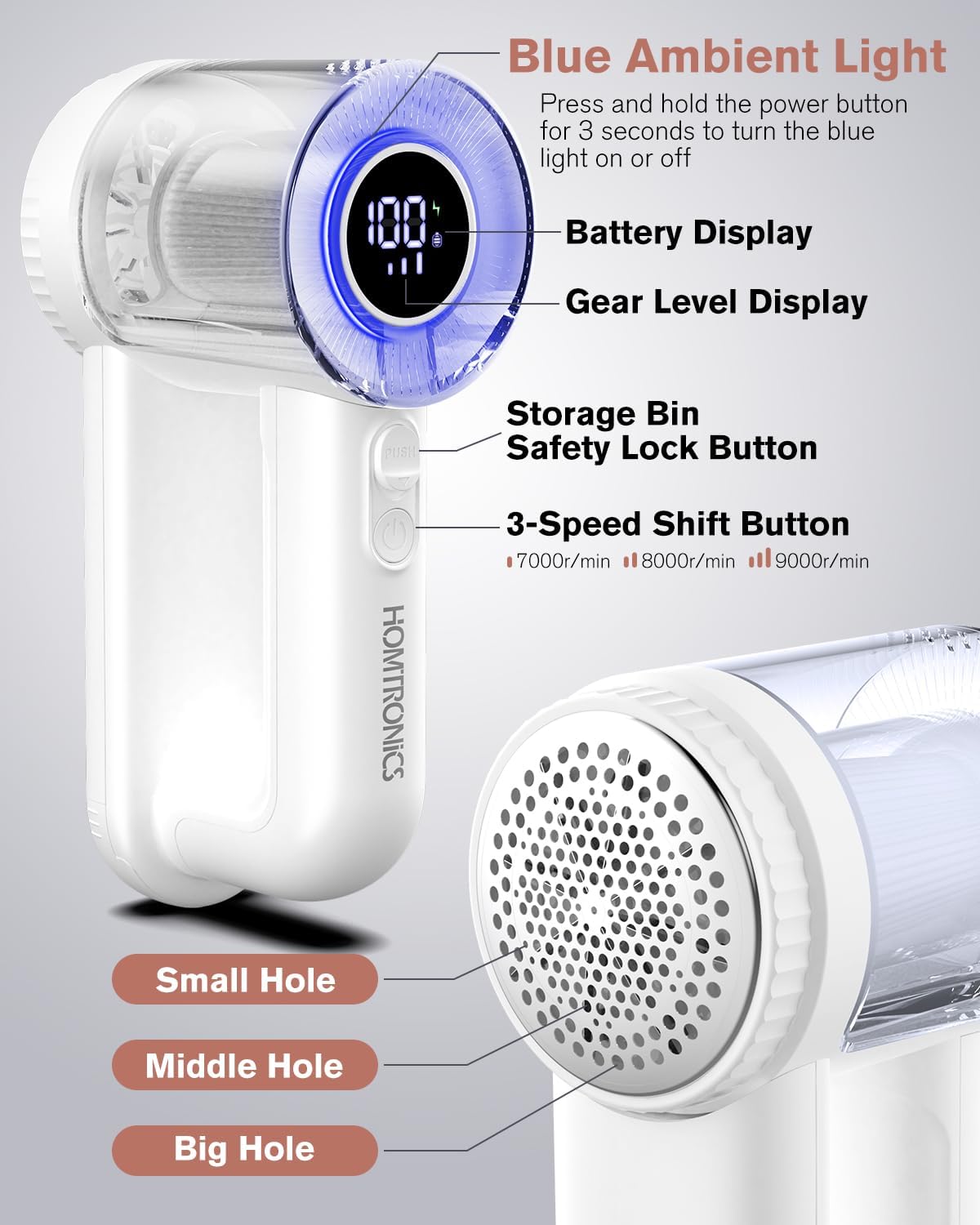
Image: A close-up view of the lint remover's control panel, highlighting the blue ambient light, battery display, gear level display, storage bin safety lock button, 3-speed shift button, and the different sizes of holes (small, middle, big) on the reinforced honeycomb mesh.
Setup
Charging the Device
- Locate the USB-C charging port on the device.
- Connect the provided USB-C cable to the device and plug the other end into a compatible USB power source (e.g., charger, power bank, computer USB port).
- The LED display will show the charging status. A full charge takes approximately 2 hours and provides up to 180 minutes of use.
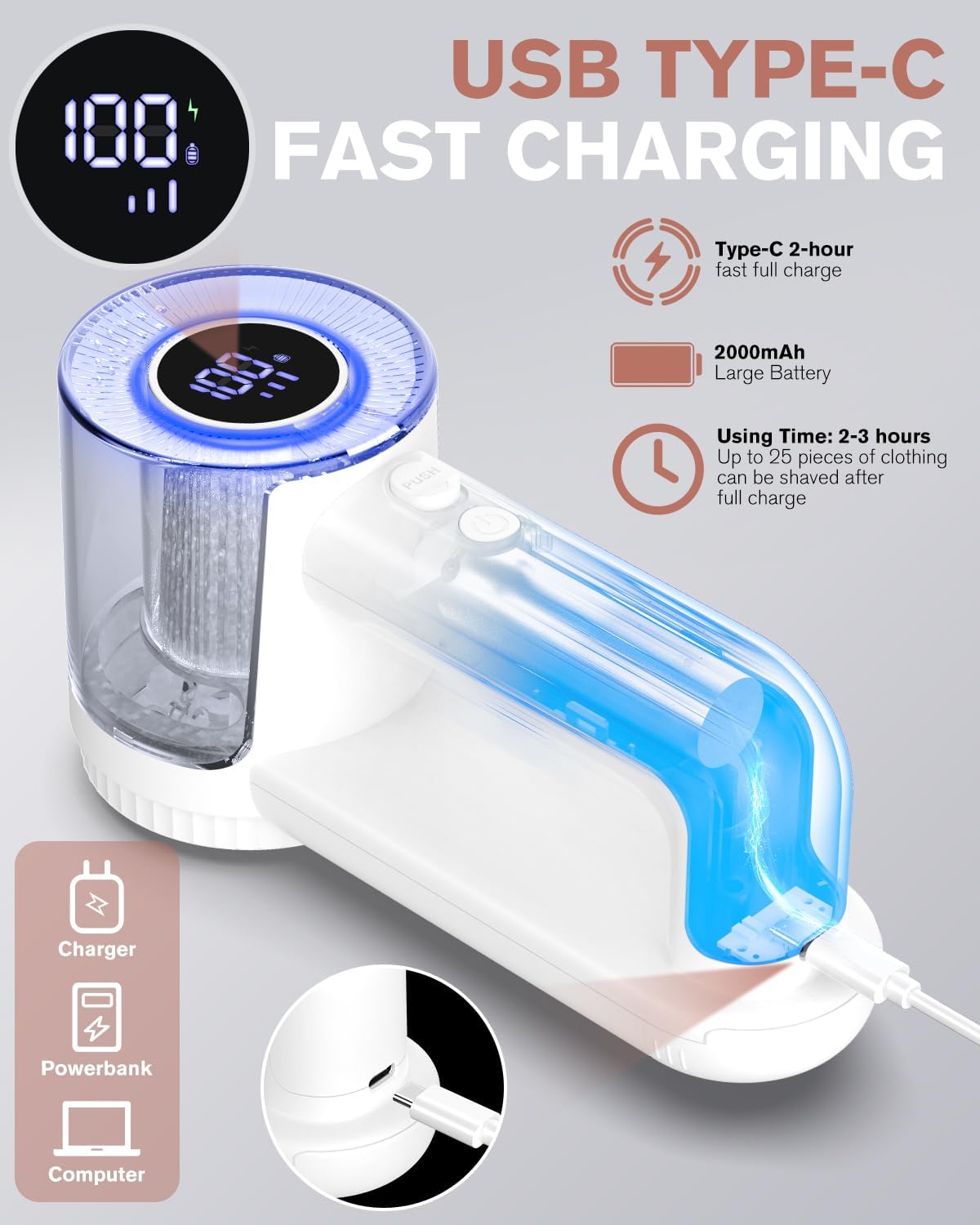
Image: The lint remover being charged via its USB Type-C port, with the LED display showing a full battery icon. Icons for charger, power bank, and computer indicate compatible power sources.
Installing/Replacing Blades
- Ensure the device is turned off and unplugged.
- Gently twist the honeycomb mesh blade cover counter-clockwise to remove it.
- Carefully remove the old blade by lifting it from its center.
- Place a new 6-leaf blade onto the central spindle, ensuring it sits flat and securely.
- Align the honeycomb mesh blade cover and twist it clockwise until it clicks securely into place. The device will not operate if the cover is not properly secured.
Operating Instructions
Electric Lint Removal
- Ensure the device is fully charged and the blade cover is securely attached.
- Press and hold the power button for 3 seconds to turn on the device. The blue ambient light will illuminate, and the LED display will show the current battery level and speed.
- Press the speed shift button to cycle through the three available speeds: 7000r/min, 8000r/min, and 9000r/min. Select the appropriate speed for your fabric type.
- Lay the garment flat on a hard, smooth surface.
- Gently glide the shaver head over the fabric, applying light, even pressure. Move in circular motions or back and forth, ensuring the mesh makes contact with the linted area.
- Observe the transparent lint storage container to see the collected lint.
- After use, press and hold the power button for 3 seconds to turn off the device.
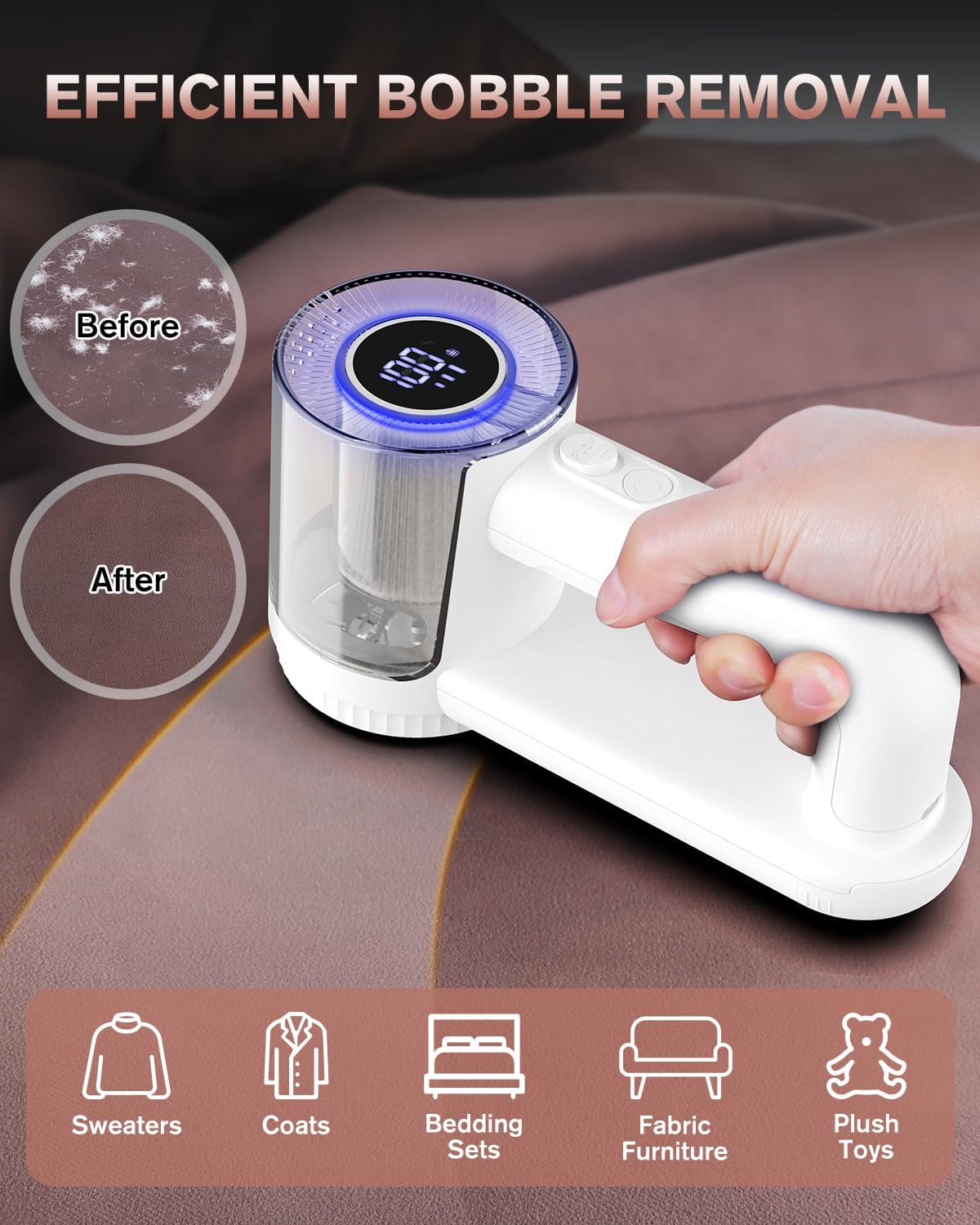
Image: The Homtronics Electric Lint Remover being used on a fabric surface, demonstrating its effectiveness with "Before" and "After" circles showing significant bobble removal. Icons below indicate suitability for sweaters, coats, bedding sets, fabric furniture, and plush toys.
Manual Lint Removal Brush
The device features a manual lint removal brush integrated into the handle. Simply slide out the brush from the handle and use it to remove surface lint or pet hair from fabrics.
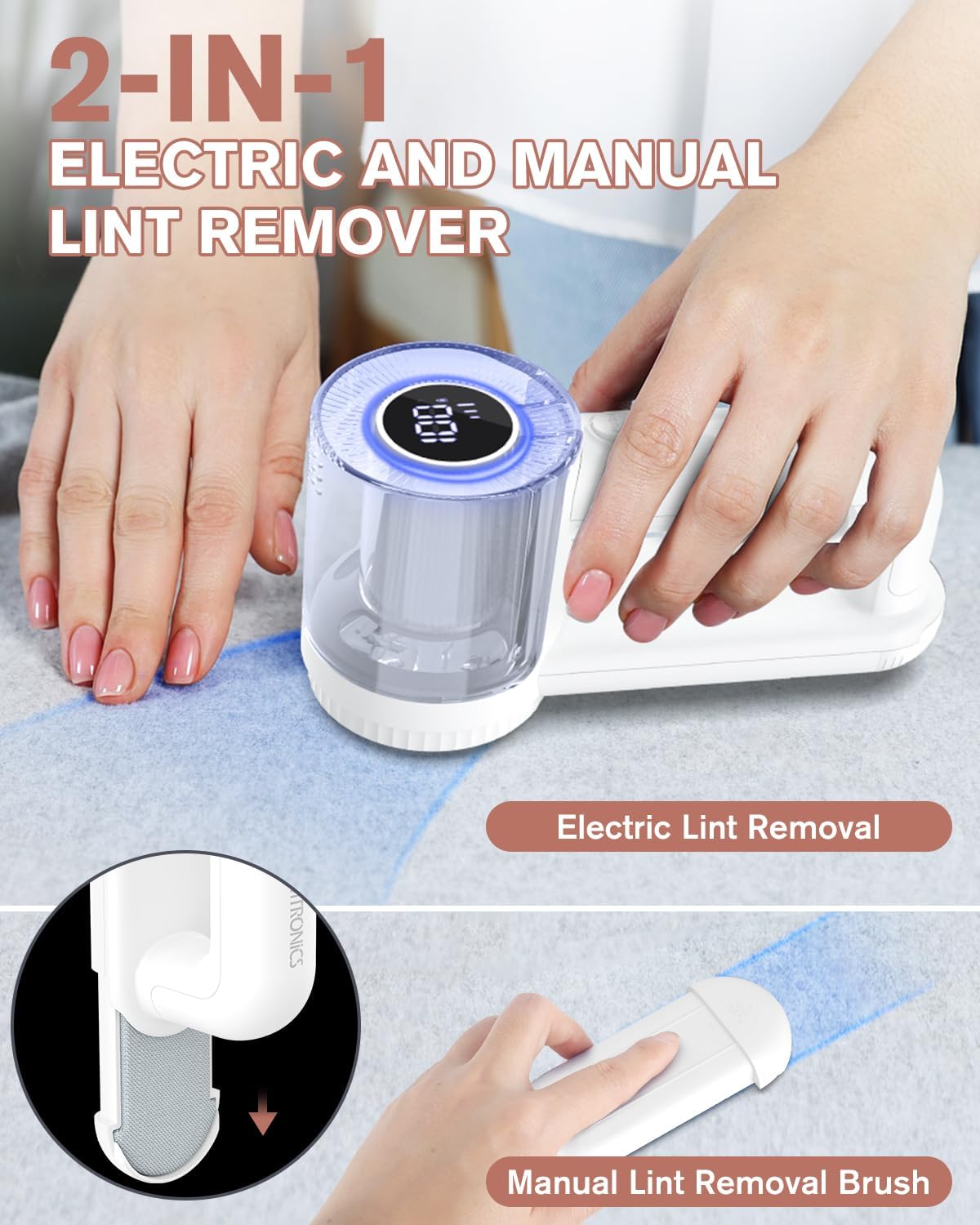
Image: A split image demonstrating both the electric lint removal function and the manual lint removal brush integrated into the device's handle, highlighting its 2-in-1 capability.
Maintenance
Cleaning the Lint Storage Tank and Blades
- Ensure the device is turned off and unplugged.
- Twist the transparent lint storage tank counter-clockwise to detach it from the main unit.
- Empty the collected lint into a waste bin.
- Use the provided small cleaning brush to remove any remaining lint or debris from the inside of the storage tank, the blade area, and the honeycomb mesh.
- The lint storage tank and blades can be rinsed with water. Ensure they are completely dry before reassembling.
- Reattach the lint storage tank by aligning it and twisting clockwise until secure.
Important: Do not wash the main unit with water. Only the blades and lint storage tank are washable.

Image: The lint remover disassembled, showing the separate lint storage tank, the blade assembly, and the cleaning brush being used to clear lint from the blade area. A note emphasizes that only the blades and lint storage tank can be washed with water, not the main unit.
Troubleshooting
| Problem | Possible Cause | Solution |
|---|---|---|
| Device does not turn on. | Low battery. Blade cover not securely attached. | Charge the device fully. Ensure the honeycomb mesh blade cover is twisted securely into place. |
| Poor lint removal performance. | Lint storage tank is full. Blades are dull or clogged. Incorrect speed setting. | Empty the lint storage tank. Clean the blades and mesh. Replace blades if dull. Increase the speed setting for denser lint. |
| Device stops unexpectedly during use. | Safety protection sensor activated (blade cover loose). Battery is low. | Check and re-secure the blade cover. Recharge the device. |
| Unusual noise during operation. | Lint or debris caught in blades. Blade not properly installed. | Turn off and clean the blade area thoroughly. Reinstall the blade, ensuring it is flat and secure. |
Specifications
| Feature | Detail |
|---|---|
| Brand | Homtronics |
| Model Number | AUHLR1 |
| Colour | White |
| Product Dimensions | 20 x 10 x 8 cm |
| Item Weight | 327 g |
| Material | Stainless Steel, Acrylonitrile Butadiene Styrene |
| Battery Capacity | 2000mAh |
| Charging Time | Approx. 2 hours |
| Operating Time | Up to 180 minutes |
| Speed Settings | 7000r/min, 8000r/min, 9000r/min |
| Blade Type | 6-Leaf Stainless Steel |
| Charging Port | USB Type-C |
Warranty and Support
Homtronics offers a 2-year extended protection plan for this product. For warranty claims, technical support, or any inquiries, please contact Homtronics customer service through the retailer's platform or visit the official Homtronics store on Amazon.
For more information, you may visit the Homtronics Store on Amazon.
Ask a question about this manual
Ask about setup, troubleshooting, compatibility, parts, safety, or missing instructions. Manuals+ will review the question and use this page’s manual context to help answer it.