
Introduction
This manual provides essential information for the safe and efficient operation of your MOUNTO DH155W LGR Commercial Compact Dehumidifier. Please read all instructions carefully before use and retain this manual for future reference.
The MOUNTO DH155W is a powerful LGR (Low Grain Refrigerant) dehumidifier designed for effective moisture removal in various environments, including water damage restoration, basements, garages, and job sites. It features a robust design, an integrated condensate pump, and digital controls for precise humidity management.
Safety Information
Always follow basic safety precautions when using electrical appliances to reduce the risk of fire, electric shock, and personal injury.
- Ensure the unit is placed on a stable, level surface.
- Do not operate the unit with a damaged power cord or plug.
- Keep the air inlet and outlet clear of obstructions.
- Do not immerse the unit in water or use it in standing water.
- Unplug the unit before cleaning or performing any maintenance.
- This appliance is not intended for use by persons (including children) with reduced physical, sensory or mental capabilities, or lack of experience and knowledge, unless they have been given supervision or instruction concerning use of the appliance by a person responsible for their safety.
Setup and Installation
Proper setup ensures optimal performance and longevity of your dehumidifier.
- Unpacking: Carefully remove the dehumidifier from its packaging. Inspect for any shipping damage.
- Initial Placement: After unpacking, allow the unit to sit upright for at least 20 minutes before plugging it in or starting operation. This allows the refrigerant to settle.
- Positioning: Place the dehumidifier in the desired location. The unit is equipped with rigid handles and semi-pneumatic wheels for easy transport. Ensure there is adequate space around the air inlet and outlet for proper airflow.
- Drain Hose Connection: The unit features a built-in condensate pump and comes with a 25ft drain hose. Connect the drain hose to the designated outlet on the unit. Ensure the hose is routed to a suitable drain point, such as a sink, floor drain, or outdoors, allowing for continuous drainage. The pump can lift water up to 15 feet vertically.

Figure 1: MOUNTO DH155W Dehumidifier, front view with handle and wheels.

Figure 2: Rear view showing the drain hose connection point.

Figure 3: Back view of the dehumidifier, highlighting the product label and specifications.
Operating Instructions
The DH155W features an automatic digital humidistat control and a user-friendly interface.
- Power On/Off: Plug the 25ft power cord into a suitable 120V electrical outlet. Press the power button on the control panel to turn the unit on or off.
- Setting Desired Humidity: Use the '+' and '-' buttons on the control panel to set your desired relative humidity (RH) level. The unit will operate until the ambient RH reaches the set point, then cycle off. It will restart automatically if the RH rises above the set point.
- Continuous Operation: The unit can be set for continuous operation, which means it will run constantly regardless of the humidity level, ideal for severe moisture conditions or water damage restoration.
- Display Information: The LED display shows real-time inlet and outlet temperature and relative humidity, allowing you to monitor job site conditions and dehumidification progress.
- Memory Restart: In case of a power outage, the unit features a memory restart function, automatically resuming operation with the previous settings once power is restored.
- Timer Function: Utilize the timer function for scheduled operation. Refer to the control panel diagram for specific timer setting instructions.
- Wi-Fi Control: The unit includes Wi-Fi control capabilities. Download the Smart Life app (available at https://smartapp.tuya.com/smartlife) to control and monitor your dehumidifier remotely.

Figure 4: Close-up of the digital control panel and display.
Maintenance
Regular maintenance ensures efficient operation and extends the lifespan of your dehumidifier. Specific detailed maintenance instructions are not provided in this document; however, general guidelines are as follows:
- Filter Cleaning: Regularly check and clean the air filter. A dirty filter can reduce efficiency and airflow. Remove the filter, clean it with warm, soapy water, rinse thoroughly, and allow it to dry completely before reinserting.
- Exterior Cleaning: Wipe the exterior of the unit with a soft, damp cloth. Do not use harsh chemicals or abrasive cleaners.
- Drain Hose Inspection: Periodically inspect the drain hose for kinks, blockages, or damage. Ensure the hose is always clear for proper water drainage.
- Storage: If storing the unit for an extended period, ensure it is clean and dry. Coil the power cord and drain hose neatly.
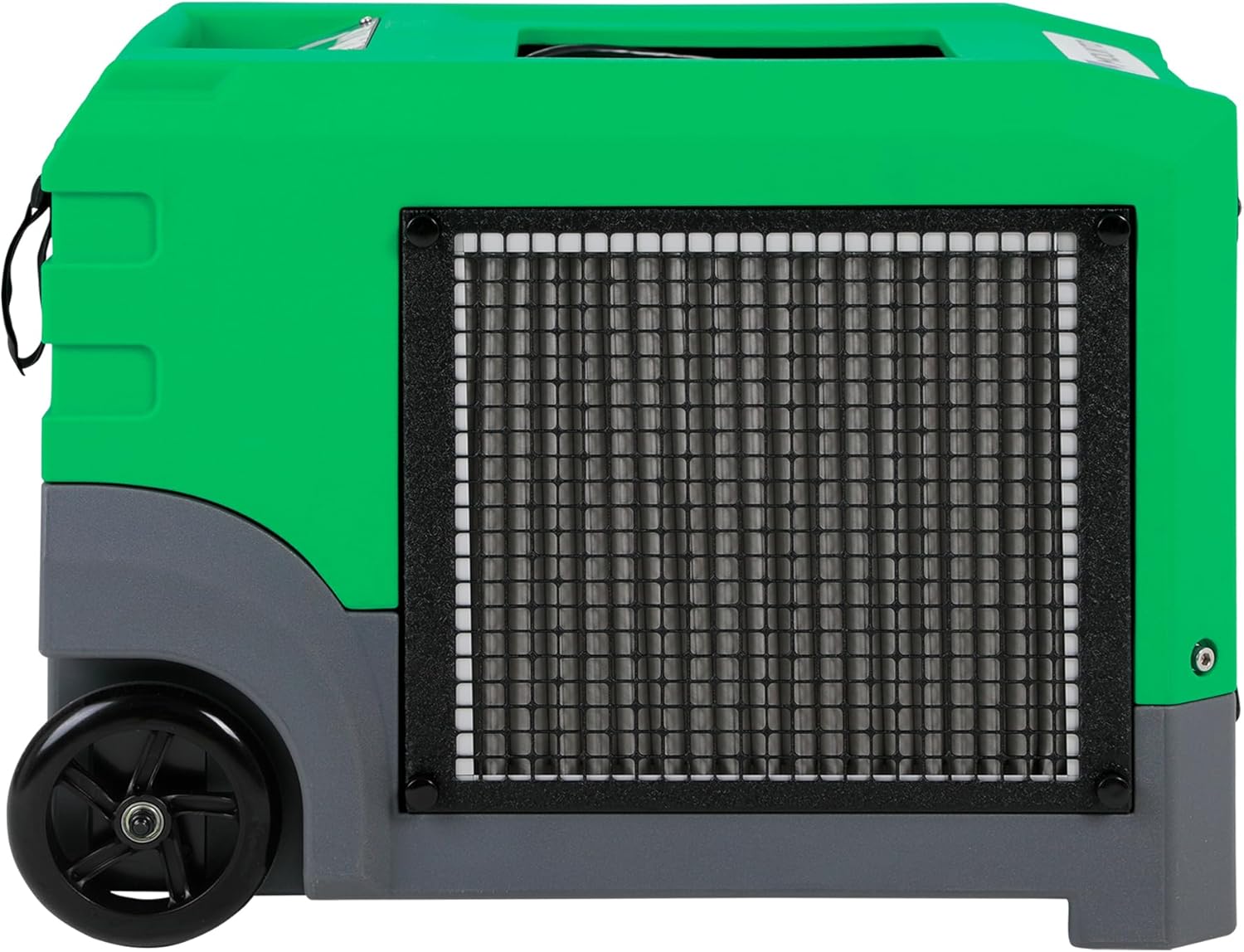
Figure 5: Side view of the dehumidifier, indicating the location of the air filter access.
Troubleshooting
If you encounter issues with your dehumidifier, refer to the following basic troubleshooting steps. For more complex problems, contact customer support.
- Unit Not Turning On: Check if the power cord is securely plugged into a working outlet. Verify the circuit breaker has not tripped.
- No Water Collection/Low Performance: Ensure the air filter is clean. Check that the humidity setting is lower than the ambient humidity. Verify the drain hose is not kinked or blocked. Ensure the unit is operating within its recommended temperature and humidity range.
- Unusual Noise: Check for any loose parts or obstructions. Ensure the unit is on a stable, level surface.
- Error Codes: If an error code appears on the display, consult the manufacturer's specific troubleshooting guide or contact customer support.
Specifications
| Feature | Specification |
|---|---|
| Brand | MOUNTO |
| Model Name | DH155W |
| Model Number | DH155W |
| Moisture Removal Capacity (Saturation) | 268 PPD (Pints Per Day) |
| Moisture Removal Capacity (AHAM) | 155 Pints |
| Floor Area Coverage | Up to 4000 sq ft |
| Air Flow Capacity | 350 CFM |
| Wattage | 470 Watts |
| Voltage | 120V AC |
| Operation Mode | Continuous |
| Product Dimensions (D x W x H) | 24" x 16" x 15" |
| Item Weight | 88 pounds |
| Material | Roto-Molded Plastic Housing |
| Special Features | Built-In Pump, Humidity Setting, LED Display, LGR Dehumidifier, Memory Restart, Wi-Fi Control |
| Included Components | Built-in Pump, 25ft Drain Hose, Power Cord, Handle, Wheels, LED Display w/ Wi-Fi Control |
| UPC | 766287108487 |
Warranty and Support
Specific warranty details for the MOUNTO DH155W LGR Commercial Compact Dehumidifier are not provided in this manual. Please refer to the warranty card included with your product or contact the manufacturer/seller directly for comprehensive warranty information and terms.
For technical assistance, parts, or any questions regarding your dehumidifier, please contact MOUNTO customer support. Contact information can typically be found on the product packaging, the MOUNTO official website, or through your point of purchase.