Introduction
Thank you for choosing the Cygnett ChargePro Fast Charging Power Bank 20K. This manual provides essential information for the safe and efficient use of your new power bank. Please read these instructions carefully before use and retain them for future reference.
Package Contents
- Cygnett ChargePro Fast Charging Power Bank 20K
- USB-C to USB-C Charging Cable (may vary by region)
- User Manual
Product Overview
The Cygnett ChargePro 20K is a high-capacity portable power bank designed for fast charging of various devices. It features multiple output ports and a digital display to indicate battery status.

This image displays the Cygnett ChargePro Power Bank 20K in Midnight, highlighting its compact design, digital display, and various ports.
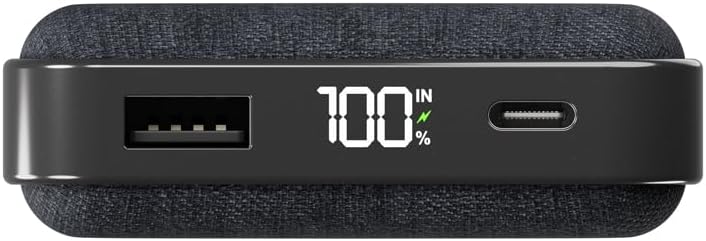
A detailed view of the power bank's top edge, illustrating the USB-A output, the digital percentage display, and the USB-C port for both input and output.
Key Features:
- 30W Fast Charging: Delivers rapid power to compatible devices.
- 20,000 mAh Capacity: Provides multiple charges for smartphones and other gadgets.
- Dual USB-C Ports: For versatile input and output.
- USB-A Port: Additional output for various devices.
- Digital Display: Shows remaining battery percentage.
Setup
Initial Charging of the Power Bank
Before first use, it is recommended to fully charge your Cygnett ChargePro Power Bank. This ensures optimal performance and battery longevity.
- Connect the provided USB-C cable to one of the USB-C ports on the power bank.
- Connect the other end of the USB-C cable to a compatible USB wall charger (not included).
- The digital display will show the charging progress. The power bank is fully charged when the display shows 100%.
Operating Instructions
Charging Your Devices
The ChargePro Power Bank can charge up to three devices simultaneously using its USB-C and USB-A ports.
- Identify the appropriate charging cable for your device (USB-C to USB-C, USB-A to USB-C, USB-A to Lightning, etc.).
- Connect one end of the charging cable to your device.
- Connect the other end of the charging cable to an available USB-C or USB-A output port on the power bank.
- Your device should begin charging automatically. The power bank's digital display will show its remaining charge.

This image demonstrates the power bank actively charging a smartphone, connected by a USB-C cable, with the phone indicating a full charge.
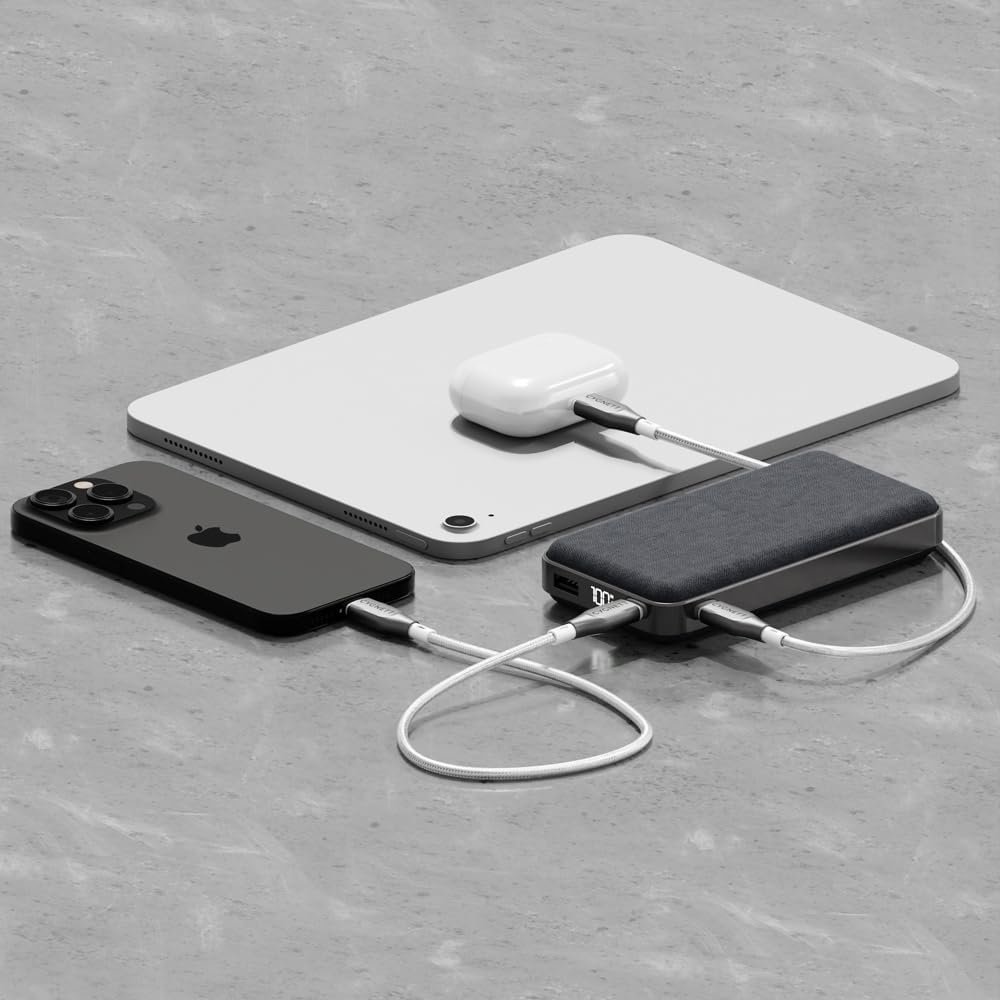
An illustration of the power bank's multi-device charging capability, showing it connected to an iPhone, an iPad, and a pair of wireless earbuds.
Understanding the Digital Display
The integrated digital display shows the exact percentage of remaining battery life in the power bank. This allows you to monitor its charge level and know when it needs to be recharged.
Maintenance and Care
- Cleaning: Use a soft, dry cloth to clean the power bank. Avoid using harsh chemicals or abrasive materials.
- Storage: Store the power bank in a cool, dry place away from direct sunlight and extreme temperatures.
- Battery Health: To maintain battery health, fully charge and discharge the power bank at least once every three months if not in regular use.
- Avoid Drops: Protect the device from drops and impacts, which can damage internal components.
Troubleshooting
- Power Bank Not Charging:
Ensure the USB-C cable is securely connected to both the power bank and the wall charger. Verify that the wall charger is functioning correctly and provides sufficient power (e.g., 30W compatible). Try a different cable or charger. - Device Not Charging from Power Bank:
Check that the charging cable is securely connected to both the power bank and your device. Ensure the power bank has sufficient charge (check the digital display). Try a different cable or port on the power bank. Some devices may require specific charging protocols; ensure compatibility. - Slow Charging:
Ensure you are using a fast-charging compatible cable and that your device supports fast charging. If charging multiple devices, the output power may be distributed, potentially slowing down individual device charging. - Digital Display Not Working:
Attempt to charge the power bank to see if the display reactivates. If the issue persists, contact customer support.
Specifications
| Model Name | ChargePro |
| Item Model Number | CY5181PBCHE, CY5182PBCHE, CY5183PBCHE |
| Battery Capacity | 20,000 mAh |
| Connector Type | USB Type C, USB Type A |
| Special Features | 30W fast charging for phones & tablets, Approved for carry-on, Charge 3 devices simultaneously, Pre-charged & ready for use out of the box, Up to 4.1 phone charges* |
| Voltage | 3.7 Volts |
| Product Dimensions | 14 x 7 x 3 cm |
| Item Weight | 200 g |
| Colour | Midnight |
*Based on iPhone 15 Pro.
Safety Information
- Do not disassemble, open, or shred the power bank.
- Do not expose the power bank to heat or fire. Avoid storage in direct sunlight.
- Do not short-circuit the power bank.
- Do not expose the power bank to mechanical shock.
- In case of a battery leak, do not allow the liquid to come into contact with skin or eyes. If contact has been made, wash the affected area with copious amounts of water and seek medical advice.
- Keep the power bank out of reach of children.
- Ensure proper disposal of the power bank according to local regulations.
Warranty and Support
Cygnett products are designed and manufactured to the highest quality standards. For information regarding warranty coverage, technical support, or to register your product, please visit the official Cygnett website or contact their customer service department. Please retain your proof of purchase for warranty claims.