
Introduction
This user manual provides detailed instructions for the installation, operation, and maintenance of your Auxbeam AS-400 4 Gang Slim Bluetooth RGB Switch Panel. Designed for off-road vehicles, trucks, and other applications, this switch panel offers advanced control over your auxiliary lighting and electrical devices with its wireless remote, Bluetooth app, and integrated panel controls. Please read this manual thoroughly before use to ensure proper functionality and safety.

The Auxbeam AS-400 4 Gang Slim Bluetooth RGB Switch Panel, shown with its wireless remote, control box, and included accessories.
Product Features
- 200FT Long Range 433MHz Wireless Remote Control: The AS-400 includes a wireless remote for controlling devices up to 200 feet (60 meters) away. It features ultra-low latency, a 433MHz signal, and FSK modulation for swift, interference-free responses. The remote and its antenna base have magnetic functions for easy attachment to metal surfaces, ideal for outdoor use.
- Bluetooth Switch Panel with APP Control: Sync your devices using the dedicated app. Connect via Bluetooth to adjust panel brightness, select desired RGB backlight colors, customize up to 200 icons, and group controls for multiple lights simultaneously.
- Automatic Dimming and Backlight Control: The backlight brightness adjusts automatically based on ambient light conditions. Manual adjustment is also possible via the app. A dedicated "Mode" button on the panel allows for quick backlight shutdown to reduce visual distractions and conserve battery life.
- 3 Lighting Modes: Each button can be programmed with three distinct lighting modes:
- TOGGLE: Provides constant lighting (ON/OFF).
- MOMENTARY: Activates only while the switch is pressed (e.g., for a horn).
- PULSED: Offers a strobe effect.
- RGB Backlighting with Unlimited Color Option: The auxiliary RGB switch panel offers unlimited RGB backlight color options to match your vehicle's interior. It can be operated via the switch panel or smartphone Bluetooth, with synchronous operation.
- Reliable Safety: The control box features built-in solid-state relays and comes with a high-quality resettable circuit breaker, offering protection against reverse polarity, overcurrent, overvoltage, and overheat. A silicone protective cover safeguards the switch panel from water damage.

The wireless remote control offers extended range and a magnetic base for convenient placement.

Control and customize your switch panel settings directly from your smartphone using the Auxbeam app.
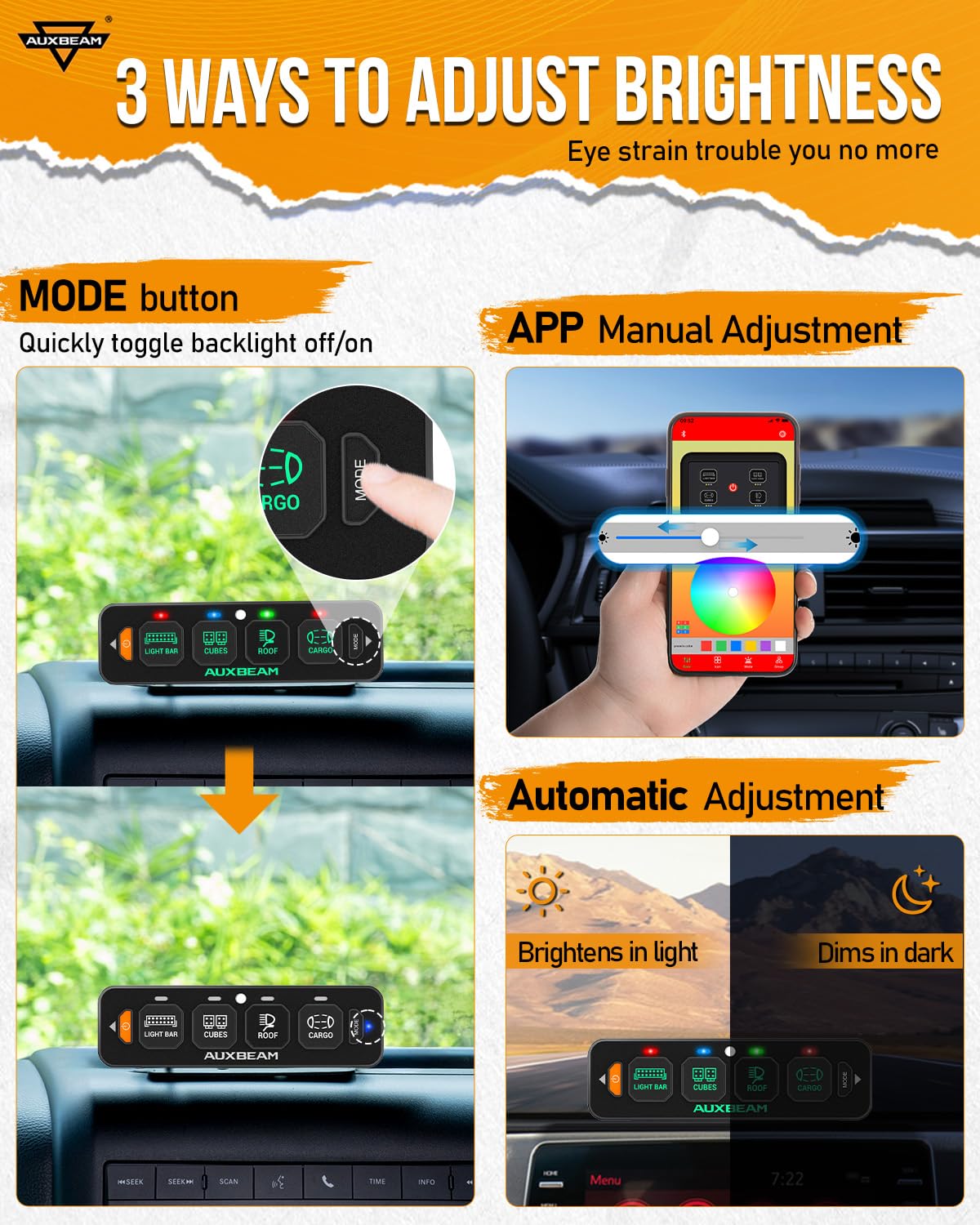
The panel's backlight adapts to ambient light and can be manually controlled for optimal visibility.
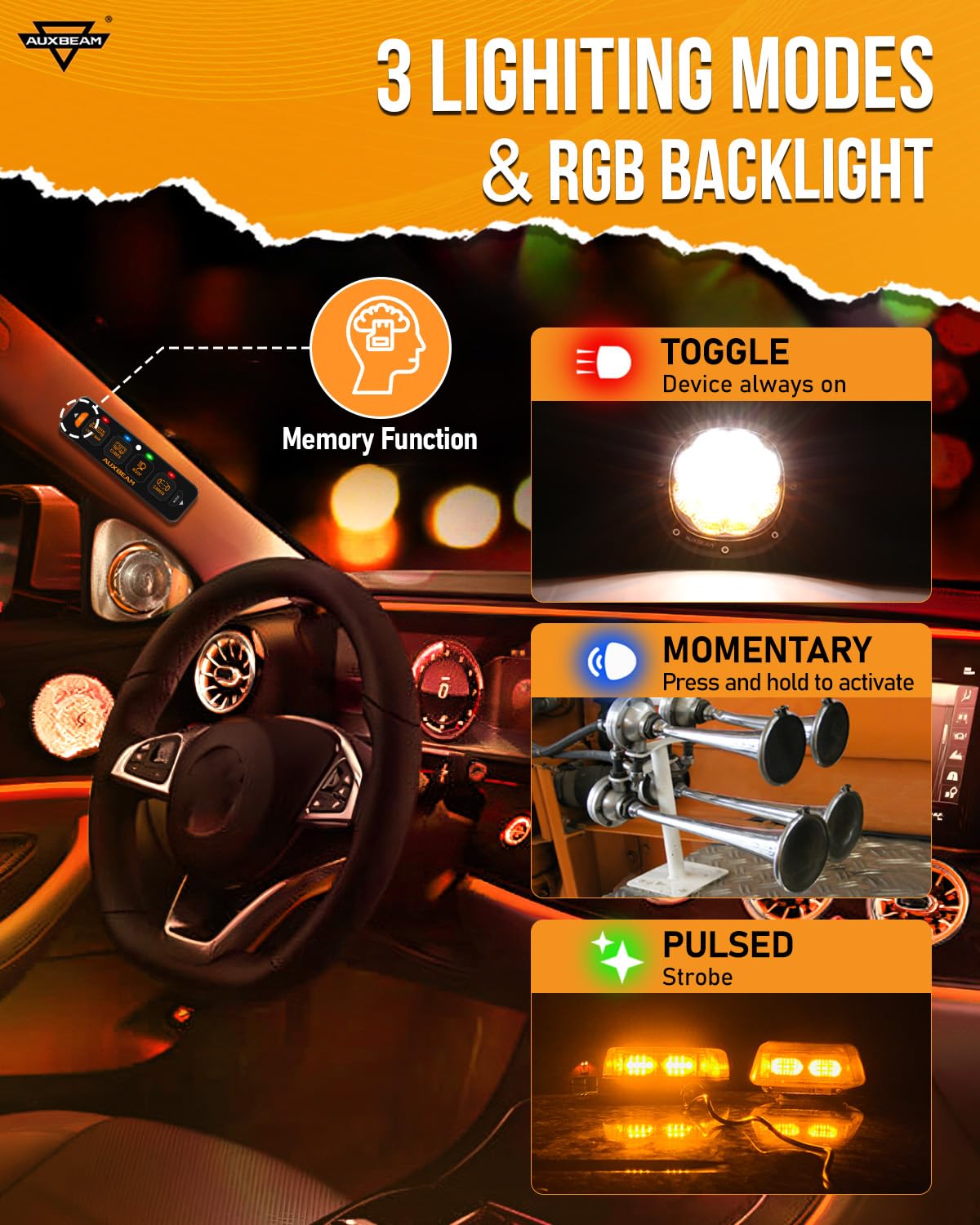
Choose from Toggle, Momentary, or Pulsed modes to suit various accessory functions.
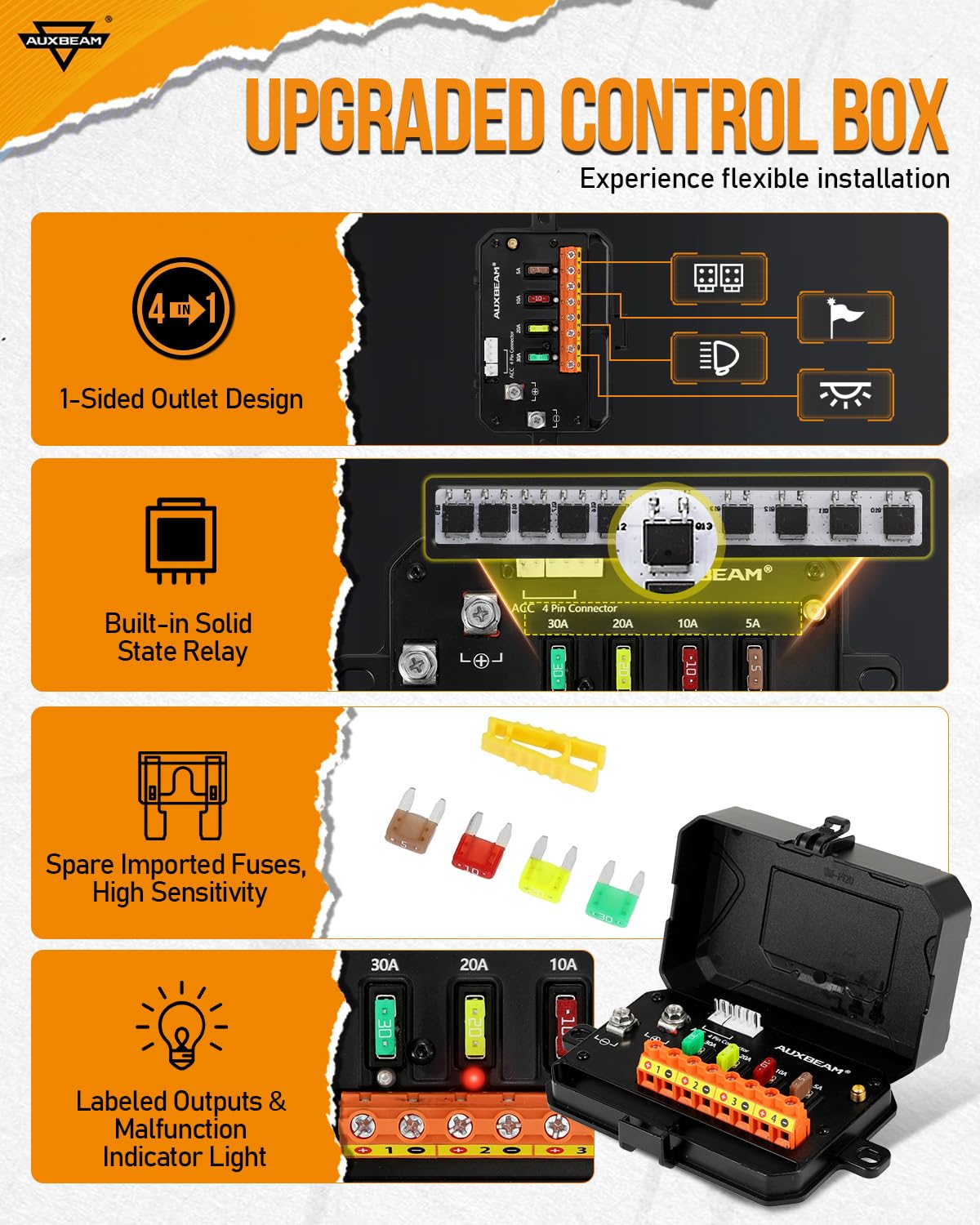
The upgraded control box ensures reliable and safe operation with integrated protection features.
What's Included
The Auxbeam AS-400 package includes all necessary components for installation and operation:
- RGB Bluetooth Switch Panel
- Wireless Remote Control
- Control Box
- 60A Circuit Breaker
- Mounting Brackets
- 10ft Wire Harness
- Power Harness
- Fuse Wire & Adapter
- Installation Kit (screws, screwdriver, double-sided tape)
- Panel Waterproof Cover
- AS-400 Package Box
- 12ft Antenna (with Adhesive and Large Magnetic Base)
- 60 pcs Labels (Decals)
- Instruction Manual

All components included in the AS-400 package for a complete setup.
Specifications
| Feature | Specification |
|---|---|
| Max Current | 60A |
| Voltage | DC 12-24V |
| Rated Voltage | 12V 20A / 24V 10A |
| Max Rated Power | 720W (at 12V) / 1400W (at 24V) |
| Waterproof Rating | IP65 |
| Operating Temperature | -40°C to 105°C (-40°F to 221°F) |
| Switch Panel Size | 5" x 1.5" |
| Control Box Size | 5" x 3.4" |
| Item Model Number | AS-400 Bluetooth Slim Switch Panel |
| Batteries | 1 Lithium Metal battery required (included) |
Installation
Wiring Method
Follow the diagram below for proper wiring. Ensure all connections are secure and insulated. Connect the ACC wire to a suitable power source, such as the cigarette lighter or radio fuse, to provide power to the switch panel.

Detailed wiring diagram showing connections for the control box and switch panel.
The control box features labeled outputs and malfunction indicator lights for easy identification and troubleshooting. Each circuit has a specific amperage rating: Circuit 1 (30A), Circuit 2 (20A), Circuit 3 (10A), and Circuit 4 (5A). If an LED is red, the corresponding fuse is bad and needs replacement.
Mounting Options
The AS-400 switch panel offers flexible installation with both horizontal and vertical placement options, allowing it to fit various vehicle positions. Use the provided mounting brackets and hardware to secure the switch panel and control box.

Examples of horizontal and vertical mounting for the switch panel.
Operation
Using the Switch Panel
The slim switch panel features four backlit buttons. Press a button to activate or deactivate the connected device. The backlight color and brightness can be customized via the app.
Using the Wireless Remote Control
The wireless remote allows for convenient control from a distance. Ensure the remote is within the 200ft operating range. The remote has four numbered buttons corresponding to the four channels on the switch panel. Apply the matching labels to the remote for easy identification.
Using the Auxbeam App
Download the Auxbeam app using the QR codes provided in the manual. Connect your smartphone to the switch panel via Bluetooth. The app allows for:
- Adjusting RGB backlight color and brightness.
- Customizing button icons (over 200 options).
- Setting groups to control multiple lights simultaneously.
- Changing lighting modes (Toggle, Momentary, Pulsed).
Adjusting Brightness
Brightness can be adjusted in three ways:
- MODE Button: Quickly toggle the backlight ON/OFF by pressing the "MODE" button on the switch panel.
- APP Manual Adjustment: Use the brightness slider within the Auxbeam app for precise control.
- Automatic Adjustment: The panel's backlight will automatically brighten in light environments and dim in dark environments for optimal visibility.
Setting Lighting Modes
Each button can be programmed to one of three lighting modes via the app:
- Toggle Mode: For devices that require continuous power (e.g., driving lights).
- Momentary Mode: For devices that activate only while the button is pressed (e.g., horn, momentary air compressor).
- Pulsed Mode: For devices that require a strobe effect (e.g., warning lights).
The panel also features a memory function, retaining the last selected lighting mode for each button.
Applying Labels
The kit includes 60 pieces of matte, reusable, waterproof PVC labels. Choose the appropriate labels for each switch on the panel and the remote control to clearly identify their functions.

Customize your switch panel and remote with the included waterproof labels.
Maintenance
To ensure the longevity and optimal performance of your Auxbeam AS-400 switch panel, follow these maintenance guidelines:
- Cleaning: Use a soft, damp cloth to clean the switch panel and control box. Avoid abrasive cleaners or solvents that could damage the surfaces.
- Silicone Cover: The included silicone protective cover helps safeguard the switch panel from dust, rain, fog, and snow. Ensure it is properly fitted, especially in harsh environments, to maintain functionality.
- Connections: Periodically check all wiring connections to ensure they remain tight and free from corrosion.
- Fuses: The control box has malfunction indicator lights. If an LED is red, it indicates a blown fuse for that circuit. Replace blown fuses with ones of the correct amperage rating (30A, 20A, 10A, 5A) as indicated on the control box.

The silicone cover provides protection against environmental elements.
Troubleshooting
If you encounter issues with your Auxbeam AS-400 switch panel, consider the following common problems and solutions:
- No Power to Panel/Devices:
- Check the main power connection to the control box and ensure it is securely connected to the battery.
- Verify the ACC wire connection is receiving power.
- Inspect the circuit breaker for the control box; ensure it is not tripped.
- Check individual fuses on the control box. If a red LED is illuminated next to a fuse, replace that fuse with one of the correct amperage.
- Wireless Remote Not Responding:
- Ensure the remote's battery is not depleted. The remote uses 1 Lithium Metal battery (included).
- Verify the antenna is properly connected to the control box and positioned for optimal signal reception.
- Ensure you are within the 200ft operating range of the remote.
- Bluetooth App Connectivity Issues:
- Ensure Bluetooth is enabled on your smartphone.
- Restart the Auxbeam app and try reconnecting.
- Ensure the switch panel is powered on.
- Try restarting your smartphone.
- Device Not Activating/Incorrect Mode:
- Confirm the device is correctly wired to the corresponding output on the control box.
- Check the lighting mode setting for that specific button in the Auxbeam app (Toggle, Momentary, Pulsed).
- Ensure the device's power requirements do not exceed the circuit's amperage rating.
Warranty and Support
The Auxbeam AS-400 4 Gang Slim Bluetooth RGB Switch Panel is backed by a 2-year warranty from Auxbeam, providing peace of mind coverage against manufacturing defects and malfunctions under normal use. This warranty ensures protection against reverse polarity, overcurrent, overvoltage, and overheat conditions.

Auxbeam provides a 2-year warranty for the AS-400 switch panel.
For technical support, warranty claims, or any questions regarding your product, please contact Auxbeam customer service through their official website or the contact information provided with your purchase. Please have your model number (AS-400 Bluetooth Slim Switch Panel) and purchase details ready when contacting support.