
1. Introduction
Thank you for choosing the DEVAISE 63 x 28 Inch Electric Standing Desk. This manual provides essential information for the safe assembly, operation, and maintenance of your new adjustable height desk. Please read these instructions thoroughly before use and retain them for future reference.
This electric standing desk is designed to provide a versatile workspace, allowing seamless transitions between sitting and standing positions to promote a healthier work environment. It features a robust frame, a spacious desktop, and an intuitive control panel with memory presets.
2. Safety Information
Important Safety Instructions:
- Always keep children and pets away from the desk when in motion.
- Use the child lock feature to prevent unintended height adjustments.
- Be aware of the anti-collision feature and do not force the desk to move if it encounters an obstacle.
- Ensure all cables are properly managed to avoid entanglement during height adjustments.
- Do not overload the desk beyond its maximum weight capacity of 180 lbs.
- Only use the desk on a level surface.
3. Package Contents
Before assembly, please verify that all components are present and undamaged. Refer to the assembly diagram below for a visual representation of the parts.
- Desktop (63 x 28 inches, Maple)
- Desk Legs (2)
- Foot Pads (2)
- Control Panel with LED Touchscreen
- Motor System
- Crossbars and Support Brackets
- Headphone Hook
- Assembly Hardware (screws, tools, etc.)
- Instruction Manual

4. Setup and Assembly
The DEVAISE Electric Standing Desk is designed for straightforward assembly. All holes are pre-drilled, and accessories are pre-labeled for ease of installation. It is recommended to have a Phillips head screwdriver available.
4.1 Assembly Steps
- Unpack all components and verify against the package contents list.
- Attach the desk legs to the crossbars using the provided hardware. Ensure proper orientation as indicated in the detailed instructions.
- Secure the foot pads to the bottom of the desk legs.
- Mount the motor system and control panel to the designated areas on the desk frame.
- Carefully place the desktop onto the assembled frame, aligning it with the pre-drilled holes. Secure the desktop with the provided screws.
- Connect all necessary cables for the motor and control panel.
- Attach the headphone hook to your preferred side of the desk.
- Perform an initial power-on and calibration as per the detailed instructions provided in the box.

5. Operating Instructions
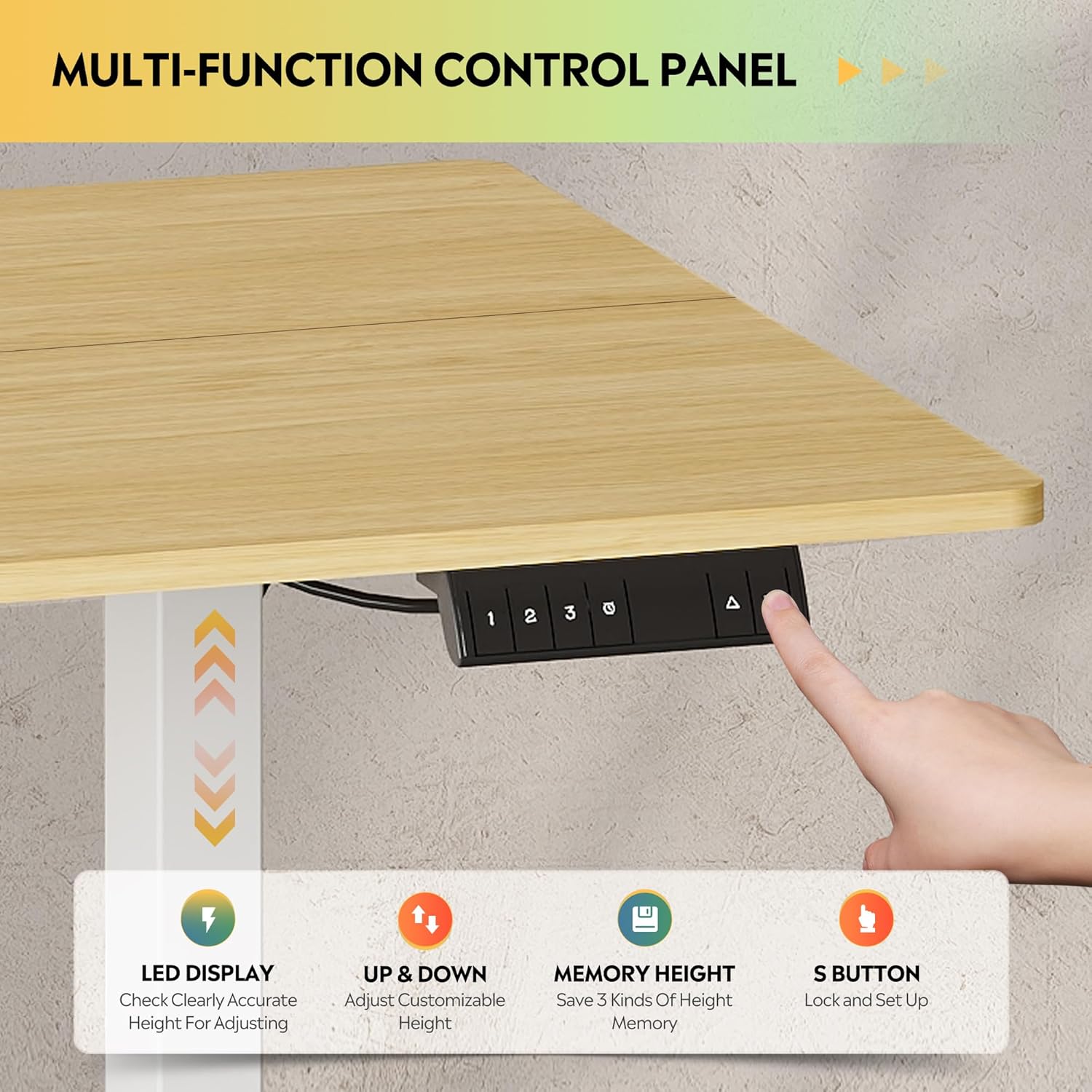
Your DEVAISE Electric Standing Desk features an intuitive LED touchscreen control panel for easy height adjustments and memory presets.
5.1 Height Adjustment
The desk's height can be adjusted smoothly and quietly from 28.35 inches (sitting height) to 46.45 inches (standing height).
- Up/Down Buttons: Use the up (▲) and down (▼) arrows on the control panel to manually adjust the desk to your desired height. The LED display will show the current height.
- The tri-motor system ensures quiet operation, typically below 50dB, minimizing disturbance in your workspace.


5.2 Memory Presets
The control panel allows you to save up to three preferred height settings for quick recall.
- Saving a Preset: Adjust the desk to your desired height. Press the 'S' button, then press one of the numbered memory buttons (1, 2, or 3) until you hear a beep or see a confirmation on the LED display.
- Recalling a Preset: Simply press the corresponding numbered memory button (1, 2, or 3) to automatically move the desk to the saved height.
6. Maintenance
Regular maintenance ensures the longevity and optimal performance of your DEVAISE Electric Standing Desk.
- Cleaning: Wipe the desktop and frame with a soft, damp cloth. Avoid abrasive cleaners or harsh chemicals that could damage the finish.
- Cable Management: Periodically check and organize cables to prevent snagging or damage during height adjustments.
- Fastener Check: Occasionally inspect all screws and fasteners to ensure they are tight. Retighten if necessary.
- Motor Inspection: Listen for any unusual noises during operation. If you notice any issues, refer to the troubleshooting section or contact customer support.
7. Troubleshooting
If you encounter any issues with your DEVAISE Electric Standing Desk, please refer to the following common solutions:
| Problem | Possible Cause | Solution |
|---|---|---|
| Desk does not move | Power cable disconnected; Child lock engaged; Overload | Check power connection; Deactivate child lock; Reduce weight on desk |
| Uneven movement or tilting | Unbalanced load; Loose fasteners | Distribute weight evenly; Check and tighten all assembly screws |
| Error code on LED display | Specific system fault | Refer to the detailed manual for specific error codes or contact customer support. |
| Anti-collision feature activated frequently | Obstruction in path | Ensure clear path for desk movement; Adjust sensitivity if possible (refer to detailed manual) |
If the problem persists after attempting these solutions, please contact DEVAISE customer support for assistance.
8. Specifications
Key technical specifications for the DEVAISE Electric Standing Desk (Model ASJZ024):
| Feature | Detail |
|---|---|
| Brand | DEVAISE |
| Model Number | ASJZ024 |
| Product Dimensions (D x W x H) | 27.63"D x 62.99"W x 28.42"H |
| Color | Maple (Desktop), White (Base) |
| Minimum Height | 28.35 Inches |
| Maximum Height | 46.45 Inches |
| Tabletop Thickness | 0.6 Inches |
| Maximum Weight Capacity | 180 Pounds |
| Base Material | Iron |
| Top Material Type | Engineered Wood |
| Special Features | 3-Button Memory Presets, Adjustable Height, Electric, Ergonomic, LED Touchscreen |
| Included Components | Headphone Hook |
| Assembly Required | Yes |

9. Warranty and Support
DEVAISE is committed to providing quality products and customer satisfaction. For any questions regarding desk assembly, product selection, or technical support, please do not hesitate to contact our U.S.-based product support team.
Please refer to the warranty information included in your product packaging for details on coverage and terms. Keep your purchase receipt as proof of purchase.
For further assistance, visit the official DEVAISE store: DEVAISE Store on Amazon
