1. Important Safety Instructions
When using electrical appliances, basic safety precautions should always be followed to reduce the risk of fire, electric shock, and injury. Read all instructions carefully before operating the COSORI Air Fryer.
- Do not touch hot surfaces. Use handles or knobs.
- To protect against electric shock, do not immerse cord, plugs, or the appliance in water or other liquid.
- Close supervision is necessary when any appliance is used by or near children.
- Unplug from outlet when not in use and before cleaning. Allow to cool before putting on or taking off parts.
- Do not operate any appliance with a damaged cord or plug or after the appliance malfunctions or has been damaged in any manner.
- Do not use attachments not recommended by the appliance manufacturer; this may cause injuries.
- Do not use outdoors.
- Do not let cord hang over edge of table or counter, or touch hot surfaces.
- Do not place on or near a hot gas or electric burner, or in a heated oven.
- Extreme caution must be used when moving an appliance containing hot oil or other hot liquids.
- Always attach plug to appliance first, then plug cord into the wall outlet. To disconnect, turn any control to “off”, then remove plug from wall outlet.
- Do not use appliance for other than intended use.
- Ensure the appliance is placed on a stable, heat-resistant surface, away from walls and other appliances, allowing sufficient air circulation.
2. Product Overview
The COSORI Air Fryer 10.8L Smart Turbo Tower Pro is designed for efficient and versatile cooking, featuring dual baskets and advanced heating technology. Its smart capabilities allow for convenient control and access to numerous recipes via a mobile application.
2.1 Components
- Main Unit: Houses the heating elements, fan, and control panel.
- Upper Basket (4.3 L): For smaller portions or simultaneous cooking.
- Lower Basket (6.5 L): Larger capacity, features Dual Blaze heating.
- Crisper Plates: Removable plates for each basket to ensure even air circulation and easy cleaning.
- Control Panel: Intuitive touchscreen display for settings and programs.
2.2 Key Features
- Dual Blaze & Turbo Blaze Technology: Ensures uniform heat distribution for perfect results, especially in the lower basket with two heating elements.
- 10.8L Total Capacity: Stacked design with 4.3L upper and 6.5L lower baskets, optimizing counter space.
- 100% Ceramic Coated Surfaces: Food-contact surfaces are ceramic-coated for safe cooking and easy cleanup, dishwasher-safe.
- Smart Connectivity (Wi-Fi): Connects to a dedicated app for remote control, recipe access, and cooking progress monitoring.
- 7 Cooking Functions: Air Fry, Bake, Roast, Grill, Reheat, Dehydrate, and Proof.
- 5 Fan Speeds: Adjustable fan speeds with automatic temperature adjustment for precise cooking.
- Copy & Sync Functions: Duplicate settings across baskets or synchronize cooking completion times for different foods.

Image: The COSORI Air Fryer 10.8L Smart Turbo Tower Pro, showcasing its stacked dual-basket design and top control panel.

Image: Illustration of the air fryer's capability to cook a complete meal simultaneously, with separate sections for carbohydrates, proteins, and vegetables.

Image: Close-up view illustrating the dual heating elements within the lower basket, ensuring uniform heat for crispy results.
3. Setup and First Use
3.1 Unpacking
- Carefully remove all packaging materials from the air fryer and its accessories.
- Remove any stickers or labels from the appliance.
- Check that all parts are present and undamaged.
3.2 Initial Cleaning
- Wash the baskets and crisper plates thoroughly with warm, soapy water. Rinse and dry completely.
- Wipe the interior and exterior of the main unit with a damp cloth. Do not immerse the main unit in water.
3.3 Placement
- Place the air fryer on a stable, flat, heat-resistant surface.
- Ensure there is at least 15 cm (6 inches) of space behind and above the appliance for proper air circulation.
- Do not place the air fryer directly under cabinets or near flammable materials.
3.4 First Use (Burn-in)
It is recommended to run the air fryer empty for a short period to eliminate any manufacturing odors.
- Plug the air fryer into a grounded electrical outlet.
- Set the temperature to 205°C (400°F) and time to 10 minutes.
- Run the cycle. A slight odor may be present, which is normal.
- Allow the unit to cool completely before proceeding with cooking.
3.5 Connecting to Wi-Fi and App
For smart features, download the VeSync app and follow the in-app instructions to connect your air fryer.

Image: The COSORI Air Fryer with a smartphone displaying the VeSync app interface, demonstrating remote control and monitoring capabilities.
4. Operating Instructions
4.1 Control Panel Overview
The touchscreen control panel allows you to select cooking functions, adjust time and temperature, and manage dual-basket operations.
4.2 Basic Operation
- Place food in the desired basket(s). Ensure crisper plates are inserted.
- Insert the basket(s) firmly into the air fryer.
- Press the Power button to turn on the unit.
- Select a cooking function (e.g., Air Fry, Roast) or manually set temperature and time using the +/- buttons.
- Press the Start/Pause button to begin cooking.
- The air fryer will beep when cooking is complete. Carefully remove the baskets.
4.3 Cooking Functions
The air fryer offers 7 versatile cooking functions:
- Air Fry: For crispy results with little to no oil (e.g., fries, chicken wings).
- Roast: Ideal for meats and vegetables (e.g., chicken, potatoes).
- Grill: For searing and achieving grill marks.
- Reheat: To warm up leftovers while maintaining texture.
- Bake: For cakes, muffins, and other baked goods.
- Dehydrate: To remove moisture from fruits, vegetables, or jerky.
- Proof: For dough rising.

Image: Visual representation of various cooking functions including fermentation (proofing), dehydrating, baking, and reheating, highlighting the versatility of the appliance.
4.4 Dual Basket Features
- Copy Function: Easily transfer the temperature and time settings from one basket to the other.
- Sync Function: Program two different foods in each basket to finish cooking at the same time.
4.5 Using the VeSync App
The VeSync app enhances your cooking experience:
- Remote Control: Start, pause, and stop cooking cycles from your smartphone.
- Recipe Library: Access a wide range of chef-developed recipes with detailed nutritional information.
- Cooking Progress: Monitor the remaining cooking time and temperature for each basket.
- Weekly Reports: Review your cooking history and usage patterns.

Image: A plate of cooked food alongside a smartphone screen displaying a recipe from the VeSync app, complete with detailed nutritional values like calories, carbohydrates, proteins, and lipids.
5. Maintenance and Cleaning
Regular cleaning ensures the longevity and optimal performance of your air fryer.
5.1 Cleaning the Baskets and Crisper Plates
- Always unplug the air fryer and allow it to cool completely before cleaning.
- The baskets and crisper plates are dishwasher-safe. For best results, place them on the top rack.
- For hand washing, use warm, soapy water and a non-abrasive sponge. The ceramic coating is non-stick and easy to clean.
- Do not use metal utensils or abrasive cleaning materials, as they can damage the ceramic coating.
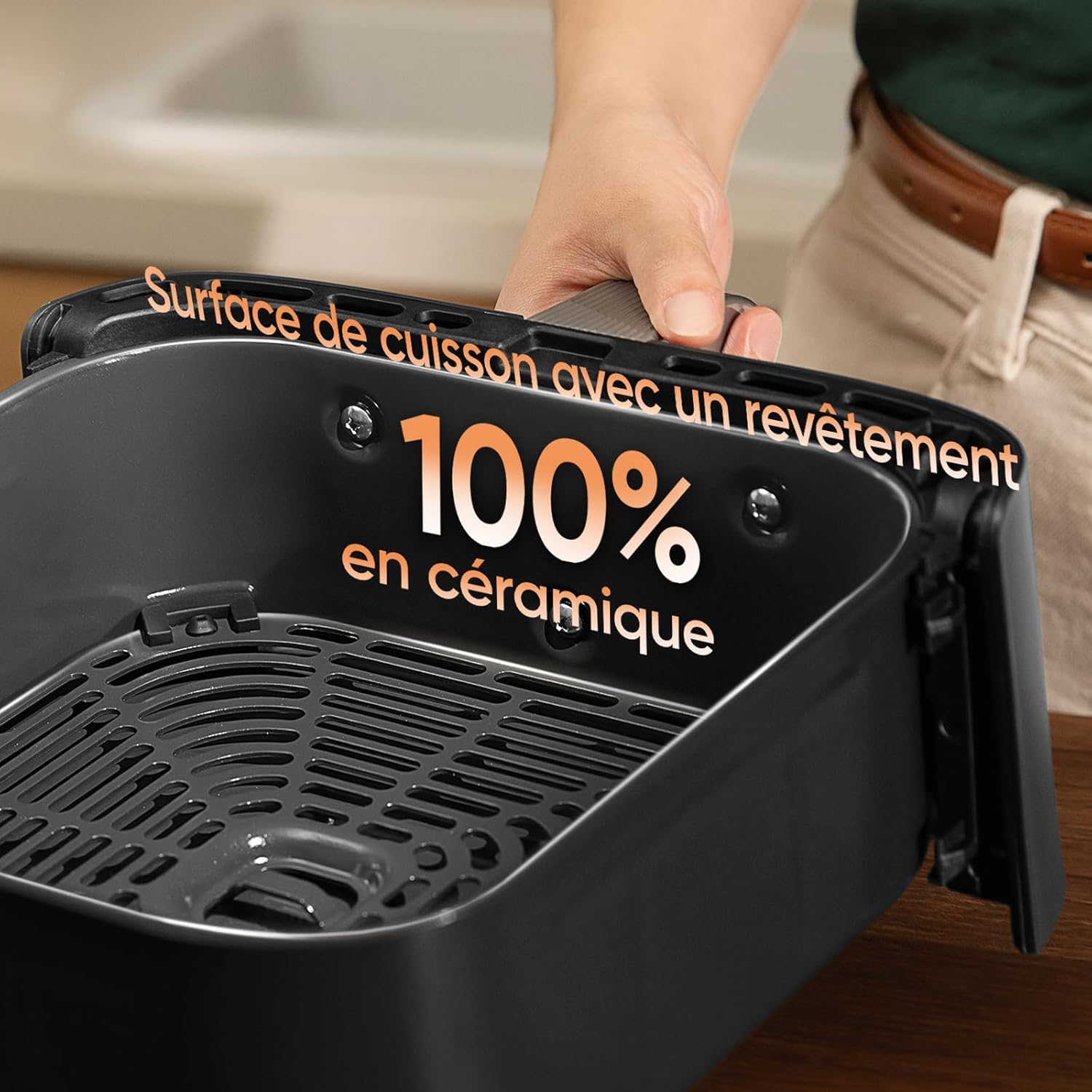
Image: A close-up view of the air fryer basket, highlighting its 100% ceramic coated cooking surface for easy cleaning and safe food contact.
5.2 Cleaning the Main Unit
- Wipe the exterior of the air fryer with a damp cloth. Dry thoroughly.
- Clean the interior with a damp cloth and mild detergent if necessary. Avoid getting water into the electrical components.
- For stubborn residue on the heating element, use a soft brush. Do not use abrasive pads or steel wool.
5.3 Storage
Store the air fryer in a cool, dry place when not in use. Ensure it is clean and dry before storage.
6. Troubleshooting
If you encounter issues with your COSORI Air Fryer, refer to the table below for common problems and solutions.
| Problem | Possible Cause | Solution |
|---|---|---|
| Air fryer does not turn on. | Not plugged in; power outlet issue; unit malfunction. | Ensure the power cord is securely plugged into a working outlet. Check circuit breaker. |
| Food is not cooked evenly. | Overcrowding baskets; insufficient shaking/flipping; incorrect temperature/time. | Do not overcrowd baskets. Shake or flip food halfway through cooking. Adjust temperature and time as needed. |
| White smoke coming from the air fryer. | Grease residue from previous cooking; high-fat food. | Clean the baskets and crisper plates thoroughly. For high-fat foods, drain excess oil. |
| App connectivity issues. | Incorrect Wi-Fi password; weak Wi-Fi signal; app outdated. | Ensure correct Wi-Fi password. Move air fryer closer to router. Update VeSync app. Restart air fryer and router. |
| Error codes on display. | Internal malfunction. | Refer to the full user manual for specific error code meanings. If persistent, contact customer support. |
7. Specifications
Detailed technical specifications for the COSORI Air Fryer 10.8L Smart Turbo Tower Pro.
| Specification | Value |
|---|---|
| Brand | COSORI |
| Model Number | CAF-DC113S-AEU |
| Color | Black |
| Dimensions (L x W x H) | 41.3 x 30 x 40.5 cm |
| Weight | 9.6 Kilograms |
| Capacity | 10.8 Liters (4.3L upper + 6.5L lower) |
| Power | 2630 Watts |
| Voltage | 240 Volts |
| Material | Metal, Plastic (Ceramic coated cooking surfaces) |
| Special Features | Safe ceramic coating, DC motor, Dual Blaze, space-saving design |
| Automatic Shut-off | Yes |
8. Warranty and Support
COSORI products are manufactured with the highest quality standards. For information regarding warranty coverage, product registration, or technical support, please refer to the warranty card included with your purchase or visit the official COSORI website.
If you require assistance with troubleshooting or have questions about your appliance, please contact COSORI Customer Support. Contact details can typically be found on the COSORI website or in the product packaging.


