
1. Introduction
The Generic C9300-24S-A Catalyst 9300 is a next-generation, enterprise-class network switch designed for advanced capabilities and high performance in modern business environments. This switch belongs to the Catalyst 9300 Series, which is engineered for high-security, scalable, and cloud-ready networking solutions. This manual provides essential information for the proper installation, operation, and maintenance of your C9300-24S-A switch.
2. Safety Information
Please read all safety instructions carefully before installing or operating the device. Failure to follow these instructions may result in injury or damage to the equipment.
- Power Supply: Use only the power supply provided with the device or a compatible replacement. Ensure the power source meets the voltage and current requirements specified for the switch.
- Ventilation: Ensure adequate airflow around the switch to prevent overheating. Do not block ventilation openings.
- Environment: Operate the switch in a clean, dry environment within the specified temperature and humidity ranges. Avoid exposure to direct sunlight, heat sources, and moisture.
- Grounding: Ensure the switch is properly grounded to prevent electrical shock.
- Servicing: Do not attempt to service the switch yourself. Refer all servicing to qualified personnel.
3. Package Contents
Verify that all items are present in the package. If any item is missing or damaged, contact your vendor immediately.
- C9300-24S-A Network Switch
- Accessories (e.g., power cord, rackmount kit)
- Menu Instruction (this manual)
4. Physical Description
The C9300-24S-A switch features 24 ports and is designed for robust network connectivity. Key features include dual redundant power supplies for enhanced reliability and StackWise-480 Technology, supporting up to 480 Gbps stacking bandwidth for seamless integration of multiple switches. It also incorporates advanced security features like AES-256 encryption.
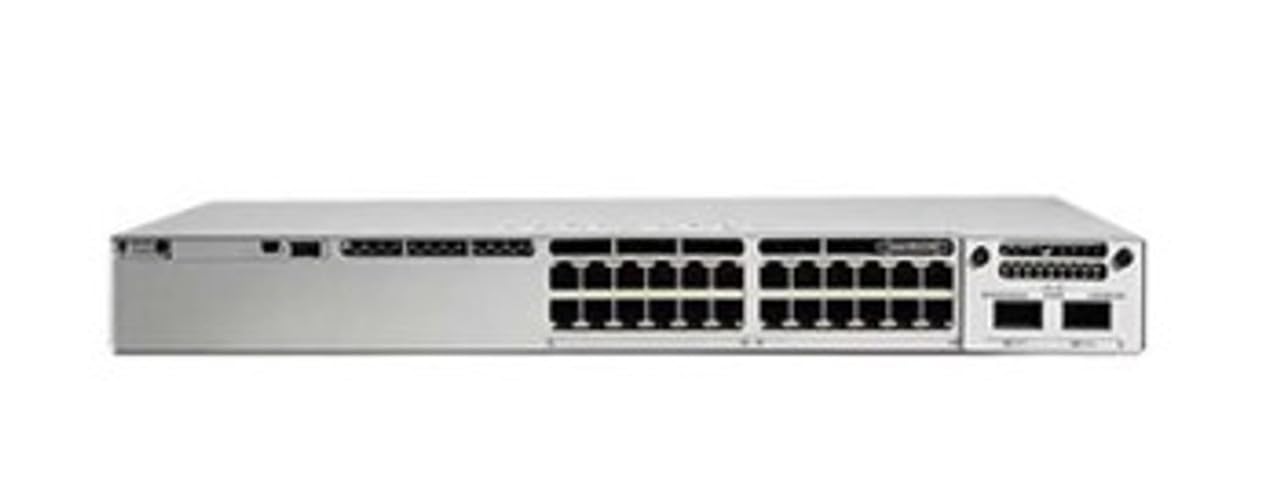
Figure 1: Generic C9300-24S-A Catalyst 9300 24-Port Network Switch. This image displays the front panel of the Generic C9300-24S-A Catalyst 9300 switch, featuring 24 SFP ports and modular uplink slots.
5. Setup
Follow these general steps to set up your C9300-24S-A network switch:
- Unpack the Switch: Carefully remove the switch and all accessories from the packaging.
- Mounting: Install the switch in a standard 19-inch equipment rack using the provided rackmount kit, or place it on a stable, level surface. Ensure proper ventilation.
- Connect Power: Connect the power cord to the switch's power input and then to a grounded electrical outlet. The switch features dual redundant power supplies for reliability.
- Connect Network Cables: Connect your network devices (servers, workstations, other switches) to the 24 SFP ports using appropriate fiber optic transceivers and cables. Utilize the modular uplink slots for high-speed connections as needed.
- Initial Power On: Power on the switch. Observe the system status LEDs to ensure proper boot-up.
- Initial Configuration: Access the switch's management interface (e.g., console port, web interface, or SSH) to perform initial configuration, including IP address assignment, password setup, and basic network settings. Refer to the command-line interface (CLI) guide for detailed configuration instructions.
6. Operating Instructions
Once the switch is set up and configured, it operates as a core component of your network infrastructure. Here are general operational guidelines:
- Monitoring: Regularly monitor the switch's performance and status through its management interface. Check port status, traffic statistics, and system health.
- Configuration Management: Periodically review and update the switch configuration as network requirements change. Save configurations to non-volatile memory to prevent loss during power cycles.
- Security: Implement and maintain strong security policies, including access control lists (ACLs), port security, and regular password changes. Utilize the built-in AES-256 encryption features for secure networking.
- Stacking: If utilizing StackWise-480 Technology, ensure proper stacking cable connections and configuration for high-bandwidth and resilient operations.
- Multi-Gigabit Ethernet: Leverage Multi-Gigabit Ethernet support on select ports for devices requiring higher bandwidth up to 10Gbps.
7. Maintenance
Regular maintenance ensures the longevity and optimal performance of your C9300-24S-A switch.
- Cleaning: Keep the switch and its surroundings clean and free of dust. Use a soft, dry cloth for external cleaning. Do not use liquid cleaners.
- Firmware Updates: Periodically check for and apply firmware updates from the manufacturer. Firmware updates often include performance enhancements, bug fixes, and security patches.
- Cable Management: Ensure all network and power cables are neatly organized and securely connected to prevent accidental disconnections or damage.
- Environmental Checks: Verify that the operating environment remains within specified temperature and humidity limits.
8. Troubleshooting
This section provides solutions to common issues you might encounter.
- No Power:
- Check if the power cord is securely connected to both the switch and the power outlet.
- Verify the power outlet is functional.
- Ensure the power supply unit is correctly seated and operational.
- No Network Connectivity:
- Check the link status LEDs on the switch ports and connected devices.
- Verify that network cables are properly connected and not damaged.
- Ensure the connected devices are powered on and configured correctly.
- Check the switch's configuration for correct VLANs, IP addresses, and port settings.
- Slow Network Performance:
- Check for high CPU utilization or memory usage on the switch.
- Inspect for network loops or broadcast storms.
- Verify duplex and speed settings on ports.
- Ensure adequate bandwidth for uplink connections.
If issues persist, consult the detailed troubleshooting guide available on the manufacturer's support website or contact technical support.
9. Specifications
| Feature | Description |
|---|---|
| Brand | Generic |
| Model Number | C9300-24S-A |
| Number of Ports | 24 |
| Port Type | 1G SFP with Modular Uplinks |
| Network Advantage | Yes |
| Redundant Power Supplies | Dual |
| Stacking Bandwidth | Up to 480 Gbps (StackWise-480) |
| Security Features | AES-256 encryption |
| Multi-Gigabit Ethernet Support | Up to 10Gbps on select ports |
| Number of Layers | 3 |
| Compatible Devices | Desktop |
10. Warranty and Support
The Generic C9300-24S-A Catalyst 9300 Network Switch comes with a 1-Year Warranty from the date of purchase. This warranty covers defects in materials and workmanship under normal use.
For technical support, warranty claims, or further assistance, please contact your vendor or refer to the manufacturer's official support channels. Ensure you have your product model number (C9300-24S-A) and proof of purchase available when seeking support.


