
1. Introduction
The OUMAX MAX N150 Mini PC is a compact and efficient desktop computer designed for various applications including office work, online meetings, home theater personal computing (HTPC), and use as a home server. It features a 13th Gen Twin Lake N150 processor, offering enhanced performance for smooth multitasking and software compatibility.

Image 1.1: OUMAX MAX N150 Mini PC with two Ethernet cables and two HDMI cables connected to the rear ports, showcasing its compact size and connectivity.
2. Package Contents
Please verify that all items listed below are included in your package. If any items are missing or damaged, please contact customer support.
- 1 x OUMAX N150 Mini PC
- 1 x AC Cable (US Standard)
- 1 x HDMI Cable (100CM)
- 1 x User Manual

Image 2.1: Diagram showing the contents of the OUMAX MAX N150 Mini PC box: the mini PC unit, user manual, HDMI cable, and AC power cable.
3. Product Overview
3.1 Front and Back Panels
Familiarize yourself with the ports and indicators on the front and back of your OUMAX MAX N150 Mini PC.

Image 3.1: Detailed view of the OUMAX MAX N150 Mini PC's front and back panels, highlighting all available ports including USB 3.2, USB 2.0, HDMI, 3.5mm audio jack, LAN, and AC power input.
Front Panel:
- CLR CMOS: Clear CMOS button.
- USB 3.2 (10Gbps): High-speed data transfer port.
- 3.5mm Audio Jack: For headphones or speakers.
- Power Indicator Light: Indicates power status.
- USB 2.0 (480Mbps): Standard USB port.
- Power Button: To turn the device on/off.
Back Panel:
- AC/IN: Power input port.
- USB 3.2 (10Gbps) * 2: Two high-speed data transfer ports.
- HDMI * 2 (max 4K 60Hz): Two HDMI ports for display output.
- LAN * 2 (1000M): Two Gigabit Ethernet ports.
4. Setup Guide
4.1 Initial Connection
- Connect Display: Connect your monitor(s) to the HDMI ports on the back of the Mini PC using the provided HDMI cable or other compatible cables.
- Connect Peripherals: Plug in your USB keyboard and mouse into the available USB ports.
- Connect Network (Optional): For a wired connection, connect an Ethernet cable from your router or modem to one of the LAN ports on the back of the Mini PC.
- Connect Power: Plug the AC power cable into the AC/IN port on the Mini PC, then plug the other end into a power outlet.
4.2 First Boot
After connecting all necessary cables, press the power button on the front panel. The power indicator light will illuminate, and the system will begin to boot. Follow the on-screen instructions to complete the operating system setup.
5. Operating Instructions
5.1 Power On/Off
- Power On: Press the power button once.
- Power Off: From the operating system, select 'Shut Down'. Alternatively, press and hold the power button for 5-7 seconds to force a shutdown (use only when necessary).
5.2 Advanced Power Features
The Mini PC supports several advanced power management features:
- Wake On LAN (WOL): Allows the computer to be woken up remotely over a network connection.
- PXE Boot: Enables booting from a network server.
- RTC Wake: Allows scheduling the computer to power on at a specific time.
- Auto Power On: Configures the computer to automatically power on after a power outage.
These features can typically be configured within the system's BIOS/UEFI settings.
6. Storage and Memory Expansion
The OUMAX MAX N150 Mini PC comes equipped with 16GB DDR4 memory and a 500GB M.2 SSD. For increased performance or storage capacity, the system supports expansion.
- Memory: The single channel 16GB DDR4 memory operates at up to 3200 MHz.
- Storage: The 500GB M.2 SSD can be expanded. The device features dual SSD slots, allowing for a total storage expansion up to 4TB (2 x 2TB).

Image 6.1: Internal view of the OUMAX MAX N150 Mini PC motherboard, illustrating the 16GB DDR4 memory module and two M.2 SSD slots for storage expansion up to 4TB.
7. Connectivity
7.1 Wired Network
The Mini PC is equipped with dual Gigabit Ethernet ports, providing stable and high-speed wired network connections. This is suitable for applications requiring consistent network performance, such as file servers or network appliances.

Image 7.1: OUMAX MAX N150 Mini PC with two Ethernet cables connected, emphasizing its dual Gigabit Ethernet ports for stable and high-speed wired network connections.
7.2 Wireless Connectivity
For wireless connections, the Mini PC includes:
- WiFi 5 (802.11ac): Provides wireless internet access.
- Bluetooth 5.0: For connecting wireless peripherals such as keyboards, mice, and audio devices.

Image 7.2: OUMAX MAX N150 Mini PC on a desk with wireless peripherals like a keyboard, mouse, and smartphone, illustrating its WiFi 5 and Bluetooth 5.0 capabilities.
8. Dual Display Setup
The OUMAX MAX N150 Mini PC supports dual 4K 60Hz display output via its two HDMI 2.0 ports. This allows for an extended desktop environment, enhancing productivity and multimedia experiences.
8.1 Connecting Two Displays
- Ensure both monitors are powered off.
- Connect an HDMI cable from each monitor to the two HDMI ports on the back of the Mini PC.
- Power on both monitors, then power on the Mini PC.
- The operating system should automatically detect both displays. You can configure display settings (e.g., extend, duplicate) within your operating system's display settings.
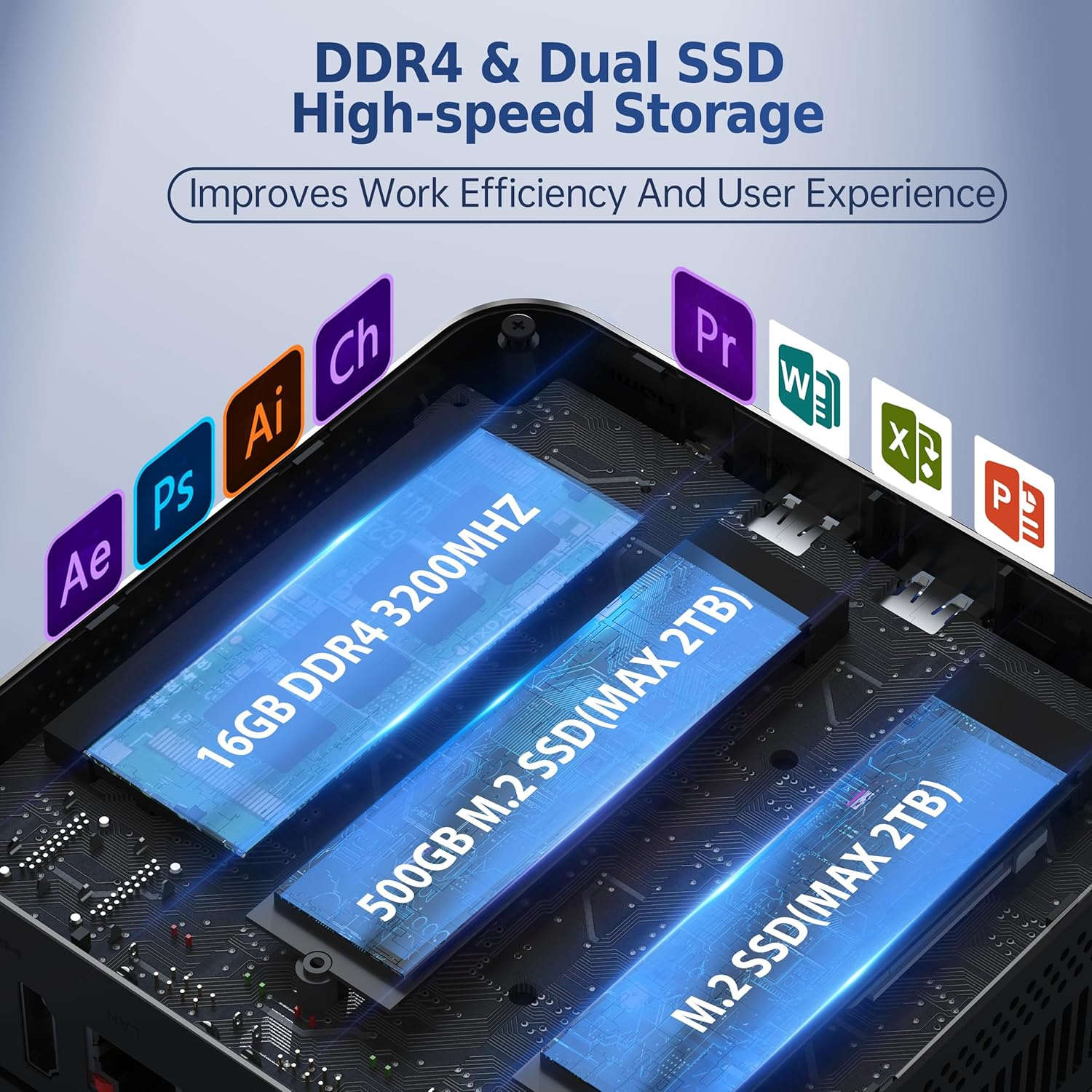
Image 8.1: OUMAX MAX N150 Mini PC connected to two external monitors, demonstrating its dual 4K 60Hz HDMI display capability for enhanced productivity.
9. Maintenance
To ensure the longevity and optimal performance of your OUMAX MAX N150 Mini PC, follow these maintenance guidelines:
- Cleaning: Regularly clean the exterior of the Mini PC with a soft, dry cloth. Use compressed air to clear dust from vents and ports to maintain proper airflow and cooling. Ensure the device is powered off and unplugged before cleaning.
- Software Updates: Keep your operating system and drivers updated to the latest versions to ensure security, stability, and performance.
- Environment: Operate the Mini PC in a well-ventilated area, away from direct sunlight, excessive heat, and moisture.
- Cable Management: Ensure cables are neatly organized and not obstructing airflow or causing strain on ports.
10. Troubleshooting
If you encounter issues with your OUMAX MAX N150 Mini PC, refer to the following common troubleshooting steps:
10.1 No Power
- Verify the power cable is securely connected to both the Mini PC and the power outlet.
- Test the power outlet with another device to ensure it is functional.
- Ensure the power button is pressed firmly.
10.2 No Display Output
- Check that the HDMI cables are securely connected to both the Mini PC and the monitor(s).
- Ensure the monitor(s) are powered on and set to the correct input source (e.g., HDMI 1, HDMI 2).
- Try connecting only one monitor to isolate the issue.
- If possible, test with a different HDMI cable or monitor.
10.3 Network Connectivity Issues
- Wired: Ensure the Ethernet cable is properly connected and the network router/modem is functioning. Check network adapter settings in the operating system.
- Wireless: Verify that Wi-Fi is enabled in the operating system and you are connected to the correct network with the correct password. Ensure the Wi-Fi router is operational.
10.4 System Performance Issues
- Close unnecessary applications running in the background.
- Check for sufficient free storage space on the SSD.
- Ensure the system is not overheating; clean vents if necessary.
- Run a system diagnostic or antivirus scan.
11. Specifications
The following table outlines the technical specifications of the OUMAX MAX N150 Mini PC:
| Feature | Specification |
|---|---|
| Processor | 13th Gen Twin Lake N150 (4 Cores, 4 Threads, 6 MB L3 Cache, up to 3.6 GHz) |
| Graphics Coprocessor | Intel Graphics 24EUs 1000MHz |
| RAM | 16GB DDR4 3200 MHz |
| Storage | 500GB M.2 SSD (Expandable up to 4TB with dual SSD slots) |
| Max Screen Resolution | 3840x2160 (4K) |
| HDMI Ports | 2 x HDMI 2.0 (Supports Dual 4K 60Hz Display) |
| USB Ports | 3 x USB 3.2, 1 x USB 2.0 |
| Ethernet | 2 x Gigabit Ethernet (1000M) |
| Wireless Connectivity | WiFi 5 (802.11ac), Bluetooth 5.0 |
| Audio | 3.5mm Audio Jack |
| Power Supply | Built-in 45W |
| Dimensions | 4.75 x 4.75 x 1.49 inches |
| Weight | 1.48 pounds |
| Operating System | OS (Pre-installed or compatible) |
| Special Features | Wake On LAN, PXE Boot, RTC Wake, Auto Power On, Low RPM Fan |
12. Warranty and Support
The OUMAX MAX N150 Mini PC comes with a standard manufacturer's warranty. For specific warranty terms, duration, and conditions, please refer to the warranty card included in your package or contact OUMAX customer support directly. Technical support is available for assistance with setup, troubleshooting, and general inquiries.
Please retain your proof of purchase for warranty claims.
