
advwin US14030800
Advwin Ice Cube Maker Machine Countertop User Manual
Model: Ice Maker Countertop (US14030800)
1. Important Safety Information
Please read all instructions carefully before operating your Advwin Ice Cube Maker. Retain this manual for future reference.
- Ensure the appliance is placed on a stable, level surface away from direct sunlight and heat sources.
- Do not immerse the appliance, power cord, or plug in water or other liquids.
- Unplug the ice maker from the power outlet before cleaning or when not in use.
- Do not operate any appliance with a damaged cord or plug, or after the appliance malfunctions or has been damaged in any manner.
- This appliance is for household use only. Do not use outdoors.
- Keep children away from the ice maker during operation.
- Use only potable water in the ice maker.
- Do not block ventilation openings on the appliance.
2. Product Overview
The Advwin Ice Cube Maker is a countertop appliance designed to produce crystal-clear square ice cubes efficiently. It features a large capacity, two water input methods, and an automatic self-cleaning function, making it ideal for home, kitchen, office, or bar use.

Figure 2.1: Advwin Ice Cube Maker Machine with external water bottle and ice scoop.
This image displays the Advwin Ice Cube Maker Machine in a kitchen setting. The machine is silver with a black top and control panel. An external water bottle is placed on top, and an ice scoop is visible on the side. A glass with ice and a beverage, along with fresh limes, are positioned next to the machine, illustrating its use.
2.1 Key Features
- High Capacity: Produces up to 55 lbs of ice daily, with a 3.3 lbs ice storage capacity and a 2.5L water tank.
- Fast Ice Production: Delivers 24 crystal-clear ice cubes in approximately 13 minutes.
- Dual Water Input: Supports manual water addition or automatic water drawing from an external source via a tube.
- Timer Function: Features a 1-24 hour reservation function for scheduled ice production.
- Intelligent Sensors: Equipped with infrared sensors for "Add Water" and "Ice Full" indicators, with automatic shut-off.
- Automatic Self-Cleaning: Simplifies maintenance with a dedicated cleaning cycle.

Figure 2.2: Ice production capacity and speed.
This image highlights the impressive ice production capabilities of the Advwin Ice Cube Maker. It visually represents "55 lbs" of ice, indicating the daily production capacity, and "2.6 QT Tank Capacity" (approximately 2.5L), along with "24 Cubes 13 Min," showcasing the speed of ice generation. The machine is shown with its lid open, revealing a full basket of ice cubes.
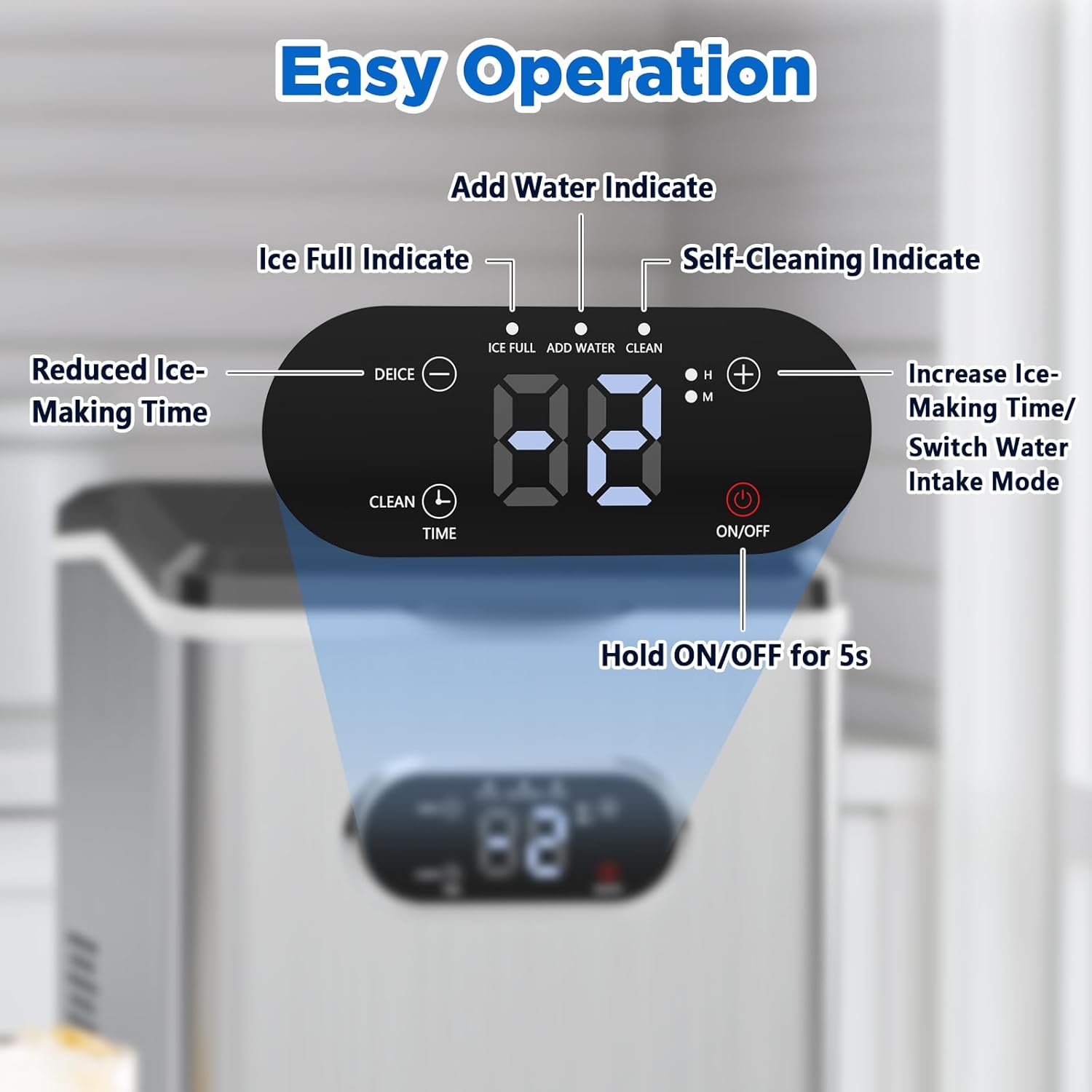
Figure 2.3: Control Panel Overview.
This close-up image details the control panel of the Advwin Ice Cube Maker. It clearly labels the various indicators and buttons: "ICE FULL," "ADD WATER," "CLEAN," "Reduced Ice-Making Time" (minus button), "Increase Ice-Making Time/Switch Water Intake Mode" (plus button), "CLEAN" (button), "TIME" (button), and "ON/OFF" (button). The digital display shows "88," indicating its readiness or a setting. This visual guide is essential for understanding the machine's operation.
3. Setup and Installation
3.1 Unpacking
- Carefully remove the ice maker from its packaging.
- Remove all packing materials, including any tape or protective film.
- Check for any damage during transit. If damaged, do not operate and contact customer support.
- Ensure all accessories are present: ice basket and ice shovel.
3.2 Placement
- Place the ice maker on a flat, stable, and heat-resistant surface.
- Allow at least 6 inches (15 cm) of clearance around the machine for proper ventilation.
- Avoid placing near heat sources (ovens, radiators) or in direct sunlight.
3.3 Water Supply
The Advwin Ice Cube Maker offers two convenient ways to add water:

Figure 3.1: Two methods for water input.
This image clearly illustrates the two methods for adding water to the ice maker. Method 1 shows "Manual Water Fill," where water is poured directly into the machine's reservoir. Method 2 depicts using an "External Water Bottle" (suitable for 2-5 L bottled water) placed on top of the machine, allowing for automatic water drawing. This visual guide simplifies the water supply process for users.
- Manual Water Fill:
- Open the lid of the ice maker.
- Pour potable water directly into the water reservoir until it reaches the MAX fill line. Do not overfill.
- External Water Bottle (Automatic):
- Place a compatible 2-5 liter bottled water jug onto the designated slot on top of the ice maker.
- The machine will automatically draw water as needed.
- Note: If there is no water in the internal tank, the machine will automatically switch to drawing water from the external source if connected.
After adding water, allow the appliance to stand upright for at least 1 hour before plugging it in to allow the refrigerant to settle.
4. Operating Instructions
4.1 First Use
Before first use, it is recommended to clean the ice maker. Refer to the "Maintenance and Cleaning" section for instructions.
4.2 Making Ice
- Ensure the ice maker is plugged into a grounded electrical outlet.
- Add water using either the manual fill or external bottle method (see Section 3.3).
- Press the ON/OFF button on the control panel to start the ice-making cycle. The indicator light will illuminate.
- The machine will begin producing ice. The first batch may take slightly longer.
- Ice cubes will be ready in approximately 13 minutes.
- When the ice basket is full, the ICE FULL indicator will light up, and the machine will automatically pause. Remove ice to resume production.
- If the water level is low, the ADD WATER indicator will light up, and the machine will pause. Add more water to resume.
- To stop ice production, press the ON/OFF button again.
4.3 Using the Timer Function
The ice maker features a 1-24 hour timer for scheduled operation.

Figure 4.1: Personalized scheduling with timer.
This image visually represents the "Create Personalized Schedules" feature of the Advwin Ice Cube Maker. It shows a clock icon on the left, symbolizing the timer function, and ice cubes on the right, indicating scheduled ice production. The machine's control panel is central, with a digital display showing "88," suggesting a time setting. This highlights the convenience of pre-setting ice-making times.
- With the machine on standby (plugged in but off), press the TIME button.
- Use the + and - buttons to set the desired delay time (in hours) before the machine starts or stops.
- Press the TIME button again to confirm the setting. The timer indicator will light up.
4.4 Adjusting Ice-Making Time (Ice Thickness)
You can adjust the ice-making duration to produce thinner or thicker ice cubes.
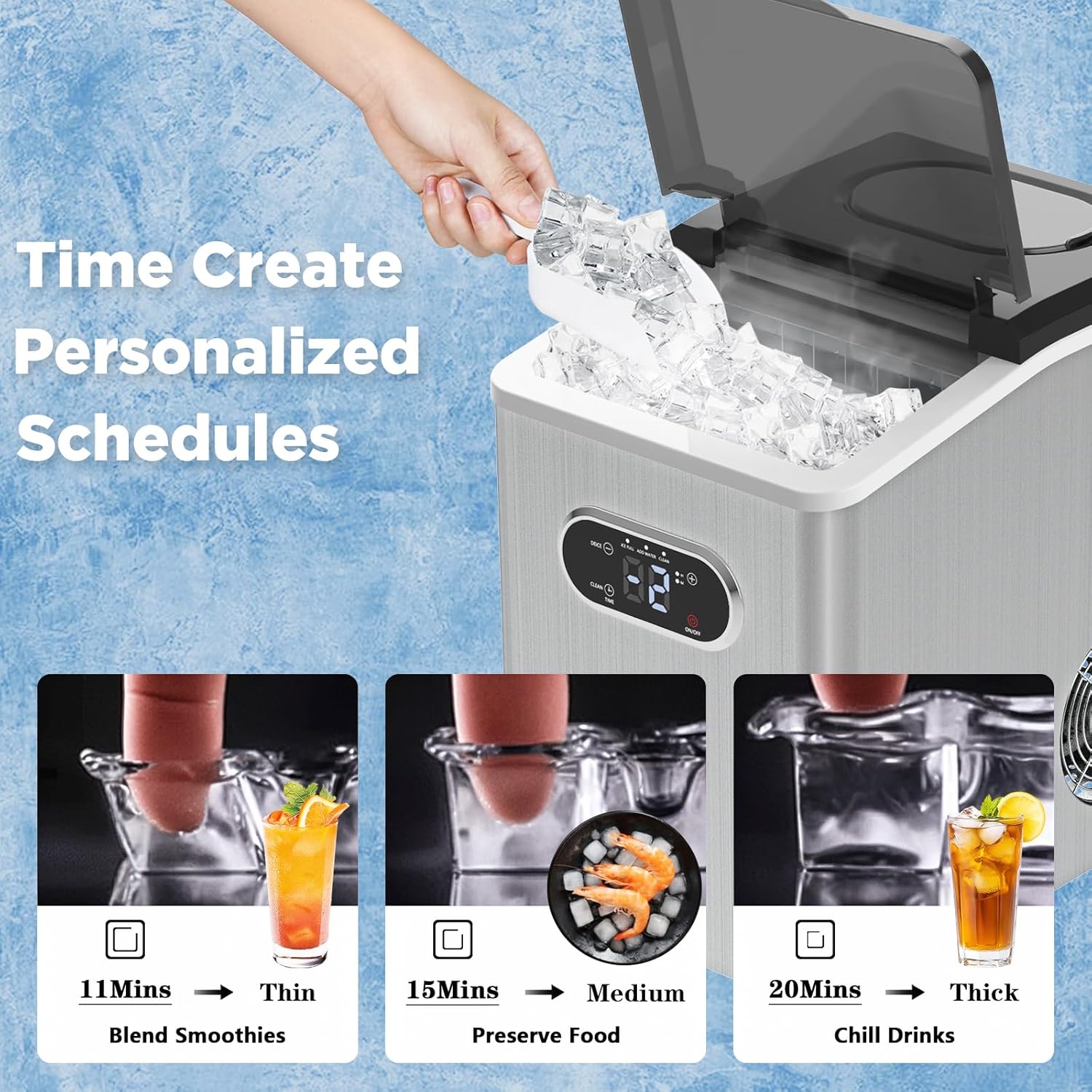
Figure 4.2: Ice thickness customization.
This image illustrates how users can customize ice cube thickness based on their needs. It shows three examples: "11 Mins → Thin" for blending smoothies, "15 Mins → Medium" for preserving food, and "20 Mins → Thick" for chilling drinks. This visual guide helps users understand the relationship between ice-making time and the resulting ice cube size/density.
- While the machine is making ice, press the + button to increase the ice-making time (for thicker ice).
- Press the - button to decrease the ice-making time (for thinner ice).
5. Maintenance and Cleaning
Regular cleaning ensures optimal performance and extends the lifespan of your ice maker.
5.1 Automatic Self-Cleaning
The Advwin Ice Cube Maker features an automatic self-cleaning function.

Figure 5.1: Automatic self-cleaning cycle.
This image illustrates the automatic self-cleaning process of the ice maker. It shows water circulating within the transparent internal components, indicating the cleaning action. Text overlays highlight "1 Press" to activate and "20 Min" for the duration of the cleaning cycle, simplifying the process for the user.
- Ensure there is water in the reservoir.
- Press and hold the CLEAN button for 5 seconds to activate the self-cleaning mode. The CLEAN indicator will light up.
- The cleaning cycle will run for approximately 20 minutes.
- Once the cycle is complete, drain the water from the reservoir.
5.2 Manual Cleaning
- Unplug the ice maker from the power outlet.
- Drain any remaining water from the reservoir by removing the drain plug (usually located at the bottom or back of the unit).
- Clean the interior with a soft cloth dampened with a mild detergent and water. Rinse thoroughly.
- Clean the ice basket and ice scoop with warm, soapy water. Rinse and dry completely.
- Wipe the exterior of the unit with a soft, damp cloth.
- Ensure all parts are completely dry before reassembling and storing or using the machine.
- For descaling, use a mixture of water and white vinegar or a dedicated descaling solution, following the product's instructions. Run a cleaning cycle with the solution, then rinse thoroughly with clean water multiple times.
6. Troubleshooting
If you encounter issues with your Advwin Ice Cube Maker, refer to the following table for common problems and solutions.
| Problem | Possible Cause | Solution |
|---|---|---|
| Machine does not turn on / No power. |
|
|
| "ADD WATER" indicator is on. |
|
|
| "ICE FULL" indicator is on. |
|
|
| No ice production or very little ice. |
|
|
| Ice cubes are too small or melt quickly. |
|
|
7. Specifications

Figure 7.1: Product Dimensions.
This image provides a clear visual representation of the Advwin Ice Cube Maker's dimensions. It labels the height as "14.17in," the width as "9.84in," and the depth as "13.78in," offering precise measurements for placement and space planning.
| Specification | Value |
|---|---|
| Model Name | Ice Maker Countertop |
| Manufacturer Reference | US14030800 |
| Product Dimensions (D x W x H) | 33.8D x 24.9W x 36.8H Centimetres (13.3D x 9.8W x 14.5H inches) |
| Weight | 11.52 kg (25.4 lbs) |
| Capacity (Water Tank) | 2.5 Liters (2.6 QT) |
| Ice Storage Capacity | 3.3 lbs |
| Ice Production per Day | 55 Pounds |
| Voltage | 110 Volts |
| Wattage | 220 Watts |
| Refrigerant | R290a |
8. Warranty and Support
Advwin offers a 12-month after-sales service for this ice maker, ensuring peace of mind for your purchase. We are committed to customer satisfaction and provide perpetual support for our products.
If you have any questions, concerns, or require assistance with your Advwin Ice Cube Maker, please do not hesitate to contact our customer support team. Ensure all accessories (ice basket and ice shovel) are present upon receipt of the goods. If any are missing, please reach out to us immediately.
For support, please refer to the contact information provided on your purchase receipt or the Advwin official website.
Ask a question about this manual
Ask about setup, troubleshooting, compatibility, parts, safety, or missing instructions. Manuals+ will review the question and use this page’s manual context to help answer it.