
Introduction
Welcome to the user manual for the OWON HDS25S Handheld Oscilloscope Multimeter. This device is a portable, 3-in-1 universal tester combining a digital oscilloscope, a 20,000-count multimeter, and a waveform generator. Designed for precision and versatility, it is suitable for various applications including vehicle diagnostics, industrial troubleshooting, and educational experiments.
Product Overview
Product Features
- Upgraded Parameters: Dual channel oscilloscope with 25 MHz bandwidth, max. 250 MS/s sampling rate, 8K recording length, 10,000 wfrms/s waveform refresh rate, and 8 bits vertical resolution.
- Dual Functionality: Combines a digital oscilloscope and a 20,000 count multimeter for accurate detection.
- Sharp Display & Portability: Features a bright 3.5" color LCD screen and a lightweight, ergonomic design for field use.
- Versatile Applications: Ideal for vehicle diagnostics, industrial troubleshooting, and educational experiments.
- Memory Function: Includes memory and screening functions, with easy data upload to PC via Type-C connection.
Device Components
The OWON HDS25S features a compact 3.5-inch LCD screen and intuitive controls for ease of use.
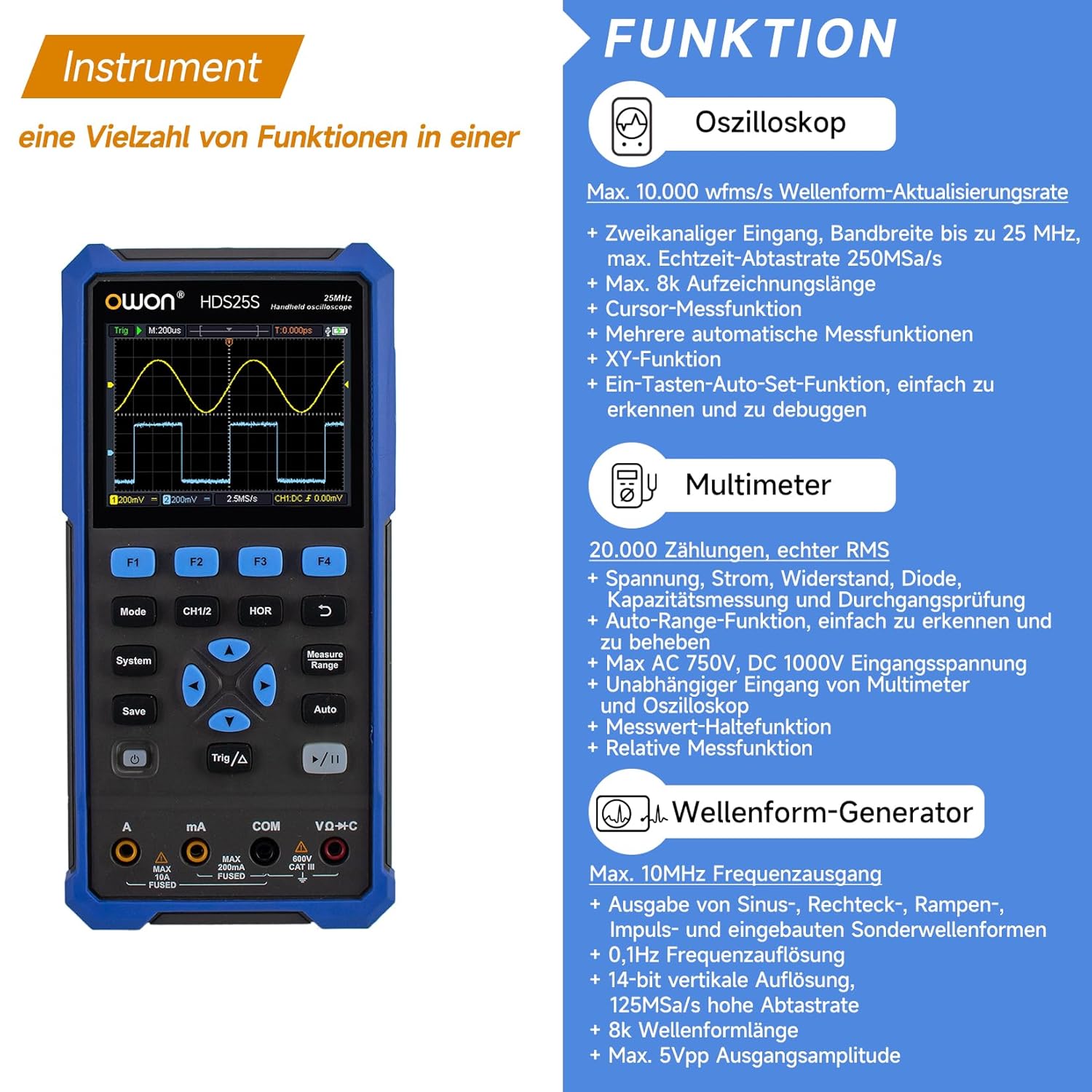
Image Description: Front view of the OWON HDS25S Handheld Oscilloscope Multimeter, displaying a waveform on its 3.5-inch LCD screen and showing the control buttons and multimeter input jacks.
Setup
Initial Setup
The device is powered by an internal battery. Ensure the device is charged before first use. Connect the device to a power source using the provided Type-C cable for charging.
Charging and PC Connection
The HDS25S supports charging and data transfer via its Type-C USB connection. To upload stored images and data to a PC, connect the device via the Type-C port.

Image Description: The OWON HDS25S connected via a USB Type-C cable to a laptop, demonstrating its PC communication and data transfer capability.
Operating Instructions
General Operation
Press and hold the power button to turn the device on or off. Use the mode selection buttons to switch between Oscilloscope, Multimeter, and Waveform Generator functions. Navigate menus and adjust settings using the directional buttons on the device.
Oscilloscope Function
The oscilloscope mode offers dual-channel input for precise waveform analysis.
- Bandwidth: 25 MHz
- Channels: 2
- Sampling Rate: Max. 250 MS/s
- Waveform Refresh Rate: 10,000 wfrms/s
- Vertical Resolution: 8 bits (10 mV/div - 10 V/div)
- Input Coupling: DC, AC, and Ground
- Memory Function: Store and screen waveforms for later review.

Image Description: The OWON HDS25S displaying a waveform on its screen, illustrating the oscilloscope function with various measurement parameters.
Multimeter Function
The integrated multimeter provides 20,000 counts for accurate electrical measurements.
- Measurement Capabilities: Voltage (AC/DC), Current (AC/DC), Resistance, Diode, Capacitance, Continuity.
- Auto-Range Function: Automatically selects the appropriate measurement range.
- Measurement Hold Function: Freezes the displayed reading for easy recording.

Image Description: The OWON HDS25S in multimeter mode, showing a digital reading on the screen with test leads connected.
Waveform Generator Function
The device includes a waveform generator for various signal outputs, useful for testing and calibration.
- Frequency Output: Max. 10 MHz
- Waveform Types: Sine, Square, Ramp, Pulse, and built-in special waveforms.
- Frequency Resolution: 0.1 Hz
- Vertical Resolution: 14-bit
- Sampling Rate: 125 MS/s
- Waveform Length: 8K
- Output Amplitude: Max. 5Vpp
Specifications
Technical Specifications
| Feature | Detail |
|---|---|
| Manufacturer | ZHANGZHOU LILLIPUT ELECTRONIC TECHNOLOGY CO.,LTD. |
| Part Number | 02 |
| Item Weight | 980 g |
| Parcel Dimensions | 24.1 x 16 x 8.8 cm |
| Item Model Number | OWON-HDS25S-01S |
| Colour | Blue |
| Style | HDS25S |
| Power Source Type | Battery Powered |
| Specifications Met | CE, RoHS |
| Batteries Included? | No |
| Batteries Required? | No |
| Date First Available | Dec 5 2024 |
Maintenance
Care and Maintenance
- Cleaning: Use a soft, dry cloth to clean the device. Avoid abrasive cleaners or solvents.
- Storage: Store the device in a cool, dry place away from direct sunlight and extreme temperatures.
- Battery Care: For optimal battery life, charge the device regularly and avoid fully discharging it for extended periods.
- Probe Care: Handle test probes and cables carefully to prevent damage. Inspect them regularly for wear and tear.
Troubleshooting
Common Issues and Solutions
- Device not powering on: Ensure the battery is charged. Connect to a power source via Type-C cable.
- Inaccurate readings: Check probe connections, ensure correct mode selection, and verify probe attenuation settings.
- Screen not responding: Try restarting the device. If the issue persists, contact customer support.
- Data transfer issues: Ensure the Type-C cable is securely connected and the PC recognizes the device.
Warranty and Support
Warranty Information
For detailed warranty information, please refer to the documentation provided with your product or visit the official Owon website.
Customer Support
If you encounter any issues or have questions regarding your OWON HDS25S, please contact Owon customer support for assistance.


