
1. Introduction
Thank you for choosing the MOUNT PRO TV Rolling Stand, Model PR4109-B. This mobile TV cart is designed to provide a versatile and stable solution for displaying televisions ranging from 26 to 65 inches and weighing up to 77 lbs. It features adjustable height, tilt, and rotation capabilities, along with a convenient utility shelf and integrated cable management. Please read this manual thoroughly before assembly and use to ensure safe and optimal performance.

Image: The MOUNT PRO TV Rolling Stand in a home environment, showcasing its design and mobility.
2. Safety Information
Always follow these safety precautions to prevent injury or damage to your equipment:
- Do not exceed the maximum weight capacity of 77 lbs (35 kg) for the TV or 11 lbs (5 kg) for the shelf.
- Ensure the TV's VESA pattern is compatible (100x100mm to 400x400mm) before installation.
- Verify that all screws and bolts are securely tightened before moving the stand or using the TV.
- Distribute weight evenly on the utility shelf.
- Keep children and pets away from the stand during assembly and adjustment.
- Move the stand slowly and carefully, especially on uneven surfaces.
3. Package Contents
Please check that all components are present and undamaged. Refer to the detailed parts list in the included PDF user manual for specific quantities and identification.
- Base with Wheels
- Main Support Pole
- TV Mounting Bracket
- Utility Shelf
- Hardware Kit (screws, washers, spacers, Allen keys)
- Instruction Manual (this document and PDF)
4. Setup and Assembly
The MOUNT PRO TV Rolling Stand is designed for easy assembly. All necessary hardware and detailed instructions are included. For a comprehensive step-by-step guide, please refer to the official User Manual (PDF).
4.1 Pre-Assembly Checks
- Ensure your TV's size (26-65 inches) and weight (up to 77 lbs) are within the stand's capacity.
- Verify your TV's VESA mounting pattern (distance between mounting holes on the back of the TV) is between 100x100mm and 400x400mm.

Image: VESA pattern compatibility chart for the TV stand.
4.2 General Assembly Steps (Summary)
- Attach the wheels to the base.
- Secure the main support pole to the base.
- Assemble the TV mounting bracket and attach it to the main support pole.
- Attach the utility shelf to the main support pole at your desired height.
- Mount your TV to the assembled bracket using the appropriate screws and spacers from the hardware kit.
5. Operating Instructions
5.1 Height Adjustment
The TV stand offers 5 levels of height adjustment, allowing you to set the screen height between a minimum of 42.1 inches and a maximum of 48.4 inches (measured from the floor to the center of the TV). To adjust, loosen the securing mechanism on the main pole, slide the TV mount to the desired height, and re-tighten securely.

Image: Visual representation of the 5-level height adjustment feature.
5.2 Tilt Adjustment
Adjust the screen tilt from -2° to +8° to achieve an optimal viewing angle and reduce glare. Loosen the tilt adjustment knobs on the TV bracket, set the desired angle, and tighten the knobs firmly.

Image: Illustration of the TV stand's tilt adjustment capability.
5.3 Screen Rotation
The TV mount allows for a 90° rotation, enabling you to switch between landscape and portrait orientations. This feature is useful for various applications such as broadcasting, live streaming, or video conferencing. Carefully rotate the screen to the desired orientation and ensure it is securely locked in place.

Image: The TV stand supporting a screen in both landscape and portrait orientations.
5.4 Mobility and Wheels
The stand is equipped with smooth, 360° swivel wheels for easy movement across various floor types without scratching surfaces. All wheels are discreetly hidden beneath the base for aesthetic appeal. To move the stand, gently push it to your desired location. Ensure the path is clear of obstacles.

Image: The TV stand demonstrating its mobility with 360-degree swivel wheels.
5.5 Utility Shelf and Cable Management
The adjustable utility shelf provides space for devices such as laptops, DVD players, sound boxes, or gaming consoles. Its height can be adjusted independently. The stand also features integrated cable management channels within the main pole to keep cables organized and out of sight, contributing to a neat setup.

Image: Details of the utility shelf, cable management, and Allen key storage.
6. Maintenance
To ensure the longevity and proper functioning of your MOUNT PRO TV Rolling Stand, follow these simple maintenance guidelines:
- Cleaning: Wipe the stand clean with a soft, damp cloth. Avoid abrasive cleaners or solvents that could damage the finish.
- Fastener Check: Periodically check all screws and bolts to ensure they remain tight. Re-tighten if necessary to maintain stability.
- Wheel Inspection: Ensure the wheels are free of debris and rotate smoothly. Clean any accumulated dust or hair from the casters.

Image: Features of the stable base, including mute casters and ease of cleaning.
7. Troubleshooting
If you encounter any issues with your MOUNT PRO TV Rolling Stand, please refer to the following common solutions:
- Stand is unstable: Ensure all assembly screws are fully tightened. Verify the TV weight does not exceed 77 lbs and is centered on the mount.
- TV does not fit: Double-check your TV's VESA pattern against the stand's compatibility (100x100mm to 400x400mm) and ensure the TV size is between 26-65 inches.
- Difficulty moving the stand: Check for obstructions around the wheels. Ensure the wheels are clean and free of debris.
- Shelf is loose: Re-tighten the shelf's securing mechanism. Ensure no weight exceeding 11 lbs is placed on the shelf.
If problems persist, please contact MOUNT PRO customer support for assistance.
8. Specifications
| Model Number | PR4109-B |
| Mounting Type | Floor Mount |
| Movement Type | Rotate, Tilt |
| Brand | MOUNT PRO |
| Material | Metal |
| Color | Black |
| Compatible Devices | Television |
| Minimum Screen Size | 26 Inches |
| Maximum Screen Size | 65 Inches |
| Maximum TV Weight | 77 lbs (35 kg) |
| Maximum Shelf Weight | 11 lbs (5 kg) |
| VESA Compatibility | 100x100mm to 400x400mm |
| Height Adjustment Range | 42.1" - 48.4" (5 levels) |
| Tilt Angle | -2° to +8° |
| Rotation | 90° (Landscape to Portrait) |
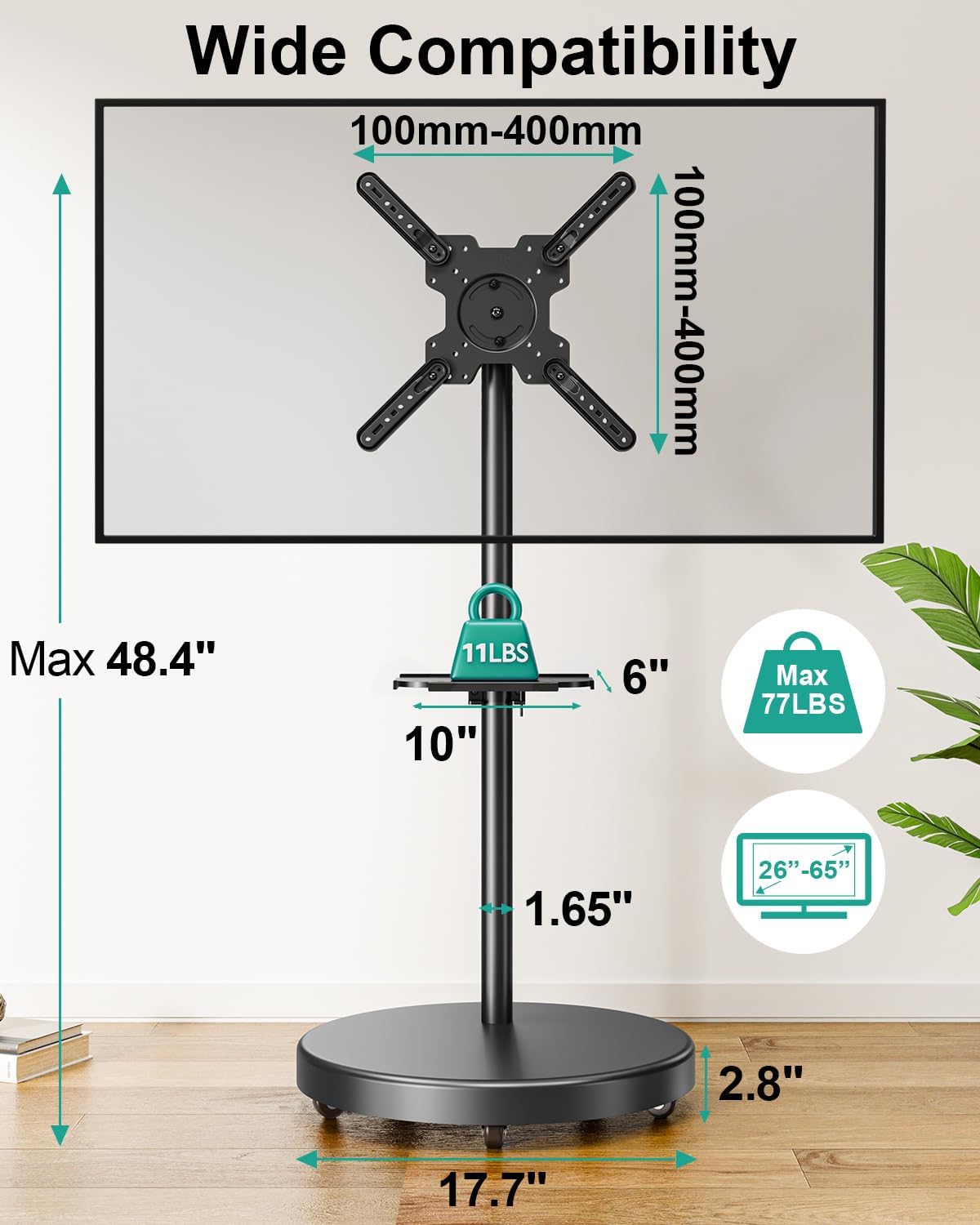
Image: Detailed specifications and dimensions of the TV stand.
9. Warranty Information
The MOUNT PRO TV Rolling Stand (Model PR4109-B) comes with a 2-year warranty from the date of purchase. This warranty covers manufacturing defects and material flaws under normal use. It does not cover damage caused by improper installation, misuse, accidents, or unauthorized modifications. Please retain your proof of purchase for warranty claims.
10. Customer Support
For any questions, concerns, or assistance with installation or operation, please contact MOUNT PRO customer support. We are committed to providing prompt assistance and will respond to inquiries within 24 hours.
MOUNT PRO Customer Service: Please refer to the contact information provided on your product packaging or the official MOUNT PRO website.


