
Conambo K10C-CBOX
Conambo K10C Bluetooth Headset User Manual
Model: K10C-CBOX
Introduction
Thank you for choosing the Conambo K10C Bluetooth Headset. This manual provides detailed instructions on how to set up, operate, and maintain your new headset, ensuring you get the best experience from its advanced features, including dual-mic noise canceling and extended battery life with the charging case.
What's in the Box
- Conambo K10C Bluetooth Headset
- Wireless Charging Case
- USB Charging Cable
- Eartips (various sizes)
- User Manual
Product Overview
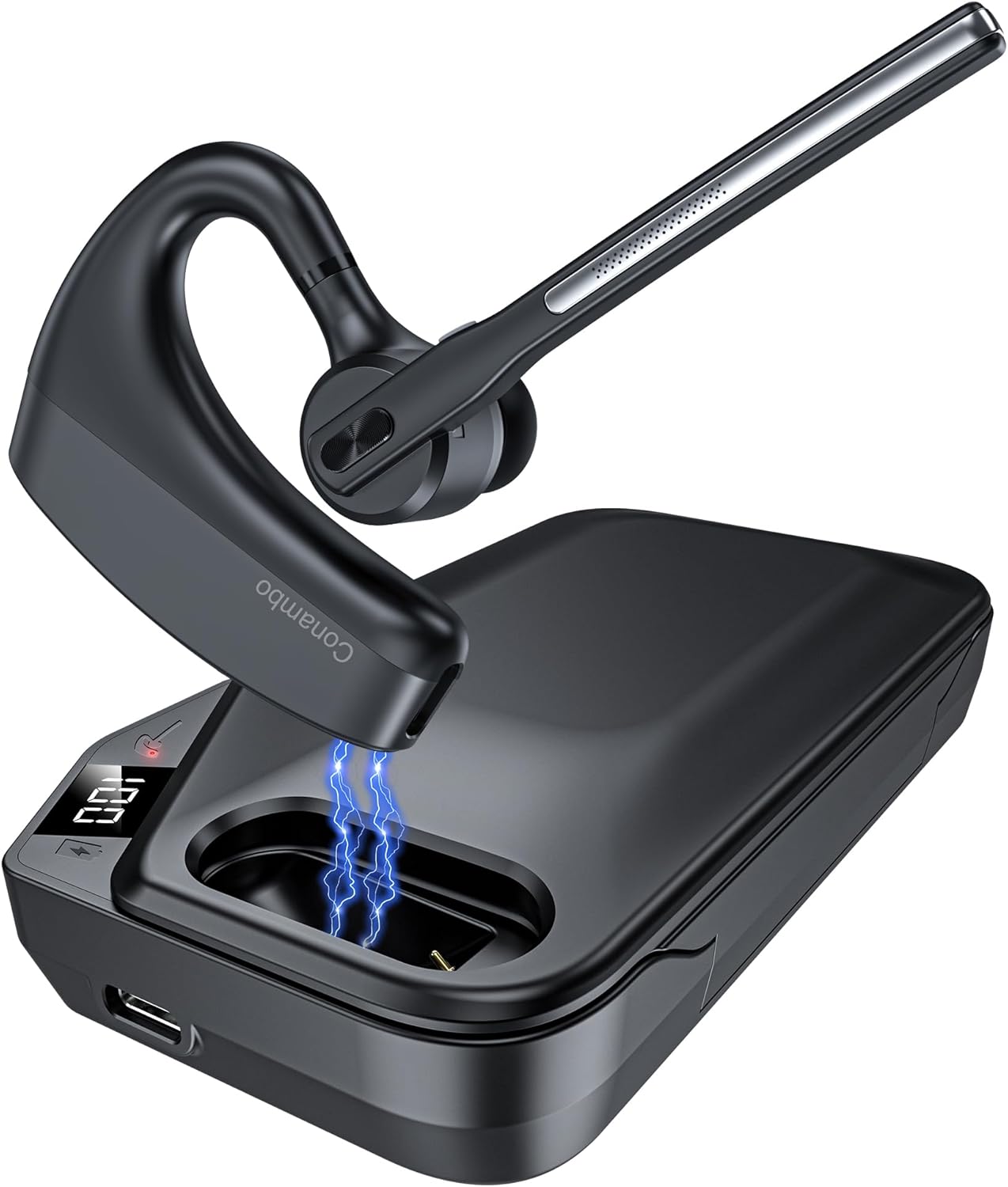
The Conambo K10C Bluetooth Headset with its dedicated charging case. The headset features an ergonomic design for comfortable wear, and the charging case provides extended battery life.
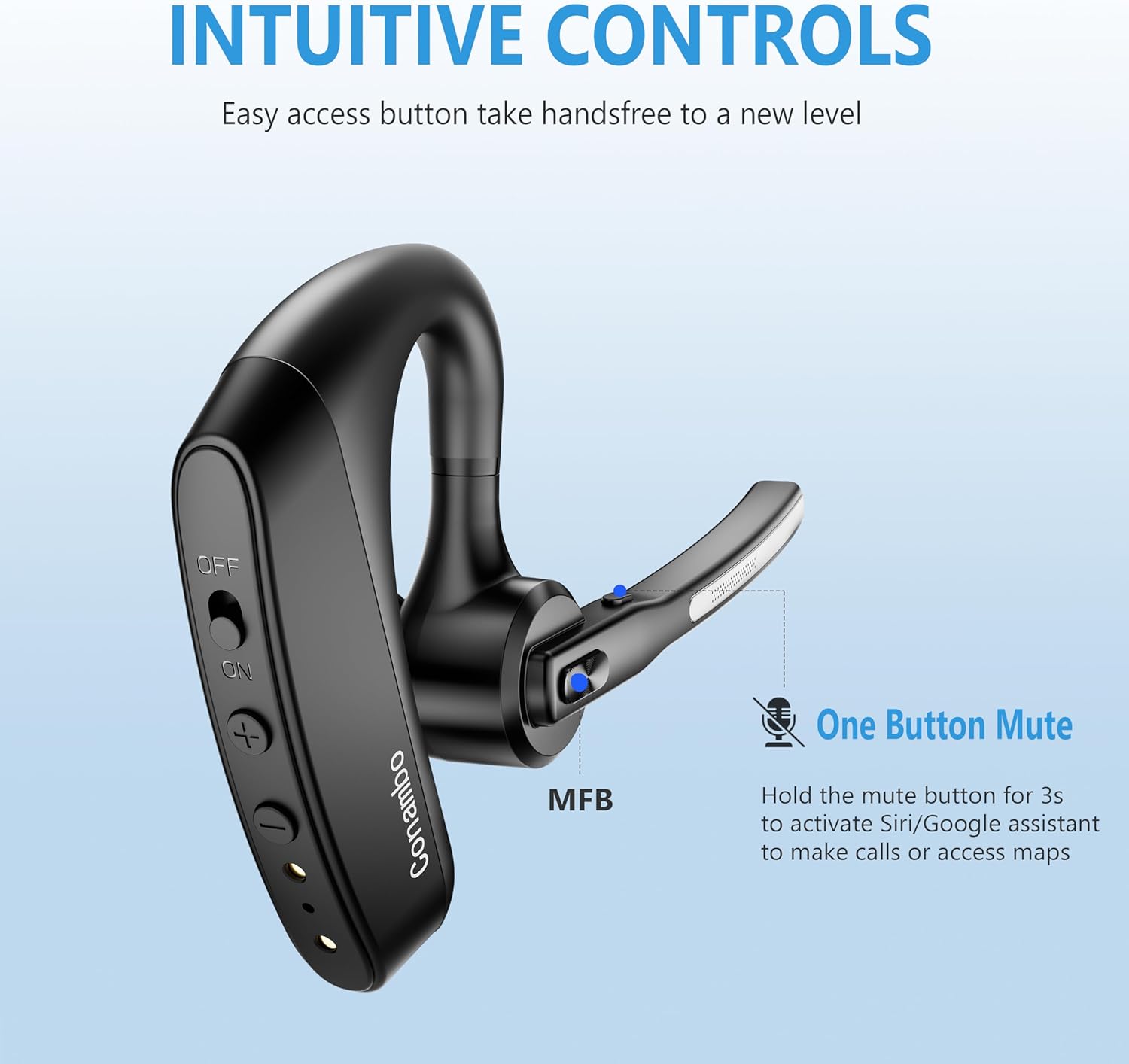
Detailed view of the headset's intuitive controls, including the power switch, volume buttons, and the Multi-Function Button (MFB). The microphone boom also features a dedicated mute button.
Key Components:
- Headset: Earpiece, Microphone Boom, Power Switch, Volume Up/Down Buttons, Multi-Function Button (MFB), Mute Button.
- Charging Case: Headset charging slot, USB-C Charging Port, LED Digital Display for battery life.
Setup
1. Charging the Headset and Charging Case
Before first use, fully charge both the headset and the charging case.
- Charging the Headset: Place the headset into the charging slot of the charging case. Ensure the charging contacts align. The headset's indicator light will show charging status.
- Charging the Case: Connect the USB charging cable to the USB-C port on the charging case and to a power source (e.g., computer USB port, wall adapter). The LED digital display on the case will show the battery percentage during charging.

The 750mAh charging case provides up to 64 hours of talk time. The LED display indicates the remaining battery life of the case.
2. Powering On/Off
- Power On: Slide the power switch on the headset to the "ON" position. You will hear a voice prompt indicating power on.
- Power Off: Slide the power switch on the headset to the "OFF" position. You will hear a voice prompt indicating power off.
3. Bluetooth Pairing
The first time you power on the headset, it will automatically enter pairing mode.
- Ensure the headset is powered on and in pairing mode (indicator light will flash).
- On your device (smartphone, laptop, etc.), enable Bluetooth.
- Search for available Bluetooth devices and select "K10C-CBOX" from the list.
- Once connected, the headset's indicator light will stop flashing, and you will hear a voice prompt confirming the connection.

The K10C supports fast pairing and multi-point technology, allowing connection to two devices simultaneously within a 59-foot (18-meter) range.
4. Multi-Point Connection
The K10C headset supports connecting to two Bluetooth devices simultaneously.
- Connect the headset to the first device as described in the "Bluetooth Pairing" section.
- Disable Bluetooth on the first device. The headset will re-enter pairing mode.
- Connect the headset to the second device.
- Re-enable Bluetooth on the first device. The headset should automatically connect to both devices. You can then switch between audio sources as needed.
Operating Instructions
1. Call Management
- Answer/End Call: Press the Multi-Function Button (MFB) once.
- Reject Call: Press and hold the MFB for 2 seconds.
- Mute/Unmute Microphone: Press the dedicated mute button on the microphone boom once during a call.

The Conambo K10C headset provides crystal clear audio quality for calls, supported by dual mic noise-canceling technology.

Equipped with CVC8.0 and ENC noise canceling technology, the K10C effectively blocks 96% of background noise, ensuring clear voice transmission.
2. Voice Assistant Activation
To activate your device's voice assistant (Siri, Google Assistant), press and hold the mute button on the microphone boom for 2 seconds.
3. Volume Control
Use the Volume Up (+) and Volume Down (-) buttons on the headset to adjust the audio volume.
Maintenance
- Cleaning: Use a soft, dry cloth to clean the headset and charging case. Do not use abrasive cleaners or solvents.
- Storage: When not in use, store the headset in its charging case to protect it and keep it charged. Store in a cool, dry place away from extreme temperatures.
- Battery Care: To prolong battery life, avoid fully discharging the battery frequently. Charge the device regularly, even if not in constant use.
Troubleshooting
| Problem | Possible Cause | Solution |
|---|---|---|
| Headset won't turn on | Low battery; Power switch off | Charge the headset; Slide power switch to ON. |
| Cannot pair with device | Headset not in pairing mode; Bluetooth off on device; Device too far | Ensure headset is in pairing mode; Enable Bluetooth on device; Move device closer (within 18m). |
| No audio during calls/music | Volume too low; Not connected; Wrong audio output selected | Increase volume on headset/device; Reconnect headset; Select K10C as audio output on device. |
| Poor call quality/noise | Interference; Headset too far from device; Microphone blocked | Move away from interference sources; Move closer to device; Ensure microphone is clear. |
| Charging case not charging | Cable issue; Power source issue | Try a different USB cable or power adapter; Ensure connection is secure. |
Specifications
| Feature | Detail |
|---|---|
| Model Name | K10C-CBOX |
| Connectivity Technology | Bluetooth V5.2 |
| Bluetooth Range | Up to 59 feet (18 meters) |
| Headset Battery Life | Up to 16 hours talk time (single charge) |
| Charging Case Battery Life | Up to 64 hours total talk time (with 750mAh case) |
| Noise Control | Dual Mic CVC8.0 & ENC Noise Canceling |
| Earpiece Shape | Over-ear |
| Weight | Approx. 18g (headset only) |
| Compatible Devices | Cellphones, Laptops, Tablets (IOS, Android, PC) |
| Water Resistance Level | Water Resistant |
Warranty and Support
Conambo products are designed for reliability and performance. For warranty information or technical support, please refer to the contact details provided on the product packaging or visit the official Conambo website. Please retain your proof of purchase for warranty claims.
Related documentsK10C-CBOX


Ask a question about this manual
Ask about setup, troubleshooting, compatibility, parts, safety, or missing instructions. Manuals+ will review the question and use this page’s manual context to help answer it.