
AKALULI L816-64G
AKALULI AI Voice Recorder User Manual
Model: L816-64G
Your intelligent companion for seamless recording and organization.
1. Introduction
The AKALULI AI Voice Recorder is a state-of-the-art digital dictaphone designed to simplify your recording and note-taking processes. Featuring built-in magnetic attachment, Bluetooth connectivity, and advanced AI capabilities powered by ChatGPT, this device offers real-time transcription, intelligent summarization, and multi-language support. Ideal for calls, meetings, lectures, and personal notes, it ensures you capture every important detail with clarity and efficiency.

The AKALULI AI Voice Recorder seamlessly integrates with your smartphone for advanced transcription and summarization.
2. Package Contents
Please check the box for the following items:
- AKALULI AI Voice Recorder (Model: L816-64G)
- Charging Cable
- Magnetic Ring
- A-to-C Adapter
- User Manual

All items included in your AKALULI AI Voice Recorder package.
3. Product Overview
The AKALULI AI Voice Recorder is designed for ease of use and portability. Its compact size and magnetic back allow for convenient attachment to your smartphone or other metallic surfaces.
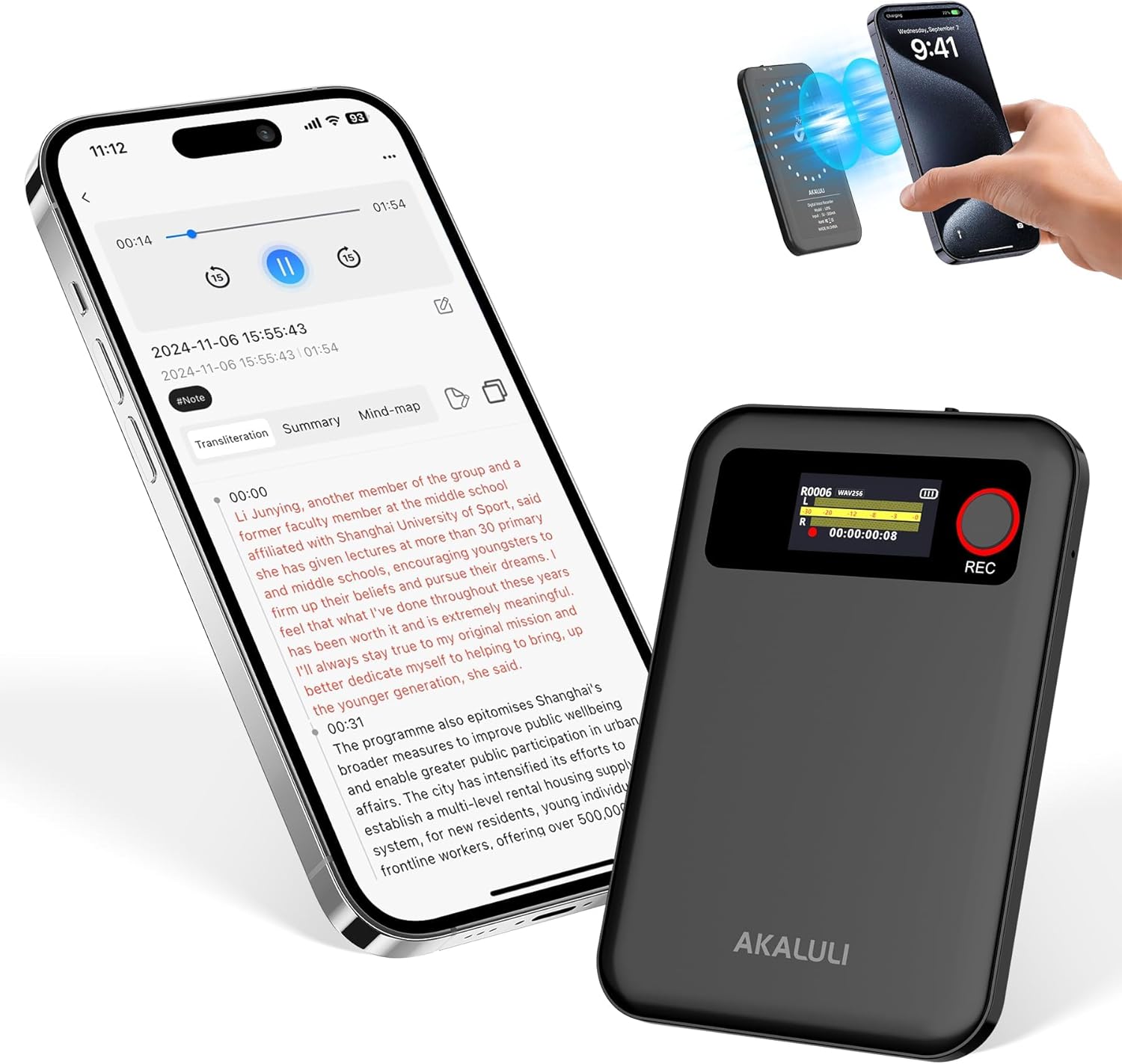
The AKALULI AI Voice Recorder (L816-64G) and its companion smartphone app.
Key Features:
- AI-Powered Transcription: Real-time speech-to-text in 59 languages.
- Smart Summarization: Utilizes ChatGPT for concise summaries and mind maps.
- Magnetic Design: Easily attaches to your phone for convenient recording.
- App Control: Seamless control and file management via dedicated iOS/Android app.
- Noise Cancellation: Built-in stereo microphone with noise reduction for clear audio.
- Large Storage: 64GB internal memory, supporting up to 480 hours of recording.

Overview of the AKALULI AI Voice Recorder's comprehensive features.
4. Setup
4.1 Charging the Device
Before first use, fully charge your AKALULI AI Voice Recorder. Connect the provided charging cable to the device's USB-C port and plug the other end into a USB power adapter (not included) or a computer's USB port. The screen will indicate charging status.
4.2 Power On/Off
- Power On: Slide the power switch to the 'ON' position. The screen will light up.
- Power Off: Slide the power switch to the 'OFF' position. The device will shut down.
4.3 App Installation & Bluetooth Connection
To unlock the full potential of your recorder, download the companion app and connect via Bluetooth:
- Download the App: Search for "AI DVR Link" in the Apple App Store (for iOS) or Google Play Store (for Android) and install it on your smartphone.
- Enable Bluetooth: Ensure Bluetooth is enabled on your smartphone.
- Pair the Device: Open the "AI DVR Link" app. The app will guide you through the pairing process. Look for 'L816' in the list of available devices and select it to connect.

Download the 'AI DVR Link' app from your device's app store to connect and manage your recordings.
5. Operating Instructions
5.1 Recording Audio
You have two primary methods for recording:
- One-Key Recording on Device: Simply press the 'REC' button on the device to start recording. Press it again to pause, and long-press to save the recording.
- App Control Recording: Open the 'AI DVR Link' app on your smartphone. Navigate to the recording interface and tap the record button within the app. You can also pause and save recordings directly from the app.

Choose between direct device control or convenient app control for your recording needs.
5.2 Transcription & Summarization
After recording, your audio files will automatically sync with the 'AI DVR Link' app. From there, you can:
- Select File: Choose the recorded audio file you wish to transcribe or summarize.
- Choose Language: Select from 59 supported languages for transcription accuracy.
- Generate Transcription: The app will process the audio into text, providing a highly accurate transcription.
- Summarize & Mind Map: Utilize the ChatGPT-powered features to generate concise summaries or visual mind maps of your content.

Leverage AI for efficient summarization and mind mapping of your recorded content.
5.3 Privacy Protection
Your data privacy is a top priority. All recordings are encrypted and stored locally on your device. Data upload and processing for transcription and summarization only occur with your explicit authorization, ensuring your information remains secure.

Your data is protected with local encryption and authorized processing.
6. Maintenance
- Cleaning: Use a soft, dry cloth to clean the device. Avoid liquid cleaners.
- Storage: Store the device in a cool, dry place away from direct sunlight and extreme temperatures.
- Battery Care: To prolong battery life, avoid fully discharging the device frequently. Charge it regularly, even if not in use for extended periods.
- Software Updates: Regularly check the 'AI DVR Link' app for firmware updates to ensure optimal performance and new features.
7. Troubleshooting
| Problem | Possible Cause | Solution |
|---|---|---|
| Device not powering on | Low battery; Power switch off | Charge the device; Ensure power switch is 'ON' |
| Unable to connect to app via Bluetooth | Bluetooth off on phone; Device not in pairing mode; App issue | Enable Bluetooth on phone; Restart device and app; Re-pair device |
| Poor transcription accuracy | Background noise; Speaker too far; Incorrect language selected | Reduce noise; Place device closer to speaker; Verify selected language in app |
| Recordings not syncing to app | Bluetooth disconnected; App not open | Ensure stable Bluetooth connection; Keep app open during sync |
8. Specifications
| Feature | Detail |
|---|---|
| Model Number | L816-64G |
| Dimensions | 0.12 x 2.36 x 3.34 inches |
| Item Weight | 5.6 ounces |
| Memory Storage Capacity | 64 GB |
| Digital Recording Time | 480 hours |
| Microphone Form Factor | Built-In |
| Microphone Operation Mode | Stereo, Noise Cancellation |
| Hardware Interface | Bluetooth |
| Supported Audio Format | MP3 Audio |
| UPC | 748899150917 |
9. Warranty & Support
AKALULI products are designed for reliability and performance. For warranty information and technical support, please refer to the official AKALULI website or contact our customer service team. Keep your purchase receipt as proof of purchase for warranty claims.
Free Transcription Minutes: Enjoy 360 minutes of free transcription time each month for 5 months. Unused minutes reset monthly. For extended usage, refer to the AKALULI AI Membership Plans available within the 'AI DVR Link' app.

Details on available transcription plans and free minutes.
Ask a question about this manual
Ask about setup, troubleshooting, compatibility, parts, safety, or missing instructions. Manuals+ will review the question and use this page’s manual context to help answer it.