
ATOTO CA-AEC122D
Contents
ATOTO CA-AEC122D Class D Car Amplifier User Manual
Model: CA-AEC122D | Brand: ATOTO
1. Introduction
The ATOTO CA-AEC122D is a high-performance Class D 4-channel car amplifier designed to enhance your in-car audio experience. Based on the TI TPA3221 amplifier chip, it delivers powerful and clear sound with high efficiency and comprehensive protection features. This manual provides detailed instructions for installation, operation, maintenance, and troubleshooting to ensure optimal performance and longevity of your amplifier.
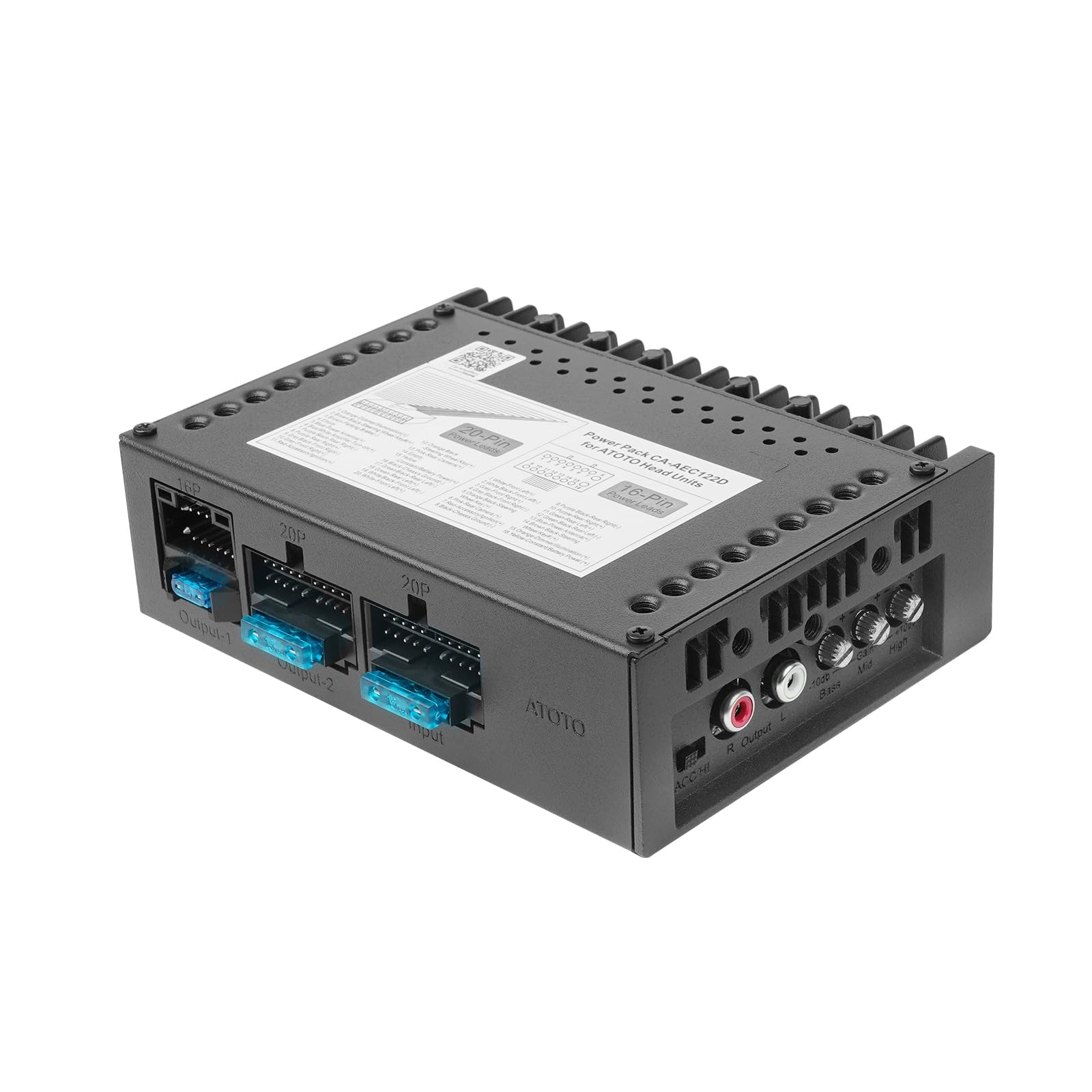
Figure 1: ATOTO CA-AEC122D Class D Car Amplifier
2. Package Contents
Verify that all items listed below are included in your package. If any items are missing or damaged, please contact customer support.

Figure 2: Included components in the ATOTO CA-AEC122D package.
- ATOTO CA-AEC122D Amplifier
- Power Cable
- 20PIN to 20PIN Power Cable
- 20PIN to 16PIN Power Cable
- Blade Fuse
- Mounting Brackets
- Mounting Screws
3. Setup and Installation
3.1 Recommended Mounting Position
The CA-AEC122D amplifier features a compact design, allowing for flexible installation. It is primarily designed for centralized integration within the center console, specifically in the double-DIN opening on the dashboard or under the glove box.

Figure 3: Amplifier dimensions and suggested mounting locations.
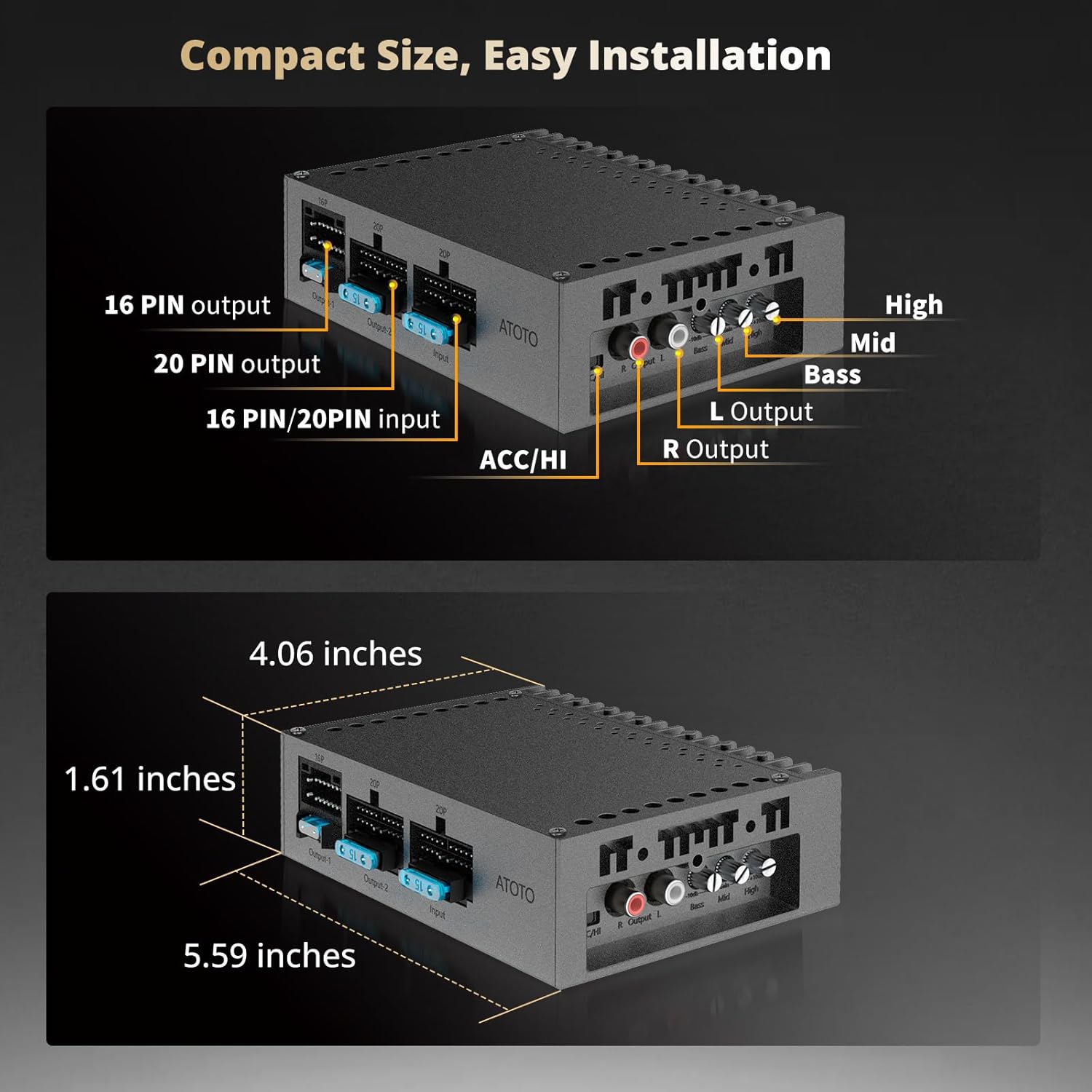
Figure 4: Example of amplifier installation within the dashboard opening.
3.2 Compatibility
This amplifier is designed for plug-and-play compatibility with selected ATOTO head units. It fits ATOTO double-DIN short chassis and single-DIN telescopic long chassis, including A6, F7, A5L, S8, and X10 Series. It is not compatible with double-DIN long chassis or extended chassis like Portable Head Units (PND) and S8PN.

Figure 5: Compatible ATOTO head unit types for the CA-AEC122D amplifier.
3.3 Wiring and Connection
The CA-AEC122D features a plug-and-play design for seamless connection. Before installation, ensure the wiring harness from your head unit is connected correctly. The amplifier uses a 4-in-1 power plug for simplified installation.

Figure 6: Step-by-step visual guide for connecting the amplifier's wiring harness.
Video 1: This video demonstrates the wiring process for the ATOTO power pack, including the 4-in-1 plug-and-play connection, compatibility with various head units, and power output capabilities. It also highlights features like SPDIF input, variable gain control, and protection mechanisms.
4. Operating Instructions
4.1 Audio Performance
The CA-AEC122D amplifier delivers powerful output in stereo (BTL) modes: RMS 4x60W at 4 Ohms (1% THD+N) and RMS 4x125W at 2 Ohms (1% THD+N). With efficiency ≥90% and ultra-low idle power consumption (<1mA), it offers excellent audio quality with a signal-to-noise ratio over 108dB.
4.2 EQ and Gain Settings
Customize your sound with the 3-band EQ (BASS/MID/HIGH) and optional gain settings (18dB, 24dB, 30dB, 34dB) for precise audio tuning.

Figure 7: Visual representation of the flexible EQ and gain settings available on the amplifier.
4.3 Volume Range Recommendation
For ATOTO car stereo systems with a peak volume of 40, it is recommended to use the volume range between 10 and 20 for optimal sound quality and power output. Continuous operation at volumes between 36 and 40 for more than 8 hours may lead to fuse issues and distortion.
5. Maintenance
To ensure the longevity and optimal performance of your ATOTO CA-AEC122D amplifier, regular maintenance is recommended. Keep the unit clean and free from dust and debris. Periodically check all wiring connections to ensure they are secure and free from corrosion. Avoid exposing the amplifier to extreme temperatures or moisture.
6. Troubleshooting
6.1 Protection Features
The CA-AEC122D is equipped with comprehensive protection features to ensure reliable and safe operation under various conditions. These include under-voltage, over-voltage, short-circuit, and over-temperature protection. It also features clipping detection and DC speaker protection.
6.2 Optimal Amp-Speaker Pairing
The CA-AEC122D delivers 4x60W RMS, which may overpower typical stock speakers (20-30W). For optimal performance and to prevent speaker damage, consider pairing the amplifier with speakers that can handle at least 50W, such as ATOTO CS-651DC/DST speakers (not included), which have an RMS power of 60-70W.

Figure 8: Illustration of optimal amplifier and speaker power matching for best audio quality and protection.
7. Specifications
| Feature | Specification |
|---|---|
| Brand | ATOTO |
| Model | CA-AEC122D |
| Amplifier Chip | TI TPA3221 Class-D |
| Channels | 4 |
| RMS Power (4 Ohms) | 4x60W (1% THD+N) |
| RMS Power (2 Ohms) | 4x125W (1% THD+N) |
| Supply Voltage Range | 10V - 16V (Working Voltage: Boost 12V to 22V stable mode) |
| Efficiency | ≥90% (typical) |
| Standby Power | <1mA |
| Signal-to-Noise Ratio (SNR) | >108dB |
| EQ Settings | 3-band (BASS/MID/HIGH) with selectable gain (18dB, 24dB, 30dB, 34dB) |
| Frequency Response | 20Hz~20KHz (±3dB) |
| Fuse Rating | 15A |
| Protection Features | Under-voltage, Over-voltage, Short-circuit, Over-temperature, Clipping detection, DC speaker protection |
| Mounting Type | Freestanding (Central console installation) |
| Parcel Dimensions | 22.5 x 14.1 x 10.69 cm; 1.01 kg |
8. Warranty and Support
Your ATOTO CA-AEC122D amplifier includes a 12-month warranty from the date of purchase. You can extend this by an additional 6 months by reaching out to customer support. Our customer care team is available around the clock on workdays to assist you.

Figure 9: Information regarding the 12+6 months product care program.
For any suggestions or assistance, please refer to the online manual details in the package or contact support via your order center. You can also email support@myatoto.com. Solutions are typically provided within 24 hours on weekdays and 48 hours on weekends.

Figure 10: Contact details for ATOTO customer support.
Documents and downloads
Ask a question about this manual
Ask about setup, troubleshooting, compatibility, parts, safety, or missing instructions. Manuals+ will review the question and use this page’s manual context to help answer it.