
1. Introduction
Thank you for choosing the LUOTWO M920 4G Two-Way Radio. This device is engineered for reliable and extended-range communication, leveraging advanced 4G PoC (Push-to-Talk Over Cellular) technology. It features built-in GPS for precise navigation, a robust design with IP67 waterproofing, and a long-lasting 4000mAh battery, making it ideal for various professional and outdoor applications.

Figure 1.1: LUOTWO M920 Walkie Talkie
2. Package Contents
Upon opening your LUOTWO M920 package, please verify that all the following items are included:
- 1 x LUOTWO M920 Walkie-talkie
- 1 x USB Cable (Type-C)
- 1 x Antenna
- 1 x Battery (4000mAh)
- 1 x Back clip
- 1 x Lanyard
- 1 x User manual
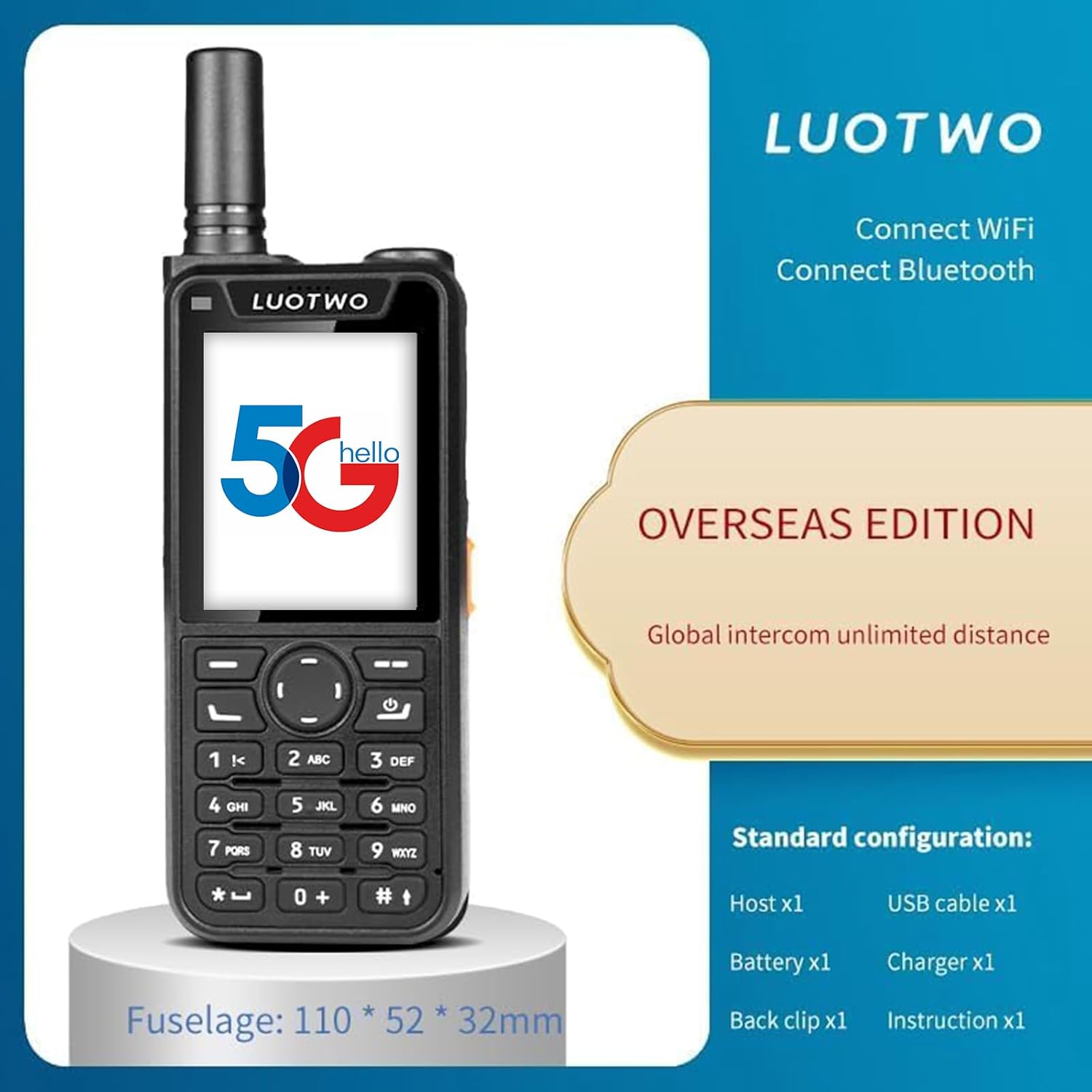
Figure 2.1: Standard configuration of the LUOTWO M920, including the main unit and accessories.
3. Product Features
The LUOTWO M920 is equipped with a range of features designed for optimal performance and user convenience:
- Unlimited Global Communication: Utilizes 4G PoC technology for stable and reliable communication up to 5000KM, breaking traditional radio range limitations.
- High-Capacity Battery: Features a 4000mAh rechargeable lithium-ion battery for extended runtime and Type-C charging for quick recharging.
- IP67 Waterproof Rating: Designed to withstand harsh conditions, making it suitable for outdoor and demanding environments.
- Robust GPS Navigation: Integrated GPS support provides precise location tracking and route mapping, essential for outdoor adventures and professional expeditions.
- Clear Audio: Equipped with advanced noise-cancelling microphones and powerful speakers for pristine, interference-free communication.
- Versatile Network Compatibility: Supports 2G/3G/4G networks for communication anywhere in the world.
- Bluetooth Functionality: Allows for wireless transmission up to 10 meters (optional configuration).
- Wi-Fi Support: Enables connectivity to Wi-Fi networks.

Figure 3.1: Overview of LUOTWO M920's primary features.

Figure 3.2: Illustrates the 5000KM ultra-long range communication capability.

Figure 3.3: Demonstrates the universal network connectivity (2G/3G/4G compatible).

Figure 3.4: Highlights the powerful 4000mAh battery endurance.

Figure 3.5: Illustrates the accurate GPS/BD integrated navigation.
4. Product Layout
Familiarize yourself with the various buttons and ports on your LUOTWO M920 radio:
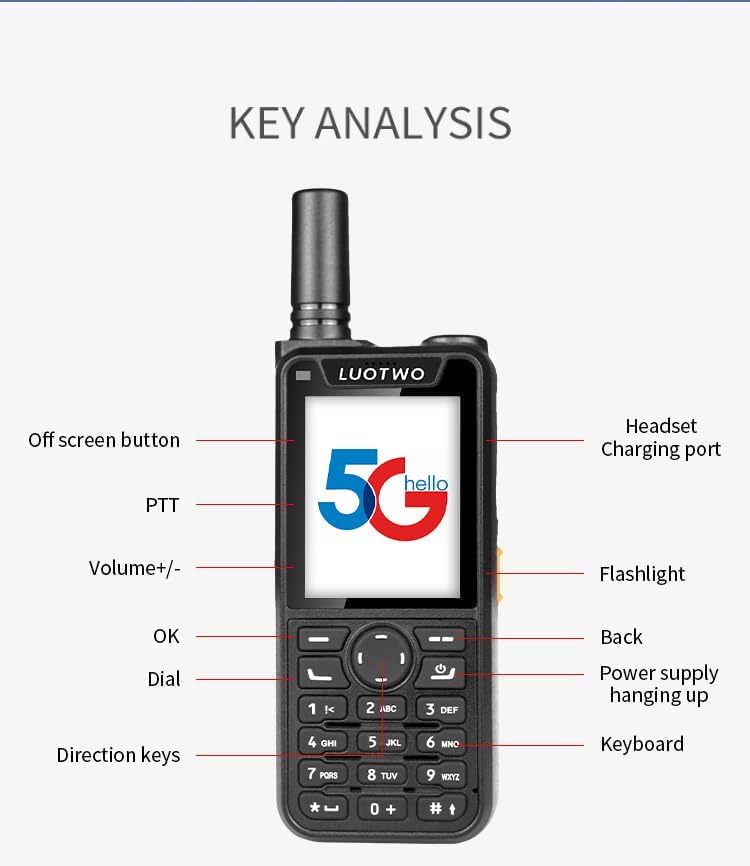
Figure 4.1: Key Analysis of the LUOTWO M920.
- Off screen button: Located on the side, used to turn the screen on/off.
- PTT (Push-To-Talk): Large button on the side for initiating and ending transmissions.
- Volume +/-: Buttons for adjusting the audio volume.
- OK: Central button for confirming selections.
- Dial: Button to access the dial pad.
- Direction keys: Up, Down, Left, Right keys for menu navigation.
- Headset/Charging port: Located on the top/side, for connecting a headset or charging cable.
- Flashlight: Button to activate the built-in flashlight.
- Back/Power supply hanging up: Button for going back in menus or ending calls.
- Keyboard: Numeric and function keys for input.
5. Setup
5.1 Battery Installation and Charging
- Ensure the device is powered off before installing or removing the battery.
- Locate the battery compartment on the back of the radio.
- Insert the 4000mAh battery, ensuring the contacts align correctly.
- Close the battery compartment cover securely.
- To charge, connect the provided USB Type-C cable to the radio's charging port and a compatible USB power adapter. The charging indicator will show the charging status.
5.2 SIM Card Installation
The M920 requires a SIM card for 4G network communication. Please ensure the device is powered off before inserting the SIM card.
- Locate the SIM card slot, typically under the battery or on the side.
- Insert the SIM card into the designated slot, ensuring correct orientation as indicated by the diagram near the slot.
- Secure the SIM card if a locking mechanism is present.
5.3 Antenna Attachment
- Screw the antenna clockwise onto the antenna connector located at the top of the radio until it is firmly seated. Do not overtighten.
6. Operating Instructions
6.1 Powering On/Off
- To power on: Press and hold the Power button (often integrated with the 'Back' or 'Hang Up' button) until the screen illuminates.
- To power off: Press and hold the Power button until a power-off prompt appears, then confirm.
6.2 Basic Communication (Push-to-Talk)
- Ensure your radio is connected to the 4G network.
- Select the desired group or contact for communication.
- Press and hold the PTT button on the side of the radio to transmit your voice. Speak clearly into the microphone.
- Release the PTT button to listen for incoming transmissions.
6.3 GPS Navigation
The integrated GPS allows for location tracking and route mapping.
- Access the GPS application from the main menu.
- The device will automatically acquire your current location.
- Follow on-screen instructions for viewing maps, tracking routes, or sharing your location.
6.4 Bluetooth Connectivity
The M920 supports Bluetooth for connecting wireless accessories like headsets (optional configuration).
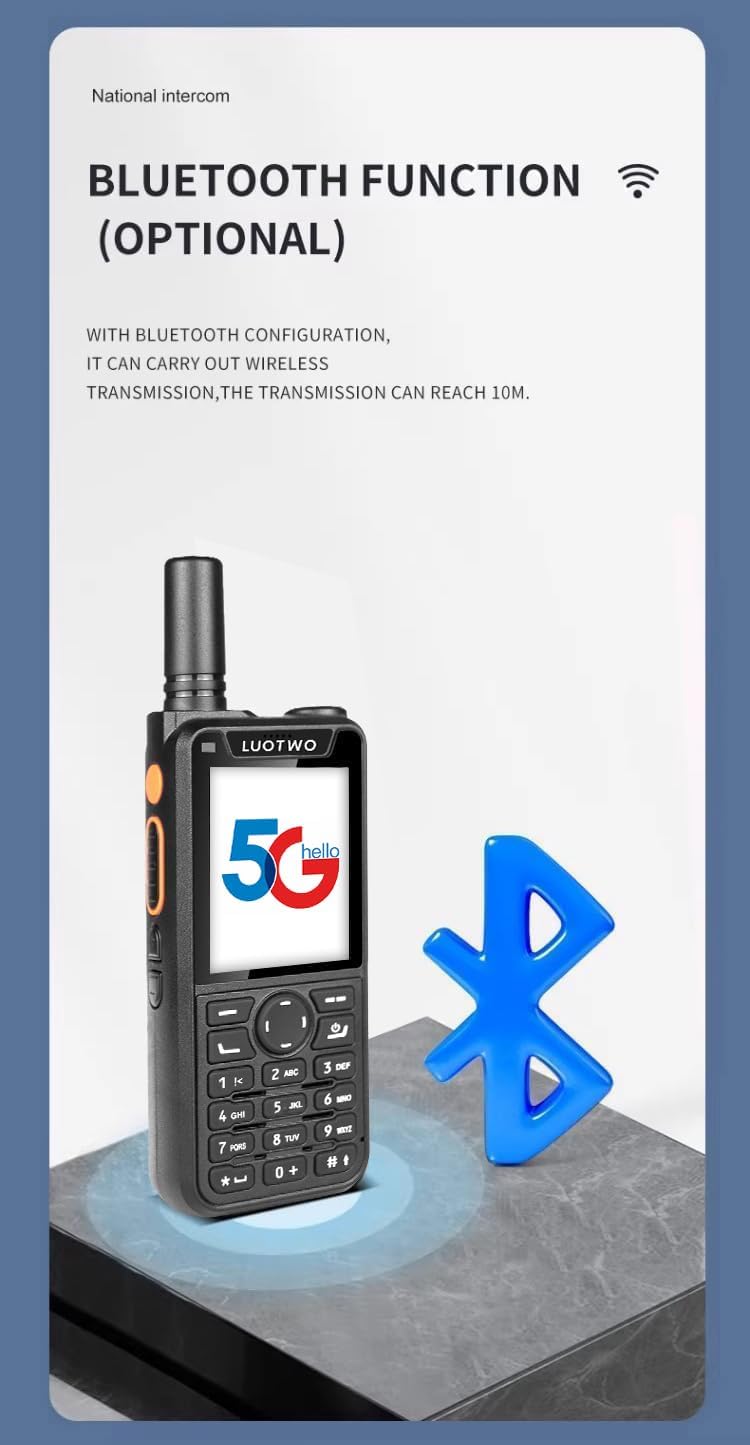
Figure 6.1: Bluetooth Functionality.
- Navigate to the Bluetooth settings in the radio's menu.
- Turn Bluetooth on and search for available devices.
- Select your desired Bluetooth device from the list and pair it.
6.5 Wi-Fi Functionality
Connect your M920 to Wi-Fi networks for data communication where 4G might be unavailable or for faster data transfer.
- Go to Wi-Fi settings in the menu.
- Enable Wi-Fi and select your desired network from the list.
- Enter the network password if prompted and connect.
7. Maintenance
7.1 Water Resistance (IP67)
The M920 is IP67 waterproof, meaning it is protected from dust and can withstand immersion in water up to 1 meter for 30 minutes. However, proper care is still necessary:
- Ensure all port covers (e.g., charging port, headset jack) are securely closed before exposure to water or dust.
- Do not intentionally submerge the device for extended periods or beyond specified depths.
- If the device gets wet, wipe it dry with a clean cloth before opening any compartments or charging.
7.2 Battery Care
- Charge the battery fully before first use.
- Avoid completely draining the battery frequently to prolong its lifespan.
- Store the radio and battery in a cool, dry place when not in use for extended periods.
- Use only the original or certified compatible charging accessories.
7.3 Cleaning
- Clean the radio's exterior with a soft, damp cloth.
- Do not use harsh chemicals, solvents, or abrasive cleaners.
- Ensure the charging port and other connectors are free of dust and debris.
8. Troubleshooting
If you encounter issues with your LUOTWO M920, please refer to the following common solutions:
| Problem | Possible Cause | Solution |
|---|---|---|
| Radio does not power on | Low or dead battery; Incorrect battery installation | Charge the battery fully; Reinstall the battery correctly. |
| No network signal | No SIM card; SIM card not properly inserted; Out of network coverage | Install SIM card; Reinsert SIM card; Move to an area with better network coverage. |
| Cannot transmit/receive | Not connected to network; Incorrect group selected; PTT button not pressed correctly | Check network connection; Select correct group; Ensure PTT button is fully pressed during transmission. |
| Poor audio quality | Weak signal; Obstructions; Microphone/speaker blocked | Move to an open area; Clear any obstructions from microphone/speaker. |
| GPS not acquiring location | Indoors or obstructed view of sky; GPS function disabled | Move to an open outdoor area; Ensure GPS is enabled in settings. |
If the problem persists after trying these solutions, please contact LUOTWO customer support.
9. Specifications
Detailed technical specifications for the LUOTWO M920:
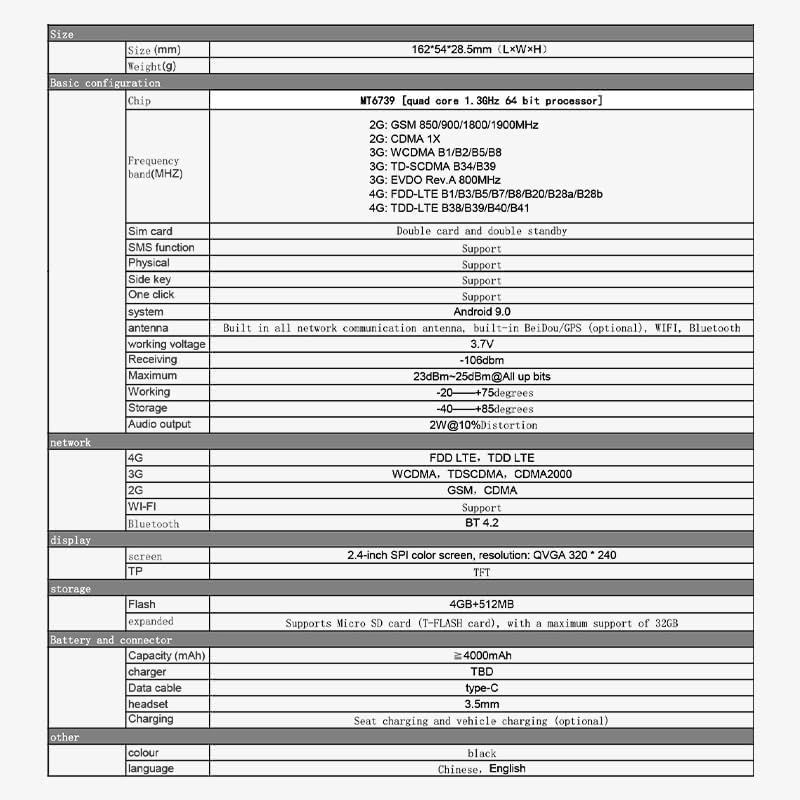
Figure 9.1: Comprehensive technical specifications of the LUOTWO M920.
| Feature | Specification |
|---|---|
| Model Number | LUOTWO M920 -1pcs |
| Dimensions (L×W×H) | 110 x 52 x 32 mm (approx.) |
| Weight | Approx. 300 grams (10.6 ounces) |
| Battery Capacity | 4000mAh Lithium-ion |
| Charging Port | Type-C |
| Network Support | 2G (GSM), 3G (WCDMA, TD-SCDMA), 4G (FDD LTE, TDD LTE) |
| SIM Card | Dual card dual standby |
| Bluetooth | BT 4.2 |
| Wi-Fi | Support |
| GPS | Built-in GPS/Beidou (optional) |
| Display | 2.4-inch SPI color screen, QVGA 320*240 |
| Storage | Flash 4GB+512MB, Supports Micro SD card (T-FLASH card) up to 32GB |
| Operating Voltage | 3.7 Volts |
| Water Resistance | IP67 Waterproof |
| Talking Range Maximum | 5000 Kilometer (PoC network dependent) |
| Operating Temperature | -20°C to +75°C |
| Audio Output | 2W@10% Distortion |
10. Usage Scenarios
The LUOTWO M920 is designed for versatile applications across various industries and activities:

Figure 10.1: The LUOTWO M920 is engineered for diverse scenarios.
- Fleet Transport: Ideal for coordinating logistics and communication across large vehicle fleets.
- Construction Sites: Durable design and long range make it perfect for communication in challenging construction environments.
- Outdoor Activities: Reliable communication for mountaineering, cycling, hiking, and other outdoor adventures.
- Business Service Industry: Suitable for hotel management, shopping malls, catering, and other service-oriented businesses requiring efficient internal communication.
- Emergency Response: Critical for maintaining communication during emergency situations and events.
11. Warranty and Support
11.1 Warranty Information
The LUOTWO M920 comes with a 1-year manufacturer's warranty from the date of purchase. This warranty covers defects in materials and workmanship under normal use. It does not cover damage caused by misuse, accidents, unauthorized modifications, or natural disasters.
11.2 Customer Support
For technical assistance, warranty claims, or any questions regarding your LUOTWO M920, please contact LUOTWO customer support through the retailer's platform or the official LUOTWO website. Please have your model number (LUOTWO M920 -1pcs) and purchase details ready when contacting support.