1. Introduction
Thank you for choosing the HAKINAKU 3-in-1 Carbon Monoxide Detector. This device is designed to provide real-time monitoring of carbon monoxide (CO) concentration, temperature, and humidity in your environment. Featuring a plug-and-play design, a high-definition display, and a built-in backup battery, it offers enhanced safety and convenience for homes, hotels, RVs, and various indoor/outdoor settings.

Figure 1: Front and back view of the HAKINAKU 3-in-1 Carbon Monoxide Detector.
2. Key Features
- 3-in-1 Detection: Integrates carbon monoxide, temperature, and humidity sensors for comprehensive environmental monitoring.
- Plug-in & Play: Compatible with 110V to 220V AC outlets, designed for immediate use upon plugging in.
- 2000mAh Backup Battery: Built-in rechargeable lithium battery provides up to 10 days of operation during power outages, saving on replacement costs.
- 2.1'' HD Screen: Displays CO ppm, humidity, temperature, CO indicator icon, plug, and alarm status with large, easy-to-read icons.
- High Precision Sensors: Utilizes electrochemical and photoelectric sensors for sensitive and stable detection performance.
- Audible & Visual Alarm: Features an 85 dB audible alarm and visual indicators for real-time gas environment detection.
- Metal Mesh Air Duct Design: Ensures accurate gas detection.

Figure 2: High-definition color screen display showing environmental data.

Figure 3: The device features a 2000mAh high-capacity backup battery.
3. Setup
- Unpack: Carefully remove the Carbon Monoxide Detector from its packaging.
- Choose Location: Select a suitable location for installation. For optimal CO detection, place the detector at least 5 feet (1.5 meters) from any fuel-burning appliance and away from direct sunlight, vents, or areas with high humidity. It should be installed on a wall or ceiling, or simply plugged into an outlet.
- Plug In: Insert the detector directly into a standard 110V to 220V AC electrical outlet. Ensure the plug is securely seated.
- Initial Power-Up: Upon plugging in, the device will automatically power on and begin its self-test sequence. The screen will illuminate and display initial readings.
- Battery Charging: The built-in 2000mAh lithium battery will begin charging automatically when the device is plugged into an active outlet.

Figure 4: The device is designed for easy plug-in installation.
4. Operating Instructions
4.1 Display Readings
The 2.1'' HD screen provides real-time data:
- CO PPM: Displays the current carbon monoxide concentration in parts per million (PPM).
- Temperature: Shows the ambient temperature.
- Humidity: Indicates the relative humidity level.
- Icons: Various icons indicate battery status, power source (plugged in), alarm status, and CO indicator.

Figure 5: Real-time monitoring of CO concentration on the display.
4.2 Alarm Function
The detector is equipped with both audible and visual alarms to alert you to dangerous CO levels.
- Audible Alarm: An 85 dB alarm will sound when CO levels exceed safe thresholds.
- Visual Alarm: The screen will display a high CO PPM reading, and an alarm icon will activate.
In case of an alarm:
- Immediately move to fresh air outdoors or open doors/windows to ventilate the area.
- Do not re-enter the premises until the alarm has stopped and the area has been thoroughly ventilated.
- Contact emergency services or a qualified technician to investigate the source of the carbon monoxide.

Figure 6: Sound and light alarm activation during high CO concentration.
5. Maintenance
- Cleaning: Regularly wipe the exterior of the detector with a soft, damp cloth. Do not use harsh chemicals, abrasives, or solvents. Ensure the air vents are clear of dust and debris.
- Battery: The built-in lithium battery is rechargeable. Keep the device plugged into an AC outlet for continuous power and to ensure the backup battery remains charged. The battery provides approximately 10 days of operation during power outages.
- Testing: It is recommended to test the alarm function periodically (e.g., monthly) by pressing the test button (if available, or by simulating a CO presence if the manual specifies). Refer to the device's specific button functions for testing.
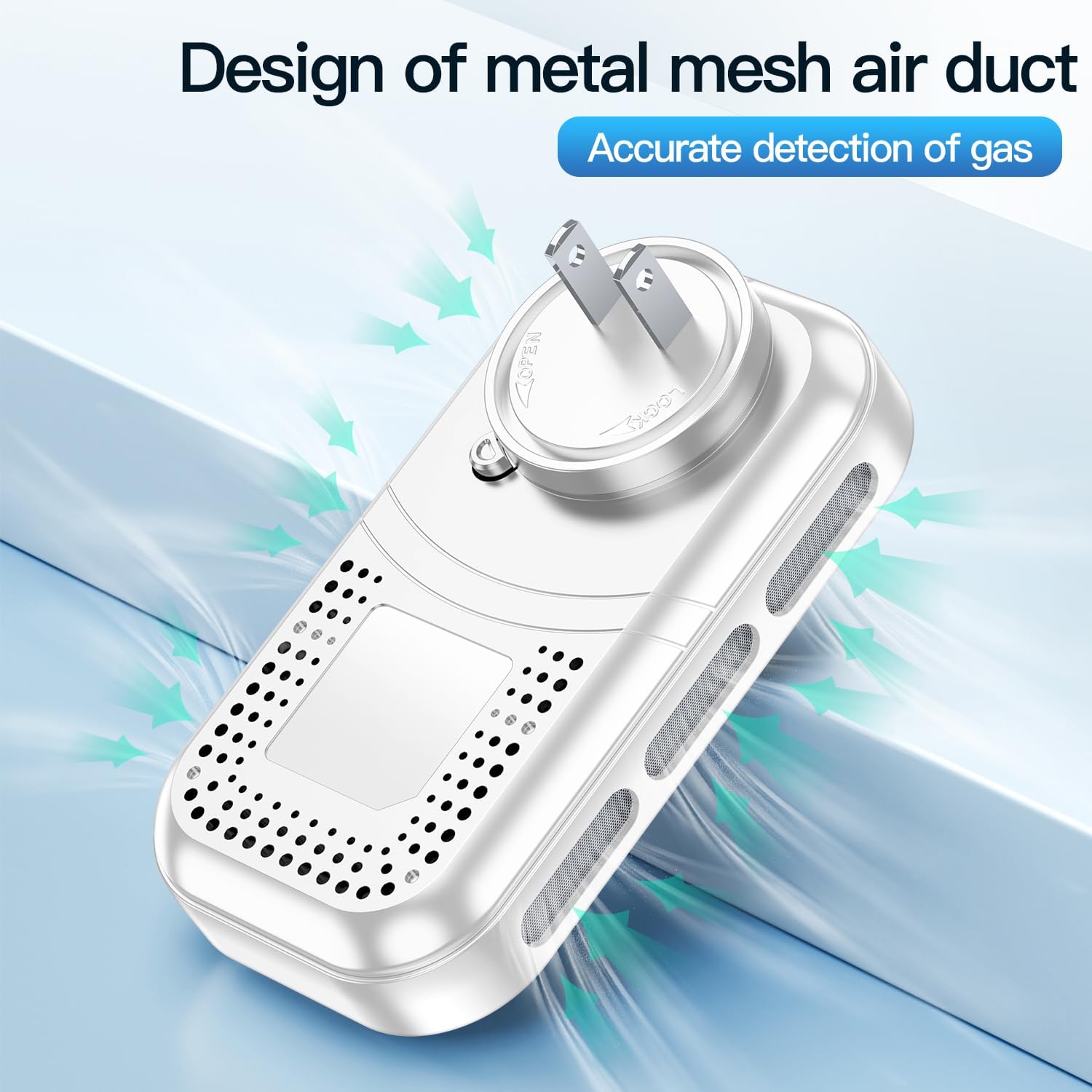
Figure 7: The metal mesh air duct design requires periodic cleaning to ensure accurate detection.
6. Troubleshooting
| Problem | Possible Cause | Solution |
|---|---|---|
| No display/Device not turning on | Not properly plugged in; Power outage; Battery fully depleted. | Ensure the device is securely plugged into a live outlet. Check household power. Allow time for the backup battery to charge if it was fully depleted. |
| Alarm sounds without visible CO source | Actual CO presence; Sensor malfunction; Dust/debris in sensor. | Evacuate and ventilate immediately. Do not assume it's a false alarm. If confirmed false, clean the detector and re-test. If problem persists, contact support. |
| Low battery warning (when plugged in) | Faulty outlet; Battery issue; Device malfunction. | Try plugging into a different working outlet. Ensure the outlet provides consistent power. If the issue persists, the internal battery may need servicing or the unit may be faulty. Contact customer support. |
| Inaccurate temperature/humidity readings | Placement near heat/cold sources; Sensor obstruction. | Relocate the detector away from direct sunlight, heating/cooling vents, or areas with extreme temperature fluctuations. Ensure air vents are clear. |
7. Specifications
| Feature | Detail |
|---|---|
| Model Number | HD11 |
| Power Source | AC 110V-220V (Plug-in) |
| Backup Battery | 2000mAh Lithium Ion (rechargeable, included) |
| Battery Life (Backup) | Up to 10 days |
| Display | 2.1'' HD Screen |
| Detection Type | Carbon Monoxide (CO), Temperature, Humidity |
| Alarm Loudness | 85 dB |
| Item Weight | 100 g |
| Manufacturer | Shenzhen Huidu Technology Co., Ltd. |
8. Warranty & Support
This HAKINAKU Carbon Monoxide Detector comes with a 2-year warranty from the date of purchase. This warranty covers defects in materials and workmanship under normal use.
For technical support, warranty claims, or any questions regarding your product, please contact HAKINAKU customer service through the retailer's platform or the contact information provided with your purchase. Please have your model number (HD11) and purchase date ready when contacting support.