
DOOGEE S119
DOOGEE S119 (2025) Rugged Phone User Manual
Model: S119 | Brand: DOOGEE
1. Introduction
Welcome to the user manual for your new DOOGEE S119 (2025) Rugged Phone. This guide provides essential information to help you set up, operate, maintain, and troubleshoot your device. The DOOGEE S119 is designed for durability and performance, featuring a robust build, a large battery, and advanced camera capabilities, making it ideal for demanding environments and active lifestyles.
2. Package Contents
Please check the contents of your package to ensure all items are present:
- 1 x DOOGEE S119 Rugged Smartphone
- 1 x Charger (33W)
- 1 x Type-C USB Cable
- 1 x Anti-explosion film (Screen Protector)
- 1 x User Manual
3. Product Overview
The DOOGEE S119 is engineered for resilience and functionality. Key features include:
- 1.32" Multifunctional Rear Display: Provides quick access to notifications, call alerts, media controls, and more.
- 10200mAh Battery: Offers extended usage time with 33W fast charging and OTG reverse charging capabilities.
- 24GB RAM + 512GB ROM: Ample memory and storage, expandable up to 2TB via TF card.
- 6.72" FHD+ IPS Waterdrop Screen: Vibrant display with 1080x2400 resolution.
- 100MP AI Main Camera: High-resolution main camera for detailed photos.
- 20MP Night Vision Camera: Captures clear images in low-light conditions.
- Mediatek MT8788 Octa-core Processor: Ensures smooth performance and efficient power consumption.
- Android 14 System: Latest Android OS for a seamless user experience.
- Rugged Certifications: IP68/IP69K/MIL-STD-810H certified for water, dust, and drop resistance.
- Connectivity: NFC, Dual SIM, GPS (Glonass, Galileo, Beidou), Bluetooth, Wi-Fi, USB.
- Security: Fingerprint ID and Face Unlock.

Figure 3.1: Front and rear view of the DOOGEE S119 (2025) Rugged Phone, highlighting its robust design and rear display.

Figure 3.2: Detailed view of the 1.32" multifunctional rear display, showing various functions like call answering, camera, calendar, message view, music, and alarm clock.

Figure 3.3: Illustration of the 10200mAh mega battery with 33W fast charging and OTG reverse charging capabilities.

Figure 3.4: Visual representation of the 24GB RAM (8GB Basic + 16GB Extended) and 512GB ROM, expandable to 2TB.

Figure 3.5: Close-up of the 6.72" FHD+ IPS Waterdrop Screen, highlighting its aspect ratio, color depth, and brightness.
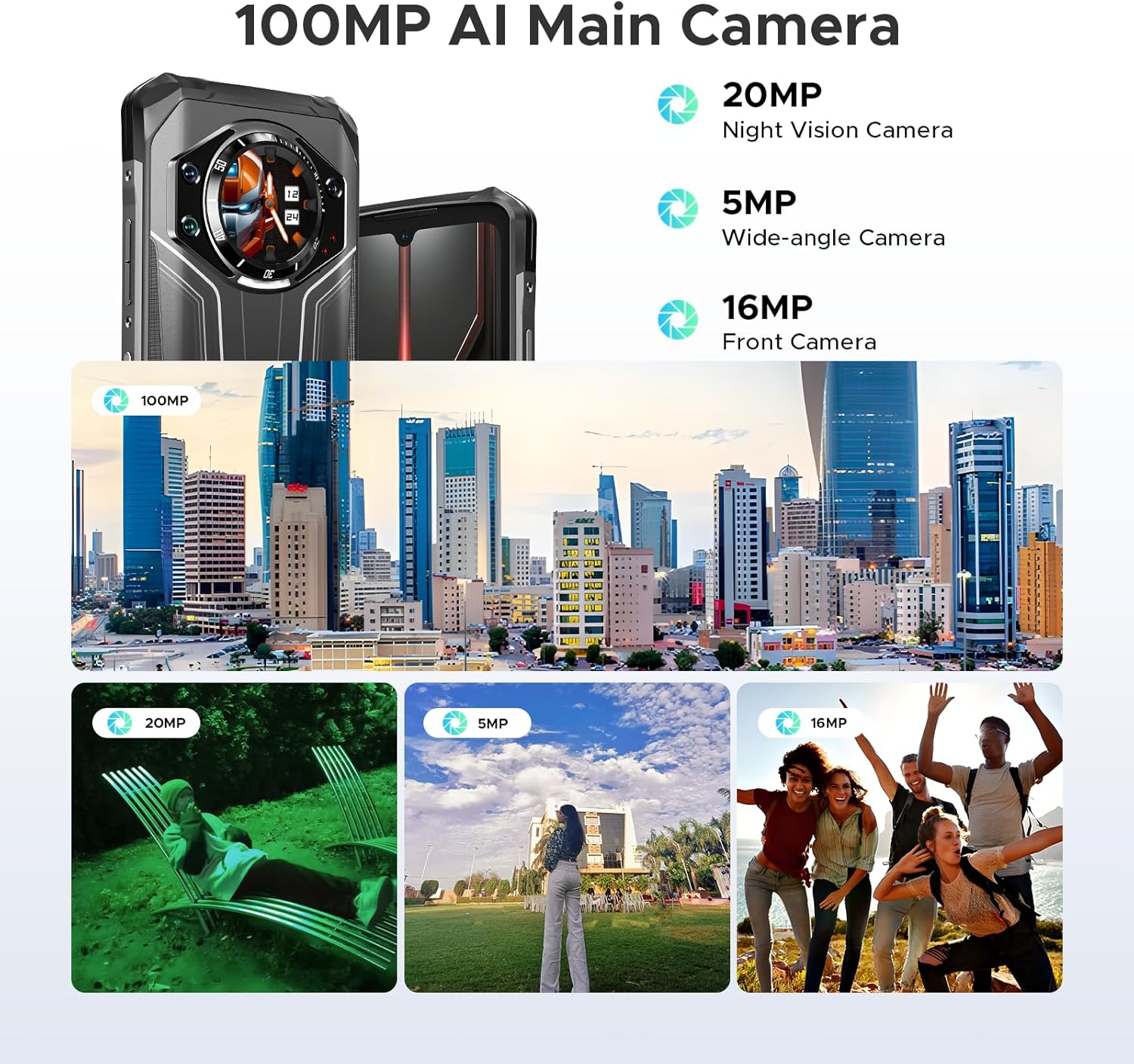
Figure 3.6: Overview of the camera system, including the 100MP AI Main Camera, 20MP Night Vision Camera, 5MP Wide-angle Camera, and 16MP Front Camera, with example photos.

Figure 3.7: Diagram illustrating the MediaTek MT8788 Octa-core Processor, its LPDDR4 Flash Memory, 12nm Production Process, and 2.0GHz Operating Frequency.

Figure 3.8: Depiction of the latest Android 14 System with various app icons, emphasizing a security-enhanced Linux base.
4. Setup
4.1 Inserting SIM Cards and TF Card
The DOOGEE S119 supports a triple card slot (2 SIM cards + 1 TF card).
- Locate the SIM card tray on the side of the phone.
- Use the provided SIM ejector tool to open the tray.
- Carefully place your Nano-SIM cards and/or TF card into the designated slots. Ensure correct orientation.
- Gently push the tray back into the phone until it clicks into place.
4.2 Initial Power On and Basic Configuration
- Press and hold the Power button (located on the side) until the DOOGEE logo appears.
- Follow the on-screen prompts to select your language, connect to Wi-Fi, and set up your Google account.
- Configure security features such as Fingerprint ID and Face Unlock for convenient and secure access.
5. Operating Instructions
5.1 Using the 1.32" Rear Display
The rear display offers quick access to various functions without needing to fully activate the main screen:
- Notifications: View incoming calls, messages, and app alerts.
- Call Answering: Answer or reject calls directly from the rear screen.
- Music Control: Play, pause, skip tracks, and adjust volume for media playback.
- Camera: Use as a viewfinder for rear camera selfies or quick shots.
- Clock/Calendar: Display time, date, and set alarms.
- Battery Check: Quickly view battery percentage.
- Compass: Access a digital compass for navigation.
Video 5.1: Demonstration of the DOOGEE S119 (2025) Rugged Phone's 1.32" multifunctional rear display features, including call answering, music control, and quick access to information.
5.2 Camera Operation
The S119 features a versatile camera system:
- 100MP AI Main Camera: For high-resolution photos. Open the Camera app and select "Photo" mode.
- 20MP Night Vision Camera: Ideal for low-light environments. Switch to "Night Vision" mode in the camera app.
- 5MP Wide-angle Camera: For capturing broader scenes. Select the wide-angle option in the camera interface.
- 16MP Front Camera: For selfies and video calls. Switch to the front camera in the app.
- Modes: Explore various modes like HDR, Panorama, and Pro Mode for enhanced photography.
5.3 Battery Management
The 10200mAh battery provides extended usage. To optimize battery life:
- Use the included 33W fast charger for quick power-ups.
- Enable battery saver mode when battery is low.
- Close unused background applications.
- Utilize OTG reverse charging to power other devices (cable not included).
5.4 General Phone Use
- Navigation: Use GPS, Glonass, Galileo, and Beidou for accurate location services.
- NFC: Enable NFC in settings for contactless payments and data transfer.
- Dual Unlock: Use side fingerprint sensor or face unlock for quick and secure access.
- Android 14: Customize settings, manage apps, and utilize Google services.
6. Maintenance
To ensure the longevity and optimal performance of your DOOGEE S119:
- Cleaning: Wipe the phone with a soft, damp cloth. Avoid harsh chemicals or abrasive materials.
- Water Resistance: While IP68/IP69K certified, ensure all ports and covers are securely closed before exposing to water. Do not intentionally submerge the device beyond specified limits.
- Temperature: Avoid exposing the phone to extreme temperatures (very hot or very cold) for prolonged periods.
- Screen Protection: Apply the provided anti-explosion film to protect the main screen from scratches.
- Software Updates: Regularly check for and install system updates to ensure optimal performance and security.
7. Troubleshooting
| Problem | Possible Solution |
|---|---|
| Phone does not power on. | Ensure the battery is charged. Connect to the charger for at least 10 minutes before attempting to power on. |
| Poor network signal or no service. | Check SIM card insertion. Verify network compatibility with your carrier (FDD, TDD, WCDMA, GSM bands). Move to an area with better coverage. |
| Apps are slow or crashing. | Close background apps. Clear app cache. Restart the phone. Ensure sufficient storage space. |
| Battery drains quickly. | Reduce screen brightness. Disable unused features like Wi-Fi, Bluetooth, GPS. Limit background app activity. |
| Rear display not responding. | Restart the phone. Check for system updates. |
| Cannot connect to Wi-Fi. | Restart your router and phone. Re-enter Wi-Fi password. Ensure you are within range. |
8. Specifications
| Feature | Detail |
|---|---|
| Model | DOOGEE S119 |
| Operating System | Android 14 |
| Processor | Mediatek MT8788 Octa-core (2 GHz CPU Speed) |
| RAM | 24 GB (8GB physical + 16GB virtual) |
| Internal Storage | 512 GB ROM (Expandable up to 2TB via TF card) |
| Main Display | 6.72 inches FHD+ IPS Waterdrop Screen (1080 x 2400 resolution) |
| Rear Display | 1.32 inches Multifunctional Round Display (386 PPI) |
| Main Camera | 100MP AI Main Camera |
| Night Vision Camera | 20MP |
| Wide-angle Camera | 5MP |
| Front Camera | 16MP |
| Battery Capacity | 10200 mAh (81 Hours Phone Talk Time) |
| Charging | 33W Fast Charging, OTG Reverse Charging |
| Durability | IP68, IP69K, MIL-STD-810H certified (Waterproof, Dustproof, Drop-proof) |
| Connectivity | Bluetooth, Wi-Fi, USB Type-C, NFC, GPS (Glonass, Galileo, Beidou) |
| SIM Card Slot | Triple Card Slot (2 SIM Cards + 1 TF Card) |
| Security Features | Side Fingerprint ID, Face Unlock |
| Dimensions | 7.02 x 3.27 x 7.04 inches |
| Item Weight | 1.32 pounds |
9. Warranty & Support
DOOGEE provides comprehensive support for its products:
- Warranty: The product comes with a 2-Year Limited Warranty.
- Returns: Enjoy a 30-Day Money Back Guarantee and Free Return policy.
- Customer Service: For any inquiries or technical assistance, please contact DOOGEE customer support. Refer to the official DOOGEE website or the contact information provided in your package for details.

Figure 9.1: Overview of DOOGEE's customer service, including 30-day money-back guarantee, 2-year limited warranty, and 24/7 online support.
Related documentsS119


Ask a question about this manual
Ask about setup, troubleshooting, compatibility, parts, safety, or missing instructions. Manuals+ will review the question and use this page’s manual context to help answer it.