
1. Introduction
The VTOMAN FlashSpeed 1000 is a portable power station designed to provide reliable power for various applications, including home backup, outdoor activities, camping, and emergency situations. Featuring an 828Wh LiFePO4 battery and a 1000W (2000W peak) pure sine wave AC output, it offers versatile power solutions. This manual provides essential information for safe and efficient operation of your device.
2. Safety Instructions
- Do not disassemble, repair, or modify the unit. Incorrect reassembly may cause fire or injury.
- Do not expose the unit to fire or extreme temperatures (above 60°C/140°F).
- Do not use or store the unit in bathrooms or areas exposed to water or rain.
- Use only approved accessories and chargers.
- Ensure proper ventilation during use and charging to prevent overheating.
- Keep the unit away from children and pets.
- Avoid dropping or subjecting the unit to strong impacts.
- If the unit emits unusual odors, heat, or appears abnormal, discontinue use immediately and contact support.

Figure 2.1: Internal view highlighting the LiFePO4 battery and Battery Management System (BMS) for enhanced safety and durability.
3. Package Contents
Verify that all items are included in your package:
- 1x VTOMAN FlashSpeed 1000 Portable Power Station
- 1x AC Charging Cable
- 1x Vehicle Cigarette Lighter Cable
- 1x USB-C to USB-C Cable
- 1x USB-A to Type-C Cable
- 1x User Manual

Figure 3.1: Contents of the VTOMAN FlashSpeed 1000 package.
4. Product Overview
Familiarize yourself with the various components and ports of your FlashSpeed 1000 Portable Power Station.

Figure 4.1: Front view of the VTOMAN FlashSpeed 1000.
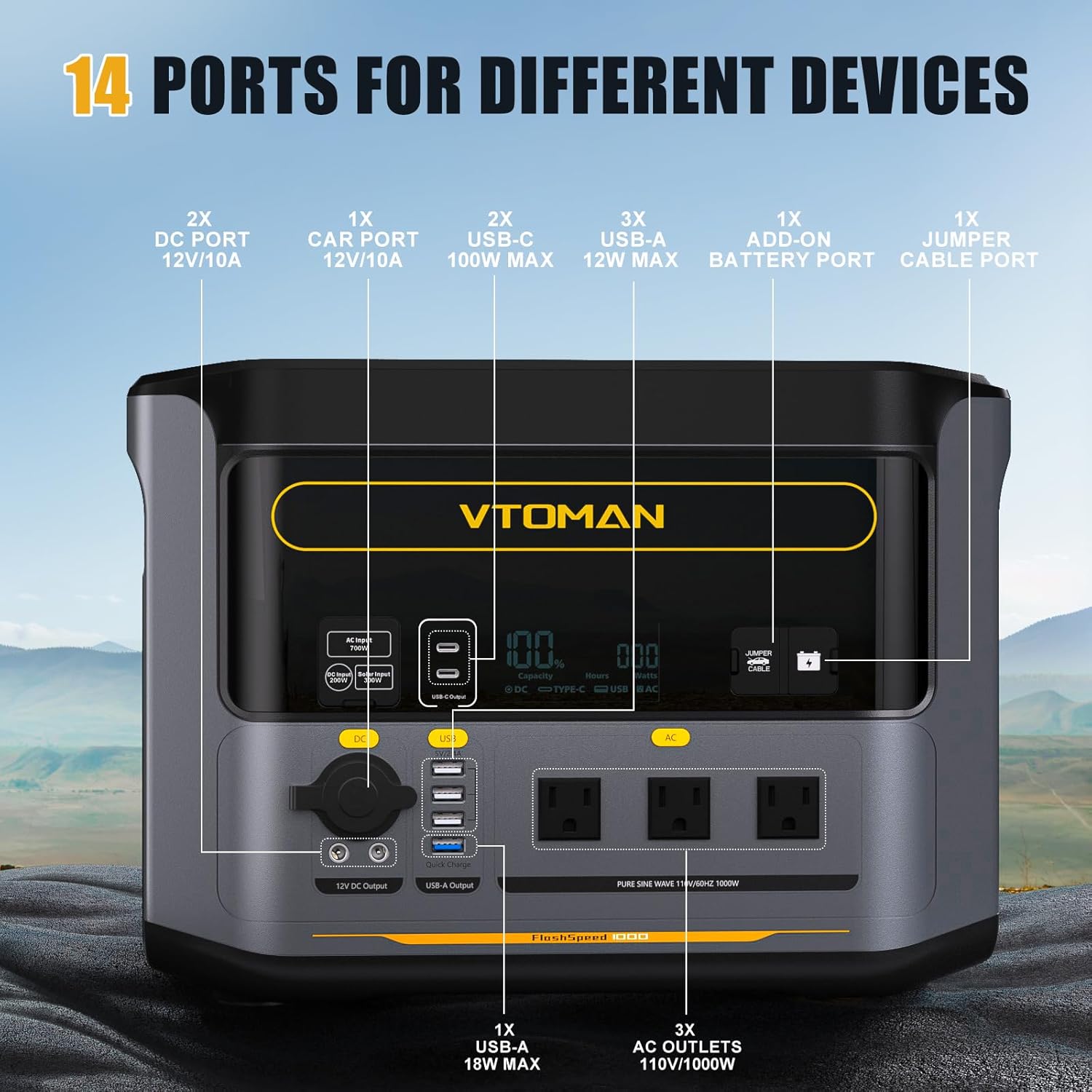
Figure 4.2: Port layout and functions.
4.1. Output Ports
- AC Outlets: 3x 110V/1000W (2000W Surge) Pure Sine Wave.
- USB-A Ports: 4 ports total (2x 12W Max, 1x 18W Max).
- USB-C Ports: 2 ports, up to 100W Max.
- DC5521 Output Ports: 2 ports, 12V/10A.
- Car Cigarette Lighter Port: 1 port, 12V/10A.
4.2. Input Ports
- AC Input Port: For fast wall charging.
- Anderson Input Port: For solar panel charging (10-50V, up to 300W).
- Car Charging Input: Via vehicle cigarette lighter cable.
4.3. Special Ports
- Add-on Battery Port: For connecting an external battery to expand capacity.
- Jumper Cable Port: For car jump-starting functionality (jumper cables sold separately).
5. Setup
Before first use, it is recommended to fully charge the power station.
- Unpack the VTOMAN FlashSpeed 1000 and all accessories.
- Connect the AC charging cable to the power station's AC input port and then to a wall outlet.
- The display will indicate charging status. Charge until the battery indicator shows 100%.
6. Operating Instructions
6.1. Charging the Power Station
The FlashSpeed 1000 offers multiple charging methods:
- AC Wall Outlet: Connect the included AC charging cable directly to a wall outlet. The unit can recharge from 0-80% within 1 hour using its 1000W AC input.
- Solar Panels: Connect compatible solar panels (VTOMAN 110W/200W/400W recommended) to the Anderson input port. The unit supports up to 300W solar input (10-50V) and can be fully charged in 4-6 hours under optimal sunlight.
- Car Charger: Use the vehicle cigarette lighter cable to charge the unit from your car's 12V outlet. A full charge typically takes 7-8 hours.

Figure 6.1: Recharging the power station via wall outlet.

Figure 6.2: 12V car charging while driving.

Figure 6.3: Solar charging the power station.
6.2. Using Output Ports
To use the output ports:
- Press the main power button to turn on the unit.
- Press the respective button (AC, DC, or USB) to activate the desired output section. The indicator light will illuminate.
- Connect your devices to the appropriate ports.
- The power station supports pass-through charging, allowing you to charge your devices while the unit itself is being charged.

Figure 6.4: Powering multiple devices simultaneously.
6.3. V-BEYOND Technology (Constant Power)
The FlashSpeed 1000 features V-BEYOND Technology, which allows it to power devices requiring more than its rated 1000W output. When powering appliances over 1000W, the unit will provide a constant 1000W output instead of shutting down, offering an alternative emergency solution for devices like water heaters, space heaters, or ovens.

Figure 6.5: V-BEYOND Technology in action, powering a resistive load.
6.4. Expandable Capacity
The FlashSpeed 1000's capacity can be expanded from 828Wh to 2376Wh by connecting it to a VTOMAN FlashSpeed 1500 extra battery (sold separately). This significantly extends the running time for your essential devices and appliances. Note that connecting an extra battery will also double the total charging time.

Figure 6.6: Expandable capacity with an extra battery.
6.5. Uninterruptible Power Supply (UPS) Function
When connected to an AC wall outlet and powering devices, the FlashSpeed 1000 can function as an Uninterruptible Power Supply (UPS). In the event of a power outage, it seamlessly switches to battery power in less than 20 milliseconds, ensuring continuous operation for connected devices like computers or medical equipment.

Figure 6.7: Seamless UPS transfer for uninterrupted power.
6.6. Car Jump Starter
The FlashSpeed 1000 can be used to jump-start cars, motorcycles, and ATVs. Connect appropriate jumper cables (sold separately) to the dedicated jumper cable port on the power station and then to your vehicle's battery terminals. The unit can help start your vehicle in approximately 3 seconds.

Figure 6.8: Using the FlashSpeed 1000 as a car jump starter.
7. Maintenance
Proper maintenance ensures the longevity and optimal performance of your power station.
- Battery Life: The LiFePO4 battery is designed for over 3000 charge cycles before its capacity degrades to 80% of its original state, offering a lifespan of 10+ years with proper care.
- Storage: Store the unit in a cool, dry place away from direct sunlight and extreme temperatures. For long-term storage, charge the unit to 50-80% every 3-6 months.
- Cleaning: Use a dry, soft cloth to clean the exterior of the unit. Do not use liquid cleaners or immerse the unit in water.
- Ventilation: Ensure the ventilation openings are clear of dust and debris to maintain proper airflow.

Figure 7.1: LiFePO4 battery and BMS for long-term safety and performance.
8. Troubleshooting
If you encounter issues with your FlashSpeed 1000, refer to the following common solutions:
- Unit Not Turning On: Ensure the battery is charged. Press and hold the main power button for a few seconds.
- No Output from Ports: Verify that the specific output section (AC, DC, USB) is activated by pressing its respective button. Check if the device connected is within the power station's output limits.
- Slow Charging: Ensure the charging cable is securely connected. For solar charging, confirm panels are in direct sunlight and free from obstructions. Check solar panel voltage and current.
- Overload Protection: If the unit shuts down due to overload, disconnect the high-power device, wait a few minutes, and restart the power station. Use V-BEYOND technology for devices slightly above 1000W.
- Display Not Working: Try restarting the unit. If the issue persists, contact customer support.
9. Specifications
| Model Name | FlashSpeed 1000 |
| Battery Type | LiFePO4 |
| Capacity | 828Wh |
| AC Output | 1000W (2000W Peak), 110V AC Pure Sine Wave |
| DC Output | 2x DC5521 (12V/10A), 1x Car Port (12V/10A) |
| USB-A Output | 4 ports (various wattages, up to 18W Max) |
| USB-C Output | 2 ports (up to 100W Max) |
| AC Input | 1000W (Fast Charging) |
| Solar Input | Up to 300W (10-50V Anderson Port) |
| Dimensions (L x W x H) | 15.6"L x 10.2"W x 11.1"H |
| Weight | Approximately 37 lbs |
| Operating Temperature | Refer to product label for specific range |
| UPS Function | Yes (<20ms switchover) |
10. Warranty and Support
10.1. Warranty Information
The VTOMAN FlashSpeed 1000 Portable Power Station comes with a 2-Year Service Agreement. Additionally, a 30-Day Easy Return policy is offered for eligible purchases.
10.2. Customer Support
For technical assistance, warranty claims, or any questions regarding your product, please contact VTOMAN customer support through their official website or the contact information provided in your purchase documentation.


