1. Introduction
The ZAPCO ST-A2 is a powerful 4-channel Class D amplifier designed for car electronics. It delivers 70 watts per channel and features robust protection mechanisms including over-current, over-voltage, and high-temperature protection. This amplifier is built with high-quality components and offers versatile connectivity options, making it a reliable choice for enhancing your vehicle's audio system. It is an Android unit and complies with FCC, IC, CE, ROHS, and WEEE specifications.
2. Product Overview

Figure 2.1: Front view of the ZAPCO ST-A2 4-Channel Amplifier, showcasing its compact design and the ZAPCO logo.
The ST-A2 amplifier is designed for efficient power delivery in a compact form factor. Its robust heatsink design ensures optimal thermal management, contributing to its reliability and longevity. The amplifier's sleek black finish allows it to blend seamlessly into various vehicle interiors.
3. Features and Functions
The ZAPCO ST-A2 amplifier is equipped with a range of features to provide high-quality audio performance and protection:
- Android Unit Class-D Power Amplifier: Efficient and powerful amplification.
- Plug & Play: Designed for easy integration into existing systems.
- 3-Bands Equalization: Allows for fine-tuning of audio output.
- 4 Balanced High-Level Inputs: For connecting to factory or aftermarket head units.
- High-Quality OP: Ensures clear and precise audio reproduction.
- 2 RCA Outputs for Amplified Subwoofer: Provides dedicated outputs for bass enhancement.
- Over-Current and Over-Voltage Protection: Safeguards the amplifier from electrical surges.
- High Temperature Protection: Prevents damage due to overheating.
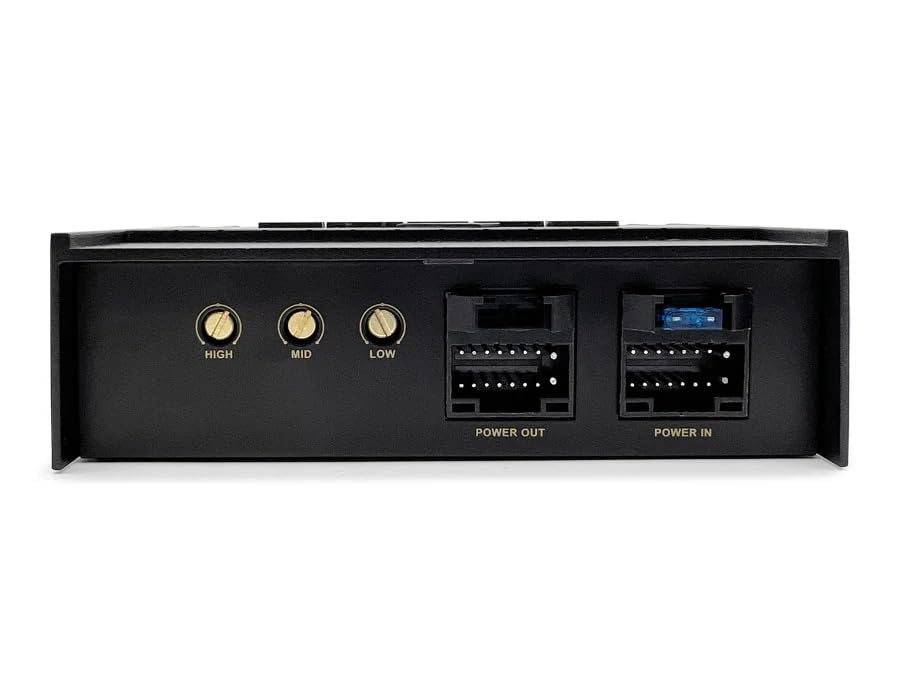
Figure 3.1: Top view of the ZAPCO ST-A2, showing the HIGH, MID, LOW equalization controls, and the POWER OUT and POWER IN connectors.
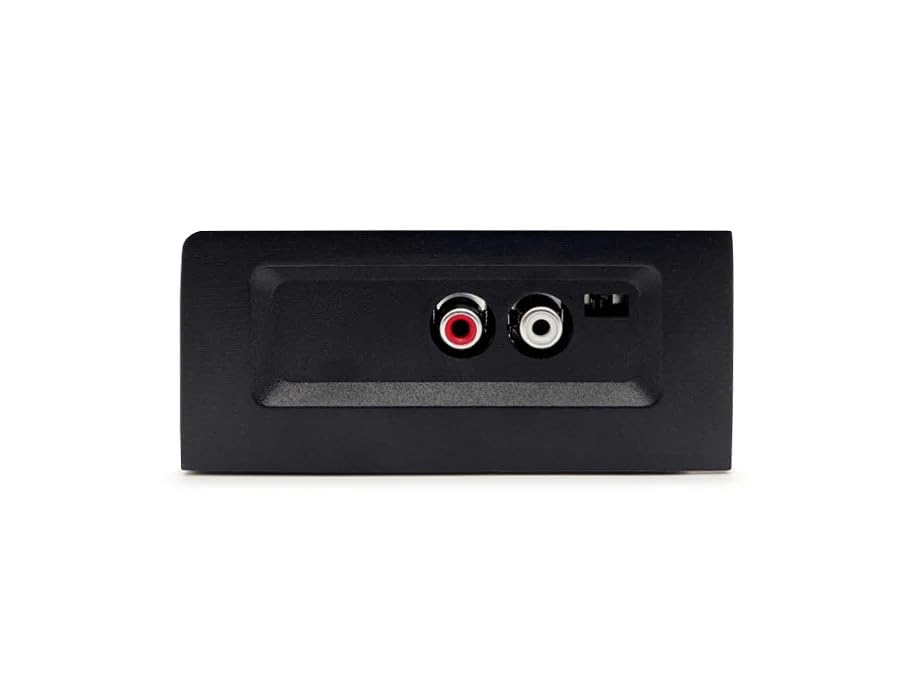
Figure 3.2: Side view of the ZAPCO ST-A2, highlighting the RCA outputs for amplified subwoofers.
4. Technical Specifications
| Specification | Value |
|---|---|
| Output Power @ 4Ω | 4 x 70 watts |
| Maximum Power | 4 x 140 watts |
| THD @ Rated Power | < 0.1% |
| Signal to Noise Ratio | > 85dB |
| Channel Separation | > 70dB |
| Frequency Response | 20Hz to 20KHz |
| Maximum Supply Voltage | 24 Volts (DC) |
| Minimum Supply Voltage | 20 Volts (DC) |
| Dimensions (W x H x L) | 103mm x 45mm x 151mm (approx. 4.1 x 1.8 x 6 inches) |
| Weight | 5 Pounds |
| Mounting Type | Freestanding |
5. Setup and Installation
Proper installation is crucial for optimal performance and safety. It is recommended that installation be performed by a qualified professional. Ensure the vehicle's battery is disconnected before beginning any wiring.
5.1. Mounting Location
Choose a mounting location that is dry, well-ventilated, and away from direct heat sources or moving parts. Ensure there is sufficient space around the amplifier for air circulation. The ST-A2 is designed for freestanding mounting.
5.2. Wiring Connections
- Power Input: Connect the main power cable from the vehicle's battery to the amplifier's power input terminal. Ensure an inline fuse is installed close to the battery. The amplifier operates with a maximum supply voltage of 24 Volts DC and a minimum of 20 Volts DC.
- Ground Connection: Connect the ground cable from the amplifier to a clean, unpainted metal surface on the vehicle's chassis. A strong ground connection is essential for stable operation.
- High-Level Inputs: Utilize the 4 balanced high-level inputs to connect directly to your vehicle's factory or aftermarket head unit speaker outputs. This "Plug & Play" feature simplifies integration.
- Speaker Outputs: Connect your car speakers to the amplifier's speaker output terminals. Ensure correct polarity for each speaker.
- RCA Outputs (for Subwoofer): If you are adding an amplified subwoofer, connect its input to the 2 RCA outputs provided on the ST-A2.
After all connections are made, double-check all wiring for secure connections and correct polarity before reconnecting the vehicle's battery.
6. Operation
Once installed and powered, the ZAPCO ST-A2 amplifier will automatically power on with your head unit. The amplifier is designed for straightforward operation.
6.1. Audio Adjustment
The ST-A2 features 3-bands equalization (HIGH, MID, LOW) to allow for basic audio tuning. Adjust these controls to achieve your desired sound profile. Start with the controls in their neutral or center positions and make small adjustments, listening carefully to the changes in sound.
6.2. Protection Features
The amplifier is equipped with built-in protection circuits to ensure its longevity and safe operation:
- Over-Current Protection: Automatically shuts down the amplifier if excessive current draw is detected.
- Over-Voltage Protection: Protects the amplifier from damage due to voltage spikes.
- High Temperature Protection: Activates if the amplifier's internal temperature exceeds safe operating limits, preventing thermal damage.
If any protection circuit is activated, the amplifier may temporarily shut down. Allow the unit to cool down or resolve the underlying issue (e.g., short circuit, improper voltage) before attempting to power it on again.
7. Maintenance
Regular maintenance helps ensure the longevity and optimal performance of your ZAPCO ST-A2 amplifier.
- Cleaning: Periodically wipe the amplifier's exterior with a soft, dry cloth to remove dust and debris. Do not use liquid cleaners or solvents.
- Ventilation: Ensure that the amplifier's heatsink fins are not obstructed. Good airflow is essential for dissipating heat.
- Connections: Occasionally check all wiring connections to ensure they remain secure and free from corrosion.
- Environment: Avoid exposing the amplifier to extreme temperatures, direct sunlight, or excessive moisture.
8. Troubleshooting
If you encounter issues with your ZAPCO ST-A2 amplifier, refer to the following common troubleshooting steps:
| Problem | Possible Cause | Solution |
|---|---|---|
| No Power / Amplifier Not Turning On |
|
|
| No Sound Output |
|
|
| Distorted Sound |
|
|
If the problem persists after attempting these solutions, contact Zapco customer support or a qualified car audio technician.
9. Warranty and Support
The ZAPCO ST-A2 amplifier is manufactured by Zapco. For specific warranty terms and conditions, please refer to the official Zapco website or the warranty card included with your product. Keep your proof of purchase for warranty claims.
For technical support, service, or further inquiries, please visit the official Zapco website or contact their customer service department. The product meets various international standards including FCC, IC, CE, ROHS, and WEEE specifications.
Note: Product specifications and features are subject to change without notice. Always refer to the latest documentation provided by the manufacturer.


