
Product Overview
The Effireli RCC004 is a dedicated replacement remote control designed for specific Cello TV models. It offers direct functionality without the need for any programming or setup, allowing for immediate use.
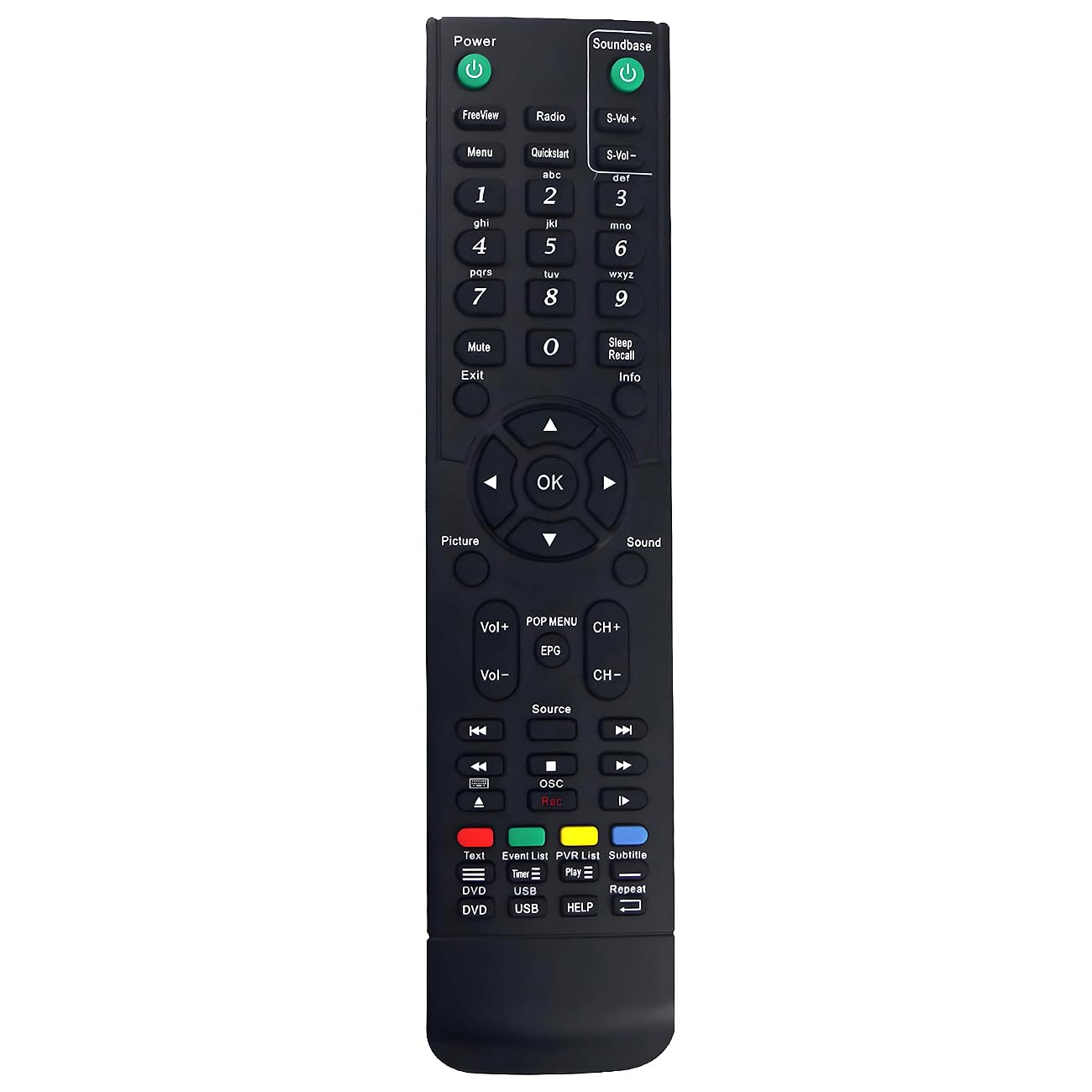
Image: Effireli RCC004 Replacement Remote Control. This image displays the front view of the remote control, highlighting its button layout and design.
This remote is an infrared (IR) device, ensuring reliable communication with compatible televisions.
Compatible Models
This Effireli RCC004 replacement remote control is compatible with the following Cello TV models:
- C32100DVB
- RCC004 (as a model identifier)
- C37115F
- C2420S
- ZS0242
- C32100F
Note: If your specific Cello TV model number is not listed above, or if your original remote control has a significantly different appearance, please contact customer support to confirm compatibility before use.
Setup Instructions
The Effireli RCC004 replacement remote control is designed for immediate use with compatible Cello TV models. No complex programming or setup procedures are required.
- Install Batteries: Open the battery compartment cover on the back of the remote. Insert two new AAA batteries, ensuring correct polarity (+ and -). Close the battery compartment.
- Point and Operate: Point the remote control directly at your Cello TV. The remote is now ready for operation.
For optimal performance, ensure there are no obstructions between the remote control and the TV's infrared receiver.
Operating Instructions
This section outlines the basic functions of the Effireli RCC004 remote control.
- Power Button (⏻): Press to turn the TV on or off.
- Number Buttons (0-9): Use to directly enter channel numbers.
- Channel Up/Down (CH+/CH-): Press to change channels sequentially.
- Volume Up/Down (VOL+/VOL-): Press to increase or decrease the TV volume.
- Mute Button (🔇): Press to mute or unmute the TV audio.
- Input/Source Button (SOURCE or INPUT): Press to select different input sources (e.g., HDMI, AV).
- Menu Button (MENU): Access the TV's main menu for settings adjustments.
- Navigation Buttons (Arrows ▲▼◀▶ and OK): Use to navigate through menus and confirm selections.
- Exit/Back Button (EXIT or BACK): Exit menus or return to the previous screen.
Refer to your Cello TV's original user manual for specific functions related to advanced TV features.
Maintenance
Proper maintenance ensures the longevity and optimal performance of your remote control.
- Battery Replacement: Replace batteries when the remote's response becomes sluggish or stops working. Always use new AAA batteries and dispose of old batteries responsibly.
- Cleaning: Wipe the remote control with a soft, dry cloth. For stubborn dirt, a slightly damp cloth can be used, but ensure no moisture enters the remote. Avoid using harsh chemicals or abrasive cleaners.
- Storage: Store the remote in a cool, dry place away from direct sunlight and extreme temperatures.
- Avoid Drops: Protect the remote from physical impact, as drops can damage internal components.
Troubleshooting
If you encounter issues with your Effireli RCC004 remote control, refer to the following troubleshooting steps:
- Remote Not Responding:
- Ensure batteries are correctly inserted with the correct polarity.
- Replace old batteries with new AAA batteries.
- Check for any obstructions between the remote's infrared emitter and the TV's IR receiver.
- Ensure you are within the effective operating range and pointing the remote directly at the TV.
- Specific Buttons Not Working:
- Clean the remote's surface, especially around the non-functional buttons, to remove any dirt or debris that might be obstructing them.
- If only certain buttons are unresponsive after battery replacement and cleaning, the remote may be faulty.
- TV Not Responding to Remote:
- Verify that your Cello TV model is listed as compatible.
- Ensure the TV's own power is on and it is not in a standby mode that disables IR reception.
If issues persist after following these steps, please refer to the Warranty and Support section for further assistance.
Specifications
| Feature | Detail |
|---|---|
| Brand | Effireli |
| Model Number | YK-RCC004 |
| Special Feature | No Programming Required |
| Max Number of Supported Devices | 1 (Television) |
| Compatible Devices | Television |
| Connectivity Technology | Infrared (IR) |
| Power Source | 2 x AAA Batteries (not included) |
Warranty and Support
Effireli provides comprehensive support for your RCC004 replacement remote control.
- Money-Back Guarantee: Enjoy a 30-day money-back guarantee from the date of purchase.
- Warranty: A 12-month warranty covers manufacturing defects. Returns and exchanges are accepted within this warranty period.
- Customer Support: For any questions regarding compatibility, troubleshooting, or warranty claims, please contact Effireli customer support directly. Contact information can typically be found on the product packaging or the retailer's website.
Please retain your proof of purchase for warranty claims.


