1. Product Overview
The MILESEEY S7 Pro Laser Distance Meter is a high-precision measuring tool designed for both indoor and outdoor applications. It features a camera viewfinder, P2P technology, and app connectivity for enhanced functionality. This manual provides detailed instructions for safe and effective operation.

Image: The MILESEEY S7 Pro Laser Distance Meter shown alongside its adjustable aluminum tripod.
Included Components:
- S7 Pro Laser Measure with Tripod x1
- Carrying Case x1
- Hand Strap x1
- Rechargeable AAA Battery x 3
- User Manual x1
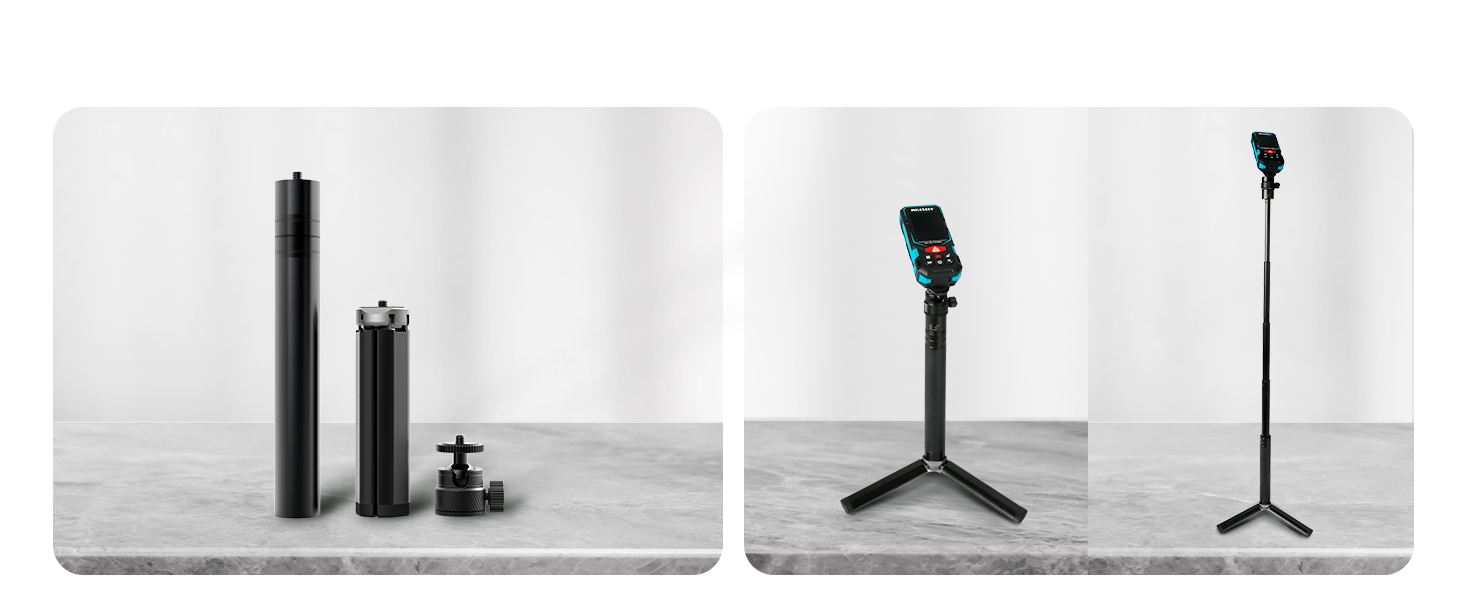
Image: A visual representation of all items included in the product package, including the laser measure, tripod, carrying case, and accessories.
2. Safety Information
Please read and understand all safety instructions before using the device. Failure to follow these instructions may result in laser radiation exposure, electric shock, fire, or serious injury.
Laser Safety:
- The device emits Class 2 laser radiation. Do not stare into the laser beam or direct it at other people or animals.
- Do not disassemble or modify the device. Unauthorized modifications may result in hazardous radiation exposure.
- Use only as described in this manual.
General Safety:
- Keep the device out of reach of children.
- Do not use the device in explosive atmospheres or near flammable materials.
- Ensure the device is fully charged before first use for optimal performance.
- When using outdoors in bright sunlight, adjust the viewing angle to ensure screen visibility.
3. Setup
Battery Installation and Charging:
The MILESEEY S7 Pro uses 3 rechargeable AAA batteries (included). Ensure batteries are inserted with correct polarity.
- Open the battery compartment cover on the back of the device.
- Insert the 3 AAA rechargeable batteries, observing the polarity markings.
- Close the battery compartment cover securely.
- Connect the device to a power source using the provided USB cable to charge the batteries. A full charge is recommended before initial use.
Tripod Assembly:
The included adjustable aluminum tripod enhances stability and precision for long-distance measurements.
- Extend the tripod legs to a stable position.
- Adjust the working height of the tripod from 3.5 inches to 32 inches as needed.
- Attach the MILESEEY S7 Pro to the tripod's mounting screw.
- Secure the device by tightening the mounting screw.

Image: Illustrations demonstrating the adjustable heights of the tripod and how the laser measure attaches to it.
4. Operating Instructions
Basic Measurement:
To perform a single distance measurement:
- Power on the device by pressing the Power button.
- Point the laser at the target.
- Press the MEAS button to take a measurement. The result will be displayed on the 2.4" IPS screen.

Image: A user holding the MILESEEY S7 Pro, demonstrating a typical handheld measurement scenario.
Pointfinder Camera Usage:
The built-in 4x zoom digital camera with on-screen targeting crosshairs helps locate the laser spot, especially in bright outdoor conditions.
- Activate the camera viewfinder mode (refer to device interface for specific button).
- Use the crosshairs on the screen to precisely aim the laser at your target.
- Press the MEAS button to capture the measurement.

Image: The laser measure's screen displaying the pointfinder camera view with crosshairs, aiding in precise targeting.
P2P Technology:
Measure the distance between any two points from a single remote location using the 360° high accuracy tilt sensor and integrated smart base.
- Place the device at a stable remote location.
- Select the P2P measurement mode (refer to device interface).
- Aim the laser at the first point (P1) and take a measurement.
- Aim the laser at the second point (P2) and take a measurement. The device will calculate the distance between P1 and P2.

Image: A visual explanation of P2P technology, showing how the device measures the distance between two points from a single position.
App Connectivity:
Connect the MILESEEY S7 Pro to the "Smart Life" intelligent app on your mobile device (phone or tablet) for advanced features and data management.
- Download and install the "Smart Life" app from your device's app store.
- Enable Bluetooth on your mobile device and the MILESEEY S7 Pro.
- Pair the devices through the "Smart Life" app.
- Once connected, you can:
- Transfer measurement data directly to the app.
- Enter dimensions onto on-site photographs.
- Draw projects and construct plans within the app.
- Access the built-in memory storage, which can store up to 1,000 groups of data.

Image: A user interacting with the "Smart Life" app on a smartphone, showing how measurement data is transferred and managed.
Measurement Modes:
The device offers various measurement modes for different applications:
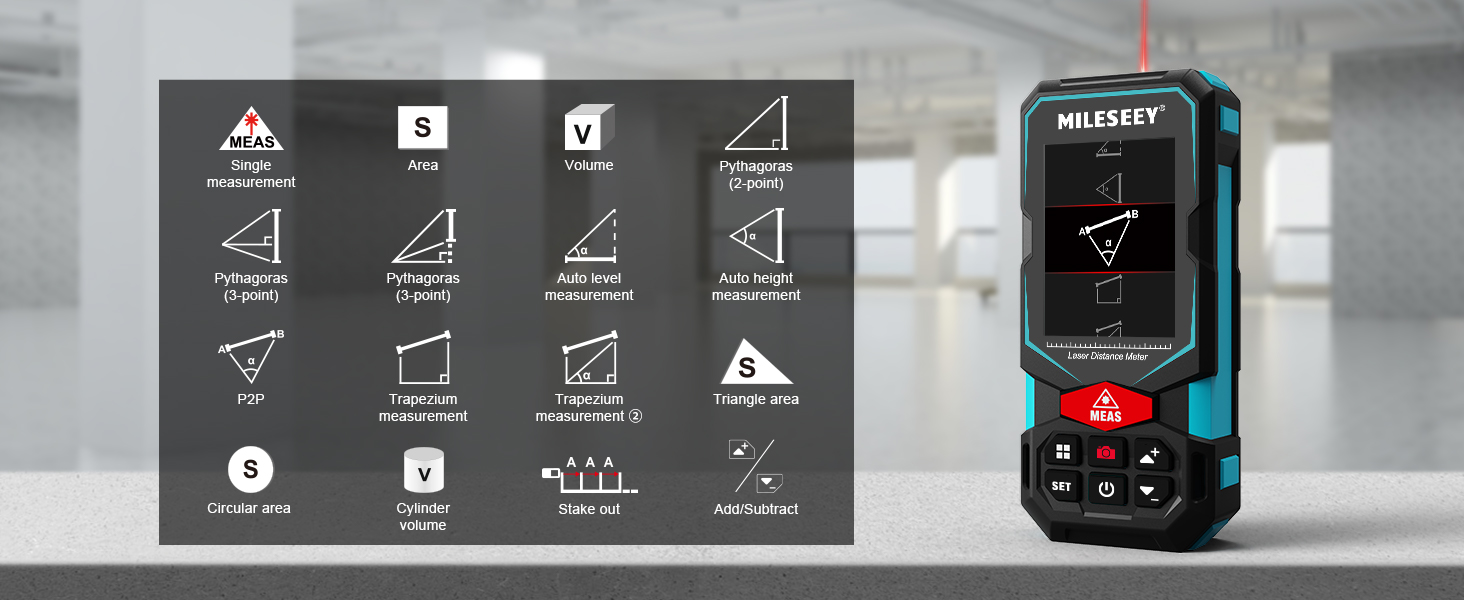
Image: An icon grid illustrating various measurement functions available on the device, such as single measurement, area, volume, Pythagoras (2-point, 3-point), auto level, auto height, P2P, trapezium, triangle area, circular area, cylinder volume, stake out, and add/subtract.
Display Features:
The 2.4" IPS display provides clear readouts in various lighting conditions. It features a rotation display that keeps the measurement in line with the device, allowing readings from any angle. Users can easily switch between white text on a black screen and black text on a white screen for optimal visibility.

Image: Demonstrates the display's readability in both bright sunlight and low light conditions.
5. Maintenance
Proper maintenance ensures the longevity and accuracy of your MILESEEY S7 Pro.
Cleaning:
- Wipe the device with a soft, damp cloth. Do not use abrasive cleaners or solvents.
- Keep the laser lens and camera clean and free from dust or debris.
Storage:
- Store the device in its carrying case when not in use to protect it from dust and physical damage.
- Store in a cool, dry place, away from direct sunlight and extreme temperatures.
IP65 Protection:
The MILESEEY S7 Pro features IP65 protection, providing excellent waterproof and dust resistance. This design allows it to withstand harsh conditions on outdoor job sites.

Image: The device shown on a rocky, dusty surface, highlighting its IP65 water and dust resistance for rugged outdoor use.
6. Troubleshooting
If you encounter issues with your MILESEEY S7 Pro, refer to the following common problems and solutions:
| Problem | Possible Cause | Solution |
|---|---|---|
| Device does not power on. | Low battery or incorrect battery installation. | Ensure batteries are fully charged and correctly inserted. |
| Screen difficult to see outdoors. | Direct sunlight on the screen. | Adjust the viewing angle to avoid direct sunlight. Utilize the display's contrast settings (white text on black screen). |
| Inaccurate measurements. | Device moved during self-calibration or measurement. | Ensure the device is stable and not moved during self-calibration or measurement. Recalibrate if necessary. |
| Cannot connect to app. | Bluetooth is off or pairing issue. | Ensure Bluetooth is enabled on both devices. Restart both the laser measure and the mobile device, then attempt to pair again. |
Video: An official product video demonstrating the features and operation of the MILESEEY S7 Pro Laser Distance Meter, including the pointfinder camera, app connectivity, long-distance measurement, P2P technology, automatic screen flip, IP65 protection, and humanized UI. This video is provided by the seller, Mileseey Direct.
7. Specifications
| Feature | Detail |
|---|---|
| Brand | MiLESEEY |
| Model Number | S7 Pro with Tripod |
| Measuring Range | Up to 330 feet |
| Accuracy | +/- 1/16 inches |
| Digital Pointfinder | 4x Zoom Camera |
| Display | 2.4" IPS Backlit Display with Rotation |
| Connectivity | Bluetooth (Smart Life App) |
| Data Storage | Up to 1,000 groups |
| Protection Rating | IP65 (Waterproof and Dust Resistant) |
| Batteries | 3 x AAA Rechargeable (Included) |
| Material | Acrylonitrile Butadiene Styrene, Rubber |
| Color | Blue |
| Item Weight | 180 Grams (6.3 ounces) |
| Product Dimensions | 2"L x 1"W x 5"H |
8. Warranty and Support
Warranty Information:
The MILESEEY S7 Pro Laser Distance Meter comes with a 24-month warranty from the date of purchase. This warranty covers defects in materials and workmanship under normal use.
The warranty does not cover damage caused by misuse, unauthorized modification, accident, neglect, or improper maintenance.
Customer Support:
For technical support, warranty claims, or any questions regarding your MILESEEY S7 Pro, please contact the manufacturer or authorized dealer.
Refer to the contact information provided in your product packaging or visit the official MiLESEEY website for further assistance.
You can also visit the MiLESEEY Store on Amazon for product information and support resources.


