
Introduction
This manual provides detailed instructions for the safe and effective use of your GODOX V100 C Flash for Canon. The GODOX V100 C is a high-performance 100Ws TTL flash designed for Canon EOS cameras, featuring touchscreen control, 2.4G wireless capabilities, and a detachable sub-flash. Please read this manual thoroughly before operation to ensure optimal performance and to prevent damage to the unit.
Safety Information
To prevent overheating and potential damage to the flash head, observe the following guidelines:
- Avoid performing more than 10 consecutive stroboscopic flashes.
- After 10 stroboscopic flashes, allow the flash to cool down for at least 15 minutes.
- If the flash automatically stops due to overheating, allow it to cool down for at least 15 minutes before further use.
Product Overview
The GODOX V100 C Flash is engineered for versatility and power, offering advanced features for professional photography.
Key Features
- 100Ws Power Output: Delivers significant power for various lighting scenarios.
- Intuitive Touchscreen Control: A 2.3-inch full-color, high-sensitivity touchscreen for easy adjustments.
- Detachable Sub-Flash (SU-1): Provides additional fill light or creative lighting options.
- Built-in 2.4G Wireless X System: Functions as both a master and receiver unit for seamless integration with other Godox wireless flash units and triggers like the GODOX X3.
- 2W LED Modeling Lamp: Features 10 adjustable levels for previewing light effects or as a continuous fill light.
- Fast Recycle Time: Achieves 1.7s recycle time, with options for faster recycling using external power packs.
- High Flash Capacity: Provides 70 to 100 consecutive full-power flashes thanks to an advanced cooling system.
- Adjustable Flash Head: Tilts from -7 to 120 degrees and rotates 330 degrees for flexible light positioning.
Included Components
- GODOX V100 Flash Unit
- VB30 Battery
Product Diagram

This image displays the GODOX V100 C flash unit along with its standard accessories. These include the main flash body, a VB30 battery, a battery charger, a USB-C cable, a mini stand, and a protective carrying pouch. The flash head is shown in various positions, highlighting its flexibility.
This diagram illustrates the main features of the GODOX V100 C flash. It points out the adjustable flash head (tilts -7 to 120 degrees, rotates 330 degrees), the built-in 2W LED modeling lamp, the convenient Type-C charging battery port, the detachable sub-flash, and the power port for external power packs like the PB960 for faster 0.8s recycling.
Setup
1. Battery Installation and Charging
- Insert the VB30 battery into the battery compartment located on the side of the flash unit. Ensure it clicks into place securely.
- To charge the battery, connect the provided USB-C cable to the Type-C charging port on the flash unit and to a compatible USB power adapter (not always included). The charging indicator will show the charging status.
2. Mounting the Flash on a Camera
- Slide the flash's hotshoe foot into your Canon EOS camera's hotshoe mount.
- Rotate the locking ring or lever on the flash unit clockwise to secure it firmly to the camera's hotshoe. Ensure it is tightly fastened to prevent accidental detachment.
3. Attaching the Detachable Sub-Flash (SU-1)
The detachable sub-flash (SU-1) can be attached to the designated slot on the front of the main flash unit for additional lighting control.
Operating Instructions
1. Power On/Off
Press and hold the power button (usually marked with a power symbol) on the flash unit to turn it on or off. The touchscreen will illuminate upon activation.
2. Touchscreen Control

The 2.3-inch full-color touchscreen allows for quick and precise adjustments. Tap on the screen to navigate menus and adjust settings such as:
- Power Levels: Adjust flash output from 1/1 to 1/256 or 2.0 to 10.
- Flash Modes: Switch between TTL (Through-The-Lens) and M (Manual) modes.
- High-Speed Sync (HSS): Activate HSS for shutter speeds faster than your camera's native sync speed.
- Zoom: Manually adjust the flash zoom head to match your lens focal length.
3. Wireless X System Operation
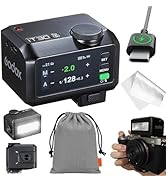
The GODOX V100 C can function as both a master and receiver unit within the Godox 2.4G Wireless X System. To pair with a Godox X3 trigger or other wireless flash units:
- Access the wireless settings menu on the touchscreen.
- Select the desired mode (Master or Receiver).
- Use the one-tap pairing feature to connect with compatible devices. Refer to the specific instructions for your Godox trigger or receiver for detailed pairing steps.
4. LED Modeling Lamp
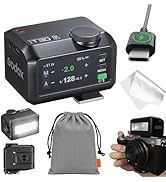
Activate the 2W LED modeling lamp via the touchscreen interface. It offers 10 adjustable brightness levels and can be used in continuous or interrupt modes to assist with focus or to provide a constant fill light.
5. Compatible Camera Models
The GODOX V100 C is compatible with a wide range of Canon EOS cameras, including but not limited to:
- Canon 5D Mark IV, 5D Mark III, 5D Mark II, 6D, 7D, 60D, 50D, 40D, 30D
- Canon 650D, 600D, 550D, 500D, 450D, 400D Digital, 1100D, 1000D
- Canon 7D Mark II, 6D Mark II, 760D, 750D, 70D, 80D, 800D, 77D
- Canon M5, M3, M50, EOS R, RP, 90D, 1500D, 3000D, 200IID
Maintenance
- Keep the flash unit dry. Do not handle with wet hands or immerse in water.
- Clean the flash head and body with a soft, dry cloth. Avoid using harsh chemicals or abrasive cleaners.
- Store the flash in a cool, dry place away from direct sunlight and extreme temperatures.
- When not in use for extended periods, remove the battery to prevent leakage.
Troubleshooting
| Problem | Possible Cause | Solution |
|---|---|---|
| Flash does not fire. | Battery is low or not installed correctly. Flash is not securely mounted on camera. Camera settings are incorrect. | Charge or re-install battery. Ensure flash is securely locked onto the hotshoe. Check camera flash settings (e.g., external flash enabled). |
| Flash stops firing after several consecutive flashes. | Overheating protection activated. | Allow the flash to cool down for at least 15 minutes before further use. Avoid excessive consecutive full-power flashes. |
| Wireless sync not working. | Incorrect wireless settings. Interference. | Verify master/receiver settings on both flash and trigger. Ensure both devices are on the same channel and group. Check for obstructions or other 2.4G devices causing interference. |
| Touchscreen unresponsive. | Temporary software glitch. | Turn the flash off and then on again. If the issue persists, contact customer support. |
Specifications
| Feature | Detail |
|---|---|
| Model | V100 C |
| Power Output | 100Ws |
| Recycle Time | 1.7s (standard), 0.8s (with external power pack) |
| Flash Sync Speed | 1/300s - 1/20000s |
| Flash Modes | TTL, Manual, Multi |
| Wireless System | Godox 2.4G Wireless X System |
| Modeling Lamp | 2W LED, 10 adjustable levels |
| Power Source | VB30 Battery (included) |
| Dimensions | 2.99 x 2.81 x 8.11 inches |
| Weight | 1.36 pounds |
| Compatible Mountings | Canon EOS cameras (E-TTL II Autoflash) |
Warranty and Support
For warranty information and technical support, please refer to the warranty card included with your product or visit the official GODOX website. Keep your purchase receipt as proof of purchase for any warranty claims.