
Tomofree K7PRO
Tomofree K7PRO 3-Wheel Electric Scooter User Manual
Model: K7PRO
Brand: Tomofree
1. Important Safety Information
Please read this manual carefully before operating your K7PRO electric scooter. Failure to follow the instructions and safety warnings could result in serious injury or damage to the scooter.
- Always wear a helmet and appropriate safety gear (knee pads, elbow pads) when riding.
- Ensure all bolts and fasteners are tightened before each ride.
- Check brake functionality before each use.
- Do not ride in wet conditions, heavy rain, or through puddles. The scooter is IPX7 rated for water resistance, but prolonged exposure to water should be avoided.
- Adhere to local traffic laws and regulations.
- Do not exceed the maximum weight limit of 220 lbs (100 kg).
- Keep hands and feet clear of moving parts.
- Avoid riding on steep inclines exceeding 20 degrees.
2. Product Overview
The Tomofree K7PRO is a lightweight, folding 3-wheel electric scooter designed for adults and seniors, offering stability and ease of use. It features a powerful 400W motor, a 36V 7.5Ah battery, and a reverse function for enhanced maneuverability.
Key Features:
- Compact Folding Design: Easily folds for storage and transport.
- 3-Wheel Stability: Provides a stable and secure riding experience.
- Reverse Function: Allows for easy backing up in tight spaces.
- Multiple Speed Modes: Three adjustable speed settings (2/6/15 mph).
- Long Range Battery: Up to 15 miles on a single charge.
- Durable Construction: Made from 98% Aviation-Grade Aluminum Alloy.
- 10-inch City Tires: Designed for stable performance on various urban terrains.
Components Diagram:
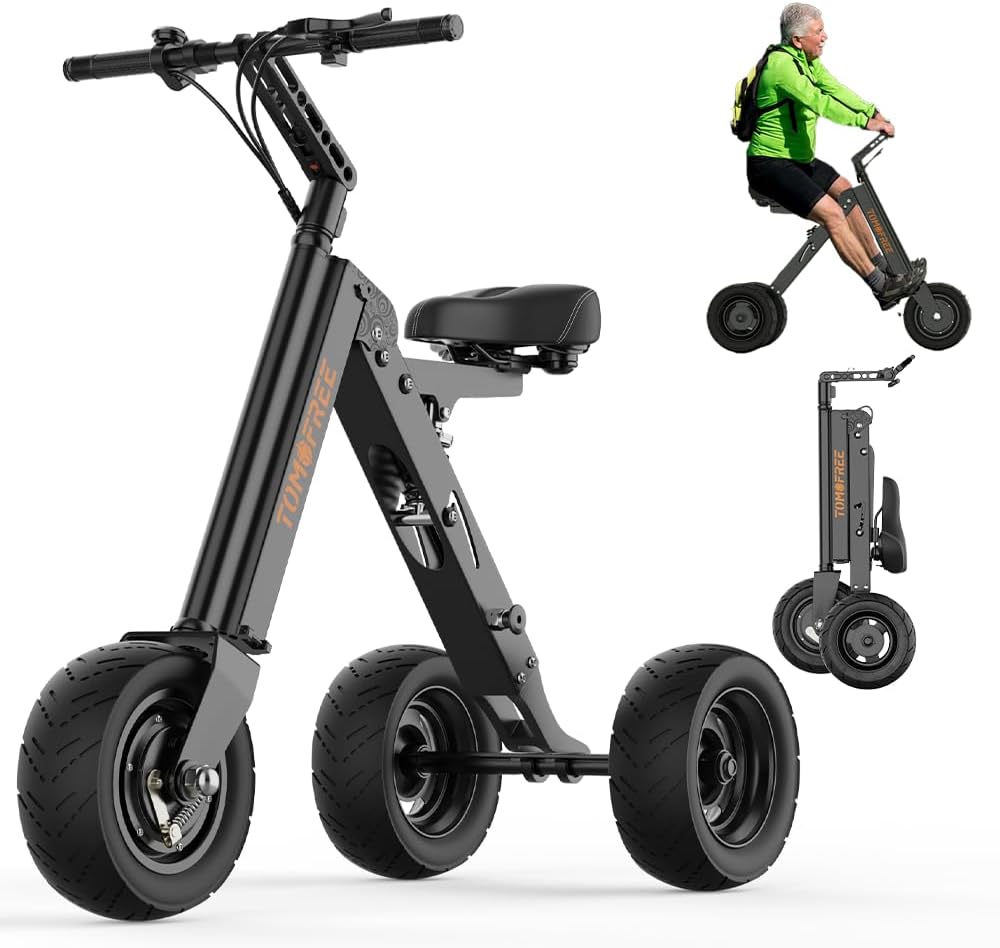
Figure 2.1: K7PRO Electric Scooter Overview
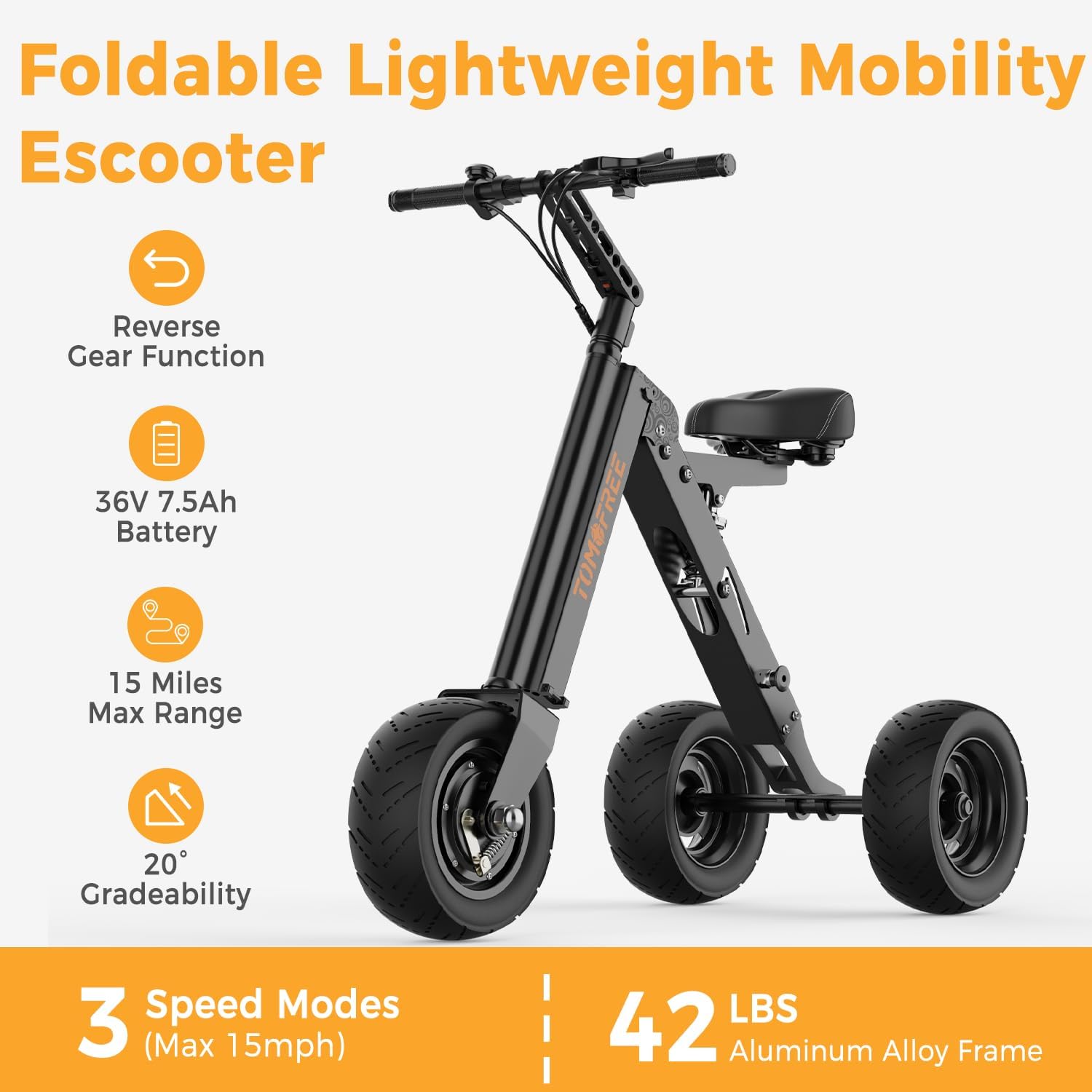
Figure 2.2: K7PRO Key Features
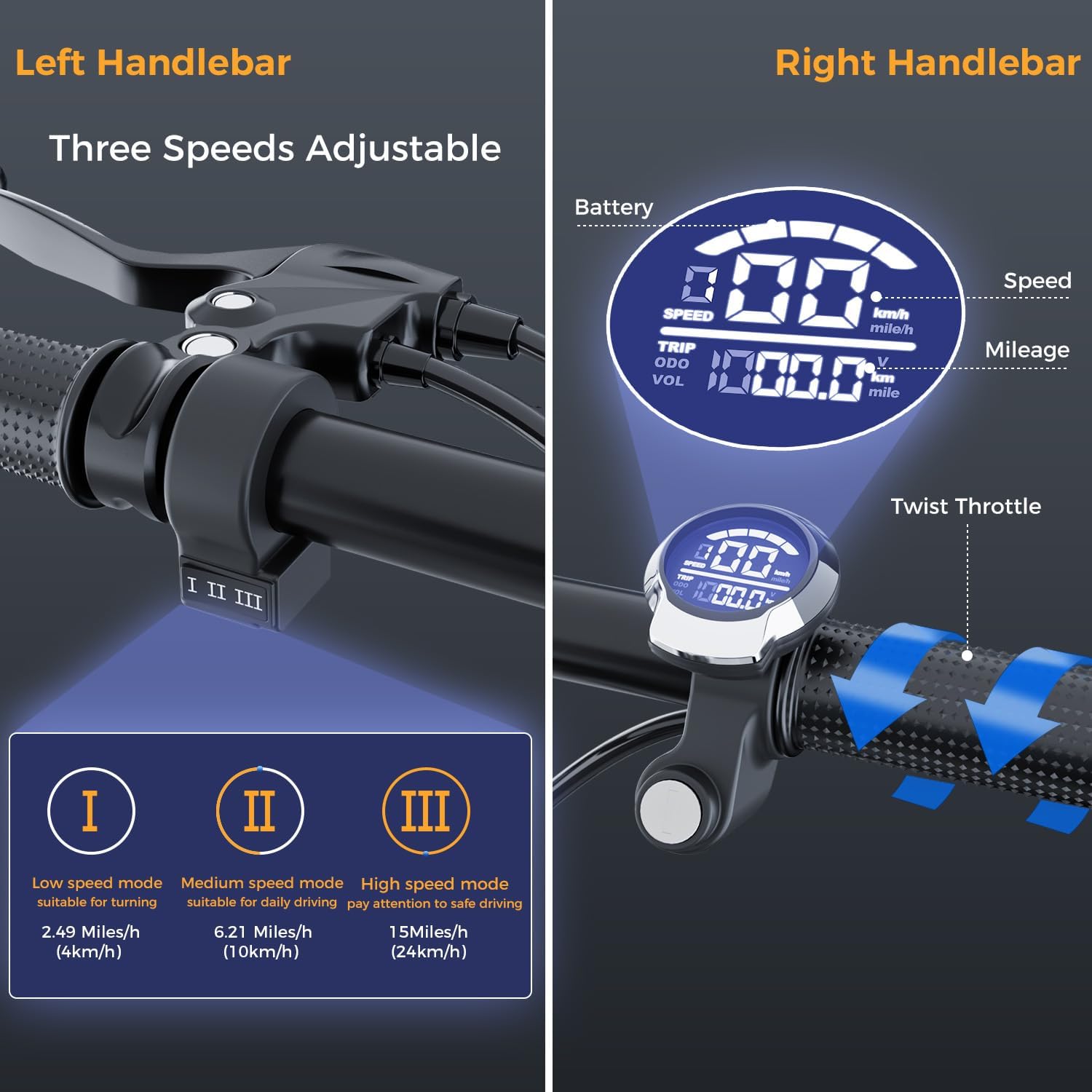
Figure 2.3: Handlebar Controls and Display
3. Setup and Initial Preparation
3.1 Unpacking
Carefully remove all components from the packaging. Verify that all included items are present:
- K7 Pro Escooter
- Escooter Keys
- Battery Keys
- Toolkit Box
- Charger
- User Manual (this document)
3.2 Assembly
The K7PRO comes mostly pre-assembled but requires a few steps to prepare for use. Refer to the following steps and the folding diagram:
- Unfold the Seat: Raise the seat to its upright position and ensure it locks securely.
- Unfold the Frame: Release the folding buckle and extend the main frame until it locks into place.
- Unfold the Handlebar: Push the handlebar buckle upward and raise the handlebar to its riding position, ensuring it clicks into place.
- Adjust Handlebar Height: If adjustable, set the handlebar to a comfortable height for riding.

Figure 3.1: Easy Folding Mechanism
3.3 Initial Battery Charge
Before first use, fully charge the scooter's battery. The charging time is approximately 4-5 hours.
- Locate the charging port on the scooter.
- Connect the charger to the scooter's charging port, then plug the charger into a standard wall outlet.
- The charger indicator light will typically show red during charging and turn green when fully charged.
- Do not overcharge the battery. Disconnect the charger once charging is complete.
4. Operating Instructions
4.1 Powering On/Off
- Insert the key into the ignition and turn it to the 'ON' position to power on the scooter.
- To power off, turn the key to the 'OFF' position and remove it.
4.2 Speed Modes
The K7PRO offers three speed modes, selectable via the button on the left handlebar:
- Mode I (Low Speed): Approximately 2 mph (4 km/h). Suitable for turning and navigating tight spaces.
- Mode II (Medium Speed): Approximately 6 mph (10 km/h). Ideal for daily driving.
- Mode III (High Speed): Approximately 15 mph (24 km/h). For maximum speed, pay attention to safe driving conditions.
4.3 Acceleration and Braking
- Acceleration: Use the twist throttle on the right handlebar to control your speed. Twist it towards you to accelerate.
- Braking: The scooter is equipped with a front drum brake. Squeeze the brake lever on the handlebar to slow down or stop. Apply brakes smoothly to avoid sudden stops.
4.4 Reverse Function
The K7PRO features a reverse gear for easy maneuvering:
- To engage reverse, press the 'R' button on the control panel. The display will indicate reverse mode.
- Twist the throttle gently to move backward.
- To switch back to forward motion, press the 'D' button.
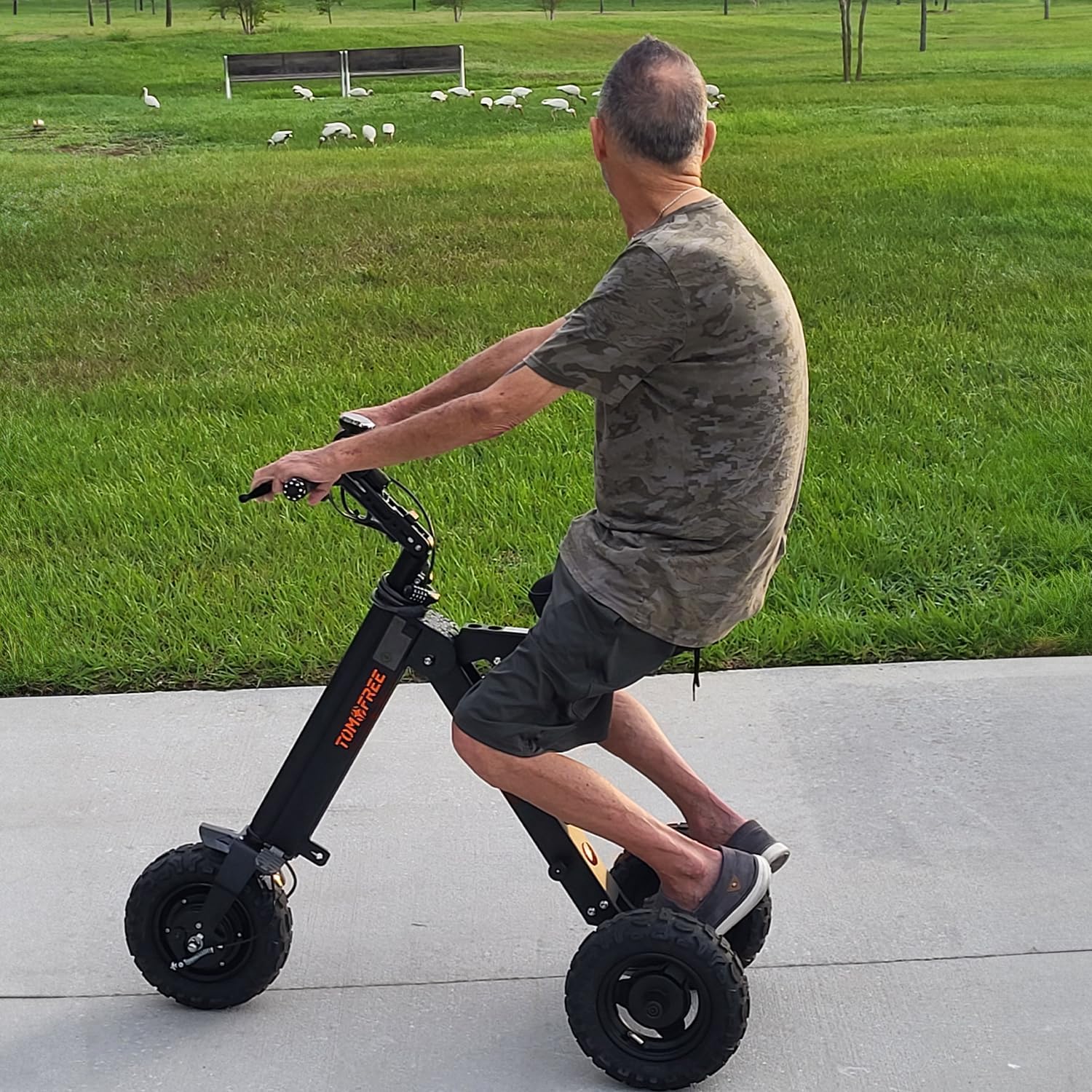
Figure 4.1: Rider on K7PRO Scooter
Video 4.1: Official demonstration of the K7PRO 3-Wheel Electric Scooter, showcasing its features and a rider in motion.
5. Maintenance
Regular maintenance ensures the longevity and safe operation of your K7PRO scooter.
5.1 Battery Care
- Charge the battery regularly, even if not in use, to maintain its health.
- Avoid completely draining the battery before recharging.
- Store the scooter in a cool, dry place when not in use, away from direct sunlight and extreme temperatures.
5.2 Tire Maintenance
- Regularly check tire pressure and inflate to the recommended PSI (refer to tire sidewall for details).
- Inspect tires for wear, punctures, or damage. Replace if necessary.
5.3 Cleaning
- Wipe down the scooter with a damp cloth. Do not use high-pressure water jets or immerse the scooter in water.
- Avoid using abrasive cleaners or solvents that could damage the finish.
5.4 Brake Inspection
- Periodically check the brake lever for proper tension and responsiveness.
- Ensure the brake pads are not excessively worn. Consult a professional for brake adjustments or replacements if needed.
6. Troubleshooting
This section addresses common issues you might encounter with your K7PRO scooter.
| Problem | Possible Cause | Solution |
|---|---|---|
| Scooter does not power on | Battery is low or dead Key not fully inserted/turned Loose connections | Charge the battery Ensure key is fully inserted and turned to 'ON' Check all visible cable connections |
| Scooter loses power or range is short | Battery not fully charged Old battery Riding on steep inclines frequently | Fully charge the battery Consider battery replacement if old Reduce riding on very steep inclines |
| Unusual noises during operation | Loose parts Debris in wheels/motor Worn components | Inspect for loose bolts and tighten Clean wheels and motor area Contact customer support if noise persists |
| Brakes are not responsive | Brake cable loose Worn brake pads | Adjust brake cable tension Replace brake pads Seek professional assistance |
If you encounter issues not listed here or if solutions do not resolve the problem, please contact Tomofree customer support.
7. Specifications
| Feature | Detail |
|---|---|
| Model Name | K7PRO |
| Motor Power | 400W Brushless Motor |
| Battery | 36V 7.5Ah |
| Max Speed | 15 MPH (24 km/h) |
| Max Range | Up to 15 Miles |
| Charging Time | 4-5 Hours |
| Weight Limit | 220 Pounds (100 kg) |
| Item Weight | 41.8 Pounds (19 kg) |
| Product Dimensions (L x W x H) | 41.3" x 18.7" x 37.8" |
| Folding Size (L x W x H) | 36.6" x 18.7" x 17.7" |
| Wheel Size | 10 Inches (City Tires) |
| Frame Material | Aluminum Alloy |
| Brake Style | Front Drum Brake |
| Gradeability | Up to 20° |
| Water Resistance | IPX7 |
8. Warranty and Support
8.1 Warranty Information
The Tomofree K7PRO electric scooter comes with a 1-year limited warranty from the date of purchase. This warranty covers manufacturing defects in materials and workmanship. It does not cover damage caused by misuse, accidents, unauthorized modifications, or normal wear and tear.
For warranty claims, please retain your proof of purchase.
8.2 Customer Support
For any questions, technical assistance, or warranty inquiries, please contact Tomofree customer support:
- Email: info@tomofree.com
- Phone (SMS Only): +1-(910)-382-1273
When contacting support, please provide your order number and a detailed description of the issue.

Figure 8.1: Tomofree Customer Support Information
Related documentsK7PRO

Ask a question about this manual
Ask about setup, troubleshooting, compatibility, parts, safety, or missing instructions. Manuals+ will review the question and use this page’s manual context to help answer it.