
1. Introduction
This manual provides essential instructions for the installation, operation, and maintenance of your LIAMOS WiFi Natural Gas Detector with an Electric Solenoid Valve. This device is designed to detect methane (CH4) and liquefied petroleum gas (LPG) leaks, providing early warning and automatic gas shut-off to enhance safety in your home or workplace. Please read this manual thoroughly before use and retain it for future reference.
2. Product Overview
2.1 Key Features
- WiFi connectivity for remote monitoring and notifications.
- Detects methane (CH4) from natural gas and LPG.
- Integrated electric solenoid valve for automatic gas shut-off upon leak detection.
- Supports DN15 (1/2 inch) and DN20 (3/4 inch) solenoid valves for gas pipes, and V15GC for gas cylinder valves.
- Tuya Smart Scenes Linkage for integration with other smart home devices.
- Audible alarm (85dB) and voice prompts.
- Visual alarm via light indicators.
- Real-time gas concentration display on LCD screen.
- Push notifications to your smartphone via the Tuya App.
2.2 Components
The product package includes the WiFi Natural Gas Detector and an electric solenoid valve (V15GC model). The detector features an LCD display, a test/mute button, a gas inlet, a USB power jack, and a connector for the external solenoid valve.

Figure 1: Overview of the LIAMOS WiFi Natural Gas Detector and V15GC Solenoid Valve.
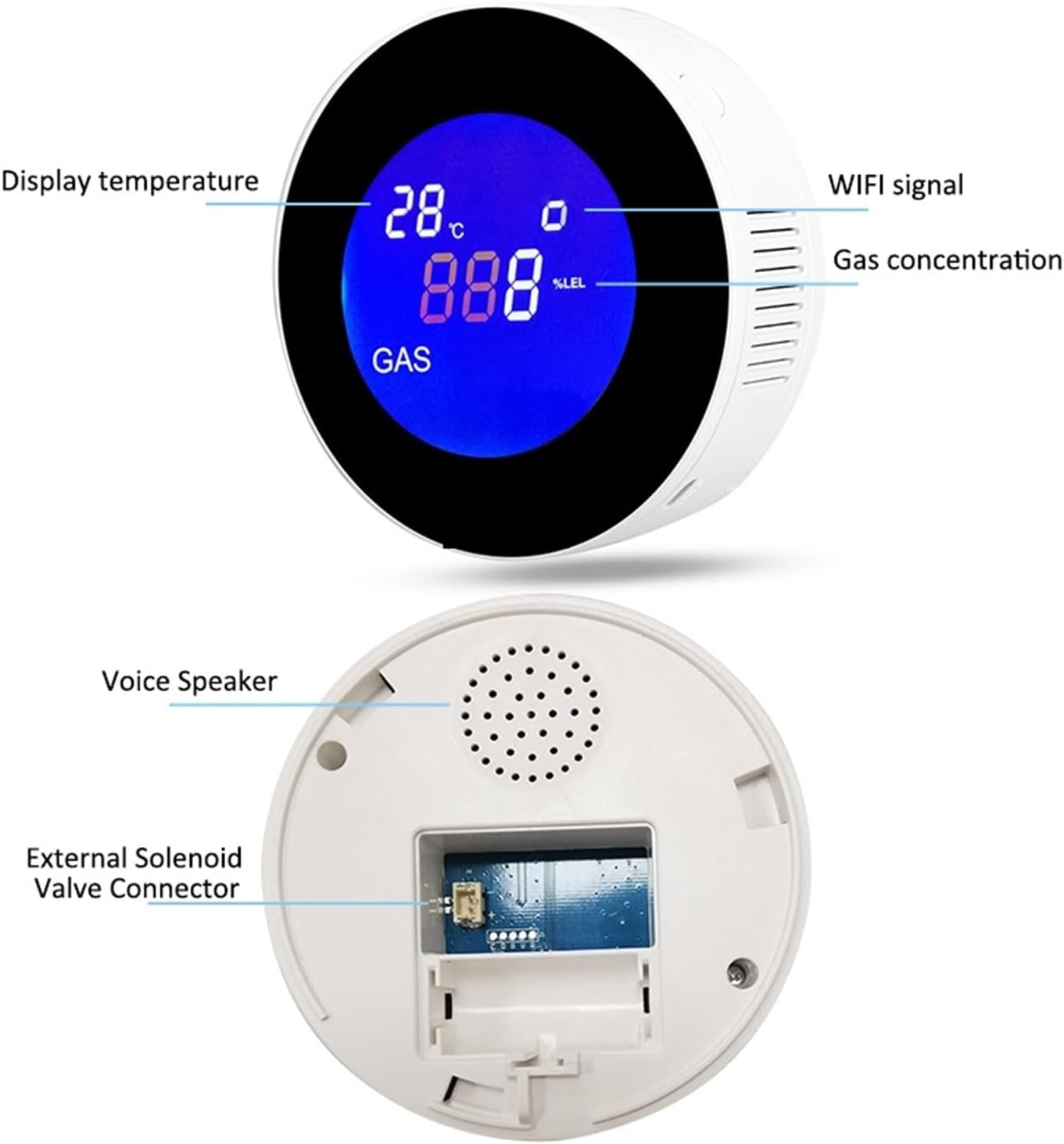
Figure 2: Front display showing temperature, WiFi signal, and gas concentration. Rear view indicates the voice speaker and external solenoid valve connector.
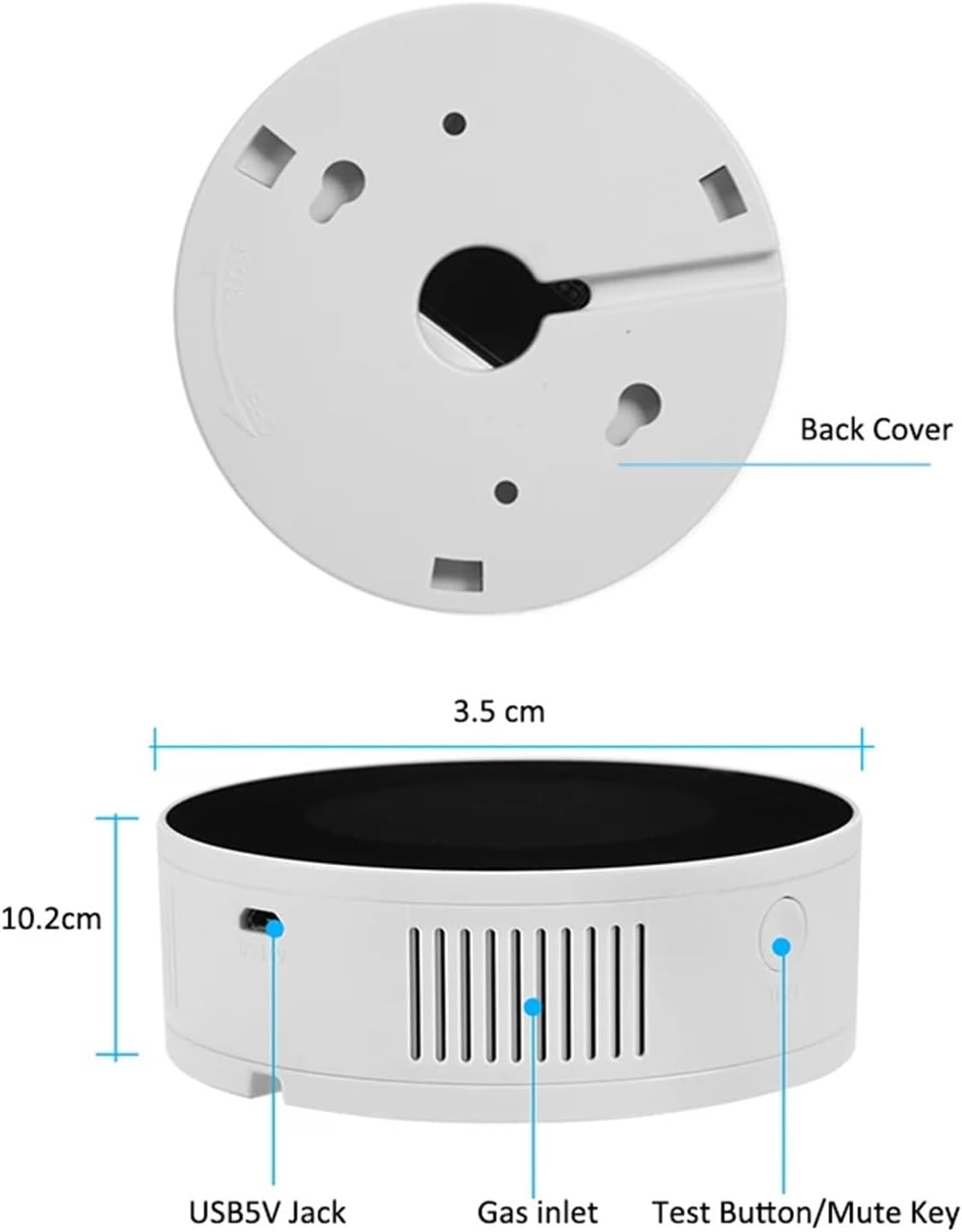
Figure 3: Dimensions of the gas detector and identification of the USB 5V jack, gas inlet, and test/mute button.
3. Specifications
| Feature | Specification |
|---|---|
| Model Number | 1005004858709923 |
| Detection Gas | Methane (CH4), LPG |
| Alarm Concentration | 8% LEL (Lower Explosive Limit) |
| Alarm Volume | 85dB |
| Connectivity | WiFi |
| Solenoid Valve Support | DN15 (1/2 inch), DN20 (3/4 inch), V15GC |
| Power Supply | USB 5V (adapter not specified, typically 5V/1A) |
| Package Dimensions | 1.18 x 0.79 x 0.39 inches |
| Item Weight | 1.76 pounds |
| Manufacturer | LIAMOS |
4. Installation and Setup
4.1 Placement Guidelines
- Install the detector in areas where gas leaks are most likely to occur, such as kitchens, near gas stoves, water heaters, or gas pipes.
- For natural gas (methane, CH4), which is lighter than air, install the detector near the ceiling, typically 30 cm (12 inches) below the ceiling and 1.5 meters (5 feet) from the gas source.
- For LPG (liquefied petroleum gas), which is heavier than air, install the detector near the floor, typically 30 cm (12 inches) above the floor and 1.5 meters (5 feet) from the gas source.
- Avoid installing near ventilation openings, windows, doors, or areas with high humidity or extreme temperatures.
4.2 Solenoid Valve Connection
The detector supports connection with DN15, DN20, or V15GC electric solenoid valves for automatic gas shut-off. Ensure the correct valve type is used for your gas pipe or cylinder.
- DN15 Solenoid Valve: Suitable for gas pipes with an outside diameter of 20mm and an inside diameter of 15mm (1/2 inch).
- DN20 Solenoid Valve: Suitable for gas pipes with an outside diameter of 25mm and an inside diameter of 20mm (3/4 inch).
- V15GC Solenoid Valve: Designed for shutting off gas cylinder valves.
Connect the solenoid valve to the designated external solenoid valve connector on the back of the gas detector. Professional installation is recommended for gas line connections.

Figure 4: The gas detector paired with a DN15 or DN20 electric solenoid valve for pipe shut-off.

Figure 5: Examples illustrating the installation of the gas detector and its connected solenoid valve in various settings, including wall-mounted and near gas lines.
4.3 Power Connection
Connect the detector to a standard USB 5V power source using the provided USB cable. Ensure the power supply is stable.
4.4 App Pairing (Tuya Smart Scenes Linkage)
- Download the Tuya Smart or Smart Life app from your smartphone's app store.
- Register or log in to your account.
- Add the device by following the in-app instructions. The detector will typically enter pairing mode automatically when first powered on or after a reset.
- Once paired, you can configure smart scenes, such as automatically shutting off the gas valve via a gas manipulator or smart controller when a leak is detected.
5. Operation
5.1 Display Information
The LCD screen displays the following information:
- Temperature: Current ambient temperature.
- WiFi Signal: Indicates network connectivity status.
- Gas Concentration: Real-time display of gas concentration in % LEL (Lower Explosive Limit).
5.2 Alarm Mechanism
When the detected gas concentration reaches 8% LEL, the detector will activate its alarm functions:
- Voice Prompt: An audible voice message will announce the gas leak.
- Siren: A loud siren (85dB) will sound.
- Visual Alarm: Light indicators on the device will activate.
- App Notification: A push notification will be sent to your smartphone via the Tuya App.
- Automatic Shut-Off: If connected, the electric solenoid valve will automatically shut off the gas supply.

Figure 6: Visual representation of the detector's capabilities, including CH4/LPG detection, voice prompts, light and sound alarms, and gas concentration display.

Figure 7: The detector displaying an alarm state with a corresponding push notification on a smartphone, indicating an emergency gas leakage alarm.
5.3 Test Button/Mute Key
Press the Test Button/Mute Key (refer to Figure 3) to manually test the alarm function or to temporarily mute an active alarm. Regular testing is recommended to ensure proper functionality.
6. Maintenance
- Regular Cleaning: Gently wipe the detector's exterior with a soft, dry cloth. Do not use harsh chemicals or abrasive cleaners. Ensure the gas inlet is free from dust or obstructions.
- Function Test: Perform a functional test at least once a month by pressing the Test Button/Mute Key. This verifies the alarm sound and light indicators are working.
- Power Supply: Ensure the detector remains continuously powered. In case of power outage, the device will not function.
- Avoid Obstruction: Do not paint over the detector or block its gas inlet.
7. Troubleshooting
| Problem | Possible Cause | Solution |
|---|---|---|
| Detector does not power on. | No power, faulty cable, or adapter. | Check USB cable and power adapter connection. Ensure power outlet is functional. |
| No alarm during gas leak. | Detector malfunction, gas inlet blocked, or concentration below alarm threshold. | Perform a manual test. Clear any obstructions from the gas inlet. Ensure the leak source is significant enough to reach 8% LEL. |
| Frequent false alarms. | Interference from cooking fumes, alcohol, or strong cleaning agents; improper placement. | Relocate the detector away from sources of fumes. Ensure proper ventilation during cooking or cleaning. |
| WiFi connection unstable or disconnected. | Weak WiFi signal, router issues, or incorrect pairing. | Ensure the detector is within WiFi range. Restart your router. Re-pair the device with the Tuya app if necessary. |
| Solenoid valve does not shut off gas. | Valve not connected, faulty valve, or detector malfunction. | Verify the solenoid valve is correctly connected to the detector. Check valve functionality. Contact support if issues persist. |
8. Safety Information
- This device is intended for gas leak detection and automatic shut-off. It is not a substitute for proper gas appliance maintenance or professional safety inspections.
- In case of an alarm, immediately open windows and doors to ventilate the area. Turn off all gas appliances and the main gas supply if safe to do so. Evacuate the premises and contact your gas provider or emergency services.
- Do not attempt to repair the device yourself. Refer all servicing to qualified personnel.
- Keep the device out of reach of children.
- Ensure the power supply is always connected for continuous protection.
9. Warranty and Support
For warranty information or technical support, please refer to the documentation provided with your purchase or contact LIAMOS customer service through the retailer where the product was purchased. Please have your model number (1005004858709923) and purchase date available.