
Introduction
This manual provides detailed instructions for the installation, operation, maintenance, and troubleshooting of your SPEDWHEL Handle Bar Stem, designed specifically for Kugoo Kirin G4 and KuKirin G4 electric scooters. Please read this manual thoroughly before installation and use to ensure proper function and safety.

Image: Front view of the SPEDWHEL Handle Bar Stem, showcasing its robust black aluminum construction and securing bolts.
Safety Information
- Ensure all bolts are securely tightened before operating the scooter. Loose components can lead to loss of control.
- Regularly inspect the handlebar stem for any signs of wear, damage, or loose connections.
- Do not modify the handlebar stem. Unauthorized modifications can compromise structural integrity and safety.
- If you are unsure about any installation step, consult a qualified technician.
Package Contents
Verify that all items are present in the package:
- 1 x SPEDWHEL Handle Bar Stem (Model G4)
- Necessary mounting bolts (pre-installed or separate)
Setup and Installation
Tools Required: Hex key set (Allen wrenches) of appropriate sizes for the stem bolts.
- Preparation: Ensure the electric scooter is powered off and stable. If replacing an existing stem, carefully remove the old handlebar and stem by loosening their respective clamping bolts.
- Attaching to Steering Column: Loosen the bolts on the lower clamp of the new SPEDWHEL Handle Bar Stem. Slide the stem onto the scooter's steering column. Ensure it is fully seated and aligned correctly with the front wheel.
- Securing the Stem: Gradually tighten the lower clamp bolts in a crisscross pattern to ensure even pressure. Do not overtighten. The stem should be firmly secured to the steering column without any rotational play.
- Attaching the Handlebar: Loosen the bolts on the front clamp of the handlebar stem. Position your scooter's handlebar into the clamp. Ensure the handlebar is centered and at the desired angle.
- Securing the Handlebar: Gradually tighten the handlebar clamp bolts in a crisscross pattern. Ensure the handlebar is firmly held and does not rotate or slip.
- Final Check: After installation, gently test the handlebar for any movement. Re-tighten bolts if necessary. Ensure all cables and wires are routed correctly and not pinched.

Image: View of the handlebar stem, highlighting the lower clamp mechanism for attachment to the scooter's steering column.
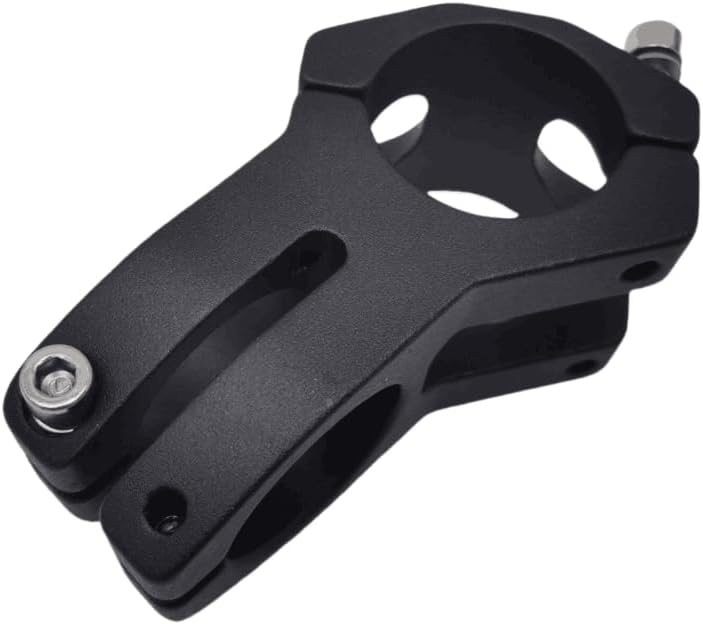
Image: Side profile of the handlebar stem, illustrating its design and the position of the securing bolts for both the steering column and the handlebar.

Image: Close-up view of the handlebar clamp on the stem, showing the bolt configuration for securing the handlebar.

Image: Top-down perspective of the handlebar stem, providing a clear view of both the steering column and handlebar clamping areas.
Operating
The handlebar stem is a fixed component once installed. Proper operation involves ensuring the handlebar is always securely fastened and aligned. Before each ride, perform a quick check:
- Grip the handlebars and attempt to twist them. There should be no movement.
- Check for any play between the stem and the scooter's steering column.
- Ensure the front wheel tracks straight when the handlebars are centered.
Maintenance
Regular maintenance ensures the longevity and safety of your handlebar stem:
- Cleaning: Wipe down the stem with a damp cloth to remove dirt and grime. Avoid abrasive cleaners.
- Bolt Inspection: Periodically check all mounting bolts for tightness. Vibrations from riding can cause bolts to loosen over time. Re-tighten as needed, but do not overtighten.
- Damage Check: Inspect the stem for any cracks, bends, or other signs of damage, especially after impacts or falls. Replace the stem immediately if any damage is detected.
Troubleshooting
- Issue: Handlebar feels loose or rotates.
Solution: Re-tighten the handlebar clamp bolts. Ensure they are tightened evenly in a crisscross pattern. If the issue persists, inspect the handlebar for compatibility or damage.
- Issue: Stem rotates on the steering column.
Solution: Re-tighten the lower clamp bolts that secure the stem to the steering column. Ensure they are tightened evenly. If the issue persists, check for proper seating of the stem on the column.
- Issue: Squeaking or creaking noises from the stem area.
Solution: Check all bolts for proper tightness. Sometimes, slightly loosening and then re-tightening bolts can resolve creaking. Ensure all contact surfaces are clean.
Specifications
- Brand: SPEDWHEL
- Model Number: G4
- Color: Black
- Product Dimensions: 1"L x 1"W (Note: These dimensions may refer to packaging or a specific part, actual stem dimensions vary)
- Handle Compatibility: Model Specific (Kugoo Kirin G4 / KuKirin G4)
- Material: (Assumed durable metal, e.g., aluminum alloy, based on product type)
- UPC: 761850187517
- ASIN: B0DPKKP156
Warranty and Support
For warranty information or technical support, please refer to the retailer or manufacturer's official website where the product was purchased. Keep your proof of purchase for any warranty claims.
