
FKPCAM FK20
Contents
FKPCAM Trail Camera FK20 User Manual
Model: FK20 | Brand: FKPCAM
Product Overview
The FKPCAM Trail Camera FK20 is a high-performance outdoor surveillance device designed for capturing wildlife, monitoring property, and various outdoor applications. Featuring 4K video recording, 64MP photo capabilities, and enhanced night vision, it ensures clear and detailed captures day and night. Its integrated solar panel and 5000mAh built-in battery provide extended operation, while WiFi connectivity and app control offer convenient remote management.
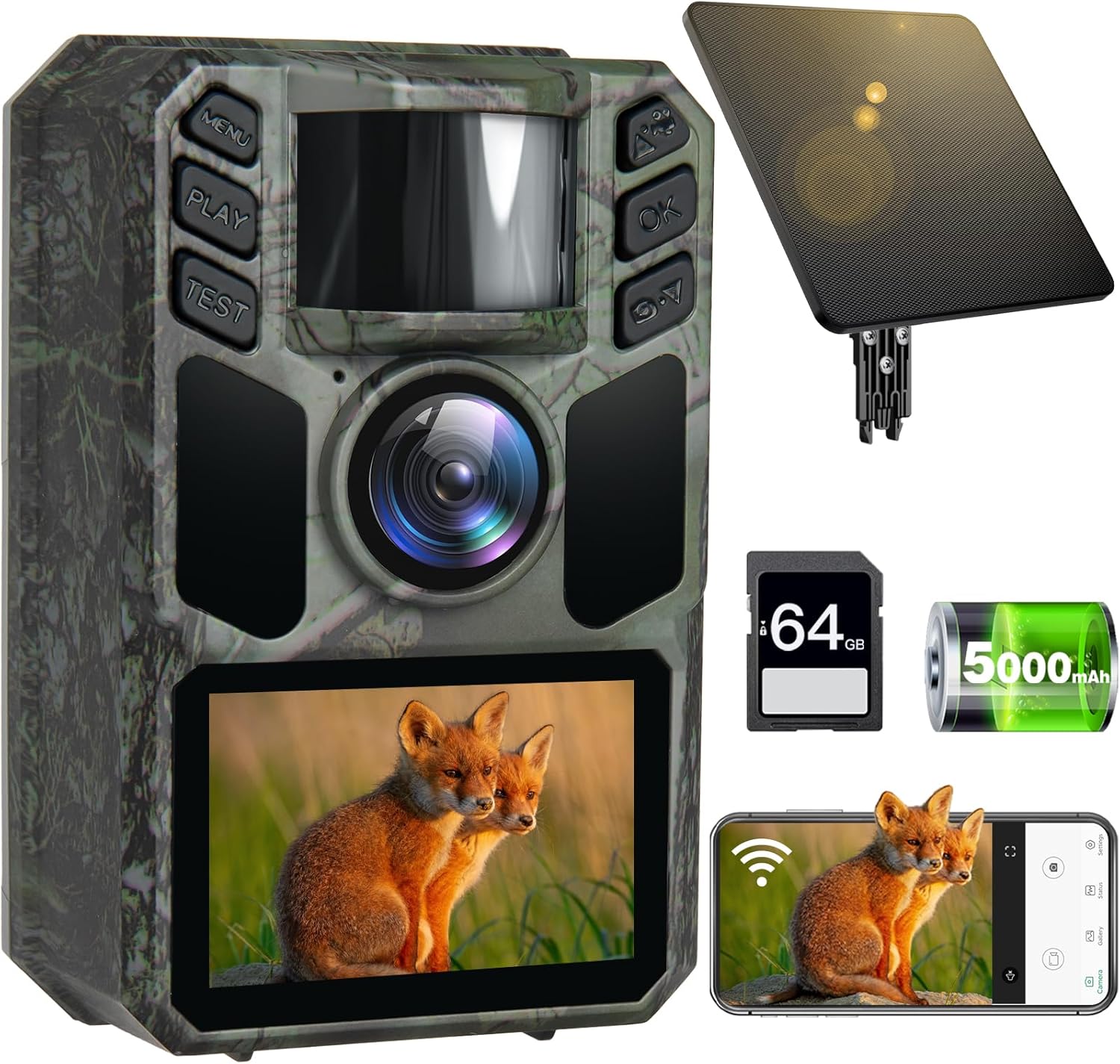
Image: The FKPCAM Trail Camera FK20, showcasing its main unit, detachable solar panel, included 64GB memory card, and 5000mAh built-in battery, along with a smartphone displaying the app interface.
What's in the Box
Upon unboxing your FKPCAM Trail Camera FK20, please verify that all components are present:
- 1 x Trail Camera (FK20)
- 1 x Solar Panel
- 1 x Mounting Bracket for Solar Panel
- 1 x Base of Stand Set (Threaded Tripod)
- 1 x Mounting Strap
- 1 x 64GB Memory Card
- 1 x USB Cable (Type-C)
- 1 x User Manual (this document)
- 1 x Mounting Tool for Solar Panel
- Screw Accessories

Image: A visual representation of all items included in the FKPCAM Trail Camera FK20 package, including the camera, solar panel, various mounting accessories, memory card, and cables.
Setup Guide
1. Initial Charging
The FKPCAM Trail Camera FK20 features a built-in 5000mAh rechargeable battery and an efficient solar panel for continuous power. For optimal performance, it is recommended to fully charge the camera before its first use, especially if it will be deployed in low-light conditions or indoors initially.
- Solar Charging: Position the solar panel in direct sunlight. The charging indicator light will turn red during charging and turn off when fully charged.
- USB Charging: Connect the camera to a 5V DC power source (e.g., wall adapter, laptop, power bank) using the provided Type-C USB cable.

Image: Illustrations demonstrating the two primary charging methods for the camera: solar power and DC5V USB charging.
2. Memory Card Installation
The camera comes with a 64GB Micro SD card. Ensure it is properly inserted before operation.
- Locate the SD card slot on the camera.
- Insert the 64GB Micro SD card with the gold contacts facing the correct direction until it clicks into place. The camera supports up to 128GB Micro SD cards.
3. Mounting the Camera
The FKPCAM Trail Camera is designed for versatile outdoor placement. Choose a location that provides a clear view of the area you wish to monitor and allows the solar panel to receive adequate sunlight.
- Tree Mounting: Use the provided mounting strap to secure the camera firmly to a tree trunk.
- Wall Mounting: Utilize the threaded tripod base and screw accessories to mount the camera to a wall or other flat surface.
- Solar Panel Placement: The solar panel can be installed flexibly with its 2m cable, allowing it to be positioned for maximum sun exposure independently of the camera's exact location.

Image: Examples of flexible installation for the camera and solar panel, showing tree mounting and wall mounting scenarios, highlighting the 2-meter cable for solar panel positioning.
Operating Instructions
1. Powering On/Off
Locate the power switch on the camera. Slide it to the "ON" position to power on the device. To power off, slide the switch to the "OFF" position.
2. WiFi Connection and App Control
The FKPCAM Trail Camera FK20 features built-in WiFi and Bluetooth for convenient control via the "TrailCam Go" app. This allows for real-time preview, photo/video download, and settings adjustment within a range of approximately 45 feet.
- Download the "TrailCam Go" app from your smartphone's app store.
- Enable Bluetooth on your smartphone.
- Open the "TrailCam Go" app and follow the prompts to connect to the camera via Bluetooth. Once connected, the app will establish a direct WiFi connection with the camera. Note: This camera does not support connection to a home Wi-Fi network or router.
- Through the app, you can browse recorded photos and videos, adjust camera settings (e.g., motion sensitivity, recording length), and download files to your phone.

Image: A visual guide demonstrating the WiFi connection and app control feature, showing a smartphone connected to the camera via the "TrailCam Go" app, with a deer in the background.
3. Capturing Photos and Videos
The camera is equipped with advanced imaging capabilities:
- 4K Video: Records crisp and detailed video footage.
- 64MP Photos: Captures high-resolution still images.
- Enhanced Night Vision: Features 850nm low-glow infrared LEDs, providing up to 100 feet of night vision range without disturbing wildlife. Images and videos captured at night will be in black and white.
- Motion Activated: A fast 0.2-second trigger speed ensures rapid capture of moving objects. The 130° PIR sensing angle provides wide coverage.

Image: Examples of the camera's high-quality output, showcasing a 64MP image of fawns and a 4K video frame of foxes, highlighting the clarity of captures.

Image: An illustration of the camera's clear night vision capability, featuring an owl and indicating the 100-foot (30m) maximum range of the 850nm low-glow LEDs.

Image: A fox in motion, illustrating the camera's rapid 0.2-second trigger speed, ensuring quick capture of moving subjects.
4. Data Transfer
You can access your captured media using several methods:
- Via App: Connect to the camera's WiFi and Bluetooth using the "TrailCam Go" app to browse and download photos/videos directly to your smartphone.
- Via USB Cable: Connect the camera to a computer using the provided Type-C USB cable to transfer files.
- Via SD Card Reader: Remove the Micro SD card from the camera and insert it into a computer using an SD card reader.

Image: A three-step visual guide showing how to transfer data: (1) App connection via WiFi/Bluetooth, (2) direct camera-to-computer connection via Type-C cable, and (3) inserting the SD card into a computer via a card reader.
Maintenance
Proper maintenance ensures the longevity and optimal performance of your FKPCAM Trail Camera FK20.
- Battery Management: The built-in 5000mAh battery is designed for extended use. Regularly check the battery level via the app. Ensure the solar panel is clean and positioned to receive maximum sunlight for continuous charging.
- Cleaning: Gently wipe the camera lens and solar panel with a soft, dry cloth to remove dust, dirt, or moisture. Avoid using abrasive cleaners or solvents.
- Weather Protection: The camera boasts an IP67 waterproof design, making it suitable for various outdoor environments, including rain and snow. However, avoid submerging the camera in water.

Image: A bear in a rainy forest, illustrating the camera's IP67 waterproof rating and its ability to operate reliably in various weather conditions, including rain, wind, snow, and sun.
Troubleshooting
If you encounter issues with your FKPCAM Trail Camera FK20, refer to the following common problems and solutions:
| Problem | Possible Cause | Solution |
|---|---|---|
| Camera not powering on. | Low battery; Power switch off; SD card issue. | Charge the camera fully. Ensure the power switch is in the "ON" position. Reinsert or replace the SD card. |
| Poor image/video quality. | Dirty lens; Insufficient light; Object too far/close. | Clean the camera lens. Ensure adequate lighting or proper night vision activation. Adjust camera placement relative to the subject. |
| WiFi connection issues. | Out of range; Bluetooth not enabled; App not running. | Ensure you are within 45 feet of the camera. Enable Bluetooth on your phone. Restart the "TrailCam Go" app. |
| Delayed recording at night. | PIR sensitivity settings; Environmental factors. | Adjust PIR sensitivity settings in the app. Ensure no obstructions are blocking the sensor. |
| Solar panel not charging. | Insufficient sunlight; Dirty panel; Cable disconnected. | Relocate the solar panel to an area with direct sunlight. Clean the solar panel surface. Check the connection cable. |
Specifications
| Feature | Detail |
|---|---|
| Model Name | FK20 |
| Brand | FKPCAM |
| Video Capture Resolution | 4K |
| Effective Still Resolution | 64 MP |
| Power Source | Solar Powered, Built-in 5000mAh Battery |
| Connectivity Technology | Wireless (Wi-Fi, Bluetooth) |
| App Control | "TrailCam Go" App (iOS compatible) |
| Night Vision Range | Up to 100 Feet (850nm Infrared LEDs) |
| Viewing Angle | 130 Degrees |
| Trigger Speed | 0.2 seconds |
| Water Resistance Level | IP67 Waterproof |
| Flash Memory Included | 64 GB Micro SD (Supports up to 128 GB) |
| Operating Temperature | -22°F to +158°F |
| Material | Plastic |
| Item Weight | 1.6 ounces |
Warranty and Support
FKPCAM is committed to providing high-quality products and excellent customer service.
- Refund Guarantee: For 90 days after the date of purchase, you are eligible for a refund for any reason.
- Product Warranty: A 24-month warranty is provided for quality-related issues.
- Technical Support: Receive professional technical support. The FKPCAM team aims to respond to inquiries within 12 hours.

Image: Icons representing FKPCAM's customer support: 12-hour response time, 30-day return/refund policy, and 1-year professional technical support. (Note: The 24-month warranty from feature bullets is prioritized over the 1-year from this image for consistency with the product description.)
For further assistance or inquiries, please contact FKPCAM customer service through the official channels provided with your product or on the FKPCAM brand store page.
Documents and downloads
Ask a question about this manual
Ask about setup, troubleshooting, compatibility, parts, safety, or missing instructions. Manuals+ will review the question and use this page’s manual context to help answer it.