1. Product Overview
The KINGBOLEN K10 Elite is a professional-grade bidirectional scan tool designed for comprehensive automotive diagnostics. It features a 10-inch HD touch screen, runs on Android 10.0, and offers extensive capabilities including full system diagnostics, over 40 reset functions, ECU coding, and advanced topology mapping. This tool is engineered to assist technicians and enthusiasts in accurately identifying and resolving vehicle issues.
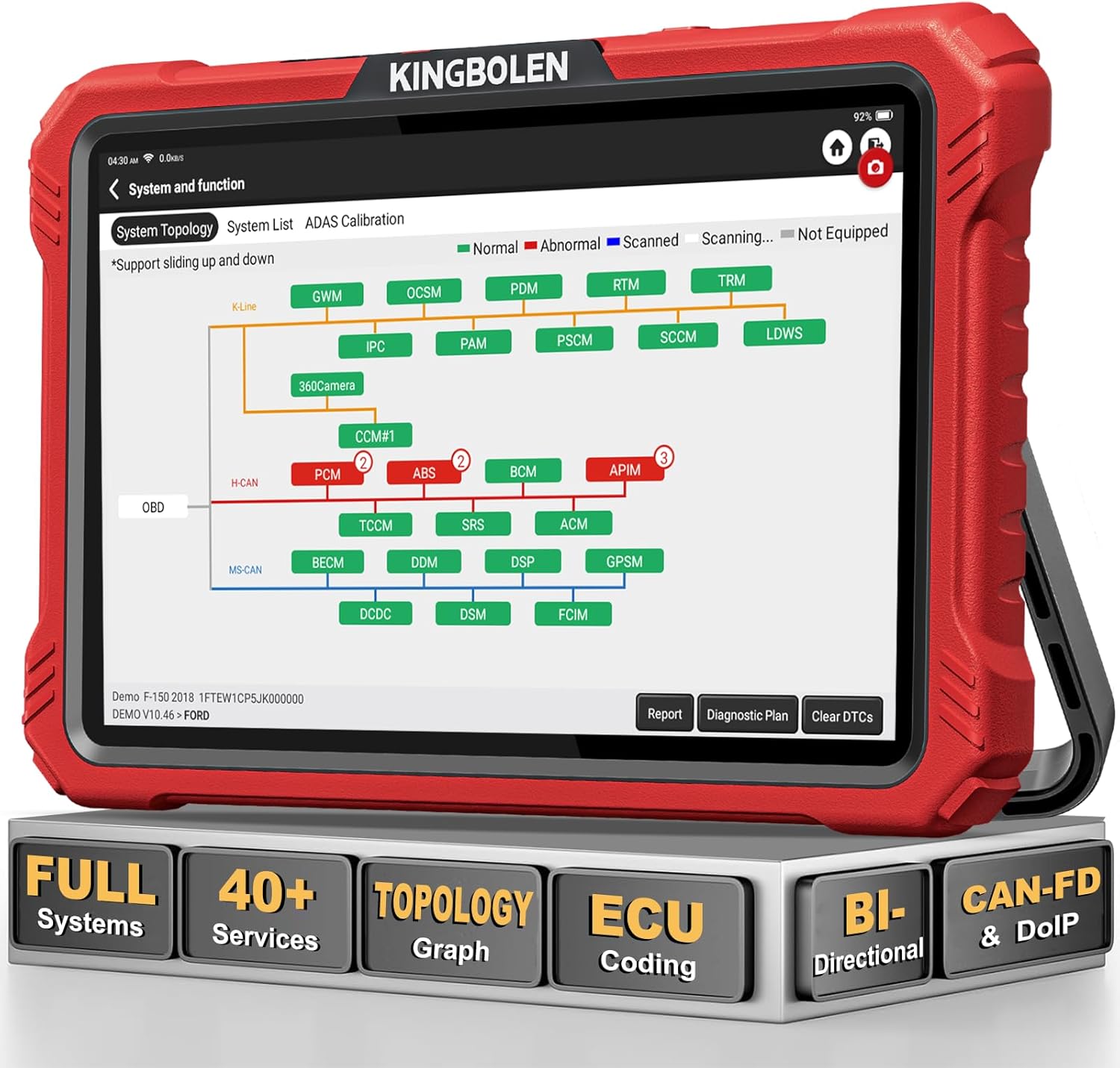
Image 1.1: The KINGBOLEN K10 Elite scan tool, showcasing its primary features including full system diagnostics, 40+ service functions, topology graph, ECU coding, bidirectional control, and support for CAN-FD & DoIP protocols.
2. Setup and Initial Use
2.1. Package Contents
Upon opening the package, verify that all components are present:
- 1 x 10'' Touch Screen KINGBOLEN K10 ELITE scan tool
- 1 x Transfer data line
- 1 x Carrying Case
- 1 x 3-in-1 Charger (US, UK, and European plugs)
- 1 x Diagnostic Connection Cable
- 1 x Type-C Cable
- 1 x Password Letter
- 1 x Packing List
- 1 x User Manual

Image 2.1: The complete set of items included with the KINGBOLEN K10 Elite, highlighting its portability and comprehensive accessories for daily use.
2.2. Powering On and Charging
The device is equipped with a 3.85V/12600mAh (7.7V/6300mAh) battery. For first-time use or if the battery is low, connect the device to the power adapter using the provided Type-C cable. The charging indicator will illuminate. A full charge ensures optimal performance and extended operation time.
2.3. Network Connection
To access updates and certain online functions, connect the K10 Elite to a Wi-Fi network. Navigate to the 'Settings' menu on the device, select 'Wi-Fi', and choose your desired network. Enter the password if prompted. A stable internet connection is crucial for initial software installation and subsequent updates.
2.4. Software Updates
The KINGBOLEN K10 Elite comes with 2 years of free software updates. After connecting to Wi-Fi, navigate to the 'Upgrade' section on the main interface. The system will check for available updates. Select and download the necessary software packages. It is recommended to keep the device updated to ensure compatibility with the latest vehicle models and diagnostic functions. After the 2-year free update period, you will still retain access to all software features from the last updated version.

Image 2.2: The update interface of the KINGBOLEN K10 Elite, emphasizing the 2-year free software update period and continuous technical support.
2.5. Connecting to Vehicle
Locate the vehicle's OBD-II port, typically found under the dashboard on the driver's side. Connect the diagnostic connection cable from the K10 Elite to the vehicle's OBD-II port. Ensure a secure connection for stable communication during diagnostics.

Image 2.3: Illustration of the wired connection between the KINGBOLEN K10 Elite and a vehicle's OBD-II port, highlighting the stability provided by a direct connection.
3. Operating the Scan Tool
3.1. Auto VIN Function
The Auto VIN function allows the K10 Elite to quickly identify most vehicle models and years automatically. This streamlines the diagnostic process by eliminating manual vehicle selection. After connecting to the vehicle, select the 'Auto VIN' option to initiate the automatic identification.

Image 3.1: The Auto VIN feature of the K10 Elite, which enables quick vehicle identification and access to full OBD2 functions across various vehicle systems.
3.2. Full Systems Diagnostics
The K10 Elite supports OE-level full systems diagnostics, allowing it to communicate with all available vehicle modules. This includes, but is not limited to, the Engine (ECM), Transmission (TCM), Anti-lock Braking System (ABS), Supplemental Restraint System (SRS), Tire Pressure Monitoring System (TPMS), Body Control Module (BCM), Steering Angle Sensor (SAS), and Air Conditioning systems. Functions include:
- Read/Clear Fault Codes: Retrieve and erase Diagnostic Trouble Codes (DTCs).
- Read Live Data/Freeze Frame: View real-time sensor data and snapshot data at the time a fault occurred.
- Read Control Module Information: Access ECU information such as software version and part numbers.
- Actuation Tests: Perform active tests on various components.

Image 3.2: The KINGBOLEN K10 Elite's capability to perform OE-level diagnostics across all vehicle systems, including engine, ABS, SRS, TPMS, and more.
3.3. Intuitive Topology Map Design
The K10 Elite features an innovative Module Topology Mapping function. This visual representation displays the interconnections between different vehicle modules, allowing users to quickly identify and pinpoint faulty modules at a glance. This significantly reduces diagnostic time and guesswork. It is recommended to use the 'Smart Scan' function when utilizing the topology graph.

Image 3.3: The intelligent topology mapping interface, which helps locate the root cause of issues by visually displaying the status and connections of all equipped vehicle systems.
3.4. 40+ Service/Calibration/Relearn Functions
The K10 Elite provides over 40 maintenance and reset functions to address common vehicle service needs. These functions include:
- Oil Reset
- Electronic Parking Brake (EPB) Reset
- Steering Angle Sensor (SAS) Reset
- Throttle Adaptation
- Battery Management System (BMS) Reset
- Tire Pressure Monitoring System (TPMS) Reset
- ABS Bleeding
- Injector Coding
- Fuel Trim Reset
- Cylinder Power Balance
- Crankshaft Sensors Relearn
- Zero Point Calibration
- Stop/Start Reset
- A/F Reset
- Electronic Throttle Relearn
The tool also offers step-by-step maintenance guide functions for specific brands like Volkswagen, Audi, Skoda, and Seat.
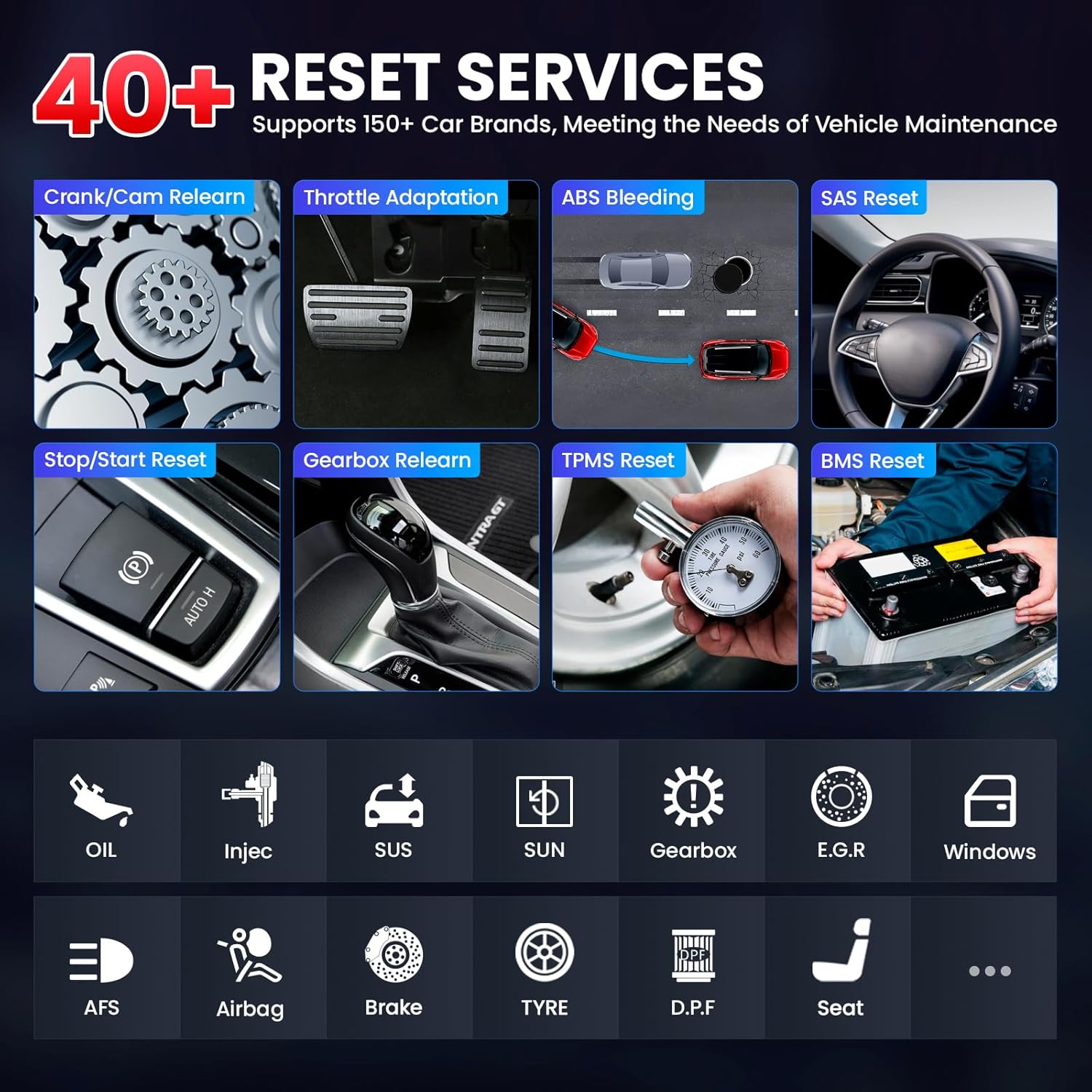
Image 3.4: A visual representation of some of the 40+ reset services available on the K10 Elite, supporting over 150 car brands for various maintenance needs.
3.5. Bi-Directional Control (Active Tests)
The K10 Elite supports powerful active tests, allowing users to send commands to vehicle systems and components to verify their functionality. This helps in accurately pinpointing the root cause of issues. Examples of active tests include:
- Fuel Injector Test
- Coolant Fan Activation
- Coolant Pump Activation
- Windshield Wiper Control
- EGR Valve Test
- Sunroof Operation
- Window Control
- A/C Clutch Cycling

Image 3.5: The bi-directional control feature allows for actuation tests on components like the A/C clutch, wipers, injectors, and fuel pump, aiding in precise fault code location.
3.6. ECU Coding
The K10 Elite supports online and offline ECU coding for various vehicles. This function is essential for:
- Matching and coding new ECUs after replacement.
- Personalizing car settings (e.g., lighting, ABS module).
- Unlocking hidden functions (e.g., movement pointer, horn alerts, disabling seat belt warnings).

Image 3.6: The advanced ECU coding feature, compatible with various car brands, enables flashing hidden features, optimizing vehicle performance, and customizing settings.
3.7. FCA AutoAuth, CAN-FD & DoIP Support
The K10 Elite provides specialized support for modern vehicle communication protocols:
- FCA Gateway Access (AutoAuth): Works with Chrysler, Dodge, Jeep, Alfa Romeo, and Fiat vehicles manufactured after 2018, allowing access to secure gateway modules for diagnostics and active tests without a bypass cable.
- CAN-FD: Compatible with GM, GMC, Buick, Chevy, and Cadillac vehicles from 2020 onwards.
- DoIP: Supports Jaguar, Land Rover, Volvo, and BMW cars manufactured after 2018.

Image 3.7: The AutoAuth feature for FCA SGW, providing quick and secure access to vehicle data for efficient diagnostics and repairs on compatible models.
3.8. Live Data Stream
The K10 Elite can display up to 12-in-1 live data streams simultaneously in both text and graph formats. This allows for intuitive analysis of abnormal parameters and real-time monitoring of sensor readings, freeze frame data, and instant error logs.

Image 3.8: The 12-in-1 live data stream feature, allowing users to check real-time working status and freeze frame data of all system sensors with various display modes.
3.9. Diagnostic Report Generation
The tool can generate comprehensive PDF diagnostic reports. These reports can be easily recorded, played back, shared, and printed, providing a clear record of vehicle health and diagnostic findings.

Image 3.9: The process of generating, sharing, and printing diagnostic reports in PDF format, facilitating easy record-keeping and communication.
4. Maintenance
To ensure the longevity and optimal performance of your KINGBOLEN K10 Elite scan tool, follow these maintenance guidelines:
- Software Updates: Regularly check for and install software updates as described in Section 2.4. Keeping the software current ensures access to the latest vehicle coverage and diagnostic functions.
- Cleaning: Use a soft, damp cloth to clean the device's screen and body. Avoid using abrasive cleaners or solvents that could damage the display or casing. Ensure the device is powered off before cleaning.
- Storage: Store the scan tool in its original carrying case in a cool, dry place, away from direct sunlight, extreme temperatures, and excessive humidity. This protects the device from physical damage and environmental factors.
- Battery Care: If the device will not be used for an extended period, charge the battery to approximately 50-70% before storage. Recharge it every few months to prevent deep discharge, which can reduce battery life.
5. Troubleshooting
If you encounter issues with your KINGBOLEN K10 Elite, refer to the following common troubleshooting tips:
- Device Not Powering On: Ensure the battery is charged. Connect the device to the power adapter and allow it to charge for at least 30 minutes before attempting to power it on again.
- No Communication with Vehicle:
- Verify that the OBD-II cable is securely connected to both the scan tool and the vehicle's OBD-II port.
- Ensure the vehicle's ignition is in the ON position (engine off or running, as required by the specific diagnostic function).
- Check the vehicle's battery voltage; low voltage can prevent communication.
- Try connecting to a different vehicle to rule out a vehicle-specific issue.
- Software Freezes/Slow Performance:
- Restart the device.
- Ensure sufficient storage space is available on the device.
- Perform a software update to the latest version.
- Wi-Fi Connection Issues:
- Verify the Wi-Fi password is correct.
- Ensure the device is within range of the Wi-Fi router.
- Restart the Wi-Fi router.
For persistent or complex issues, please contact KINGBOLEN customer support.
6. Specifications
| Feature | Specification |
|---|---|
| Brand | KINGBOLEN |
| Model | KBLA05-K10 ELITE |
| Operating System | Android 10.0 |
| Display | 10.0 Inch HD Touch Screen |
| Display Resolution | 1280*800 Pixel |
| Memory | 4GB RAM + 128GB ROM (Extended Memory) |
| Battery | 3.85V/12600mAh (7.7V/6300mAh) Lithium Polymer |
| Camera | 8.0MP Rear Camera |
| Connectivity | WIFI (2.4GHz+5.0GHz), Bluetooth, Wired Connection |
| Product Dimensions | 14.33"L x 11.81"W x 5.35"H |
| Item Weight | 7.98 pounds |
| Supported Languages | 40+ Worldwide Languages (e.g., EN, FR, ES, DE, IT, RU, PT, JP, TU, POL) |
| Vehicle Coverage | 180+ Car Brands, models after 1996 |
7. Warranty and Support
7.1. Warranty Information
The KINGBOLEN K10 Elite Bidirectional Scan Tool comes with a 1-year warranty from the date of purchase. This warranty covers manufacturing defects and malfunctions under normal use. Please retain your proof of purchase for warranty claims.
7.2. Customer Support
For any questions regarding product registration, vehicle compatibility, technical assistance, or other inquiries, please contact KINGBOLEN customer support. Our team is available to provide prompt assistance.
- Email Support: kblofficial@163.com
Please provide your product model and a detailed description of your issue when contacting support to facilitate a quicker resolution.


