
Kinhank With Light
Contents
Kinhank Super Console X4 PLUS User Manual
Model: With Light | Brand: Kinhank
Introduction
Welcome to your new Kinhank Super Console X4 PLUS. This manual provides detailed instructions for setting up, operating, and maintaining your console to ensure an optimal gaming and media experience. Please read this manual thoroughly before using the product.
Package Contents
Please verify that all items listed below are included in your package:
- Super Console X4 PLUS Console (x1)
- Wireless Controllers (x2)
- Power Supply (x1)
- HD Cable (x1)
- Remote Control (x1)
- User Manual (x1)
- TF Card (4GB) (x2)
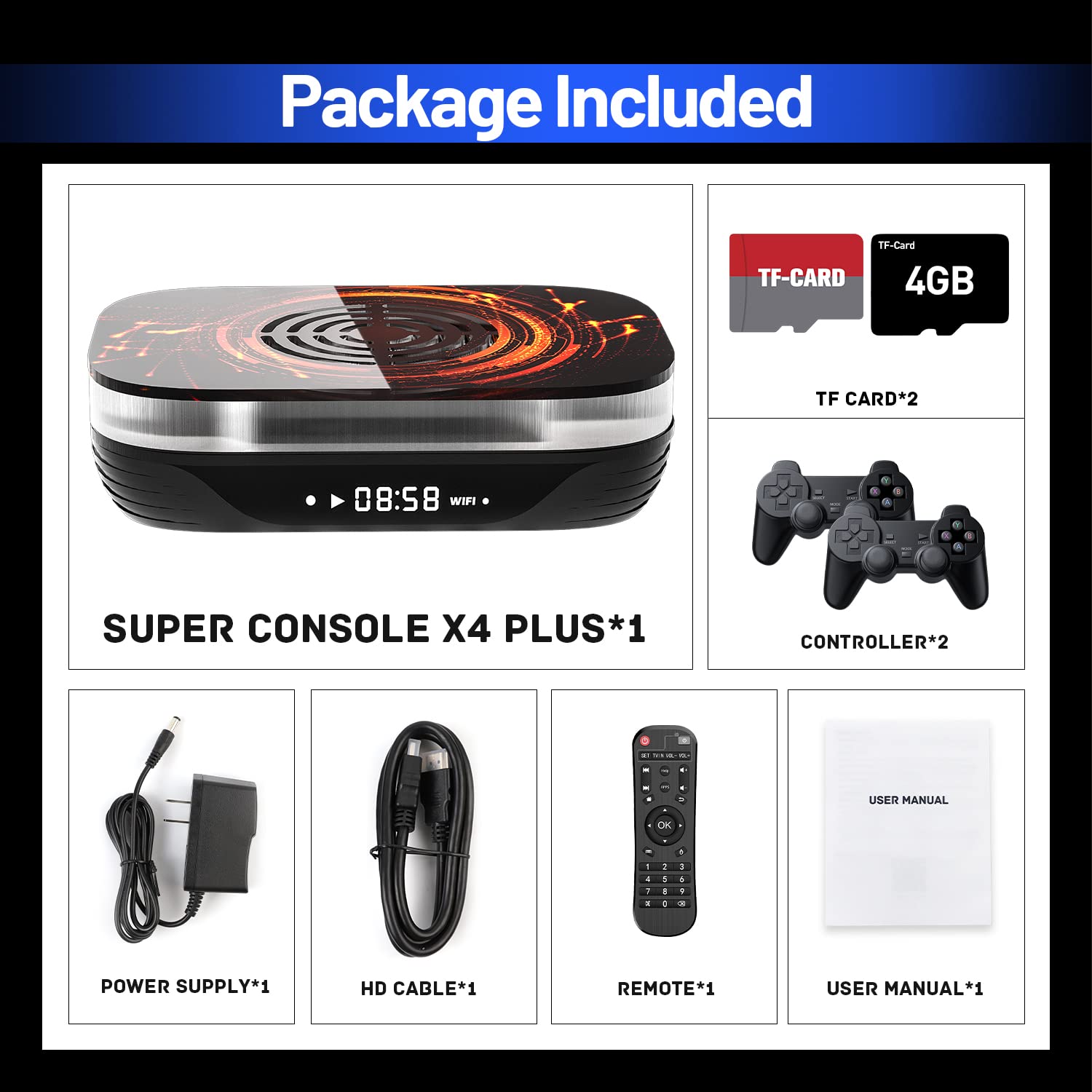
Image: Contents of the Kinhank Super Console X4 PLUS package, including the console, two controllers, power supply, HD cable, remote, user manual, and two TF cards.
Key Features
The Kinhank Super Console X4 PLUS offers a robust set of features for an immersive entertainment experience:
- Rich Classic Games: Pre-loaded with over 65,000 classic games, offering a vast library for retro gaming enthusiasts. Supports 64-bit emulators smoothly.
- All-in-One Game Console: Integrates EmuELEC 4.6 (game system), Android 11 (smart TV system), and CoreELEC (video & audio system) for versatile use.
- Excellent Performance: Powered by the Amlogic S905X4 chip with USB 3.0 for faster data transfer and smooth loading of games and movies.
- Powerful Cooling Effect: Features a built-in cooling fan with colorful lights that automatically activates to maintain optimal chip temperature (around 50℃), preventing overheating and frame drops.
- 8K UHD Output: Supports 8K UHD output and the latest 4K 120 10bit AV1 decoding for superior visual quality on compatible displays.

Image: The Kinhank Super Console X4 PLUS connected to a TV displaying a game, highlighting the vast library of over 65,000 games and wireless controllers.

Image: Visual representation of the three integrated systems: Android TV 11, EmuELEC 4.6, and CoreELEC, demonstrating the console's versatility.

Image: Diagram illustrating the Amlogic S905X4 chip architecture, emphasizing its quad-core CPU, GPU, RAM (4GB DDR3), and ROM (32GB eMMC) for stable and fast performance.

Image: Cross-section view of the console highlighting the built-in cooling fan and heat sinks, demonstrating its effective heat dissipation compared to a non-cooled system.

Image: Comparison of 8K, 4K, and 1080p resolutions, showcasing the console's 8K UHD output capability and support for AV1 decoding via its HDMI port.
Setup Guide
Connecting the Console
- Connect HD Cable: Insert one end of the included HD cable into the HD port on the back of the console and the other end into an available HDMI input on your television or monitor.
- Connect Power Supply: Plug the power adapter into the DC 5V port on the console, then connect the adapter to a power outlet.
- Insert TF Cards: Carefully insert the pre-loaded TF cards into the designated TF card slots on the console. Ensure they are fully seated.
- Prepare Controllers: Ensure your wireless controllers have fresh batteries or are fully charged.
- Power On TV: Turn on your television and select the correct HDMI input source that the console is connected to.
- Power On Console: Press the power button on the console or use the included remote control to power on the device.
Initial System Boot
Upon first boot, the console will typically launch into the EmuELEC game system. You can switch between the three integrated systems (EmuELEC, Android 11, CoreELEC) as needed through the system's interface or dedicated remote buttons.

Image: Detailed view of the console's ports (LAN, AV, HD, SPDIF, DC 5V, TF Card, USB 3.0, USB 2.0) and dimensions, illustrating connection points and data transfer speeds.
Operating Instructions
Navigating the Interface
Use the directional pad and action buttons on the wireless controllers or the navigation buttons on the remote control to browse menus, select options, and interact with the system.
Switching Systems
The console supports three distinct operating systems: EmuELEC (for gaming), Android 11 (for smart TV functions), and CoreELEC (for media playback). Consult the on-screen menu options or specific buttons on your remote control to seamlessly switch between these environments.
Playing Games (EmuELEC)
The EmuELEC system is pre-configured with a vast collection of retro games:
- From the main EmuELEC menu, navigate through the list of emulators or game categories.
- Select your desired game from the displayed list.
- Press the designated button (usually 'A' or 'X' on the controller) to launch the game.
- To exit a game or access in-game emulator menus (e.g., save states, load states), typically press a combination of buttons like SELECT + START simultaneously. Refer to the specific emulator's documentation for precise controls.
Using Android 11
The Android 11 system transforms your console into a smart media device. Connect to your home Wi-Fi network via the Android settings menu to access the Google Play Store, browse the internet, and install streaming applications.
Using CoreELEC
CoreELEC is a lightweight operating system optimized for media playback. It provides a smooth and efficient platform for watching movies, listening to music, and managing your media library.
Maintenance
To ensure the longevity and optimal performance of your Kinhank Super Console X4 PLUS, follow these maintenance guidelines:
- Ventilation: Always place the console in a well-ventilated area, ensuring that the cooling fan vents are not obstructed. This prevents overheating and maintains stable performance.
- Cleaning: Regularly wipe the exterior of the console with a soft, dry, lint-free cloth. Do not use liquid cleaners or abrasive materials.
- Environment: Avoid exposing the console to extreme temperatures, high humidity, direct sunlight, or dusty environments.
- Handling: Handle the console with care. Do not drop it or subject it to strong impacts.
- No Disassembly: Do not attempt to open the console or perform any unauthorized repairs. This will void your warranty and may cause damage to the device.
Troubleshooting
If you encounter any issues with your console, please refer to the following common problems and solutions:
- No Audio Output
- Ensure the HD cable is securely connected to both the console and your TV. Check your TV's audio settings and volume levels. If using an external audio system, verify its connections and input selection. Some users have reported initial audio issues; ensure all cables are fully seated and try restarting the console.
- Controller Issues / Unresponsive Controls
- Verify that the wireless controllers have fresh batteries or are fully charged. Try re-pairing the controllers with the console (refer to the system's settings for pairing instructions). If using third-party controllers, ensure they are compatible with the console. For advanced users, check controller mappings within the system settings, as incorrect configurations can lead to unresponsiveness.
- Console Overheating
- The console features a built-in cooling fan. Ensure that the fan vents are not blocked by objects or dust. Operate the console in a cool, well-ventilated environment to allow for proper airflow.
- Games Lagging or Freezing
- Ensure there is sufficient storage space on the TF cards. If running in Android mode, close any unnecessary background applications. For online features or updates, a strong and stable internet connection is recommended. Restarting the console can often resolve temporary performance issues.
Specifications
| Component | Detail |
|---|---|
| Processor | Amlogic S905X4 Quad-Core ARM Cortex-A55 (Up to 2.0GHz) |
| GPU | ARM Mali-G31 MP2 |
| RAM | 4GB DDR3 |
| ROM | 32GB eMMC |
| Operating Systems | EmuELEC 4.6, Android 11, CoreELEC |
| Video Output | 8K UHD (up to 8K@24FPS, 4K@60FPS), AV1 Decoding |
| Wireless Connectivity | 2.4G+5G WIFI, Bluetooth 4.0 |
| Wired Connectivity | Gigabit Ethernet |
| Ports | USB 3.0, USB 2.0, HD (HDMI), AV, SPDIF, DC 5V, TF Card Slot |
| Dimensions | 7.1 x 5.9 x 3.9 inches |
| Weight | 1.6 pounds |
Warranty and Support
For detailed warranty information, technical assistance, or customer support, please refer to the documentation included with your purchase or visit the official Kinhank website. It is recommended to retain your proof of purchase for any warranty claims.
Ask a question about this manual
Ask about setup, troubleshooting, compatibility, parts, safety, or missing instructions. Manuals+ will review the question and use this page’s manual context to help answer it.