
Introduction
This manual provides detailed instructions for the installation, operation, and maintenance of your LEDIARY 20-inch Modern Ceiling Fan with Lights and Remote. Please read this manual thoroughly before installation and use to ensure safe and efficient operation.
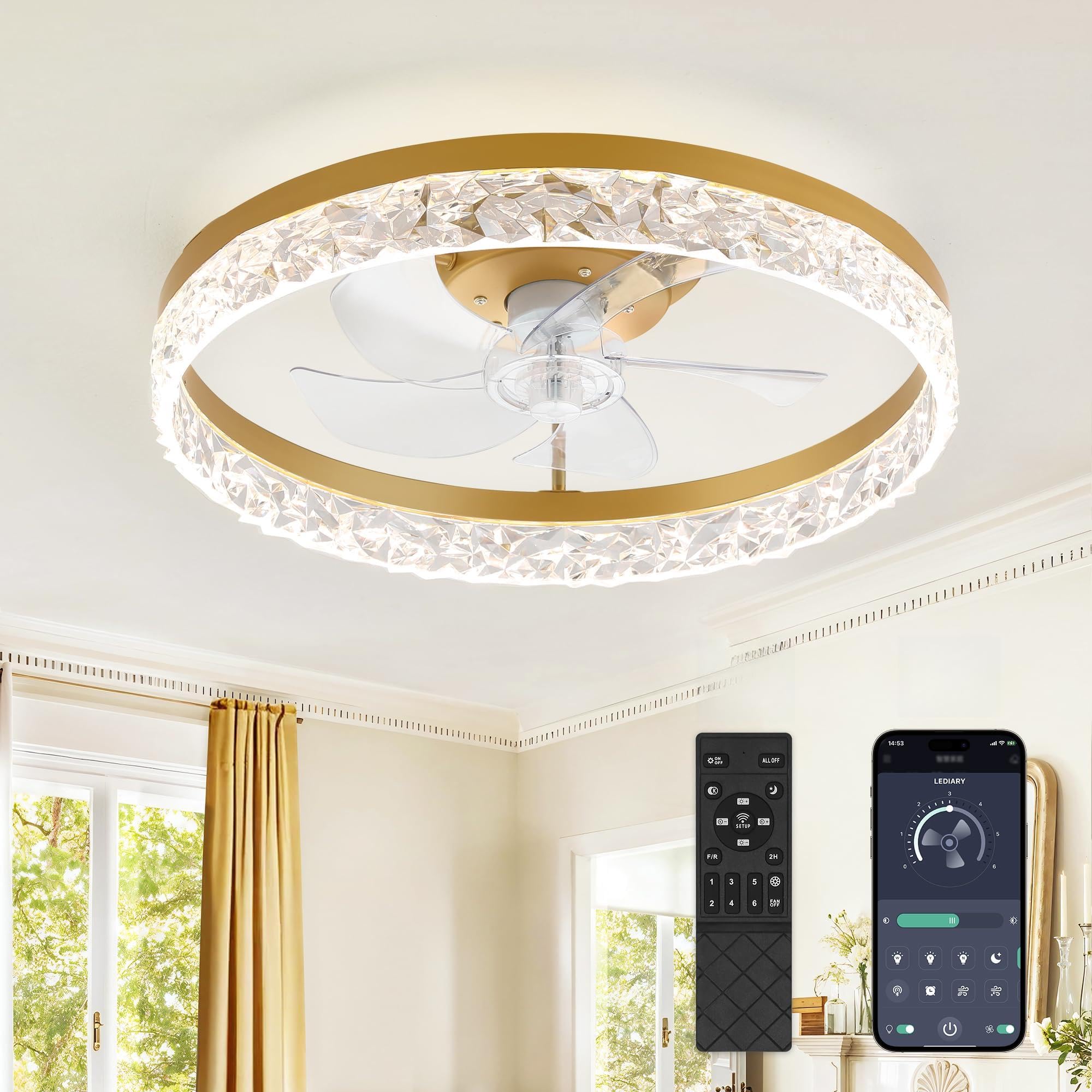
Image: The LEDIARY 20-inch Modern Ceiling Fan with Lights and Remote, showcasing its sleek design.
Safety Information
- Always turn off power at the circuit breaker before installation or maintenance.
- Ensure all electrical connections comply with local codes and ordinances.
- Consult a qualified electrician if you are unsure about wiring procedures.
- Do not bend the fan blades during installation or cleaning.
- Ensure the mounting structure can support the weight of the fan.
- Keep children away from the fan during operation.
- This product is for indoor use only.
Package Contents
Verify that all components are present before beginning installation:
- Ceiling Fan Unit (with integrated LED light)
- Remote Control
- Mounting Bracket
- Wire Nuts
- Screws and Anchors
- User Manual (this document)

Image: A view of the ceiling fan components as they appear in the packaging, including the main unit, remote, and hardware.
Setup & Installation
Tools Required: Screwdriver, wire strippers, electrical tape, ladder.
- Turn off Power: Before starting, ensure the power to the ceiling fan location is turned off at the circuit breaker.
- Mounting Bracket Installation: Secure the mounting bracket to the ceiling junction box using the provided screws and anchors. Ensure it is firmly attached and can support the fan's weight.
- Wiring Connections:
- Connect the ground wire (green or bare copper) from the fan to the ground wire from the ceiling box using a wire nut.
- Connect the neutral wire (white) from the fan to the neutral wire from the ceiling box using a wire nut.
- Connect the live wire (black) from the fan to the live wire from the ceiling box using a wire nut.
- Ensure all connections are secure and insulated with electrical tape if necessary.
- Attach Safety Cable: Connect the safety cable from the fan to the mounting bracket or a secure structural point in the ceiling.
- Secure Fan Unit: Carefully lift the fan unit and attach it to the mounting bracket, ensuring all wires are tucked safely inside the junction box. Secure the fan unit with the appropriate screws.
- Power On: Restore power at the circuit breaker.
Video: An overview of the LEDIARY ceiling fan's features and installation process, including wiring and mounting.

Image: Detailed view of the wiring connections for the ceiling fan, showing the black, white, and ground wires.
Operating Instructions
Your LEDIARY ceiling fan can be controlled via the included remote control or a smartphone app (Bluetooth required).
Remote Control Functions:
- Power On/Off: Turns the fan and light on or off.
- Fan Speed: Select from 6 fan speeds (1-6).
- Light Brightness: Adjust brightness from 10% to 100% (stepless dimming).
- Color Temperature: Change light color from warm white (3000K) to cool white (6500K).
- Reversible Motor (F/R): Switches between downdraft (summer) and updraft (winter) airflow modes.
- Timer: Set the fan to turn off after 1 or 2 hours.
- Night Light: Activates a low-level night light setting.

Image: The remote control and a smartphone screen displaying the app interface for controlling the fan and light functions.
Light Settings:
The integrated LED light offers stepless dimming and color temperature adjustment. When turned off, the fan remembers the last light setting (color temperature and brightness).

Image: Visual representation of the stepless color temperature change (3000K Warm White to 6500K Clear White) and smooth dimming from 10% to 100% brightness.
Reversible Motor:
The fan features two airflow modes to optimize comfort year-round:
- Summer Mode (Downdraft): Creates a cooling effect by pushing air downwards.
- Winter Mode (Updraft): Circulates warm air upwards, helping to distribute heat evenly.

Image: Diagram illustrating the downdraft (summer mode) and updraft (winter mode) airflow patterns of the reversible motor.
Maintenance
- Cleaning: To clean the fan, wipe with a soft, damp cloth. Do not use abrasive cleaners or solvents. Ensure power is off before cleaning.
- Blade Care: The fan blades are made of ABS plastic. Handle with care to avoid damage.
- Light Source: The LED light source is integrated and not user-replaceable.
Troubleshooting
| Problem | Possible Cause | Solution |
|---|---|---|
| Fan does not operate. | No power supply; loose wiring; remote control battery low. | Check circuit breaker; ensure all wires are securely connected; replace remote control batteries. |
| Light does not turn on. | No power supply; loose wiring; LED module failure. | Check circuit breaker; ensure all wires are securely connected; contact customer support for LED module replacement. |
| Fan makes excessive noise. | Loose screws; unbalanced blades; motor issue. | Check and tighten all mounting screws; ensure blades are properly installed; contact customer support. |
| Remote control not working. | Low battery; remote not paired. | Replace batteries; refer to remote pairing instructions (usually press and hold a button within 5 seconds of power-on). |
Specifications
| Feature | Detail |
|---|---|
| Brand | LEDIARY |
| Model | Ceiling Fans with Lights |
| Size | 20 inches (diameter) |
| Color | Gold |
| Material | Acrylic, Metal, Plastic |
| Fan Speeds | 6 Speeds |
| Light Source | Integrated LED |
| Brightness | 3570 Lumens |
| Color Temperature | 3000K (Warm White) - 6500K (Cool White), Stepless Change |
| Dimming | 10%-100% Smooth Dimming |
| Voltage | 110-120 Volts |
| Control Method | Remote Control, App Control (Bluetooth required), Wall Switch |
| Special Features | Reversible Motor, Timer Setting (1H/2H), Night Light, Memory Function |

Image: Diagram showing the dimensions (19.7" diameter, 7.9" height) and key features like memory function, low noise, dimmable, and 2-year after-sales support.
Warranty & Support
Your LEDIARY Ceiling Fan with Remote comes with a 2-year support period. If you encounter any issues or require assistance, please contact our after-sales support team. Refer to the contact information provided in your product packaging or on the official LEDIARY website.
For further assistance, please visit the LEDIARY Store on Amazon.


