
1. Introduction
The GENDOME Go 300 Portable Power Station is a versatile and reliable power solution designed for various applications, including home backup, outdoor camping, travel, and emergency situations. Featuring a 288Wh LiFePO4 battery and a 300W AC outlet, it provides stable power for a wide range of electronic devices. This manual provides essential information on the safe operation, maintenance, and troubleshooting of your Go 300 power station.
Please read this manual thoroughly before using the product and retain it for future reference.
2. Safety Information
Adherence to the following safety guidelines is crucial for preventing electric shock, explosion, fire, and property damage. Improper use may result in serious injury or death.
- Do not disassemble, repair, or modify the unit.
- Do not place the unit near fire or expose it to heat.
- Do not use or store the unit in a bathroom or in an area exposed to rain or moisture.
- Use only original or certified charging cables and adapters.
- Keep the unit away from children and pets.
- Do not use the unit if it has been damaged or dropped.
- Ensure proper ventilation during use to prevent overheating.
- The LiFePO4 battery is designed for long life and safety, certified by UN and UL standards.
3. Package Contents
Verify that all items are present in the package:
- 1 x GENDOME Go 300 Portable Power Station
- 1 x 65W Charger
- 1 x USB-C Cable
- 1 x Solar Charging Cable
- 1 x User Manual
4. Product Overview & Setup
Familiarize yourself with the components and ports of your Go 300 power station.
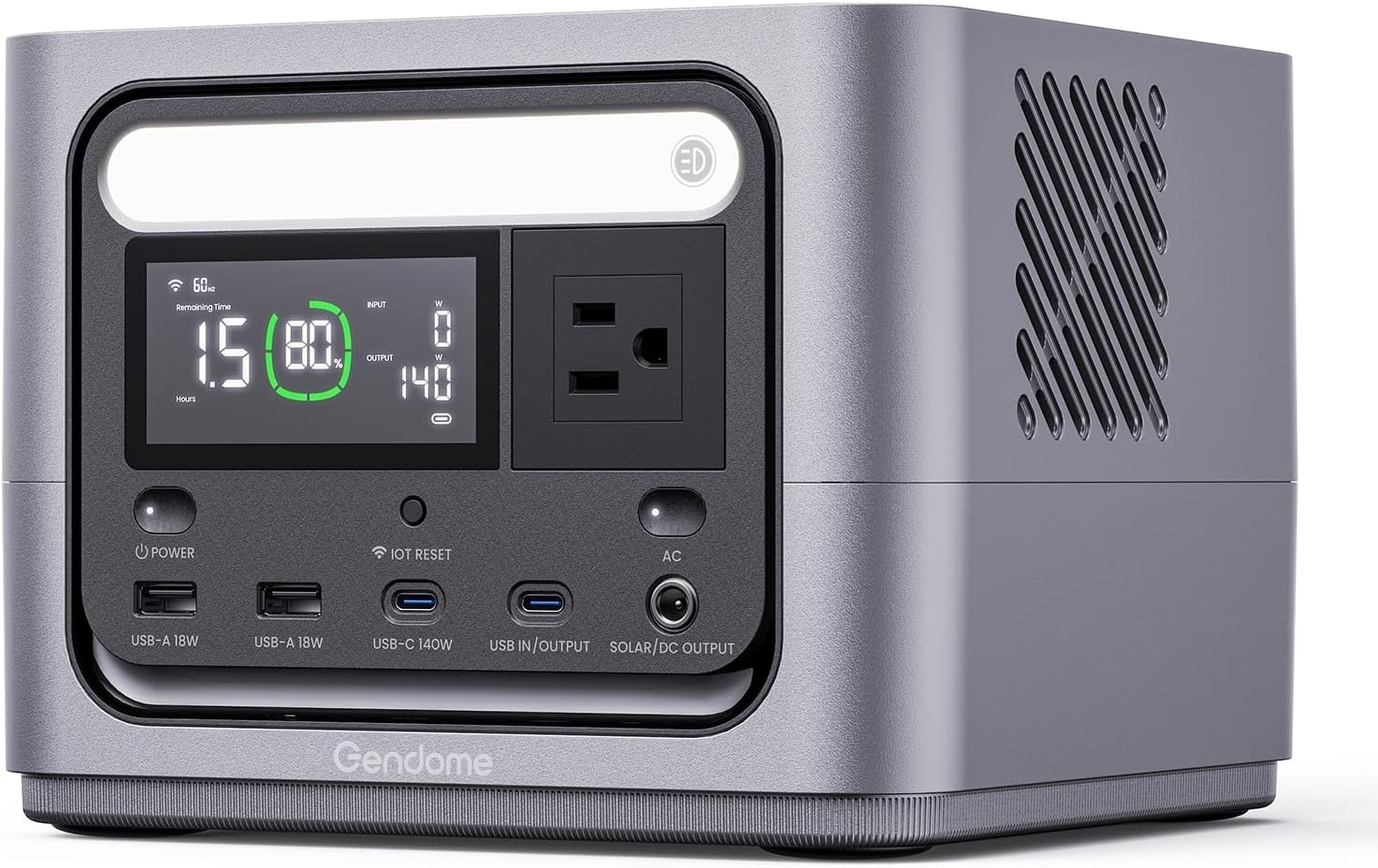
Image Description: A front-facing view of the GENDOME Go 300 Portable Power Station. The central display shows battery percentage, remaining time, input, and output wattage. Below the display are various ports: two USB-A (18W), one USB-C (140W), and a combined USB In/Output and Solar/DC Output port. An AC outlet is visible on the right side of the display. Power and AC buttons are located on either side of the port section.

Image Description: A detailed diagram highlighting the versatile output ports of the GENDome Go 300. Numbered labels indicate: 1) AC (300W), 2) USB-C (140W), 3) USB-C (140W) In/Output, 4) USB-A x 2 (18W), 5) DC output (160W) Solar input (200W), and 6) Wireless Charging (15W) on the top surface.
4.1 Initial Use
Before first use, fully charge the Go 300. Connect the provided 65W charger to the USB In/Output port and plug it into a wall outlet. The display will indicate charging status.
4.2 Powering On/Off
Press and hold the Power button for 3 seconds to turn the unit on or off. The display will illuminate upon activation.
5. Operating the Go 300
5.1 Charging the Go 300
The Go 300 supports three charging methods:
- USB-C Charging: Use the provided USB-C cable and 65W charger for wall charging.
- Solar Charging: Connect a compatible solar panel (not included) to the Solar/DC Output port using the provided solar charging cable. Ensure the solar panel is positioned for maximum sunlight exposure.
- Car Charging: Use a compatible car charger (not included) to charge the unit from your vehicle's 12V outlet.

Image Description: An illustration showing the three ways to recharge the GENDOME Go 300: via USB-C, a solar panel, and a car charger. The power station is depicted outdoors with a solar panel setup, emphasizing its versatility for off-grid use.
5.2 Powering External Devices
The Go 300 offers multiple output options for various devices:
- AC Output: Press the AC button to activate the 300W AC outlet. Plug in devices such as laptops, small appliances, or lights.
- USB-C Output: The two USB-C ports provide up to 140W each, supporting PD 3.1 fast charging for compatible smartphones, tablets, and laptops simultaneously.
- USB-A Output: The two USB-A ports provide 18W output for charging standard USB devices.
- Wireless Charging: Place your Qi-compatible device on the wireless charging pad located on top of the unit.

Image Description: A graphic highlighting the key features of the GENDOME Go 300: 288Wh capacity, 300W output, and 7 outlets. The power station is shown on a wooden surface with a smartphone wirelessly charging on top.

Image Description: A scene depicting the GENDOME Go 300 in an office setting, simultaneously charging two laptops via its PD3.1 fast-charging USB-C ports. This illustrates its capability to provide high-speed power to multiple demanding devices.
5.3 GENDOME App Control
Pair your Go 300 with the GENDOME app for enhanced control and monitoring. The app allows for:
- Scheduled charging
- Real-time data monitoring
- Power consumption tracking
- Voice control
- Light switch for multi-scene use
6. Maintenance
Proper maintenance ensures the longevity and optimal performance of your Go 300.
- Storage: Store the unit in a cool, dry place away from direct sunlight and extreme temperatures. For long-term storage, charge the unit to 50-80% every 3-6 months to preserve battery health.
- Cleaning: Use a dry, soft cloth to clean the exterior of the unit. Do not use abrasive cleaners or immerse the unit in water.
- Battery Care: The LiFePO4 battery has a long lifespan of up to 10 years and 3000+ cycles. Avoid fully discharging the battery frequently to maximize its lifespan.
7. Troubleshooting
If you encounter issues with your Go 300, refer to the following common problems and solutions:
| Problem | Possible Cause | Solution |
|---|---|---|
| Unit does not power on | Battery is depleted; Power button not pressed correctly. | Charge the unit; Press and hold the Power button for 3 seconds. |
| AC output not working | AC output not activated; Device exceeds 300W limit. | Press the AC button; Check device wattage. |
| USB ports not charging | Cable issue; Device not compatible. | Try a different cable; Ensure device is compatible with USB-A/USB-C. |
| Unit overheating | Poor ventilation; Excessive load. | Ensure clear airflow around the unit; Reduce connected load. |
If the problem persists, please contact customer support.
8. Specifications
| Feature | Detail |
|---|---|
| Model Name | Go 300 |
| Battery Capacity | 288Wh |
| Battery Type | LiFePO4 |
| AC Output | 300W (Rated) |
| USB-C Output | 2 x 140W (PD 3.1) |
| USB-A Output | 2 x 18W |
| Wireless Charging | 15W |
| Solar Input | Up to 200W |
| Product Dimensions | 8.3"L x 8"W x 6.3"H |
| Item Weight | 10.43 pounds |
| Certifications | UL 2743 (Fireproof), UN 38.3 (Drop-Proof) |
9. Warranty & Support
9.1 Warranty Information
The GENDOME Go 300 Portable Power Station comes with a 2-year warranty from the date of purchase. This warranty covers manufacturing defects and workmanship. It does not cover damage caused by misuse, accidents, unauthorized modifications, or natural disasters.
9.2 Customer Support
For technical assistance, warranty claims, or any questions regarding your GENDOME Go 300, please contact our customer support team. Refer to the contact information provided on the product packaging or our official website.