
Introduction
The Effireli RC5118 is a dedicated replacement remote control designed for a wide range of television models from brands such as Hitachi, Telefunken, OK, Luxor, Edenwood, Finlux, and Polaroid. This remote is engineered for immediate use, requiring no complex programming or setup procedures. Simply insert batteries and begin operating your compatible television.
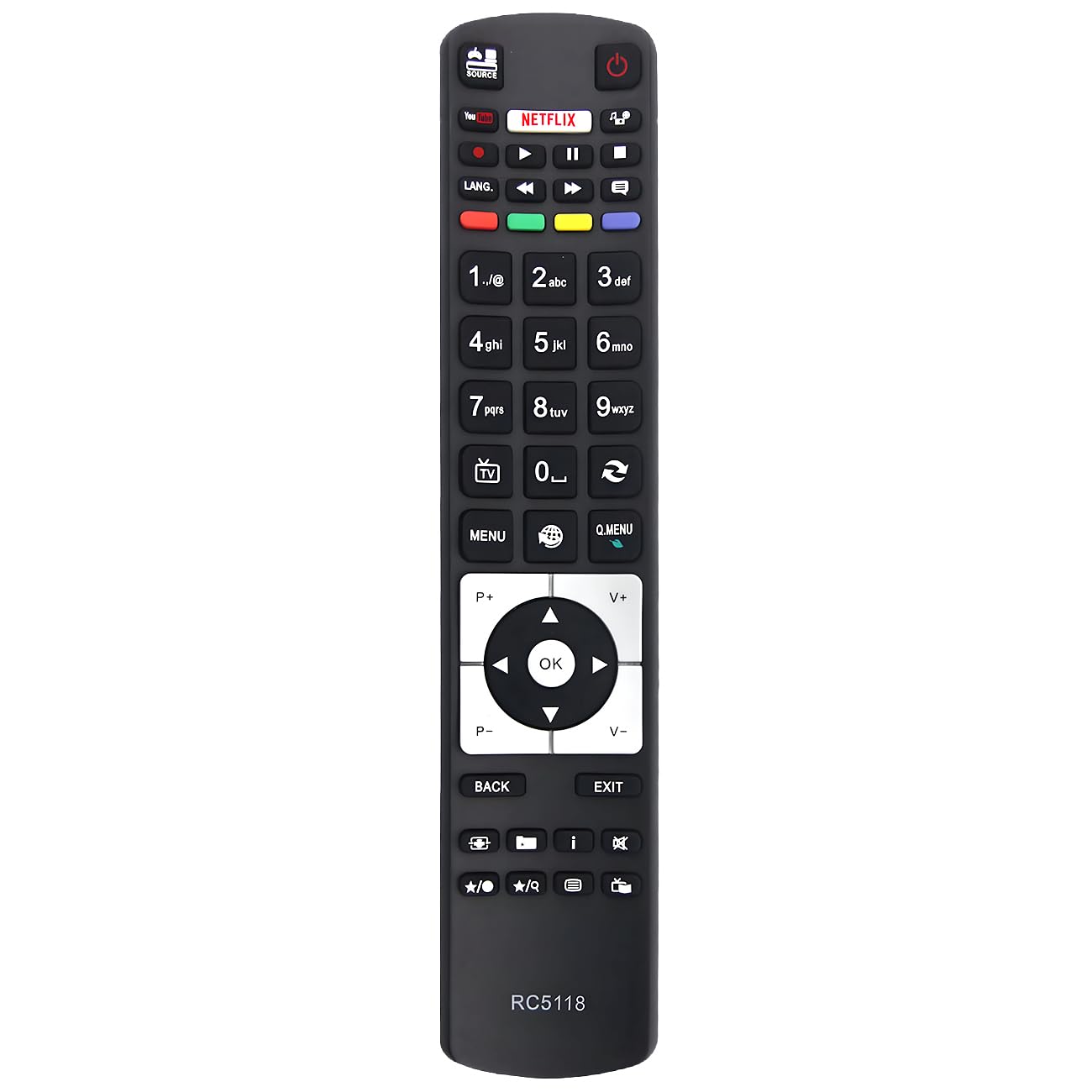
Image: The Effireli RC5118 replacement remote control, showcasing its standard button layout.
Product Features
- No Programming Required: Ready to use out of the box with compatible TV models.
- Direct Operation: Point and operate functionality for ease of use.
- Infrared (IR) Technology: Utilizes standard infrared signals for communication with your television.
- Single Device Control: Specifically designed to control one television.
Setup
- Insert Batteries:
Locate the battery compartment on the back of the RC5118 remote control. Slide the cover open. Insert two new AAA batteries (not included), ensuring that the positive (+) and negative (-) terminals align correctly with the indicators inside the compartment. Close the battery cover securely.
- Point and Operate:
Once batteries are installed, the remote is ready for use. Point the remote control directly towards the infrared sensor on your television. The remote should function immediately with compatible models without any additional pairing or code entry.
Operating Instructions
The RC5118 remote control provides essential functions for your television. Below are common button functionalities:
- Power Button: Turns the television on or off.
- Channel Up/Down: Navigates sequentially through television channels.
- Volume Up/Down: Adjusts the television's audio output level.
- Mute Button: Silences or restores the television's audio.
- Number Buttons (0-9): Allows direct input for channel selection.
- Menu Button: Accesses the television's main settings or options menu.
- Navigation Buttons (Up, Down, Left, Right): Used to move cursor or selection within on-screen menus.
- OK/Enter Button: Confirms a selection or enters a submenu.
- Back/Exit Button: Returns to the previous menu screen or exits the current menu.
Note: The exact functionality of certain buttons may vary based on your specific television model and its features.
Compatible Television Models
The Effireli RC5118 replacement remote is compatible with numerous television models from various brands. A partial list of compatible models includes:
- 43UC7250
- 49UC7250
- 55UC7250
- 65UC8250
- 43UHD7008-1
- 48WF400A
- A40F446A
- A55F446A
- C55U320A4CW-3D
- C55U320N4CW-3D
- D32F286B4CW
- D32F287N4CW
- D32H286B3CW
- D39F265B3CW
- D39F275M3CW
- D40F282Y4CW
- D40F286B4CW
- D40F287M4CW
- D40U292X4C
- D43F279Q3CW
- D43F282Y4CW
- D43F286B3CW
- D43F287M3CW
- D48F287M4CW
- TFLU4317UHD31B
- D49F279N3CW
- D49F286B4CW
- L43U300N4CW
- D49F287N4CW
- D49U297N4CW
- D49U400U4CW
- D55F287B3CW
- D55F287B4CW
- D55F287M4CW
- D55F287N3CW
- D55F287Y4CW
- D55F289N4CW
- D55U297N4CW
- D55U400Y4CW
- DOMUS40DVISMW
- L32F249U4CW
- L40F283A4CW
- L40U300A4CW
- L48U300A4CW-3D
- L48U300N4CW
- L48U300Q4CW
- L48U500M4CWI
- L55F249N3CW
- L55U300N4CW
- L55U300N4CWI
- L55U300Q4CW
- L65F249A3CW
- D32H286B4CW
- L65F249N3CW
- L65U249A4CW-3D
- L65U249N4CW
- L65U249Q4CW
- L65U253B4CW
- LF43FZ20
- LF43WZ20
- LU49FZ30
- TFK32BC16
- TFL24DVSAT12V16B
- TFL494303UHD17
- TFL554303UHD17
- TFL65FHD250BC/2
- TFLE55FHDC6300B/2
- TFLES65302FHDWF400B
- TFLUC5516UHD300B
- TFS49UHD17B
- WF43-EA40
- WF43-EA41
- WF48-EA40
- WF48-EA41
- XF43B400
- XF48B400
- XF50A401
- XF55A400
- XF55B400
- XH32A100D
- XH32A201D
- XH32A201D-W
- XH32A301
- XH32A301-W
- XU40A401
- XU49A401
- XU49B401
- XU55A441C
- XU65A441
- 32HB1S66I
- 42HZC66T3D
- 42HZC663D
- 40HE1511-B
- 55HGW69-H
- 40HE1511-W
- 50HYT62U H
- 24HE1510-W
- 65HZ6W69
- 43HGW69 H
- 55HK6T64U
- 32HE1510-W
- 49HGW69-H
- 49F501HG2W69
- 24HE1510-B
- 55HB6T62U
- 48HB6T62U
- 32HE1510-B
- FIN40BASEBK
- FIN48SMARTBK
- 48FT3E242ST
- FIN48BASEBK
- FIN32BASEBK
- FIN55SMARTBK
- 42FLHK242BHCDN
- 322LED14
- 3-42-LED-14
- 3-40-LED-14
- 3-50-LED-14
- 542LED14
- P50D300S
- 5-50-LED-14
- 3-32-LED-14
- P55D600
- 3-24-LED-14
- P32D300S
- 32692F-TIB
- ODL 40690F-TIB
- ODL 55651U-TIB
- 32HB5150
- 32HB5151
- 43FB5151
If your television model is not listed above or if your original remote control has a significantly different appearance, please contact the retailer or manufacturer for compatibility confirmation.
Specifications
| Model Number | RC5118 (YK-RC5118) |
| Brand | Effireli |
| Connectivity Technology | Infrared (IR) |
| Special Feature | No Programming Required |
| Max Number of Supported Devices | 1 (Television) |
| Compatible Devices | Television |
| Package Dimensions | 9.84 x 1.97 x 0.79 inches (approx.) |
| Item Weight | 3.52 ounces (approx.) |
Troubleshooting
- Remote is not responding to the TV:
- Ensure that fresh AAA batteries are correctly inserted into the remote control, observing the polarity markings.
- Verify that there are no physical obstructions between the remote control and the television's infrared receiver.
- Confirm that the remote control is pointed directly at the television's IR sensor.
- Check if your television model is listed in the "Compatible Television Models" section.
- Some buttons are not working as expected:
- This replacement remote is designed for primary television functions. Advanced or smart TV specific features present on your original remote may not be supported.
- If basic functions (power, volume, channel) are not working, re-check battery installation and compatibility.
- Remote works intermittently:
- Replace the batteries with a new set to rule out low power.
- Ensure that strong light sources, such as direct sunlight or certain types of fluorescent lighting, are not interfering with the television's IR receiver.
Warranty and Support
- Warranty: This Effireli product is covered by a 12-month warranty against manufacturing defects from the original date of purchase.
- Money-Back Guarantee: A 30-day money-back guarantee is offered, allowing for returns within this period.
- Returns and Exchanges: Returns and exchanges are accepted within the warranty period for issues related to manufacturing defects.
- Customer Support: For further assistance, compatibility verification, or to process a warranty claim, please contact the retailer from whom the product was purchased or refer to the manufacturer's official support channels.