
Effireli YK-EN2BB27H
EN2BB27H Replacement Remote Control User Manual
For Hisense TV Models: H50AE6030, H43AE6030, H32AE5500, H39AE5500, H43AE5500, H43AE6000, H50AE6000, H55AE6000, H65AE6000, EN2BB27H, T225284, H65AE6030, H55AE6030, H50AE6000
1. Product Overview
This manual provides instructions for the Effireli EN2BB27H Replacement Remote Control, designed for various Hisense TV models. This remote is engineered for immediate use without the need for complex programming or setup procedures. Simply insert batteries and begin operation.
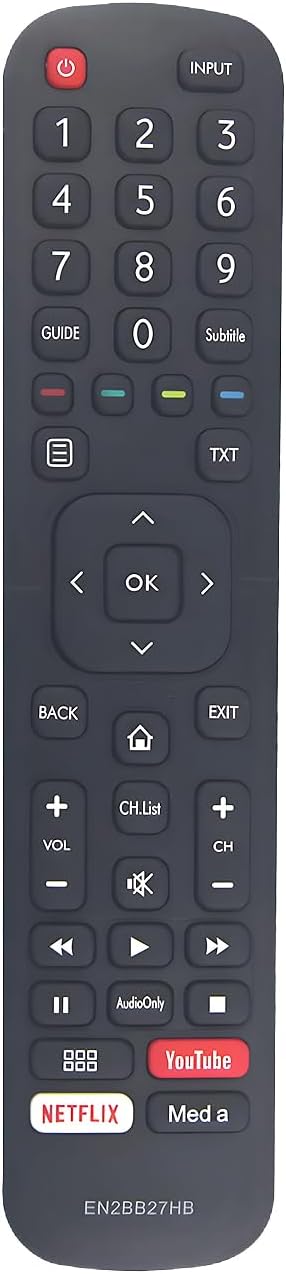
Image 1: Front view of the EN2BB27H Replacement Remote Control. The remote is dark gray with white button labels. Key buttons visible include Power (red), Input, number pad (0-9), navigation cluster with OK button, Volume and Channel controls, playback buttons, and dedicated app buttons for Netflix and YouTube.
1.1 Key Features
- No Programming Required: Ready to use out of the box.
- Direct Operation: Point and operate with ease.
- Infrared Connectivity: Standard IR signal for reliable control.
- Wide Compatibility: Compatible with a range of Hisense TV models.
2. Setup
2.1 Battery Installation
The remote control requires two AAA batteries (not included) for operation.
- Locate the battery compartment cover on the back of the remote control.
- Slide the cover downwards or press the latch to open the compartment.
- Insert two AAA batteries, ensuring the positive (+) and negative (-) terminals align correctly with the markings inside the compartment.
- Close the battery compartment cover securely until it clicks into place.
2.2 Initial Use
Once batteries are installed, the remote is ready for immediate use. No pairing or programming steps are necessary. Point the remote directly at your Hisense TV and press the desired button.
3. Operating Instructions
This section details the functions of the various buttons on your replacement remote control.
| Button | Function |
|---|---|
| Power (Red) | Turns the TV on or off. |
| INPUT | Selects the input source (HDMI, AV, etc.). |
| 0-9 (Number Buttons) | Directly selects TV channels. |
| GUIDE | Displays the electronic program guide. |
| Subtitle | Activates or deactivates subtitles. |
| Navigation (Up, Down, Left, Right) | Navigates through menus and options. |
| OK | Confirms selections in menus. |
| BACK | Returns to the previous screen or menu. |
| Home (House icon) | Accesses the TV's home screen or smart TV portal. |
| EXIT | Exits the current menu or application. |
| VOL +/- | Adjusts the volume level. |
| CH.List | Displays the channel list. |
| CH +/- | Changes the TV channel up or down. |
| Mute (Speaker with X) | Mutes or unmutes the TV audio. |
| Playback Controls (Rewind, Play/Pause, Fast Forward, Stop) | Controls media playback (e.g., USB, streaming apps). |
| Netflix | Direct access to the Netflix application. |
| YouTube | Direct access to the YouTube application. |
4. Maintenance
4.1 Battery Replacement
Replace batteries when the remote's response becomes sluggish or it stops functioning. Always replace both batteries at the same time with new ones of the same type (AAA). Do not mix old and new batteries, or different types of batteries.
4.2 Cleaning
To clean the remote control, wipe it with a soft, dry cloth. Do not use abrasive cleaners, waxes, or solvents. Avoid getting liquids inside the remote.
4.3 Storage
If the remote control will not be used for an extended period, remove the batteries to prevent leakage and potential damage to the remote.
5. Troubleshooting
| Problem | Possible Cause / Solution |
|---|---|
| Remote is not responding. |
|
| Some buttons are not working. |
|
| Remote works intermittently. |
|
Important Note: If your TV model number is not explicitly listed in the "Compatible Models" section or if your original remote looks significantly different, please contact the seller directly to confirm compatibility before assuming a defect.
6. Specifications
- Model Number: YK-EN2BB27H
- Brand: Effireli
- Connectivity Technology: Infrared (IR)
- Max Number of Supported Devices: 1 (Television)
- Special Feature: No Programming Required
- Power Source: 2 x AAA Batteries (not included)
7. Warranty and Support
7.1 Warranty Information
This product comes with a 30-day money-back guarantee from the date of purchase. Additionally, a 12-month warranty is provided, covering manufacturing defects. Returns and exchanges are accepted within this warranty period for eligible issues.
7.2 Customer Support
For any questions, concerns, or warranty claims, please contact the seller or manufacturer through the platform where the product was purchased. Provide your order details and a clear description of the issue for prompt assistance.
Ask a question about this manual
Ask about setup, troubleshooting, compatibility, parts, safety, or missing instructions. Manuals+ will review the question and use this page’s manual context to help answer it.