
1. Introduction
This manual provides essential instructions for the safe and efficient operation of your Parsagi T12 PLUS Cordless Soldering Station. This device is designed for precision soldering tasks and is compatible with Makita 18V batteries. Please read this manual thoroughly before use and retain it for future reference.

Image 1.1: Parsagi T12 PLUS Cordless Soldering Station. This image displays the main unit connected to a Makita 18V battery, with the soldering iron and a roll of solder wire.
2. Safety Information
Always observe the following safety precautions to prevent injury or damage to the soldering station:
- Heat Hazard: The soldering iron tip reaches very high temperatures. Avoid direct contact with skin or flammable materials.
- Fumes: Soldering produces fumes. Work in a well-ventilated area or use a fume extractor.
- Electrical Safety: Ensure the battery is correctly inserted. Do not use the station with damaged batteries or if the unit itself is damaged.
- Low Voltage Protection: The unit features built-in low-voltage protection to safeguard your battery. Do not attempt to bypass this feature.
- Children and Pets: Keep the soldering station out of reach of children and pets.
3. Product Overview
The Parsagi T12 PLUS is a high-precision, cordless soldering station featuring an STM32 chip for temperature control and an IPS color display.
Key Features:
- STM32 High-precision Control
- Rapid Adjustable Temperature (100°C to 480°C / 200°F to 896°F)
- IPS Color Display
- Auto Sleep Function
- Low Voltage Protection
- °C/°F Temperature Unit Switch
- Compatible with Makita 18V Batteries
Component Identification:

Image 3.1: Component Identification. This diagram labels the key parts of the soldering station, including the handle interface, IPS display, encoder, handle, handle sleeper, heating elements, DC input port, and power switch.
- Handle Interface: Connection point for the soldering iron handle.
- IPS High Definition Color Screen: Displays temperature, battery status, and settings.
- Encoder: Rotary knob for adjusting temperature and navigating menus.
- Handle: The soldering iron handle.
- Handle Sleeper: Integrated holder for the soldering iron, activating auto-sleep.
- Heating Elements: The T12 soldering tips.
- DC Input Port: For optional external 17-24V DC power source.
- Power Switch: Turns the unit on/off.
4. Setup
Follow these steps to set up your soldering station for first use:
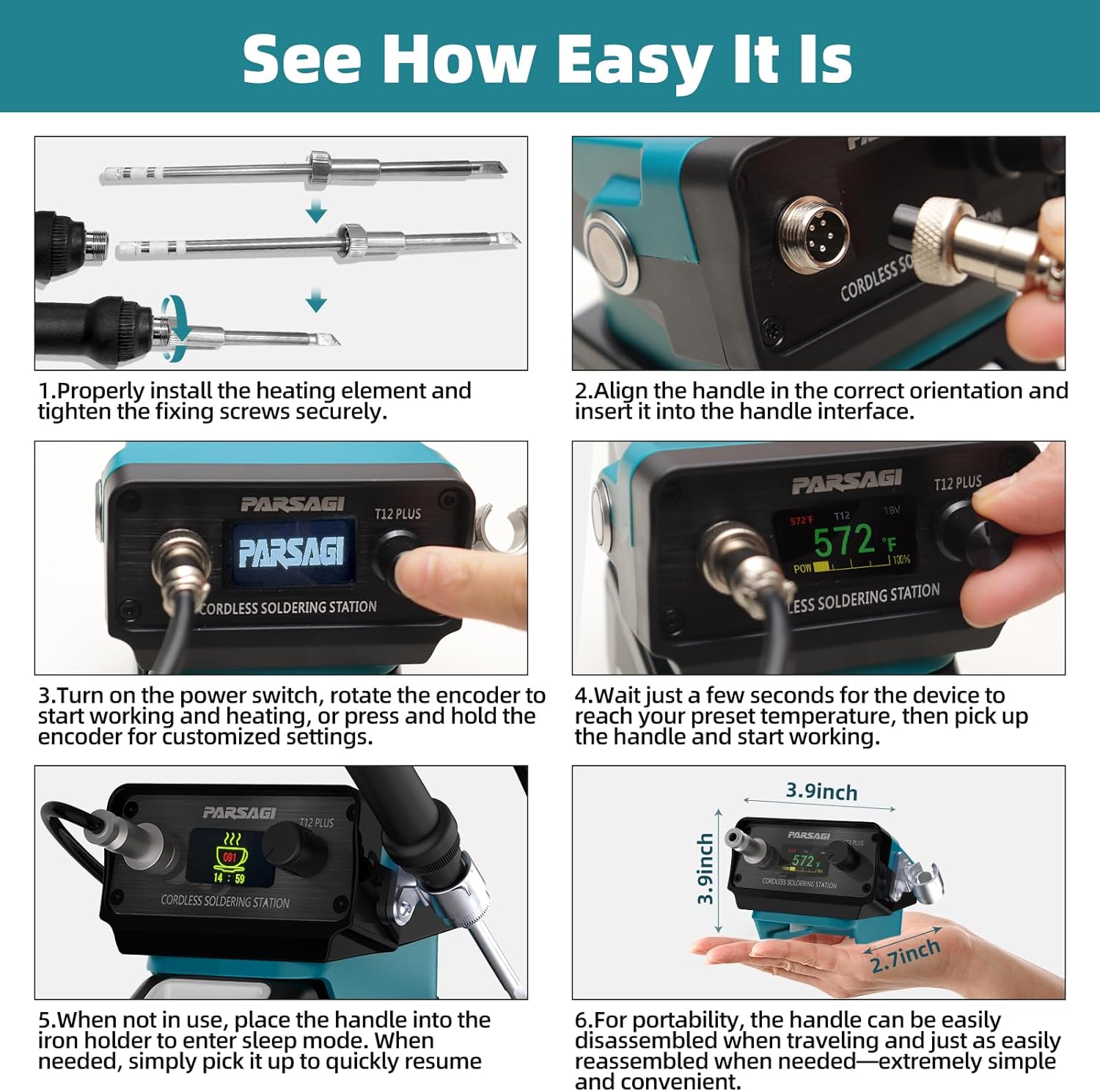
Image 4.1: Assembly Steps. This image illustrates the process of installing the heating element, aligning the handle, powering on, and placing the handle in the holder.
- Install Heating Element: Properly install the T12 heating element (soldering tip) into the soldering gun handle. Ensure it is seated correctly and tighten any fixing screws securely. Improper installation can lead to error codes and prevent heating.
- Connect Handle: Align the soldering iron handle with the handle interface on the main unit and insert it firmly.
- Insert Battery: Attach a charged Makita 18V battery to the base of the soldering station.
- Power On: Turn on the power switch. The IPS display will illuminate.
5. Operating Instructions
The Parsagi T12 PLUS offers precise control and a user-friendly interface.
Basic Operation:
- Power On: After setup, turn on the power switch. The display will show the current temperature and battery status.
- Adjust Temperature: Rotate the encoder knob to adjust the desired temperature. The temperature range is 100°C to 480°C (200°F to 896°F). The unit heats rapidly, typically reaching the set temperature within seconds.
- Auto Sleep: When the soldering iron is placed in its integrated holder (handle sleeper), the unit will automatically enter sleep mode to conserve energy and prolong tip life. Pick up the handle to wake it up and resume heating.
- Low Voltage Protection: The station monitors battery voltage and will shut down or enter a protective state if the battery voltage drops too low, preventing over-discharge.
Customizable Settings:
Press and hold the encoder knob to access the settings menu. Navigate through the options by rotating the encoder and confirm selections by pressing it.
- Temperature Calibration: Adjust the temperature reading for accuracy.
- Auto Sleep Mode: Configure the duration before entering sleep mode.
- Boost Duration & Boost Degree Settings: Customize temporary temperature boosts.
- Wake-Up Methods: Select how the unit wakes from sleep (e.g., picking up the handle).
- Buzzer On/Off Switch: Enable or disable audible alerts.
- Battery Guard for Low Voltage Protection: Adjust low voltage cut-off thresholds (use with caution).
- °C/°F Unit Conversion: Switch between Celsius and Fahrenheit temperature displays.
6. Maintenance
Soldering Tip Replacement:
The Parsagi T12 PLUS is compatible with any standard T12 soldering tips. To replace a tip:
- Ensure the unit is powered off and the tip has cooled completely.
- Carefully remove the old tip from the soldering iron handle.
- Insert the new T12 tip, ensuring it is fully seated and secured.
Cleaning:
- Regularly clean the soldering tip with a damp sponge or brass wool to remove oxidation and solder residue.
- Wipe the main unit and handle with a soft, dry cloth. Do not use abrasive cleaners or solvents.
7. Troubleshooting
Common Issues and Solutions:
- Error Code / Not Heating: If the display shows an error code and the soldering station is not heating, it most likely indicates that the soldering gun (handle and tip) is improperly installed. Ensure the heating element (tip) is correctly seated and the handle is securely connected to the main unit.
- Unit Not Powering On: Check that the Makita 18V battery is fully charged and correctly inserted. Ensure the power switch is in the 'On' position.
- Inaccurate Temperature Reading: Perform a temperature calibration through the settings menu.
8. Specifications
| Feature | Specification |
|---|---|
| Model | T12 PLUS |
| Brand | Parsagi |
| Power Source | Makita 18V Battery (Tool Only) / External 17-24V DC |
| Voltage | 18 Volts (DC) |
| Temperature Range | 100°C to 480°C (200°F to 896°F) |
| Display Type | IPS Color Display |
| Control Chip | STM32 |
| Item Weight | 13.1 ounces |
| Package Dimensions | 8.62 x 4.8 x 3.5 inches |
| Included Components | 1 Soldering Station (Battery and Charger Not Included) |
9. Warranty and Support
For warranty information and customer support, please refer to the documentation provided with your purchase or contact Parsagi directly through their official channels. Keep your proof of purchase for any warranty claims.
For additional resources and product information, you may visit the Parsagi Store on Amazon.