

Introduction
The NIGOGOR Smart Wireless Meat Thermometer is designed to simplify your cooking experience, whether indoors or outdoors. Featuring a thin probe, Bluetooth connectivity, and real-time temperature tracking via a dedicated app, this device ensures perfectly cooked meats every time. It is ideal for BBQ, grilling, smoking, and oven use, providing precise temperature monitoring for both the internal meat temperature and ambient cooking environment.

Image: The NIGOGOR Smart Wireless Meat Thermometer, its charging base, and the accompanying mobile application interface displaying temperature readings.
Product Features
- 100% Wireless Smart Design: Offers freedom in cooking with remote monitoring via a free app compatible with Android and iOS devices.
- Ceramic Probe with Dual Sensors: Monitors internal meat temperature (up to 212°F / 100°C) and ambient/external temperature (up to 572°F / 300°C) simultaneously. The ceramic handle provides high heat resistance and efficient heat transfer, while the fine probe helps maintain meat integrity.
- Cooking Recommendation System: The app includes recommended meat temperatures based on expert recipes and allows recording of cooking data for personalized results.
- Bluetooth 5.2 Connectivity: Ensures fast and stable connections, allowing monitoring from up to 432 feet (131 meters) away, even through walls and obstacles.
- Rechargeable Probe and Base: Equipped with a 2000mAh rechargeable lithium battery, providing up to 300 hours of use on a single 6-hour USB charge, suitable for long cooking sessions.

Image: The mobile application interface showing real-time internal and ambient temperature readings, along with target temperature settings.
Package Contents
Upon opening your package, please ensure all the following components are present and in good condition:
- 1 x Wireless Meat Thermometer Base
- 1 x Wireless Meat Thermometer Probe
- 1 x USB Charging Cable
- 1 x User Manual (this document)
Setup Guide
1. Initial Charging
Before first use, fully charge the thermometer probe and base. Connect the USB charging cable to the base, and ensure the probe is correctly seated in the base. A full charge typically takes about 6 hours and provides up to 300 hours of use.

Image: The thermometer base being charged via a USB-C cable, with the probe stored inside. The display shows battery level and temperature.
2. App Download and Installation
Download the free "PROBE PLUS" application from your device's app store (available for iOS and Android). Search for "PROBE PLUS" in the Apple App Store or Google Play Store.
3. Bluetooth Pairing
- Ensure Bluetooth is enabled on your smartphone or tablet.
- Open the "PROBE PLUS" app.
- The app will automatically search for and connect to the thermometer base. Ensure the probe is in the base or within close proximity to the base for initial pairing.
- Once connected, the app will display the current temperature readings.

Image: A visual representation of the Bluetooth connection range, illustrating how the probe communicates with the base, and the base with the smartphone, allowing for remote monitoring.
Operating Instructions
1. Inserting the Probe
Carefully insert the probe into the thickest part of the meat, avoiding bones. It is crucial to ensure the "ATTENTION!" notch on the probe is fully inserted into the meat to prevent damage and ensure accurate internal temperature readings. The ceramic handle should remain outside the meat.

Image: The thermometer probe correctly inserted into a roasted chicken, highlighting the internal temperature sensor and the external (ambient) temperature sensor on the probe shaft.
2. Monitoring Temperature
Once the probe is inserted, place the meat in your cooker (grill, oven, smoker, etc.). The app will display real-time internal and ambient temperatures. You can set target temperatures based on meat type and desired doneness using the app's recommendation system or customize your own.

Image: A hand placing a baking tray with salmon, into which the thermometer probe is inserted, into an oven. A smartphone screen next to it displays the real-time temperature readings from the app.
3. Using Presets and Custom Settings
The app offers a variety of preset temperatures for different meat types (Beef, Poultry, Pork, Lamb, Seafood) and doneness levels (Rare, Medium Rare, Medium, Medium Well, Well Done). You can select these or manually set your desired target temperature. The app will alert you when the target temperature is reached.
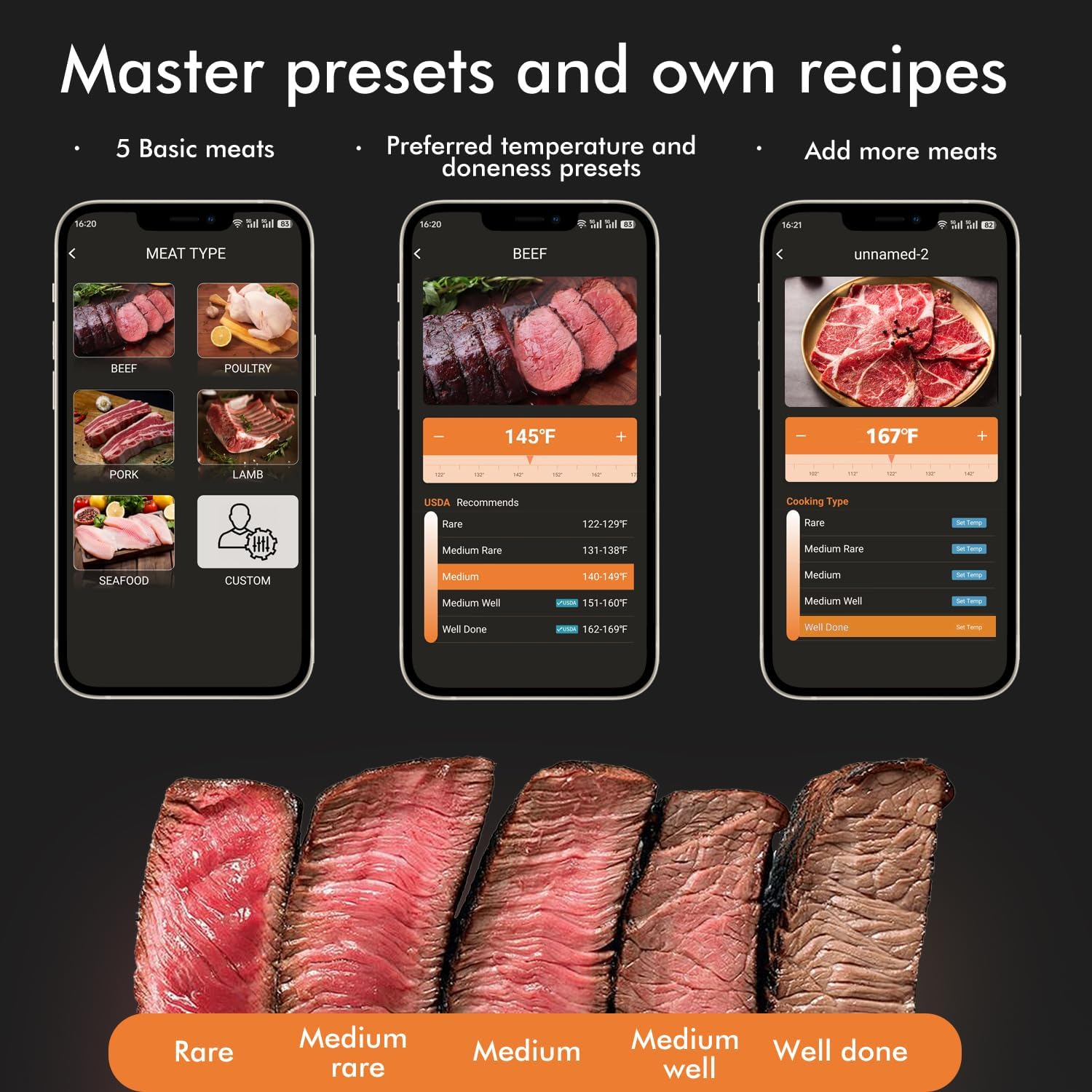
Image: Multiple smartphone app screens demonstrating the selection of various meat types and the ability to choose or customize temperature presets for different levels of doneness.
4. Remote Monitoring
Thanks to Bluetooth 5.2, you can monitor your cooking from up to 432 feet away. Keep the thermometer base within 10-130 feet of the probe for optimal signal. If obstacles are present, the range may be reduced; move closer if connection issues occur.

Image: A smartphone displaying a "Food Maturity Reminder" notification, indicating that the cooking process is complete, positioned next to a grill with meat cooking.
Maintenance
Cleaning the Probe
The probe is IPX7 waterproof and dishwasher safe. After each use, clean the probe thoroughly with warm soapy water or place it in the dishwasher. Ensure all food residue is removed. Do not immerse the charging base in water.

Image: The meat thermometer probe submerged in water, illustrating its IPX7 waterproof rating, indicating it can withstand immersion.
Storage
Store the probe in its charging base when not in use. Keep the device in a cool, dry place away from direct sunlight and extreme temperatures.
Troubleshooting
| Problem | Possible Cause | Solution |
|---|---|---|
| No Bluetooth Connection | Bluetooth is off on device; App not open; Probe/Base out of range; Low battery. | Ensure Bluetooth is on. Open the app. Move closer to the base/probe. Charge the device. |
| Inaccurate Temperature Readings | Probe not inserted correctly (notch not past meat surface); Probe damaged. | Re-insert probe ensuring the notch is fully within the meat. If problem persists, contact support. |
| Short Battery Life | Not fully charged; Old battery (unlikely for new product). | Ensure a full 6-hour charge before use. |
| App Not Responding | App crash; Device operating system issue. | Close and restart the app. Restart your smartphone/tablet. |
Specifications
| Feature | Detail |
|---|---|
| Brand | NIGOGOR |
| Model Name | wireless meat thermometer FM (FM2107) |
| Connectivity Technology | Bluetooth 5.2 |
| Internal Temperature Range | Up to 212°F (100°C) |
| Ambient Temperature Range | Up to 572°F (300°C) |
| Response Time | 0.95 seconds |
| Battery Type | 2000mAh Rechargeable Lithium Battery (1 C battery included) |
| Battery Life | Up to 300 hours on a 6-hour charge |
| Wireless Range | Up to 432 feet (131 meters) |
| Waterproof Rating | IPX7 (Probe only) |
| Material | Food Grade 304 Stainless Steel (probe), Ceramic (handle), Plastic (base) |
| Dimensions (Probe) | 4.89 Inches (Length) |
| Weight | 8.8 ounces |
| Certifications | FCC |
Warranty and Support
For any questions, technical assistance, or warranty claims, please contact NIGOGOR customer support. Refer to the product packaging or the official brand website for the most current contact information.