
Introduction
Thank you for choosing the FOUKWAKC H8 64GB 4K Thumb Action Camera. This compact and versatile camera is designed for capturing high-quality video and photos in various environments, from outdoor sports to daily vlogging. This manual will guide you through the setup, operation, and maintenance of your new device to ensure optimal performance.
What's in the Box
Upon unboxing, please verify that all the following components are included:
- Thumb camera
- Magnetic lanyard
- Rotating back clip
- Data cable (USB Type-C)
- 64GB micro SD card
- Waterproof housing
- Curved and flat base mounts
- Helmet bracket
- Bicycle bracket

Figure 1: All components included with the FOUKWAKC H8 camera.
Setup
1. Camera Overview and Features
The FOUKWAKC H8 is a compact device with powerful capabilities. It supports 4K UHD video recording and features a 120° wide-angle lens. Key features include Wi-Fi mobile phone interconnection, hands-free operation, built-in magnetic attraction for easy mounting, recording while charging, and loop recording support up to 256GB.
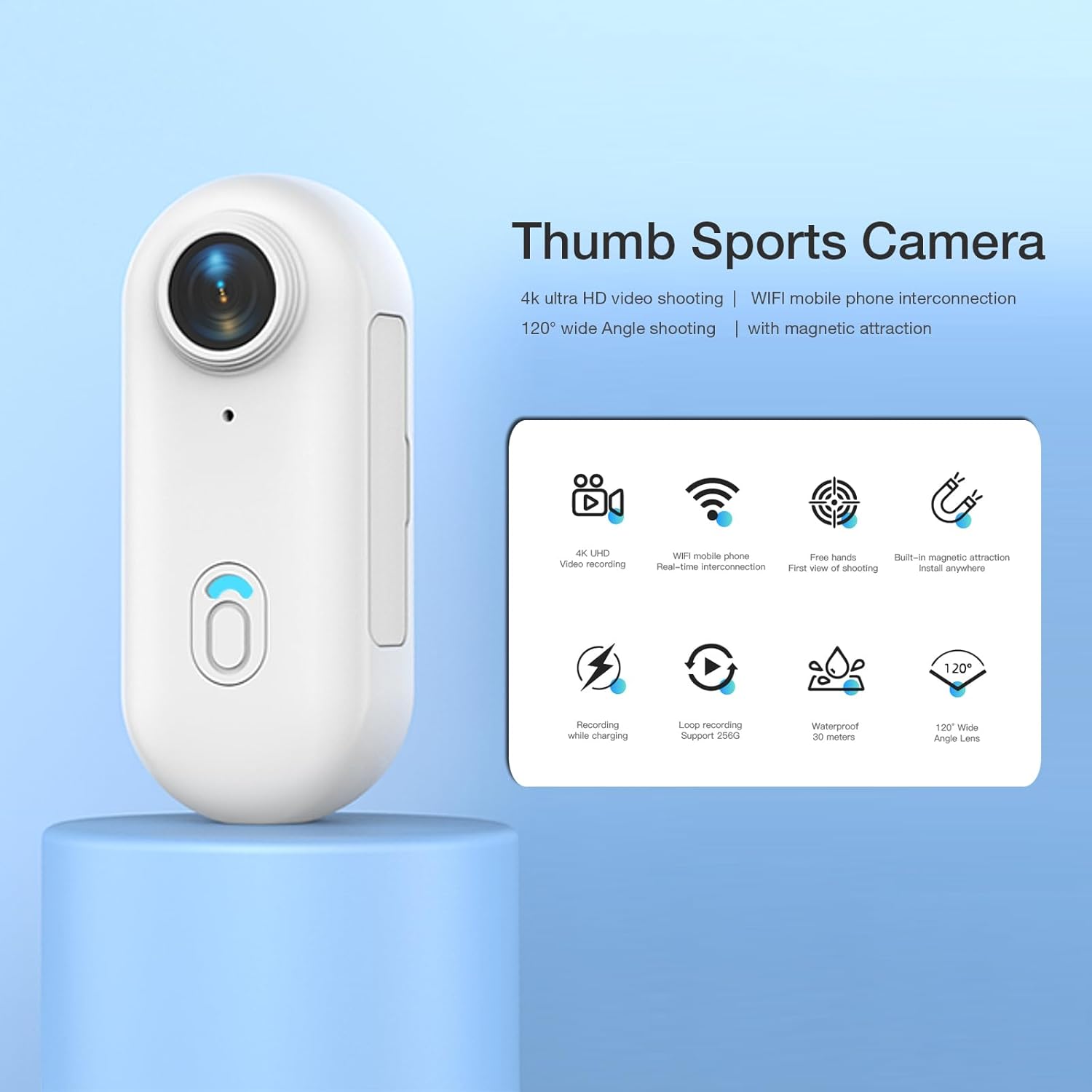
Figure 2: Overview of the camera's main features.
2. Memory Card Installation
The camera comes with a 64GB micro SD card. To install, locate the memory card slot on the side of the camera. Gently insert the micro SD card until it clicks into place. Ensure the camera is powered off before inserting or removing the memory card.
3. Charging the Camera
Connect the camera to a power source using the provided USB Type-C data cable. The camera supports recording while charging, allowing for extended use. A full charge provides approximately 100 minutes of recording in 4K mode, 120 minutes in 2K mode, and 150 minutes in 1080P mode.

Figure 3: The camera can be charged via a power bank or motorcycle power.
4. Attaching Accessories
The FOUKWAKC H8 offers multiple mounting options:
- Magnetic Lanyard: The camera features a strong built-in magnet. Attach it to the magnetic lanyard for hands-free recording around your neck.
- Rotating Back Clip: Use the 360° rotating back clip to attach the camera to clothing pockets, folders, school bags, or your waist.
- Mount Brackets: Utilize the helmet bracket, bicycle bracket, and curved/flat base mounts for secure attachment to helmets, bicycles, or other surfaces.

Figure 4: Magnetic attraction allows for easy wearing.

Figure 5: The portable back clip allows attachment to various items.
Operating Instructions
1. Power On/Off
- Power On: Press and hold the Power Button on the front of the camera for 3 seconds. The blue light will turn on.
- Power Off: Press and hold the Power Button for 3 seconds. The LED light will turn off.
2. Recording Modes
The camera supports two primary recording modes:
- Direct Recording (without APP): Turn on the product. When the blue light is steady, press the record button once. The blue light will flash slowly to indicate recording has started.
- APP Recording: After connecting the camera to the mobile app (see next section), you can start recording directly from the app interface.
3. Wi-Fi Connection and App Usage
The camera features built-in Wi-Fi for seamless connection to your smartphone, allowing for live viewing, video transfer, and sharing.
- Download and Install App: Search for "Viidure" in the Apple App Store (for iOS) or Google Play Store (for Android). Alternatively, you can download the app from the official website: https://www.6zhentan.com/app/d0001/index.html.
- Power On and Wi-Fi Pairing: Press and hold the Power Button to turn on the recorder. If a memory card is inserted, the blue light will be steady. If no memory card is inserted, the blue light will flash and vibrate. Quickly press the Power Button twice to enter Wi-Fi pairing mode. The blue and green LEDs will flash alternately, indicating the device is ready for pairing.
- Connect to App: Open the app on your mobile device and go to the recorder connection section. Then, open your phone's Wi-Fi settings, find the Wi-Fi network named "H88..." and select it. Enter the password: 12345678. Return to the app, and it should show a successful connection.
- View, Transfer, and Share: Once connected, you can view live footage, transfer videos and photos to your mobile phone, edit, and share them on social media at any time.

Figure 6: Wi-Fi connection guide and app interface.
4. Video Resolution
The camera supports multiple video resolutions, including 4K (3840*2160), 2K, and 1080P. You can select your preferred resolution within the mobile application.

Figure 7: 4K UHD recording provides clear photo and video quality.
5. Loop Recording
The camera supports loop recording, which automatically overwrites the oldest footage when the memory card is full. This ensures continuous recording without manual deletion. The camera supports up to 256GB memory cards for extended recording capacity.

Figure 8: Loop recording for automatic coverage.
Maintenance
To ensure the longevity and optimal performance of your FOUKWAKC H8 camera, follow these maintenance guidelines:
- Cleaning: Use a soft, dry cloth to clean the camera body. For the lens, use a specialized lens cleaning cloth and solution to avoid scratches.
- Waterproof Housing: When using the waterproof housing, ensure all seals are clean and properly closed before submerging. After use in water, rinse the housing with fresh water and dry thoroughly. Remember, the camera itself is not waterproof without the housing.
- Storage: Store the camera in a cool, dry place away from direct sunlight and extreme temperatures. Remove the battery if storing for extended periods.
- Memory Card: Regularly back up your footage and format the micro SD card periodically to maintain performance and prevent data corruption.
Troubleshooting
If you encounter issues with your FOUKWAKC H8 camera, refer to the following common problems and solutions:
| Problem | Possible Cause | Solution |
|---|---|---|
| Camera does not power on. | Low battery; Power button not pressed long enough. | Charge the camera fully. Press and hold the Power button for 3 seconds. |
| Cannot record. | No memory card; Memory card full or abnormal; Camera not in recording mode. | Insert a micro SD card. Format or replace the memory card. Press the record button once to start recording. |
| Wi-Fi connection fails. | Incorrect password; Wi-Fi not enabled on camera; Phone Wi-Fi issue. | Ensure correct password (12345678). Double-press Power button to enable Wi-Fi pairing. Turn phone Wi-Fi off/on and retry. |
| Poor video quality. | Lens is dirty; Low light conditions; Incorrect resolution setting. | Clean the lens. Ensure adequate lighting. Select 4K resolution in the app. |
| Camera freezes or becomes unresponsive. | Software glitch. | Locate the RESET button (often a small pinhole) and press it with a thin object to restart the camera. |
Specifications
| Feature | Detail |
|---|---|
| Brand Name | FOUKWAKC |
| Model Number | H8P |
| Item Weight | 12 ounces |
| Product Dimensions | 0.8 x 1.1 x 2.54 inches |
| Batteries | 1 A battery required (included) |
| Color Name | white-4K |
| Special Features | 4K, wireless, compact, mobile-app, night vision |
| Photo Sensor Technology | CMOS |
| Video Capture Resolution | 4K |
| Maximum Aperture | 3.5 f |
| Flash Memory Type | Micro SD |
| Video Capture Format | MP4 |
| Supported Audio Format | MP4 |
| Connectivity Technology | USB, Wi-Fi |
Warranty and Support
FOUKWAKC is committed to providing cost-effective products and ensuring customer satisfaction. For any product-related inquiries, technical support, or warranty claims, please refer to the official FOUKWAKC brand store or contact customer service through your point of purchase.
Visit the FOUKWAKC Store: https://www.amazon.com/stores/FOUKWAKC/page/E4BBC420-28FB-495A-AAAE-CF2DE4EE5BD9