
GODOX V100S
Godox V100S TTL Speedlight Flash for Sony Cameras User Manual
Model: V100S | Brand: GODOX
1. Safety Information
Please read the following safety warnings carefully before using the product to prevent injury to yourself or others and to avoid damage to the product.
- Always keep this product dry.
- Keep out of reach of children.
- Keep away from ignition sources.

Image: Safety warning labels for the Godox V100S flash.
2. What's Inside the Box
Verify that all components are present upon unboxing your Godox V100S flash unit.
- V100 Flash for Sony x1
- Storage Bag x1
- Lithium Battery (VB30) x1
- Adapter x1
- Mini Stand x1
- USB-C Charging Cable x1

Image: Overview of the Godox V100S package contents.
3. Setup
3.1 Battery Installation and Charging
The Godox V100S uses a high-performance lithium battery (VB30). Ensure the battery is fully charged before first use.
- Insert the VB30 lithium battery into the battery compartment of the flash unit.
- Connect the USB-C charging cable to the flash unit or directly to the VB30 battery.
- Plug the adapter into a power outlet to begin charging. The battery is compatible with the optional VC26T Multi-Battery Charger for faster charging of multiple batteries.

Image: Battery charging options for the Godox V100S.
3.2 Plastic Ring Installation (USA Version)
For the USA Version of the Godox V100S, the plastic ring needs to be installed by the user. This ring is essential for attaching magnetic accessories like the AK-R1 kit.
- Locate the separate metal ring and the small screwdriver included in the package.
- Carefully remove any pre-installed plastic ring from the flash head if present.
- Align the metal ring with the flash head and secure it using the provided screws and screwdriver. Ensure it is firmly attached.

Image: Godox V100S accessories, highlighting the need for ring installation.
3.3 Mounting the Flash
Attach the V100S flash to your Sony camera's hot shoe or a compatible light stand using the mini stand.
- Slide the flash's mounting foot into the camera's hot shoe.
- Secure the flash by rotating the locking ring or lever on the flash foot until it is tight.
- Alternatively, attach the flash to the included mini stand for off-camera use.
4. Operating Instructions
4.1 Power On/Off and Touchscreen Interface
The V100S features an intuitive touchscreen for easy control.
- To power on/off, press and hold the power button.
- The 2.3" full-color touchscreen allows quick adjustments of power levels, activation of high-speed sync (HSS), and switching between TTL and Manual (M) modes.
- Tap on the desired setting on the screen to adjust it.

Image: Godox V100S touchscreen for effortless control.
4.2 Flash Modes and Power Output
The V100S offers versatile lighting options with its 100Ws power output.
- TTL Mode: Automatic flash exposure for convenience.
- Manual (M) Mode: Adjust power levels from 1/1 to 1/256 or from 2.0 to 10 for precise control.
- The advanced cooling system allows for 70 to 100 consecutive flashes at 100Ws without performance degradation.

Image: Godox V100S 100Ws power output.
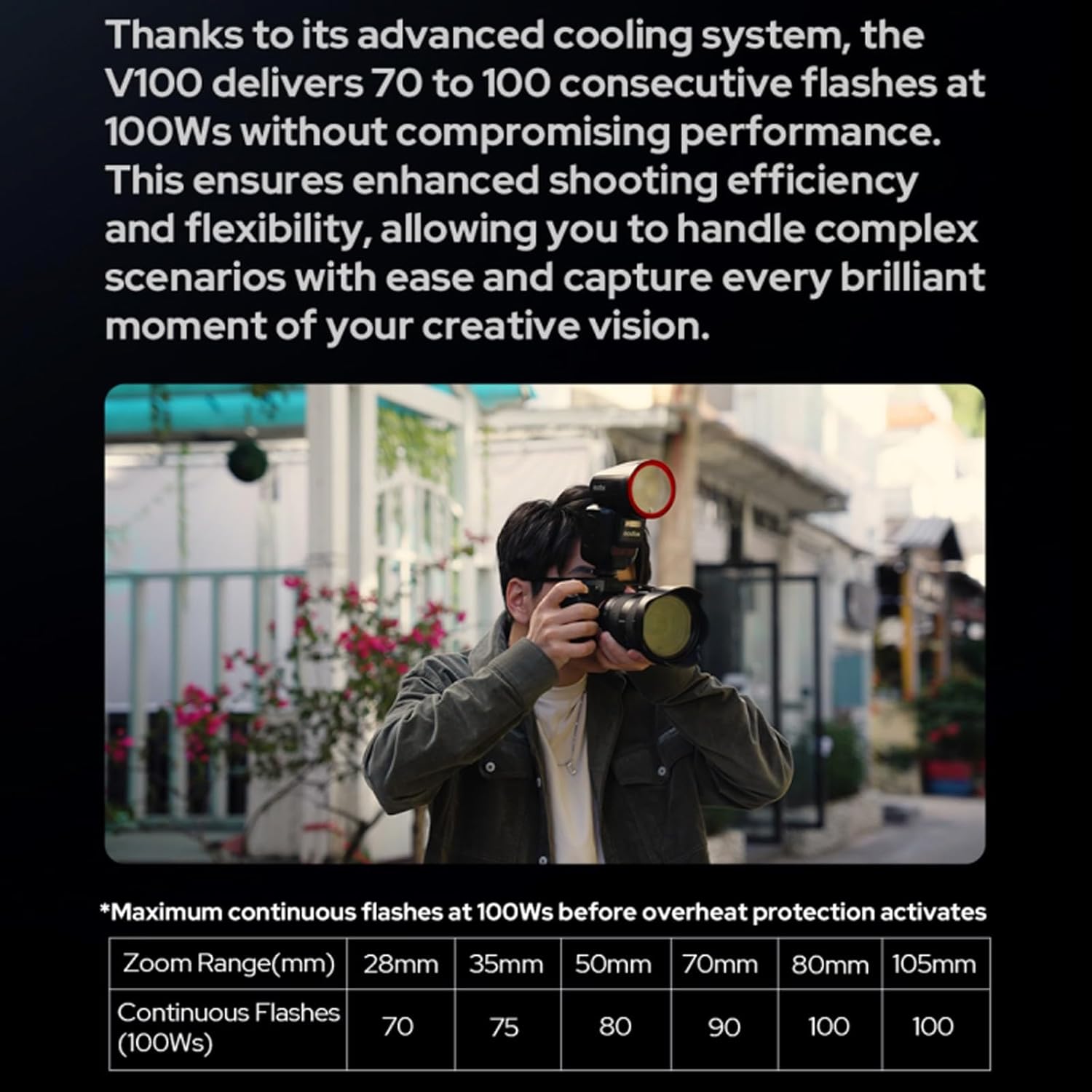
Image: Godox V100S cooling system performance and continuous flash capacity.
4.3 Detachable Sub Flash (SU-1)
The V100S features a detachable sub flash (SU-1) for enhanced lighting versatility.
- The SU-1 can be used to create dual-light setups with a single flash unit.
- This feature is particularly useful for portrait photography, allowing for more creative lighting solutions.

Image: Detachable sub flash (SU-1) in use for bounce flash.
4.4 LED Modeling Lamp
A 2W LED modeling lamp is integrated into the V100S for previewing light effects or as a fill light.
- The lamp offers 10 adjustable levels of brightness.
- It supports continuous or interrupt modes, adapting to various creative needs.

Image: Godox V100S LED modeling lamp in use.
4.5 Godox 2.4G Wireless X System
The V100S integrates with the Godox 2.4G Wireless X System, allowing it to function as both a master and receiver unit.
- One-tap pairing capability ensures seamless integration with the X3 trigger or other Godox wireless flash units.
- This system streamlines multi-flash setups and enhances productivity for complex lighting scenarios.
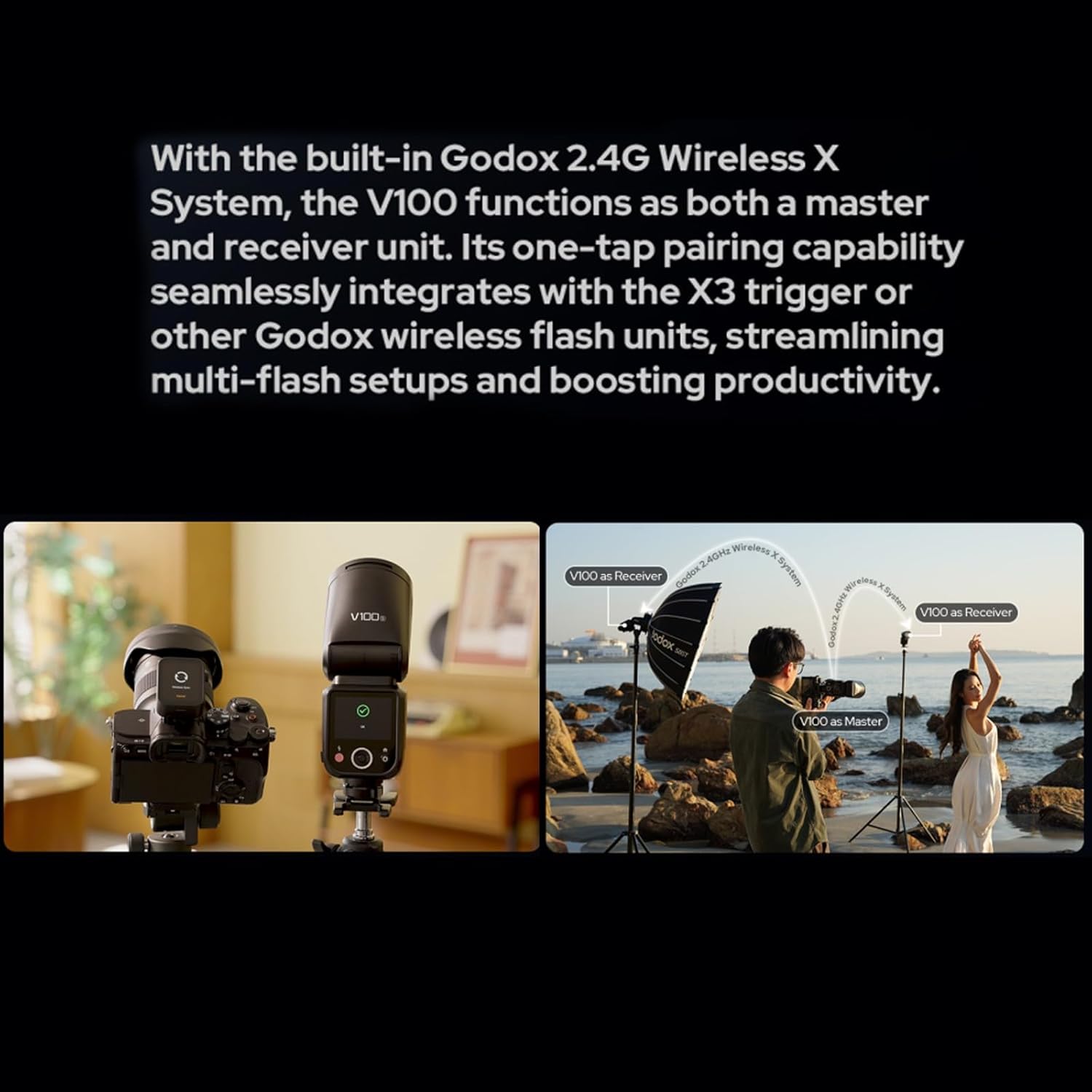
Image: Godox 2.4G Wireless X System setup with V100S as master and receiver.
4.6 Global Shutter and High-Speed Sync (HSS)
The V100S is compatible with cameras featuring global shutters, such as the Sony a9III, and supports high-speed sync.
- Supports shutter speeds up to 1/80,000 seconds.
- Offers TTL functionality for outstanding high-speed continuous shooting with precision.
- Ideal for sports photography, outdoor bright light, and other fast-paced shooting scenarios.

Image: Global shutter and HSS performance examples.
5. Maintenance
Proper maintenance ensures the longevity and optimal performance of your Godox V100S flash.
- Cleaning: Use a soft, dry cloth to clean the flash unit. Avoid using solvents or harsh chemicals.
- Storage: Store the flash in a dry, cool place, away from direct sunlight and extreme temperatures. If storing for extended periods, remove the battery.
- Battery Care: Recharge the lithium battery regularly, even if not in use, to maintain its health. Avoid fully discharging the battery frequently.
- Handling: Handle the flash with care to prevent drops or impacts, which can damage internal components.
6. Troubleshooting
If you encounter issues with your Godox V100S, refer to the following common troubleshooting steps:
- Flash Not Firing:
- Ensure the battery is charged and correctly installed.
- Check if the flash is securely mounted on the camera's hot shoe.
- Verify the flash is powered on and not in sleep mode.
- Confirm the camera's flash settings are correctly configured (e.g., external flash enabled).
- Incorrect Exposure:
- In TTL mode, ensure the flash exposure compensation is not set too high or low.
- In Manual mode, adjust the power output accordingly.
- Check camera ISO, aperture, and shutter speed settings.
- Wireless Connection Issues:
- Ensure both the V100S and the trigger (e.g., X3) are on the same channel and group.
- Verify that both units are powered on and within range.
- Check for any obstructions between the flash and the trigger.
- Touchscreen Unresponsive:
- Restart the flash unit.
- Ensure the screen is clean and dry.
For further assistance, please consult the official Godox support resources or contact customer service.
7. Specifications
| Feature | Detail |
|---|---|
| Product Dimensions | 7.87 x 8.66 x 3.94 inches |
| Item Weight | 2.2 pounds |
| Item Model Number | Godox V100 Sony |
| Batteries | 1 Nonstandard Battery required (included) |
| Manufacturer | Godox |
| Brand | GODOX |
| Compatible Mountings | Sony Alpha |
| Battery Life | 680 seconds (approximate) |
| Camera Flash Type | External |
| Flash Sync Speed | Up to 1/80000 seconds |
| Power Output | 100Ws (Max) |
| Recycle Time | 1.7s (approximate) |
| Wireless System | Built-in 2.4G Godox X System |
| Modeling Lamp | 2W LED with 10 adjustable levels |
8. Warranty and Support
Specific warranty details and support contact information are typically provided in the full product manual included with your purchase or can be found on the official Godox website.
For technical support, firmware updates, or warranty claims, please visit the Official GODOX Store or their global website.