
Introduction
The MOZA Handbrake Shifter Table Clamp is an accessory designed to securely mount your MOZA HBP Handbrake or Shifter to a table or desk. This clamp provides a stable and ergonomic mounting solution, enhancing your sim racing experience by allowing flexible positioning of your peripherals. It is constructed from high-strength steel to ensure durability and a strong clamping force.
Safety Information
Please read and understand all safety instructions before installing and using the MOZA Handbrake Shifter Table Clamp. Failure to follow these instructions may result in injury or damage to the product or your equipment.
- Secure Mounting: Always ensure the clamp is securely fastened to a stable surface before attaching any peripherals. An unstable setup can lead to equipment falling or shifting during use.
- Desktop Thickness: Verify that your desktop or table surface is within the specified thickness range (up to 60mm) for proper and safe clamping.
- Pinch Points: Be aware of potential pinch points when adjusting or tightening the clamp. Keep fingers clear of moving parts.
- Weight Limit: Do not exceed the intended weight capacity of the clamp. This clamp is designed for MOZA handbrakes and shifters.
- Regular Inspection: Periodically check the tightness of all screws and the clamp's grip on the table to ensure continued stability.
Setup and Installation
Follow these steps to properly install your MOZA Handbrake Shifter Table Clamp and attach your MOZA peripheral.
1. Attaching the Clamp to Your Desk
- Identify a suitable location on your desk or table. Ensure the surface is flat and sturdy. The clamp is designed for desktops up to 60mm thick.
- Position the MOZA Handbrake Shifter Table Clamp on the edge of your desk. The top plate should rest on the desk surface, and the clamping arms should extend below.
- Tighten the two large thumb screws located at the bottom of the clamping arms. Turn them clockwise until the clamp is firmly secured to the desk. Ensure both screws are tightened evenly to prevent tilting.
- Verify the clamp's stability by gently attempting to move it. It should not wobble or slide.

Image: The MOZA Handbrake Shifter Table Clamp, ready for installation. This image shows the overall structure of the clamp with its top plate and two clamping screws.
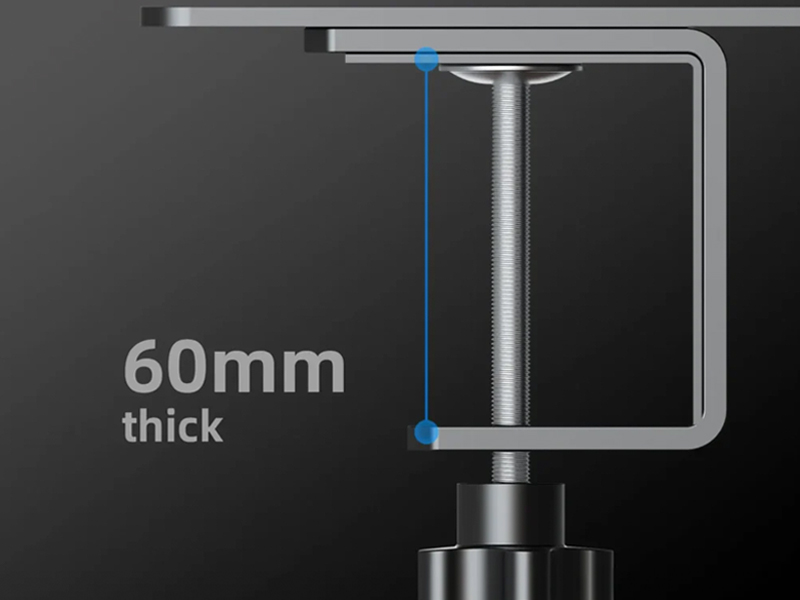
Image: A close-up view illustrating the maximum desktop thickness of 60mm that the clamp can accommodate.
2. Attaching Your MOZA Handbrake or Shifter
- Align the mounting holes on the base of your MOZA HBP Handbrake or Shifter with the corresponding holes on the top plate of the table clamp. The top plate features a versatile hole pattern to accommodate various MOZA peripherals.
- Secure the handbrake or shifter to the clamp using appropriate screws (screws are typically provided with the handbrake/shifter, not the clamp). Ensure all screws are tightened firmly to prevent any movement during use.

Image: An illustration showing a MOZA handbrake (ghosted) being mounted onto the table clamp, demonstrating the alignment of mounting holes.

Image: A top-down view of the clamp's mounting plate, highlighting the various screw holes for attaching peripherals.
Operating
Once installed, the MOZA Handbrake Shifter Table Clamp operates passively by providing a stable mounting platform. No active operation is required from the clamp itself.
- Pre-Use Check: Before each use of your handbrake or shifter, quickly check that the clamp remains tightly secured to your desk and that the peripheral is firmly attached to the clamp.
- Adjustments: If you need to reposition the clamp, loosen the thumb screws, move the clamp to the desired location, and then re-tighten the screws securely.
Maintenance
Proper maintenance will ensure the longevity and continued performance of your MOZA Handbrake Shifter Table Clamp.
- Cleaning: Wipe the clamp with a soft, dry cloth to remove dust and debris. For stubborn marks, a slightly damp cloth can be used, followed by immediate drying. Avoid abrasive cleaners or solvents.
- Inspection: Periodically inspect the clamp for any signs of wear, damage, or loose components. Pay attention to the threads of the clamping screws and the integrity of the steel structure.
- Storage: If storing the clamp for an extended period, ensure it is clean and dry. Store it in a cool, dry place away from direct sunlight and extreme temperatures.
Troubleshooting
This section addresses common issues you might encounter with the MOZA Handbrake Shifter Table Clamp.
| Problem | Possible Cause | Solution |
|---|---|---|
| Clamp is not holding securely to the desk. | Thumb screws are not tightened enough; desktop thickness exceeds 60mm; desk surface is uneven or unstable. | Ensure thumb screws are fully tightened. Verify desktop thickness is within the 60mm limit. Move the clamp to a more stable and even section of the desk. |
| Handbrake/Shifter wobbles on the clamp. | Mounting screws are loose or not all screws are used; peripheral is not properly aligned. | Tighten all mounting screws that attach the peripheral to the clamp. Ensure the peripheral is correctly aligned with the mounting holes. |
| Clamp leaves marks on the desk. | Excessive tightening; desk surface is delicate. | Avoid over-tightening. Consider placing a protective pad (e.g., felt or rubber) between the clamp and the desk surface, ensuring it does not compromise stability. |
Specifications
| Feature | Detail |
|---|---|
| Model Number | RS038 |
| Material | High-strength Steel |
| Color | Black |
| Item Dimensions (L x W x H) | 5.91 x 5.12 x 5.51 inches (150 x 130 x 140 mm) |
| Item Weight | 1.12 Kilograms (2.46 pounds) |
| Maximum Desktop Thickness | 60mm |
| Tensile Strength | 5000 PSI |
Warranty and Support
For detailed warranty information regarding your MOZA Handbrake Shifter Table Clamp, please refer to the official MOZA Racing website or the warranty card included with your product. Warranty terms and conditions may vary by region.
If you require technical assistance, have questions about installation, or need to report an issue, please contact MOZA Racing customer support through their official channels:
- Official Website: Visit the MOZA Racing website for support resources, FAQs, and contact information.
- Online Support: Look for a "Support" or "Contact Us" section on the website to submit a ticket or find relevant contact details.
Official Product Videos
No official product videos were found for the MOZA Handbrake Shifter Table Clamp in the provided data.
