
Introduction
Thank you for choosing the LEDIARY 20-inch Low Profile Ceiling Fan with Dimmable LED Light. This manual provides essential information for the safe installation, operation, and maintenance of your new ceiling fan. Please read these instructions thoroughly before installation and retain them for future reference.

Image: The LEDIARY 20-inch Low Profile Ceiling Fan with its remote and app control interface.
Safety Information
To reduce the risk of electric shock, fire, or injury, always follow these basic safety precautions:
- Ensure the power is turned off at the circuit breaker before installation or servicing.
- All electrical connections must be in accordance with local codes, ordinances, or national electrical codes. If you are unfamiliar with wiring, consult a qualified electrician.
- The fan must be mounted to a structurally sound ceiling joist or outlet box capable of supporting the fan's weight.
- Do not bend the fan blades when cleaning the fan.
- Do not insert objects into the path of the fan blades.
- This appliance is not intended for use by persons (including children) with reduced physical, sensory, or mental capabilities, or lack of experience and knowledge, unless they have been given supervision or instruction concerning use of the appliance by a person responsible for their safety.
Product Specifications
| Brand | LEDIARY |
| Model Name | Y24FSD0031-2801 |
| Color | Black |
| Product Dimensions | 20"D x 20"W x 5.7"H |
| Item Weight | 6.36 pounds |
| Power Source | AC |
| Voltage | 120 Volts |
| Light Output | 2800 Lumens |
| Color Temperature | 3000K-6000K (Dimmable) |
| Fan Speeds | 6 Wind Speeds |
| Control Method | Remote Control, App Control |
| Special Features | App Operable, Color Temperature Adjustable, Remote Controlled, Reversible DC Motor, Timer, Light Memory Function |

Image: Detailed product dimensions and key features including voltage, lumens, memory function, and after-sales service.
Installation Instructions
1. Pre-Installation
- Turn off power: Ensure the power supply to the installation location is disconnected at the circuit breaker.
- Gather tools: You will need a screwdriver, wire strippers, and possibly a ladder.
- Unpack contents: Carefully remove all components from the packaging.
2. Mounting the Fan
Attach the mounting bracket to the ceiling junction box. Ensure the bracket is securely fastened to a ceiling joist or a suitable support structure to hold the fan's weight.

Image: Illustration of securing the mounting bracket to the ceiling.
3. Wiring Connections
Connect the fan's electrical wires to the household wiring. Typically, this involves connecting the black wire (live) to the black wire, the white wire (neutral) to the white wire, and the green/bare copper wire (ground) to the ground wire from the ceiling. Use wire nuts to secure connections.

Image: Diagram showing the electrical wiring connections for the ceiling fan.
4. Attaching the Fan Body
Carefully lift the fan body and align it with the mounting bracket. Secure the fan body to the bracket using the provided screws. Ensure all connections are tight and the fan is stable.

Image: Illustration of attaching the main fan body to the installed mounting bracket.
5. Final Assembly
Install the light cover and any decorative elements. Ensure all parts are securely in place before restoring power.
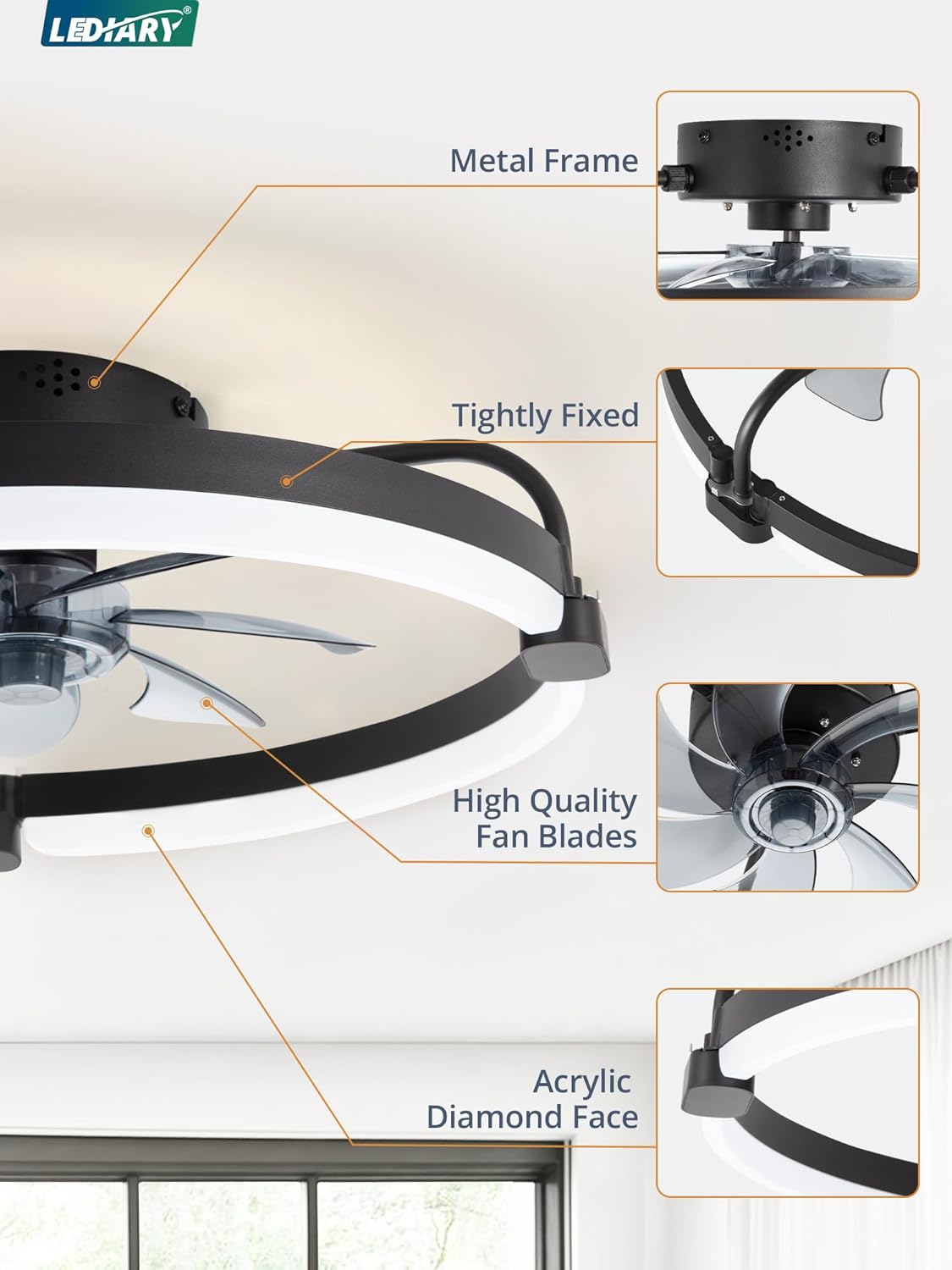
Image: Close-up view of the fan's components, highlighting the metal frame, high-quality fan blades, and acrylic diamond face for a modern design.
Operating Instructions
Remote Control Operation
The fan and light can be controlled using the included remote control. Ensure 2 AAA batteries are installed in the remote.
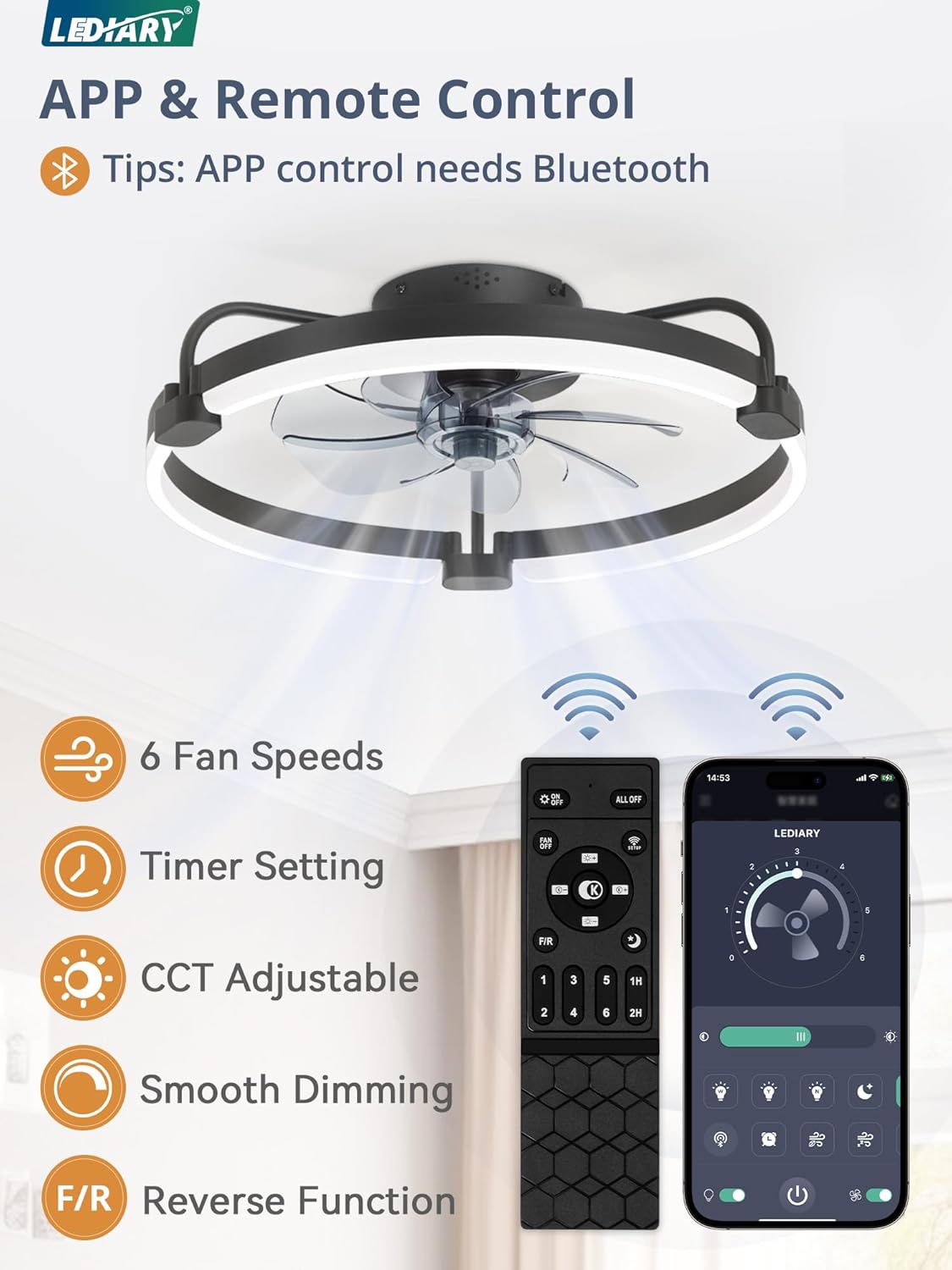
Image: The remote control and a smartphone displaying the LEDIARY app interface for fan and light control.
- Light ON/OFF: Toggles the light on or off.
- Fan ON/OFF: Toggles the fan on or off.
- CCF Change: Adjusts the color temperature of the light (3000K-6000K).
- Brightness Change: Adjusts the brightness of the light (10%-100%).
- Night Light: Activates a low-brightness night light mode.
- Forward/Reverse (F/R): Changes the fan's rotation direction for summer (downdraft) or winter (updraft) modes.
- Speed 1-6: Selects one of six fan speeds.
- Timer (1H/2H): Sets the fan to turn off automatically after 1 or 2 hours.
- Pairing: Used to pair the remote with the fan if needed.
- ALL OFF: Turns off both the fan and the light.
App Control Operation
The fan can also be controlled via a smartphone app. Download the LEDIARY app and follow the in-app instructions for pairing. App control requires Bluetooth connectivity.

Image: A smartphone screen displaying the LEDIARY app, showing controls for fan speed, light brightness, and color temperature.
Light Functions
The integrated LED light offers stepless dimming and adjustable color temperature.
- Color Temperature: Adjust from warm white (3000K) to cool white (6000K) to suit your preference or activity.
- Brightness: Adjust the light intensity from 10% to 100%.
- Memory Function: The light will remember your last brightness and color temperature setting when turned off and on again.

Image: Visual representation of the light's adjustable color temperature (3000K to 6000K) and brightness (10% to 100%).
Fan Functions
The fan features a reversible DC motor and 6 wind speeds for optimal comfort.
- 6 Wind Speeds: Choose from gentle breezes (1-2 speeds for comfortable wind), natural airflow (3-4 speeds), or strong cooling (5-6 speeds for cool wind).
- Reversible DC Motor: Operate in downdraft mode during summer to create a cooling effect, or updraft mode during winter to circulate warm air evenly.
- Timer Setting: Use the timer function to automatically turn off the fan after 1 or 2 hours.
- Low Noise Operation: The fan is designed for quiet operation, with fan sound levels around 30dB, ensuring a peaceful environment.

Image: Depiction of the fan's reversible function, showing downdraft for summer cooling and updraft for winter heat circulation.

Image: Visual guide to the 6 wind speed settings, suggesting appropriate speeds for sleeping, working, and exercising.

Image: A graphic illustrating the low noise level of the fan (30dB), comparable to a quiet room, ensuring peaceful sleep.
Care and Maintenance
- Cleaning: To clean the fan, wipe with a soft, damp cloth. Do not use abrasive cleaners or solvents. Ensure power is off before cleaning.
- No Lubrication: The motor is permanently lubricated and does not require oiling.
- Tighten Fasteners: Periodically check all screws and fasteners for tightness.
Troubleshooting
| Problem | Possible Cause | Solution |
|---|---|---|
| Fan does not start | No power supply; Loose wiring; Remote control not paired or batteries dead. | Check circuit breaker; Verify all wire connections; Replace remote batteries or re-pair remote. |
| Light does not work | Loose wiring; LED driver issue. | Check light wiring connections; Contact customer support if LED driver is suspected. |
| Fan makes noise | Loose screws; Fan blades unbalanced; Motor issue. | Tighten all screws; Ensure blades are securely attached; Contact customer support. |
| Remote control not working | Dead batteries; Not paired; Obstruction. | Replace batteries; Re-pair remote with fan; Ensure no obstructions between remote and fan. |
Warranty and Customer Support
LEDIARY provides a 2-year after-sales service for this product. If you encounter any issues or have questions regarding your ceiling fan, please contact our customer support team. We are committed to responding within 24 hours to assist you.
For support, please refer to the contact information provided with your purchase or visit the official LEDIARY website.


