
1. Introduction
Thank you for choosing the LEDIARY 24'' Low Profile Ceiling Fan with Light. This manual provides detailed instructions for the safe installation, operation, and maintenance of your new ceiling fan. Please read this manual thoroughly before installation and keep it for future reference.
Important Safety Information:
- Always turn off power at the circuit breaker before beginning installation or performing any maintenance.
- All wiring must be in accordance with national and local electrical codes. If you are unfamiliar with wiring, consult a qualified electrician.
- Ensure the mounting location can support the weight of the fan.
- Do not bend the fan blades when installing or cleaning.
2. Package Contents
Carefully unpack all components and ensure all parts are present before discarding packaging materials. Refer to the image below for a visual guide to the included parts.
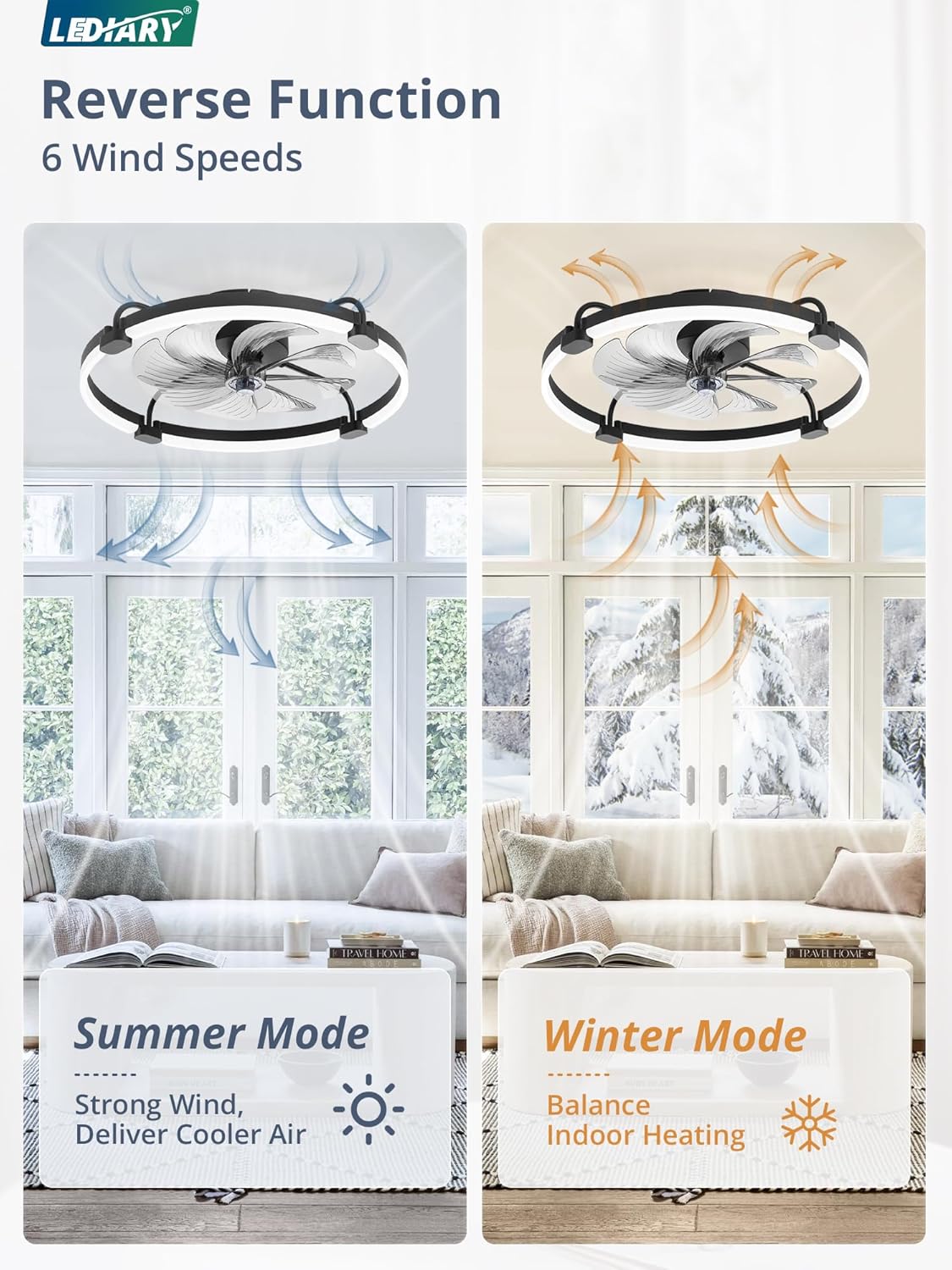
Image: All components of the LEDIARY 24-inch ceiling fan.
- Main Motor Housing
- LED Light Strips (4 sections)
- Support Elbows (4 pieces)
- Fan Blades (8 pieces, pre-assembled into 2 components)
- Remote Control (2 AAA batteries included)
- Mounting Bracket
- Hardware Kit (screws, wire nuts, anchors)
- Instruction Manual
3. Setup and Installation
Follow these steps for proper installation. For a visual guide, please refer to the installation video provided below.
Video: 24 Inch Ceiling Fans with Lights Installation Guide. This video demonstrates the complete installation process from unboxing to final setup.
Step-by-Step Installation:
- Unboxing and Parts Inspection: Carefully open the package and lay out all components. Verify that all parts listed in Section 2 are present and undamaged.
- Assemble the Main Body:

Image: Connecting support elbows to the fan canopy.
Turn the canopy upside down. Connect the 4 support elbows to the corresponding notches on the canopy and tighten the nuts. Adjust the direction of all connectors to be parallel to the canopy. - Attach LED Light Strips:

Image: Inserting LED light strips into support elbows and securing them.
Insert the two ends of each LED light strip into the corresponding ports on the connectors of the support elbows. Press the joints up and down to fit them tightly. Repeat for all four light strips. Slide the metal sheet on each connector to lock and secure the LED light strip. - Assemble Fan Blades:

Image: Assembling the fan blades and attaching them to the motor shaft.
Align the two slots on the two fan components with each other, then slide and press along the slots to assemble them into a complete fan blade unit. Insert the assembled fan blades into the shaft of the main motor housing and tighten the cap. - Install Ceiling Bracket: Loosen the four screws on the mounting bracket from the fan's main body and remove the bracket. Install the ceiling bracket onto your ceiling's electrical box using appropriate screws and anchors.
- Wiring: Hang the fan temporarily from the ceiling bracket using the safety cable. Connect the fan's electrical wires to your household wiring according to local electrical codes (typically: Live to Live, Neutral to Neutral, Ground to Ground). Secure connections with wire nuts.
- Final Assembly: Carefully lift the fan and align the screw holes on the main body with the mounting bracket. Secure the fan to the bracket by tightening the screws. Ensure all connections are secure and the fan is stable.
4. Operating Your Ceiling Fan
Your LEDIARY ceiling fan can be controlled via the included remote control or a dedicated mobile application.
Remote Control Operation:

Image: Remote Control Layout.
- Light ON/OFF: Turns the light on or off.
- Fan ON/OFF: Turns the fan on or off.
- ALL OFF: Turns off both the fan and the light.
- Brightness Adjustment (+/-): Increases or decreases light brightness (10%-100%).
- Color Temperature Change (K button): Cycles through 3 color temperatures: Warm (3000K), Neutral (4000K), White (6000K).
- Fan Speeds (1-6): Selects one of six wind speeds.
- Forward/Reverse (F/R): Changes the fan's rotation direction for summer (downdraft) or winter (updraft) modes.
Image: Reverse Function (Summer/Winter Modes).
- Timer (1H/2H): Sets the fan to automatically turn off after 1 or 2 hours.
- Night Light (Moon icon): Activates a low-brightness night light mode.
App Control Operation:

Image: App Control Interface.
Download the LEDIARY app from your smartphone's app store. Follow the in-app instructions to pair your fan. The app provides comprehensive control over all fan and light functions, including stepless dimming, color temperature adjustment, fan speeds, and timer settings.
5. Maintenance
Regular maintenance ensures optimal performance and longevity of your ceiling fan.
- Cleaning: Always turn off power at the circuit breaker before cleaning. Use a soft, damp cloth to wipe down the fan and light surfaces. Do not use abrasive cleaners or solvents that may damage the finish.
- Blade Cleaning: Gently wipe the fan blades to remove dust buildup.
- Tightness Check: Periodically check all screws and connections to ensure they are secure.
6. Troubleshooting
If you encounter issues with your fan, refer to the common problems and solutions below. If the problem persists, please contact customer support.
| Problem | Possible Cause | Solution |
|---|---|---|
| Fan does not operate | No power to the fan; Loose wire connections; Remote control battery low or not paired. | Check circuit breaker and wall switch; Verify all wire connections are secure; Replace remote batteries or re-pair remote (refer to remote instructions). |
| Light does not turn on | Loose wire connections; LED light strip issue. | Check light wire connections; If problem persists, contact customer support. |
| Fan is noisy | Loose screws on fan housing or mounting bracket; Fan blades are unbalanced. | Tighten all screws on the fan housing and mounting bracket; Ensure fan blades are properly installed and balanced. |
| Remote control not responding | Batteries are dead; Remote not paired with fan. | Replace batteries (2 AAA); Follow pairing instructions in the remote control section. |
7. Specifications
| Feature | Detail |
|---|---|
| Model Name | Y24FSD0031-6801 |
| Dimensions | 24"D x 24"W x 5.3"H |
| Power Source | AC |
| Light Output | 3200LM |
| Color Temperature | 3000K-6000K (Stepless Dimming) |
| Control Method | App, Remote |
| Fan Speeds | 6 Wind Speeds |
| Motor Type | Reversible DC Motor |
| Noise Level | Low Noise (approx. 30dB) |
| Timer Function | Yes (1H/2H) |
| Item Weight | 8.78 pounds |
8. Warranty and Support
LEDIARY provides a 2-year after-sales service for this product. If you encounter any problems with installation, operation, or product damage, please do not hesitate to contact our customer support team. We are committed to replying within 24 hours to assist you.
For support, please refer to the contact information provided with your purchase or visit the official LEDIARY website.