
1. Important Safety Information
Please read and understand all safety instructions before installing or operating the SAMA Q60 AIO Liquid CPU Cooler. Failure to follow these instructions may result in product damage, property damage, or personal injury.
- Ensure your computer system is powered off and unplugged from the wall outlet before installation.
- Handle components with care to avoid damage.
- Do not open the liquid cooling loop; it is a sealed system.
- Keep the product away from extreme temperatures, humidity, and direct sunlight.
- Use only the provided mounting hardware and accessories.
2. Package Contents
Verify that all components listed below are present in your SAMA Q60 AIO Liquid CPU Cooler package.
- SAMA Q60 360mm Radiator with Integrated Pump/Water Block
- 3 x XT120 PWM Fans
- Mounting Brackets for Intel and AMD Sockets
- Thermal Paste
- Fan Screws and Radiator Screws
- Cables (Type-C, PWM, ARGB)

Image: All included mounting hardware and accessories for the SAMA Q60 cooler.
3. Product Overview
The SAMA Q60 is a high-performance All-in-One (AIO) liquid CPU cooler designed for efficient thermal management and aesthetic customization.
3.1. 2.8" LCD Display
The water block features a 2.8-inch IPS LCD screen with 480x480 resolution and 500 nits brightness. This display can be customized to show real-time system statistics, custom images, or videos via the SAMA Monitor software.

Image: The 2.8-inch LCD display on the SAMA Q60 water block, showing system information.
3.2. High-Performance Fans
The Q60 includes three pre-installed XT120 fans with Liquid Crystal Polymer (LCP) blades for enhanced strength and airflow. These fans operate at 500–2600 RPM ±10%, delivering up to 86 CFM airflow and 3.7 mmH₂O static pressure, while maintaining a noise level under 35 dB-A. They feature Type-C daisy-chaining for reduced cable clutter and Fluid Dynamic Bearings for quiet operation.

Image: Detailed view of an XT120 fan, highlighting its LCP blades and Type-C daisy-chaining.
3.3. Ultra-Efficient Radiator
The oversized 397 × 120 × 27mm aluminum radiator features 20mm thick water channels, ensuring exceptional heat transfer for demanding workloads.

Image: Internal view of the 12-channel square radiator, illustrating heat dissipation.
3.4. Quiet, Durable Water Pump
Equipped with a high-efficiency pump running at 2500 RPM ±10%, the cooler ensures rapid coolant circulation while staying under 35 dB-A. The pump's robust structure (95 × 100.8 × 64.1mm) guarantees longevity and reliable performance.
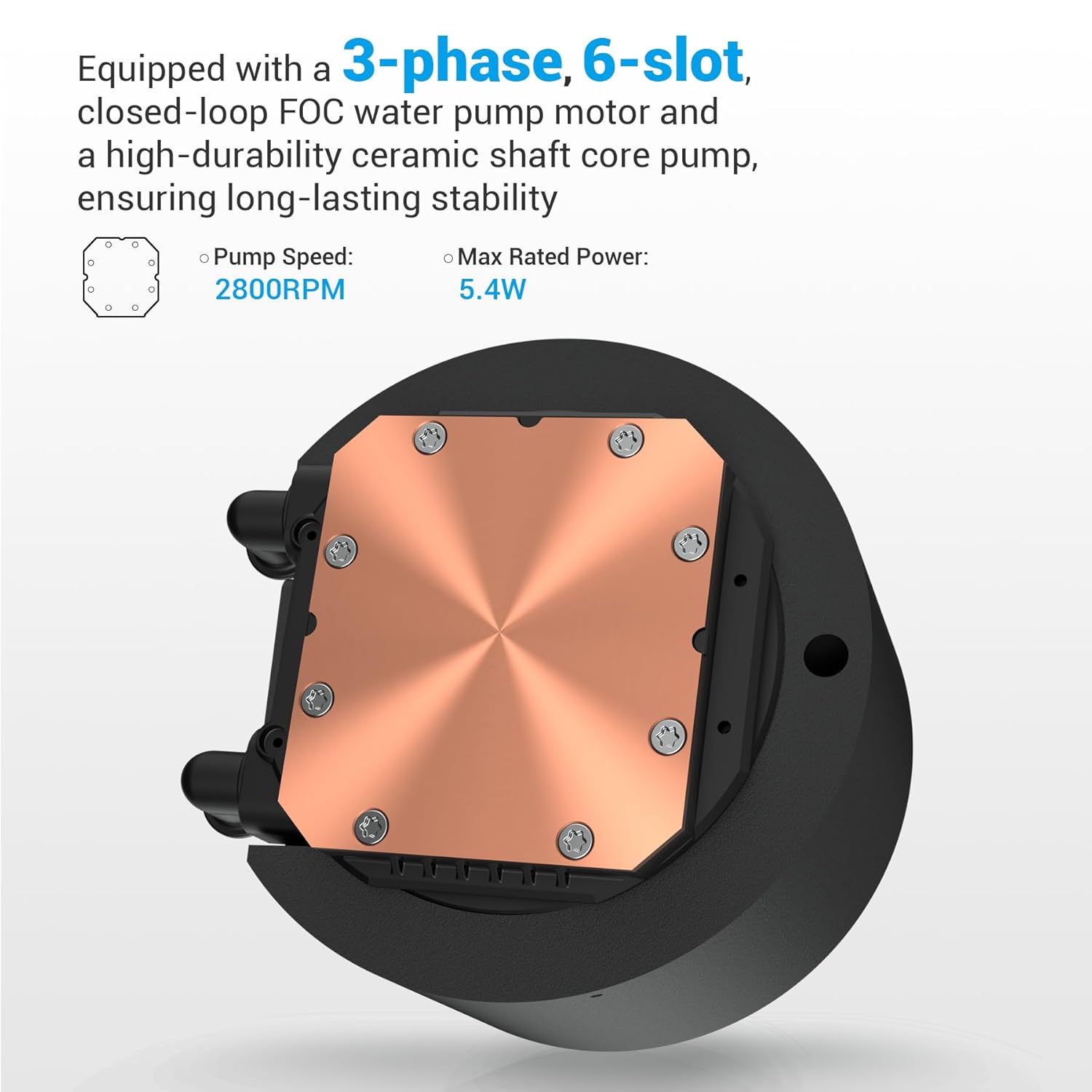
Image: The pump base, featuring a 3-phase, 6-slot closed-loop FOC water pump motor.
4. Compatibility
The SAMA Q60 CPU cooler offers broad compatibility with various CPU sockets:
- Intel Sockets: LGA 115X, 1200, 1700, 1851, 20XX
- AMD Sockets: AM4, AM5
5. Installation Guide
This section provides a general overview of the installation process. For detailed visual instructions, please refer to the official installation video.
5.1. Pre-Installation Steps
- Unpack all components and verify against the package contents list.
- Prepare your motherboard by installing the correct mounting backplate (if required for your CPU socket).
- Apply the included thermal paste to the CPU IHS (Integrated Heat Spreader).
5.2. Radiator and Fan Installation
- Mount the three XT120 fans to the radiator using the provided screws. Ensure the fan airflow direction is as desired (intake or exhaust).
- Install the radiator assembly into your PC case. Common mounting locations include the top or front of the case, depending on clearance.
5.3. Water Block Installation
- Secure the water block onto your CPU using the appropriate mounting brackets and screws for your socket type. Ensure even pressure for optimal contact.
5.4. Cable Connections
- Connect the fan PWM cables to your motherboard's fan headers or a fan controller.
- Connect the pump power cable to the designated AIO_PUMP or CPU_FAN header on your motherboard.
- Connect the LCD display's Type-C cable to an available USB 2.0 header on your motherboard.
- Connect any ARGB cables from the fans to your motherboard's ARGB header or a dedicated ARGB controller.

Image: The SAMA Q60 cooler fully installed within a PC system.
5.5. Official Installation Video
For a comprehensive visual guide on installing your SAMA Q60 AIO Liquid CPU Cooler, please watch the official tutorial video below.
Video: Official installation tutorial for the SAMA Q series water cooling system.
6. SAMA Monitor Software
The SAMA Monitor software allows you to customize the LCD display and monitor system information. It is essential for unlocking the full potential of your SAMA Q60 cooler.
6.1. Software Download and Installation
- Visit the official SAMA website: www.samagears.com
- Navigate to the 'Support' section and click on 'Software'.
- Download the SAMA Monitor software for Q Series AIO. You may find direct download links via Google Drive or OneDrive.
- Install the software by following the on-screen prompts.
6.2. Operating the Software and Customizing the LCD
Once installed, open the SAMA Monitor software to access various settings and customization options for your LCD display:
- System Info: View real-time CPU and GPU temperatures, load, fan speeds, RAM usage, and network activity.
- Settings: Adjust various parameters such as CPU temperature sensor source, CPU/GPU usage, fan control, and temperature units (Celsius/Fahrenheit).
- LCD Customization: Access the dedicated LCD screen settings to:
- Adjust screen rotation (0°, 90°, 180°, 270°) for optimal viewing based on installation orientation.
- Set font color and background color.
- Upload custom background images or videos (GIF, MP4 formats supported).
- Toggle UI data display on/off.
- Adjust screen brightness.
- Select from various preset themes or create your own custom themes using the 'DIY Theme' editor.
7. Maintenance
Proper maintenance ensures the longevity and optimal performance of your SAMA Q60 AIO Liquid CPU Cooler.
- Dust Cleaning: Regularly clean dust from the radiator fins and fan blades using compressed air or a soft brush. Accumulated dust can impede airflow and reduce cooling efficiency.
- Visual Inspection: Periodically check the tubing and connections for any signs of leaks or damage. While the system is sealed, routine checks are recommended.
- Thermal Paste: If you ever remove the water block from the CPU, clean off the old thermal paste and apply a fresh layer before reinstallation.
8. Troubleshooting
If you encounter issues with your SAMA Q60 AIO Liquid CPU Cooler, refer to the following common troubleshooting steps:
- No Power/Fans Not Spinning:
- Ensure all power cables (PWM for fans, pump power) are securely connected to the motherboard.
- Check BIOS/UEFI settings to ensure fan headers are configured correctly and not set to 'disabled' or '0 RPM' at low temperatures.
- High CPU Temperatures:
- Verify that the water block is making proper contact with the CPU and that thermal paste was applied correctly.
- Ensure fans are spinning and oriented correctly for optimal airflow.
- Check for dust buildup on the radiator.
- Confirm the pump is operating (you may hear a faint hum or feel vibrations in the tubing).
- LCD Display Not Working/Blank:
- Ensure the Type-C USB cable from the water block is securely connected to a motherboard USB 2.0 header.
- Verify that the SAMA Monitor software is installed and running.
- Restart the SAMA Monitor software or your computer.
- Check for software updates for SAMA Monitor.
If issues persist, please contact SAMA customer support for further assistance.
9. Specifications
Detailed technical specifications for the SAMA Q60 360mm AIO Liquid CPU Cooler.

Image: Dimensions of the SAMA Q60 radiator and pump.
| Feature | Specification |
|---|---|
| Brand | SAMA |
| Model Number | Q60 |
| Cooling Method | Liquid |
| Compatible Devices | Desktop |
| Radiator Dimensions | 397 x 120 x 27 mm (15.63 x 4.72 x 1.06 inches) |
| Radiator Material | Aluminum |
| Fan Type | XT120 PWM Fans (3 included) |
| Fan Speed | 500–2600 RPM ±10% |
| Air Flow Capacity | 86 Cubic Feet Per Minute (CFM) |
| Static Pressure | 3.7 mmH₂O |
| Noise Level (Fans) | Under 35 dB-A (30 Decibels listed in specs) |
| Fan Bearing Type | Fluid Dynamic Bearing (FDB) |
| Pump Speed | 2500 RPM ±10% (2800 RPM listed in specs) |
| Pump Noise Level | Under 35 dB-A |
| Pump Dimensions | 95 × 100.8 × 64.1 mm |
| LCD Display Size | 2.8 inches |
| LCD Resolution | 480 × 480 |
| LCD Brightness | 500 nits |
| Power Connector Type | Type-C (for LCD) |
| Voltage | 12 Volts |
| Wattage | 5 watts |
| Item Weight | 5.61 pounds |
10. Warranty and Support
SAMA products are designed for reliability and performance. For warranty information and technical support, please refer to the official SAMA website or contact their customer service.
- Warranty: Specific warranty terms and duration may vary by region and retailer. Please retain your proof of purchase for warranty claims.
- Technical Support: For assistance with installation, troubleshooting, or product inquiries, visit the SAMA website (www.samagears.com) and navigate to the 'Support' section.