
Introduction
This manual provides detailed instructions for the installation, operation, and maintenance of your Inexaccessories Double Din Car Stereo. Please read this manual thoroughly before using the product to ensure proper function and safety.
Setup
Package Contents
Verify that all items are present in the package:
- In-dash Car Stereo Unit
- Backup Camera
- Power Cable
- USB Cable
- Mounting Brackets
- User Manual
Installation Guidelines
Professional installation is recommended. Ensure your vehicle's dash opening matches the standard double din size (approximately 173x98mm or 175x100mm). If not, a suitable dash kit may be required. Confirm compatibility of your factory wiring harness and radio antenna adapter before installation.
Important: All positive and negative wires must be connected correctly and isolated to prevent short circuits.

Image: Product dimensions, detailed wiring diagram for power, speakers, and accessories, along with a list of included components. This image illustrates the physical size of the unit, the necessary wiring connections, and what to expect in the box.
Operating Instructions
Power On/Off and Basic Controls
Press the power button to turn the unit on or off. Use the touchscreen for navigation and control. The volume knob (if present) or touchscreen controls adjust audio levels.
CarPlay & Android Auto
Connect your iPhone or Android smartphone via the original USB cable to activate CarPlay or Android Auto. This allows access to navigation, calls, messages, and music apps directly from the stereo's display. Voice control (Siri/Google Assistant) is supported for hands-free operation.
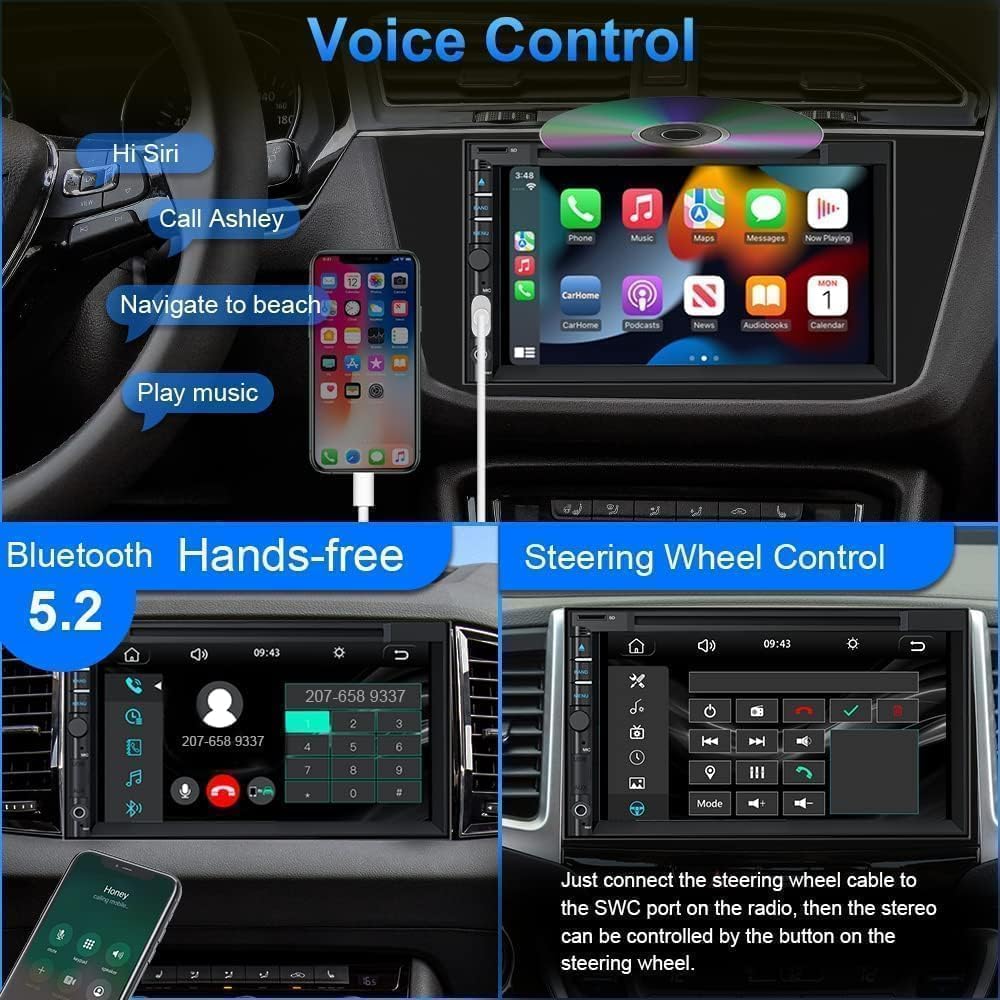
Image: Demonstrates the CarPlay interface (top) and Android Auto interface (bottom) displayed on the car stereo's 7-inch touchscreen, showing app icons and voice command prompts.
Bluetooth 5.2 Connectivity
Pair your mobile device via Bluetooth for hands-free calling and audio streaming. The built-in microphone and external microphone interface ensure clear voice pickup. Access your phone's contacts and call history directly from the stereo.

Image: A close-up of the car stereo screen showing an incoming Bluetooth call with options to answer or decline.
CD/DVD Playback
Insert a CD or DVD into the disc slot to play audio or video content. The unit supports a wide variety of disc formats, providing high-definition video and excellent sound quality.

Image: A close-up of the car stereo unit showing a CD being inserted into the disc slot.
AM/FM Radio
Access the AM/FM tuner to listen to radio stations. Scan for available stations or manually tune to a specific frequency. Save your favorite stations as presets for quick access.
Mirror Link Function
The Mirror Link feature allows you to display your smartphone screen (Android/iPhone) directly onto the car stereo. Connect your phone using its original USB cable to mirror apps, navigation, and videos. This is useful for apps not supported by CarPlay or Android Auto.

Image: The car stereo screen displaying a mirrored smartphone screen, showing a video playing.
Backup Camera Operation
When the vehicle is shifted into reverse gear, the stereo automatically displays the feed from the connected backup camera. This feature provides a wide-angle, HD night vision view for parking assistance.

Image: An illustration showing a car with a backup camera, and the car stereo screen displaying the reverse image with parking guidelines.
Steering Wheel Control (SWC)
Connect your vehicle's steering wheel control wires (KEY1/KEY2 and ground wire) to the stereo. Access the "Steering Wheel Control" settings in the unit's menu to program the buttons. This allows you to control basic functions like volume, track changes, and mode selection without taking your hands off the wheel.

Image: The car stereo screen showing the "Steering Wheel Learning" interface, where users can program steering wheel buttons.
Audio Settings (EQ & Subwoofer)
Customize your audio experience using the 30-band EQ settings. Adjust frequencies to match your preferences. The unit also supports subwoofer output for enhanced bass.

Image: A close-up of the car stereo screen displaying the 30-band equalizer settings, allowing for fine-tuning of audio frequencies.
Maintenance
- Cleaning: Use a soft, dry cloth to clean the screen and unit. Avoid abrasive cleaners or solvents.
- Disc Care: Handle CDs/DVDs by the edges. Keep them clean and free of scratches to ensure proper playback.
- Temperature: Avoid exposing the unit to extreme temperatures, which can affect performance and lifespan.
- Firmware Updates: Check the manufacturer's website periodically for any available firmware updates to improve performance or add features.
Troubleshooting
| Problem | Possible Cause | Solution |
|---|---|---|
| Unit does not power on. | Incorrect wiring; Blown fuse. | Check power connections (ACC, B+, GND). Verify the 10A fuse. Ensure all positive and negative wires are correctly connected and isolated. |
| No sound. | Volume too low; Mute activated; Speaker wiring issue. | Increase volume. Check if mute is active. Verify speaker wire connections. |
| CarPlay/Android Auto not connecting. | Incorrect USB cable; Phone settings. | Use the phone's original USB cable. Ensure phone is unlocked and permissions are granted. Restart phone and stereo. |
| Backup camera not displaying. | Camera wiring issue; Reverse trigger not connected. | Check camera power and video signal connections. Ensure the reverse trigger wire is correctly connected to the vehicle's reverse light circuit. |
| Steering Wheel Controls not working. | Incorrect wiring; Not programmed. | Verify KEY1/KEY2 and ground wire connections. Follow the programming steps in the "Operating Instructions" section. If your car uses Digital Steering Wheel Control, a CANBUS adapter may be required. |
Specifications
- Model Number: faf00a2d-ed71-47b9-b949-52792dc72329
- Brand: Inexaccessories
- Screen Size: 7 inch
- Display Type: Full HD Touch Screen (1280x720 resolution)
- Connectivity: Bluetooth 5.2, USB, TF Card, AUX (3.5mm Jack)
- Special Features: CarPlay, Android Auto, Mirror Link, Rear View Camera Support, Steering Wheel Control (SWC), Subwoofer Output, 30-Band EQ
- Media Playback: CD, DVD
- Radio Tuner: AM/FM
- Audio Output Mode: Stereo, Surround
- Color: Black
- Manufacturer: WOWiViD
Warranty
This Inexaccessories Double Din Car Stereo comes with a 12-month guarantee from the date of purchase. Please retain your proof of purchase for warranty claims. The warranty covers manufacturing defects under normal use. It does not cover damage caused by improper installation, misuse, accidents, or unauthorized modifications.
Support
For technical assistance, installation queries, or any other questions regarding your Inexaccessories car stereo, please contact our customer support team. We offer 24-hour technical support before and after your purchase. You can message us via the Amazon platform for prompt assistance.
Before contacting support, please ensure you have read this manual thoroughly and attempted the troubleshooting steps.