
1. Introduction
Thank you for purchasing the XO F41 Mirror Bluetooth Speaker. This device combines a digital clock display with a portable Bluetooth speaker, offering multiple playback options including Bluetooth, TF card, and FM radio. Please read this manual carefully before use to ensure proper operation and to maximize your experience with the product.

Image 1.1: The XO F41 Mirror Bluetooth Speaker in use, showing its digital clock display.
2. Product Features
- Bluetooth 5.3 Connectivity: For stable and efficient wireless audio streaming.
- Mirror Display: Clear digital time display with adjustable brightness.
- Multiple Playback Modes: Supports Bluetooth, TF card, and FM radio.
- Integrated Microphone: For hands-free calling.
- Long Playback Time: Up to 8 hours at 50% volume, 5 hours at 100% volume.
- Compact and Portable Design: Easy to carry and place anywhere.
- USB-C Charging: Modern and convenient charging port.
3. Package Contents
Please check the package for the following items:
- XO F41 Mirror Bluetooth Speaker
- USB-C Charging Cable
- User Manual

Image 3.1: The XO F41 Mirror Bluetooth Speaker packaging.
4. Device Layout and Controls
Familiarize yourself with the speaker's buttons and ports:
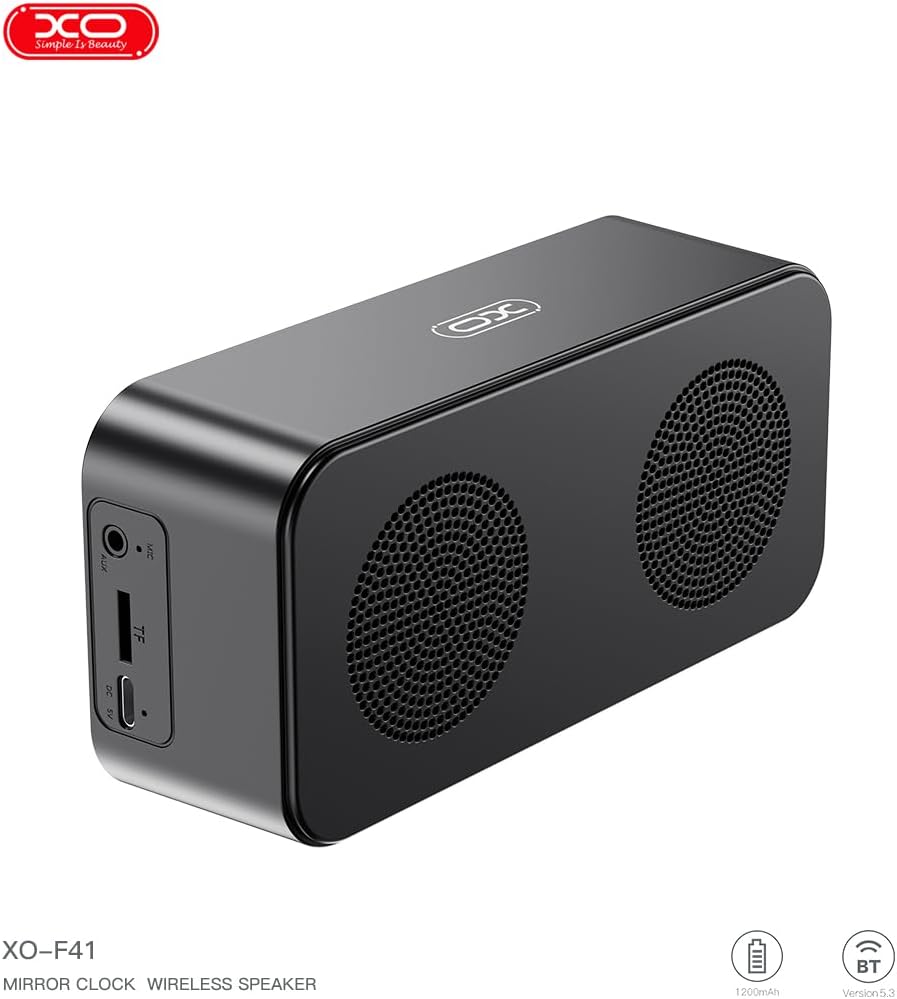
Image 4.1: Side view of the XO F41 with ports labeled.
- Power Button: Press and hold to power on/off. Short press to switch modes.
- Play/Pause Button: Play or pause audio. Answer/end calls.
- Volume Up/Next Track: Short press for volume up, long press for next track.
- Volume Down/Previous Track: Short press for volume down, long press for previous track.
- USB-C Port: For charging the device.
- TF Card Slot: Insert a TF (MicroSD) card for local music playback.
- AUX Port: For wired audio input.
5. Setup
5.1 Charging the Speaker
- Connect the provided USB-C cable to the charging port on the speaker.
- Connect the other end of the cable to a USB power adapter (not included) or a computer's USB port.
- The charging indicator will illuminate. It takes approximately 3 hours for a full charge.
- The indicator will turn off or change color once fully charged.
5.2 Power On/Off
- To Power On: Press and hold the Power button for approximately 3 seconds. You will hear an audible prompt.
- To Power Off: Press and hold the Power button for approximately 3 seconds. You will hear an audible prompt.
6. Operating Instructions
6.1 Bluetooth Pairing
- Ensure the speaker is powered on and in Bluetooth mode. If not, short press the Power button to cycle through modes until "BT" or a Bluetooth icon appears on the display.
- On your mobile device, enable Bluetooth and search for available devices.
- Select "XO-F41" from the list of devices.
- Once paired, the speaker will indicate a successful connection, and you can begin playing audio from your device.
6.2 TF Card Mode
- Insert a TF (MicroSD) card with MP3 audio files into the TF card slot.
- The speaker will automatically switch to TF card mode and begin playing music. If not, short press the Power button to cycle to TF card mode.
- Use the Volume Up/Down buttons for track navigation and the Play/Pause button for playback control.
6.3 FM Radio Mode
- Short press the Power button to switch to FM radio mode. The display will show the FM frequency.
- Long press the Play/Pause button to automatically scan and save available FM stations.
- Short press the Volume Up/Down buttons to switch between saved stations.
6.4 Clock and Alarm Settings
The XO F41 features a digital clock display. Specific instructions for setting the time and alarm are typically found in the detailed manual included with the product. Generally, a dedicated 'M' (Mode) or 'Set' button is used to enter time/alarm setting mode, and volume buttons are used to adjust values.

Image 6.1: The XO F41 speaker functioning as a bedside clock.
6.5 Adjusting Display Brightness
The display brightness is adjustable. Look for a dedicated button (often labeled with a sun icon or similar) or a combination of button presses (e.g., double-pressing the Power button) to cycle through brightness levels. Refer to the included quick start guide for exact steps.
7. Maintenance
- Cleaning: Use a soft, dry cloth to clean the speaker's surface. Do not use abrasive cleaners or solvents.
- Storage: Store the speaker in a cool, dry place away from direct sunlight and extreme temperatures when not in use for extended periods.
- Water Resistance: This device is not waterproof. Avoid exposure to water or excessive moisture.
- Battery Care: To prolong battery life, avoid fully discharging the battery frequently. Charge the device regularly, even if not in constant use.
8. Troubleshooting
| Problem | Possible Cause | Solution |
|---|---|---|
| Speaker does not power on. | Low battery. | Charge the speaker for at least 30 minutes. |
| Cannot pair via Bluetooth. | Speaker not in pairing mode; Bluetooth disabled on device; too far from device. | Ensure speaker is in Bluetooth mode. Enable Bluetooth on your device. Move speaker closer to your device (within 10 meters). |
| No sound from TF card. | TF card not inserted correctly; unsupported file format; no audio files on card. | Reinsert TF card. Ensure files are in MP3 format. Verify audio files are present on the card. |
| Poor FM radio reception. | Weak signal; environmental interference. | Move the speaker to a different location. Re-scan for stations. |
9. Specifications
| Feature | Detail |
|---|---|
| Model Number | XO-F41 |
| Bluetooth Version | Bluetooth V5.3 |
| Bluetooth Frequency | 2.402GHz-2.480GHz |
| Battery Capacity | 1200mAh |
| Charging Input | USB-C, DC5V/0.5A |
| Charging Time | Approximately 3 hours |
| Play Time | 8H (50% volume); 5H (100% volume) |
| Effective Distance | Less than 10 meters |
| Maximum Power | 5W |
| Loudspeaker Unit | 52mm |
| Signal-to-Noise Ratio | >80dB |
| Product Dimensions | 15 x 3.81 x 11 cm (approx. 150 x 45 x 72 mm) |
| Product Weight | 320 g (approx. 0.28 kg) |
| Material | Plastic |
| Special Feature | Adjustable Brightness |

Image 9.1: Detailed product parameters.
10. Warranty Information
The XO F41 Mirror Bluetooth Speaker comes with a standard manufacturer's warranty. Please refer to the warranty card included in your package for specific terms, conditions, and duration. Keep your purchase receipt as proof of purchase for any warranty claims.
11. Customer Support
For further assistance, technical support, or inquiries regarding your XO F41 Mirror Bluetooth Speaker, please contact the retailer or manufacturer's customer service department. Contact details are typically provided on the product packaging or the official brand website.
