
1. Introduction
This manual provides detailed instructions for the proper use and maintenance of your LUOTWO N88 Global 4G PoC Walkie Talkie. Please read this manual thoroughly before operating the device to ensure optimal performance and longevity. The N88 walkie talkie offers global communication capabilities, supporting 2G, 3G, and 4G networks, an extensive communication range, integrated GPS, and a high-capacity battery for extended use.
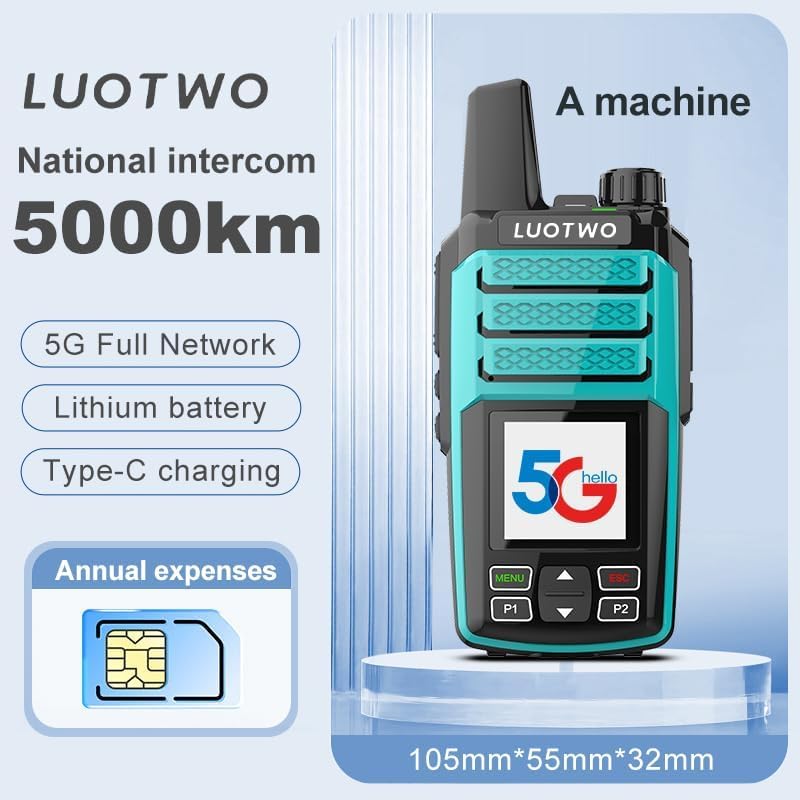
Image 1.1: LUOTWO N88 Walkie Talkie highlighting 5G Full Network, Lithium battery, Type-C charging, and 5000km range.
2. Package Contents
Verify that all items listed below are present in your package:
- 2 x LUOTWO N88 Walkie-talkie units
- 2 x USB Charging Cables
- 2 x Antennas
- 2 x 8800mAh Batteries
- 2 x Back Clips
- 2 x Lanyards
- 1 x User Manual (this document)
3. Product Overview
Familiarize yourself with the components of your LUOTWO N88 walkie talkie:
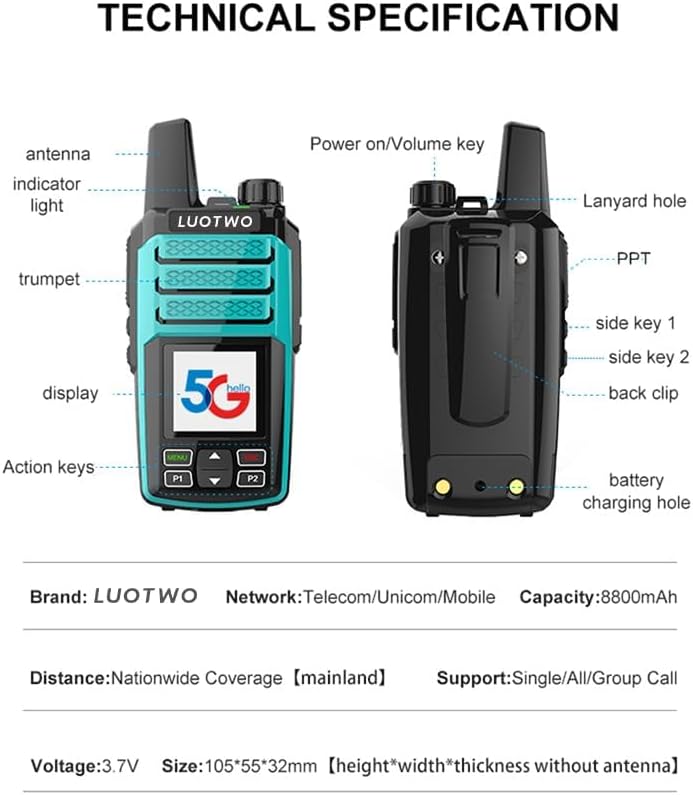
Image 3.1: Front and back view of the LUOTWO N88 with labeled components.
- Antenna: For signal transmission and reception.
- Indicator Light: Displays device status (e.g., charging, transmitting, receiving).
- Trumpet (Speaker): For audio output.
- Display: Shows operational information.
- Action Keys (Menu, P1, P2, Up/Down): For navigating menus and selecting functions.
- Power On/Volume Key: Rotates to power on/off and adjust volume.
- PTT (Push-to-Talk) Button: Press and hold to transmit voice.
- Side Key 1: Programmable function key.
- Side Key 2: Programmable function key.
- Back Clip: For attaching the device to clothing or a belt.
- Battery Charging Hole: Connects to the USB charging cable.
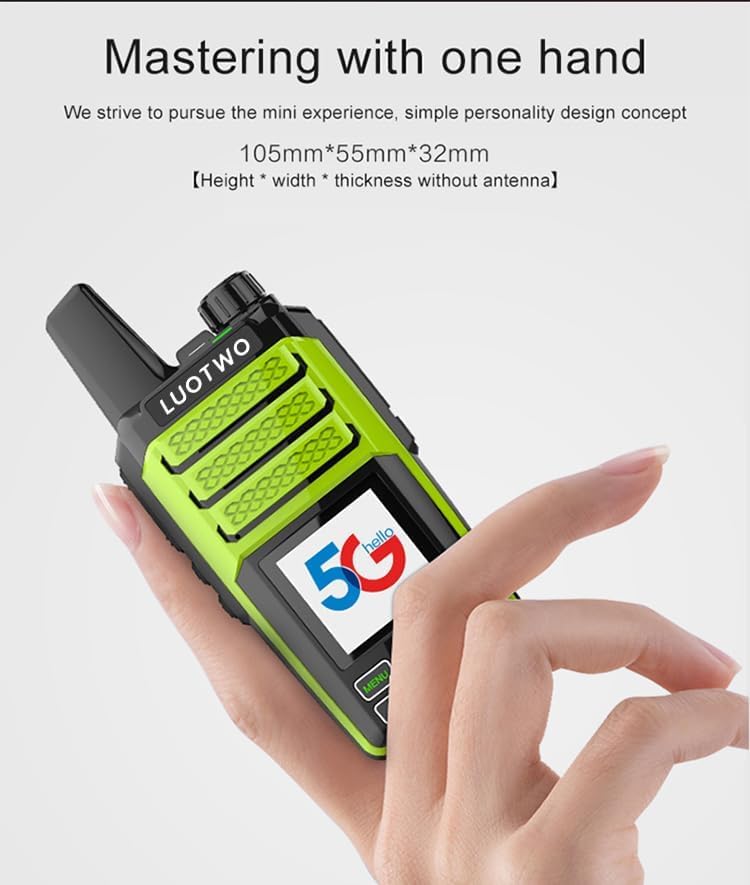
Image 3.2: The compact design of the N88, suitable for single-hand operation.

Image 3.3: Detail of the back clip and battery charging port for convenient use and charging.
4. Setup
4.1. Battery Installation
- Ensure the device is powered off.
- Remove the battery cover on the back of the walkie talkie.
- Align the 8800mAh battery with the contacts inside the compartment.
- Gently press the battery into place until it clicks.
- Replace the battery cover, ensuring it is securely latched.
4.2. SIM Card Installation
The N88 supports 4G networks. A SIM card is required for global communication functionality.
- With the battery removed, locate the SIM card slot.
- Insert your activated 4G SIM card into the slot, ensuring correct orientation.
- Reinstall the battery and battery cover.
4.3. Charging the Battery
Before first use, fully charge the battery.
- Connect the provided USB charging cable to the battery charging hole on the device.
- Connect the other end of the USB cable to a compatible USB power adapter (not included) or a computer USB port.
- The indicator light will show charging status. A full charge typically takes several hours.
- Disconnect the charger once the battery is fully charged.
4.4. Attaching the Antenna and Back Clip
- Screw the antenna clockwise onto the antenna connector at the top of the device until secure.
- Slide the back clip onto the designated grooves on the back of the device until it locks into place.
5. Operating Instructions
5.1. Power On/Off and Volume Adjustment
- Power On: Rotate the Power On/Volume key clockwise until you hear a click and the display illuminates.
- Power Off: Rotate the Power On/Volume key counter-clockwise until you hear a click and the display turns off.
- Volume Adjustment: Rotate the Power On/Volume key clockwise to increase volume and counter-clockwise to decrease volume while the device is on.
5.2. Basic Communication (PTT)
- To Transmit: Press and hold the PTT button on the side of the device. Speak clearly into the microphone. The indicator light will typically turn red.
- To Receive: Release the PTT button. The indicator light will typically turn green when receiving.
- The N88 supports single, group, and all calls, depending on your network configuration. Refer to your service provider for specific group call setup.
5.3. GPS Functionality
The integrated GPS provides precise location tracking and navigation. Access GPS features through the device's menu system using the Action Keys. Specific GPS functions may vary based on firmware and network services.
5.4. Network Compatibility
The N88 is compatible with 2G, 3G, and 4G networks (Telecom/Unicom/Mobile). The device will automatically connect to the strongest available network. Ensure your SIM card is active and has a data plan for optimal performance.
6. Maintenance
6.1. Cleaning the Device
- Use a soft, damp cloth to wipe the exterior of the walkie talkie.
- Do not use harsh chemicals, solvents, or abrasive cleaners.
- Ensure all ports are dry before charging or operating.
6.2. Battery Care
- Avoid fully discharging the battery frequently.
- Charge the battery in a cool, dry environment.
- If storing the device for an extended period, charge the battery to approximately 50% and remove it from the device.
6.3. General Handling
- Avoid dropping the device or subjecting it to strong impacts.
- Keep the device away from extreme temperatures, direct sunlight, and moisture.
- Do not attempt to disassemble or modify the device, as this will void the warranty.
7. Troubleshooting
If you encounter issues with your LUOTWO N88, refer to the following common problems and solutions:
| Problem | Possible Cause | Solution |
|---|---|---|
| Device does not power on | Low battery; Battery not installed correctly; Device fault | Charge the battery; Reinstall the battery; Contact support if issue persists |
| No network connection | No SIM card; SIM card not active; Out of network coverage; Incorrect APN settings | Install/check SIM card; Verify SIM card activation; Move to an area with network coverage; Check APN settings with your service provider |
| Poor audio quality | Low volume; Obstruction of speaker/microphone; Weak signal | Adjust volume; Clear any obstructions; Move to an area with better signal |
| GPS not acquiring signal | Indoor use; Obstruction; GPS module error | Move to an open outdoor area; Ensure clear line of sight to the sky; Restart device |
| Battery not charging | Faulty cable/adapter; Loose connection; Device fault | Try a different USB cable/adapter; Ensure cable is securely connected; Contact support |
8. Specifications
Technical specifications for the LUOTWO N88 Global 4G PoC Walkie Talkie:
- Brand: LUOTWO
- Model: N88
- Battery Capacity: 8800mAh
- Network Compatibility: 2G, 3G, 4G (Telecom/Unicom/Mobile)
- Communication Distance: National Coverage (mainland), up to 5000km
- Call Support: Single Call, All Call, Group Call
- Operating Voltage: 3.7V
- Dimensions (H x W x T, without antenna): 105mm x 55mm x 32mm
- UPC: 735407589567
9. Warranty Information
The LUOTWO N88 Global 4G PoC Walkie Talkie comes with a 1-year manufacturer's warranty from the date of purchase. This warranty covers defects in materials and workmanship under normal use. Please retain your proof of purchase for warranty claims.
Note: Information regarding the availability of spare parts is currently unavailable.
10. Support
For technical assistance, warranty claims, or further inquiries, please contact the retailer or the manufacturer's customer support channel. Refer to your purchase documentation for specific contact details.