
1. Introduction
This manual provides essential information for the safe and efficient operation of your LVYUAN 5000 Watt Pure Sine Wave Power Inverter. Please read all instructions carefully before installation and use. This inverter converts 12V DC battery power to 110V/120V AC household power, suitable for various applications including home backup, RVs, trucks, and solar systems.

Image 1.1: The LVYUAN 5000 Watt Pure Sine Wave Power Inverter, including the main unit, wired remote control, wireless remote control, battery cables, and spare fuses.
2. Safety Information
Always observe the following safety precautions to prevent injury or damage to the inverter and connected devices:
- Ensure proper ventilation around the inverter. Do not block cooling vents.
- Do not expose the inverter to water, rain, or excessive moisture.
- Connect the inverter only to a 12V DC power source. Connecting to a 24V or higher DC source will damage the unit.
- Always connect the inverter to the battery terminals with correct polarity (red to positive, black to negative). Reverse polarity will cause damage.
- Do not connect the inverter to AC distribution wiring.
- Keep children away from the inverter.
- Disconnect the inverter from the battery before performing any maintenance or cleaning.
- Ensure the total wattage of connected appliances does not exceed the inverter's continuous power rating (5000W).
3. Package Contents
Verify that all items are present in your package:
- LVYUAN 5000W 12V Pure Sine Wave Power Inverter
- Wired 3-in-1 LCD Remote Control (with 5 meters of Cat 6 cable)
- Wireless Remote Control (battery not included, requires 23A 12V)
- Battery Cables (2 pairs, 3AWG, 20in/50cm)
- Extra Fuses (6 x 50A)
- User Manual (this document)
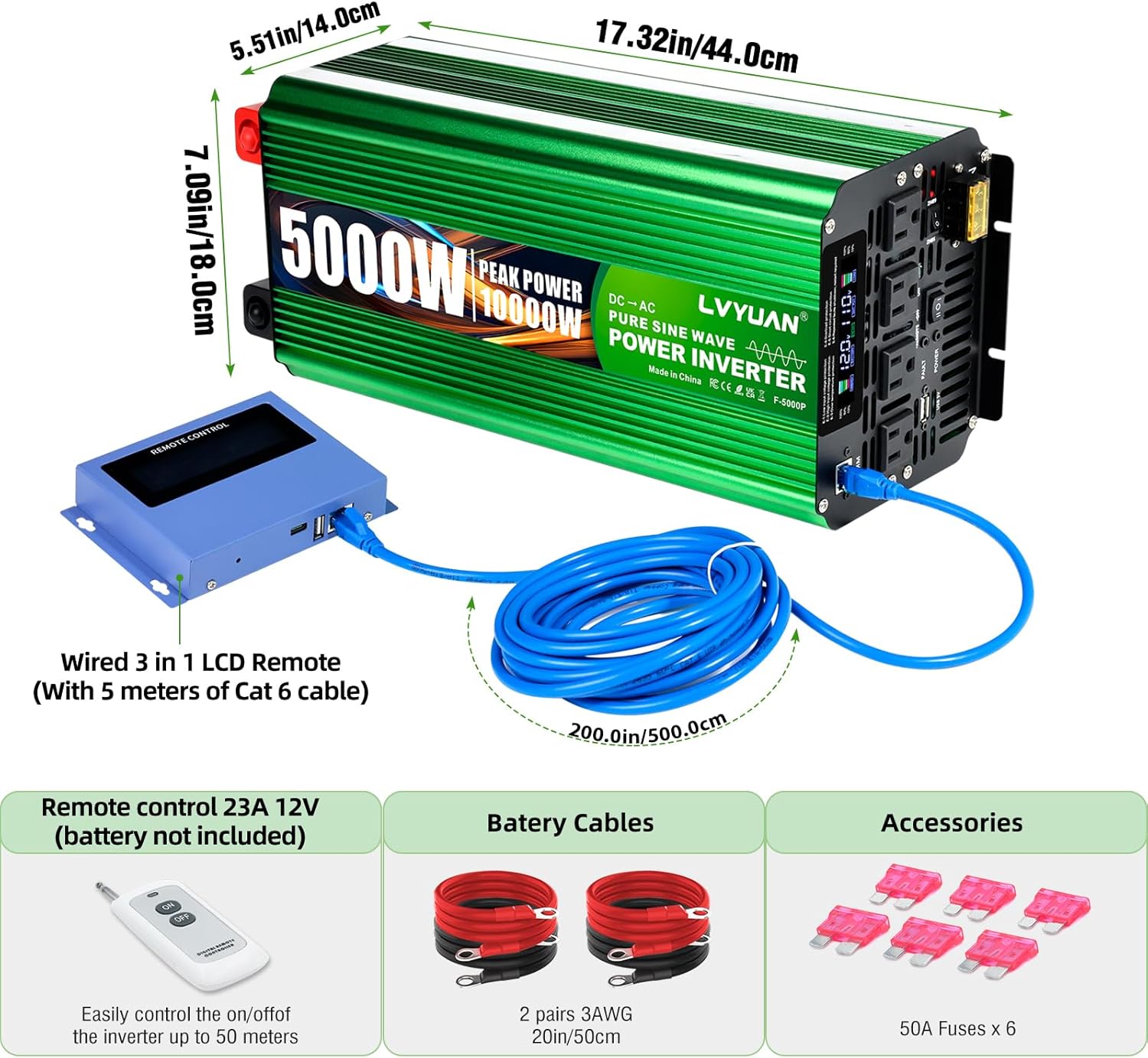
Image 3.1: All components included with the LVYUAN 5000 Watt Pure Sine Wave Power Inverter.
4. Product Features
The LVYUAN 5000W Pure Sine Wave Power Inverter offers advanced features for reliable power conversion:
- Pure Sine Wave Output: Provides stable and clean power, ideal for sensitive electronics.
- High Power Output: 5000W continuous power, 10000W peak power for heavy-duty applications.
- Multiple Output Ports: Four U.S. standard AC outlets, one USB port, and a hardwire port.
- Advanced Remote Control: Includes both wired and wireless 3-in-1 LCD remote controls for convenient monitoring and operation from a distance.
- Intelligent LCD Display: Real-time data monitoring for input voltage, output voltage, output wattage, battery capacity, and error codes.
- Robust Construction: Durable aluminum body for enhanced protection and efficient cooling.
- Comprehensive Safety Protections: Overvoltage, low voltage, overload, short circuit, overheat, and reverse polarity protection (built-in fuse).
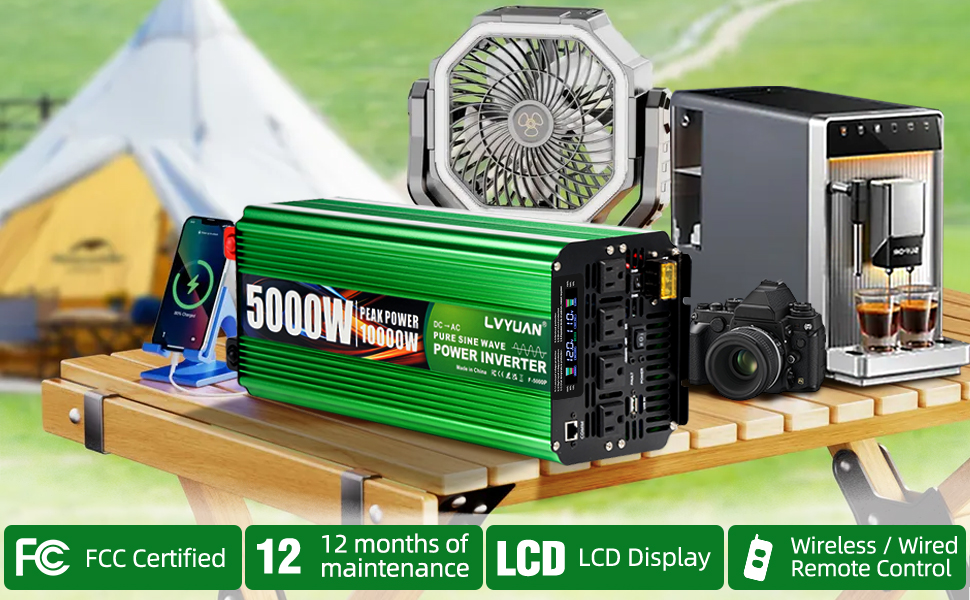
Image 4.1: The inverter is suitable for a wide range of applications, from home use to outdoor activities and vehicle power.
5. Setup and Installation
Follow these steps for proper installation of your power inverter:
5.1 Connecting to a 12V DC Battery
- Ensure the inverter is turned off and no appliances are connected.
- Connect the red battery cable to the positive (+) terminal of the inverter and the positive (+) terminal of the 12V battery.
- Connect the black battery cable to the negative (-) terminal of the inverter and the negative (-) terminal of the 12V battery.
- Ensure all connections are tight and secure to prevent arcing and overheating.

Image 5.1: Proper connection of battery cables to the inverter's DC input terminals.
5.2 Connecting the Remote Control
The inverter supports both wired and wireless remote controls. Only one type can be used at a time.
- Wired Remote: Connect the Cat 6 cable from the wired LCD remote control to the "REMOTE CONTROL" port on the inverter.
- Wireless Remote: Insert a 23A 12V battery (not included) into the wireless remote. The wireless remote can operate up to 50 meters away.

Image 5.2: Illustration of wired and wireless remote control connections and operational range.
5.3 Hardwire Terminal Connection
For high-power appliances, use the AC hardwire block. Consult a qualified electrician for this installation.

Image 5.3: The AC hardwire block for direct wiring of high-power loads.
6. Operating Instructions
6.1 Powering On/Off
- After connecting the battery, press the ON/OFF switch on the inverter or the remote control.
- The LCD display will illuminate, indicating the inverter is operational.
- To turn off, press the ON/OFF switch again.
6.2 Using the LCD Display and USB Port
The LCD display provides real-time operational data and error codes. The USB port can charge compatible devices.

Image 6.1: The LCD remote control displays key operational parameters and includes charging ports.
- Input Voltage: Displays the current DC voltage from the battery.
- Output Voltage: Shows the AC output voltage (110V/120V).
- Output Wattage: Indicates the current power consumption of connected devices.
- Battery Capacity: A bar graph showing the estimated remaining battery charge.
- USB Port: Provides 5V power for charging USB devices.
- Type-C Port: Supports high-speed charging (PD 3.0 QC 3.0, 20W Max).
7. Maintenance
Regular maintenance ensures the longevity and optimal performance of your inverter:
- Cleaning: Periodically clean the exterior of the inverter with a dry, soft cloth. Ensure vents are free from dust and debris.
- Connections: Regularly check battery cable connections for tightness and corrosion. Clean any corrosion with a wire brush and baking soda solution.
- Storage: When not in use for extended periods, store the inverter in a cool, dry place away from direct sunlight and moisture. Disconnect it from the battery.
- Battery Health: Maintain your 12V battery according to its manufacturer's recommendations to ensure consistent power supply to the inverter.
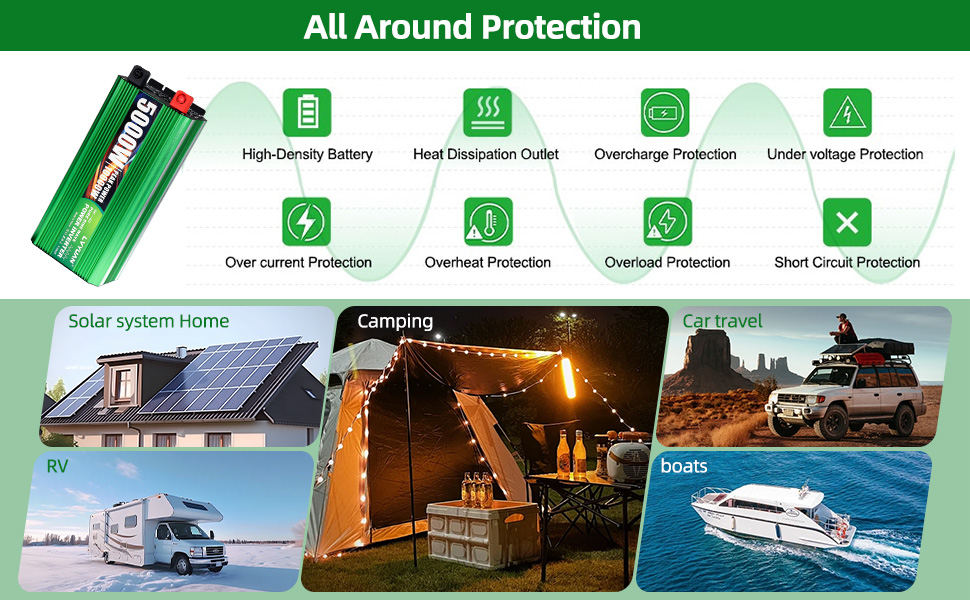
Image 7.1: The inverter features temperature-controlled rapid cooling fans to prevent overheating.
8. Troubleshooting
The LCD display provides error codes to help diagnose common issues:
| Error Code | Description | Possible Cause / Solution |
|---|---|---|
| E-1 | Low Voltage Protection | Battery voltage is too low. Recharge or replace the battery. |
| E-2 | High Voltage Protection | Battery voltage is too high. Check charging system. |
| E-3 | Over Temperature Protection | Inverter is overheating. Reduce load, ensure proper ventilation, or allow to cool. |
| E-4 | Overload Protection | Connected load exceeds 5000W. Reduce the load. |
| E-5 | Short Circuit Protection | Short circuit detected in output. Disconnect all loads and check wiring. |
| E-6 | Restart Required | A fault occurred, requiring a manual restart. Turn off, wait, then turn on. |

Image 8.1: Understanding the error codes displayed on the inverter's LCD screen.
9. Specifications
Technical specifications for the LVYUAN 5000 Watt Pure Sine Wave Power Inverter:
| Feature | Specification |
|---|---|
| Continuous Power | 5000 Watts |
| Peak Power | 10000 Watts |
| Input Voltage | 12V DC |
| Output Voltage | 110V/120V AC |
| Output Waveform | Pure Sine Wave |
| Efficiency | >90% |
| Product Dimensions | 17.32 x 5.51 x 7.09 inches (44.0 x 14.0 x 18.0 cm) |
| Item Weight | 11.9 pounds (5.4 kg) |
| Model Number | LVYUAN500012V |
| USB Output | 5V |
| Type-C Output | PD 3.0 QC 3.0 (20W Max) |
Image 9.1: Physical dimensions of the inverter for installation planning.
10. Warranty and Support
Your LVYUAN 5000 Watt Pure Sine Wave Power Inverter comes with a 12-month warranty from the date of purchase.
For any questions, technical assistance, or warranty claims, please contact us via email. Our support team is available to assist you with any issues you may encounter.
Contact Email: support@lvyuan.com (Example email, please refer to your product packaging or official website for the correct contact information.)


