
Introduction
The CHUBORY A68 Brushless Motor Drone is designed for beginners, offering a user-friendly experience with advanced features. It includes a 2K HD camera, auto hover, 3D flips, headless mode, and trajectory flight capabilities. Equipped with durable brushless motors and two upgraded batteries, it provides extended flight time and enhanced stability. Its compact, foldable design and included carrying case make it highly portable.

Image: The CHUBORY A68 drone highlighting its key features including being under 249g, brushless motor, HD camera, and 36 minutes long flight time.
What's in the Box
Your CHUBORY A68 drone package includes the following components:
- Drone
- Controller
- 2 x Batteries
- Propellers (spare set included)
- User Manual
- USB Charger Cable
- Carrying Case
- Screws
- Screwdriver
- Propeller Guards

Image: A complete overview of the CHUBORY A68 drone and all its included accessories, neatly laid out.
Setup
- Charge Batteries: Fully charge both drone batteries using the provided USB charging cable. Connect the cable to a USB power source (e.g., computer, USB wall adapter). The battery indicator lights will show charging status.
- Install Drone Battery: Insert a fully charged battery into the drone's battery compartment. Ensure it clicks securely into place.
- Install Propeller Guards: Attach the propeller guards to the drone's arms for added protection, especially for beginners.
- Prepare Controller: Open the collapsible phone mount on the controller. Ensure the controller has sufficient power.
- Power On: Press and hold the power button on the drone and then on the controller to turn them on. Follow the pairing instructions in the detailed manual for first-time connection.

Image: An illustration showing the drone battery being inserted and the concept of secure charging, emphasizing the two included batteries for 36 minutes of flight time.
Operating Instructions
The CHUBORY A68 drone offers a variety of intelligent flight modes and user-friendly controls:
- One Key Start/Landing: Press a single button for automatic takeoff or landing, simplifying operation for new pilots.
- Optical Flow Positioning: Utilizes a downward-facing camera to maintain stable hovering indoors or in areas with good ground texture.
- Altitude Hold: Automatically maintains a set altitude, allowing you to focus on directional control and camera operation.
- 3D Flips: Execute impressive aerial acrobatics with a simple button press.
- Headless Mode: Eliminates the need to adjust the drone's position before flight; the direction will be relative to the pilot.
- Speed Adjustment: Multiple speed modes allow pilots to choose a pace suitable for their skill level and environment.
- Gesture Selfie: Perform specific hand gestures to trigger photo or video recording from the drone's camera.
- Trajectory Flight: Draw a path on your smartphone screen, and the drone will automatically follow the designated route.
- HD Adjustable Camera: The 2K HD camera can be adjusted within 90 degrees via the remote control or the companion app, offering versatile aerial photography and videography. The dual cameras provide both front and downward views.

Image: A collage demonstrating various operating features of the drone, including Gesture Photography, 3D Flips, Headless Mode, Trajectory Flight, Speed Adjustment, and One Key Start/Landing.

Image: Close-up view of the drone's dual camera system, illustrating its 90-degree remote adjustability and the ability to capture both front and downward camera shots.
Video: A review of the CHUBORY A68 Foldable Drone, demonstrating its features and flight capabilities in real-world scenarios. This video provides a practical overview of the drone's operation.
Maintenance
- Battery Care: Store batteries in a cool, dry place. Do not overcharge or over-discharge. If not used for extended periods, charge them to about 50% capacity.
- Propeller Inspection: Regularly check propellers for any damage (cracks, bends). Replace damaged propellers immediately to ensure stable flight.
- Motor Care: The brushless motors are designed for longevity. Keep them free from dust and debris. Avoid operating in sandy or dusty environments.
- Cleaning: Use a soft, dry cloth to clean the drone body and camera lens. Avoid using harsh chemicals.
- Storage: When not in use, store the drone and its accessories in the provided carrying case to protect them from damage.
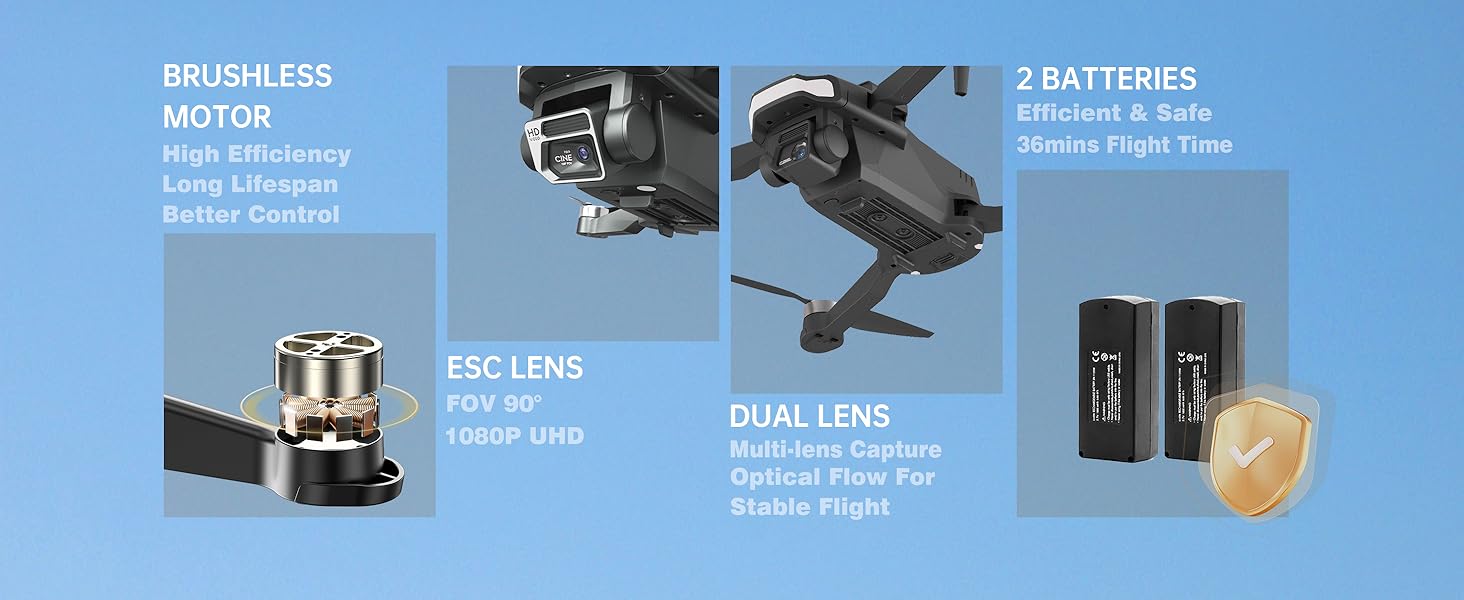
Image: An illustration detailing the brushless motor's high efficiency and long lifespan, alongside the dual lens system for stable flight and the two batteries providing 36 minutes of flight time.
Troubleshooting
| Problem | Possible Cause | Solution |
|---|---|---|
| Drone does not respond to controller | Not paired; low battery; interference | Re-pair drone and controller; charge batteries; move to an open area. |
| Unstable flight/drifting | Uncalibrated; damaged propellers; strong wind | Perform calibration; replace damaged propellers; fly in calm conditions. |
| Camera not recording/poor quality | SD card full/missing; dirty lens; low light | Insert/replace SD card; clean lens; ensure adequate lighting. |
| Short flight time | Battery not fully charged; old battery; aggressive flying | Ensure full charge; consider replacing old batteries; fly more conservatively. |
Specifications
- Brand: CHUBORY
- Model Name: A68
- Item Weight: 150 Grams (5.3 ounces)
- Product Dimensions: 9.44"L x 7.08"W x 2.95"H
- Video Capture Resolution: 1080p (2K HD Camera)
- Video Capture Format: MP4
- Connectivity Technology: Wi-Fi
- Control Type: Remote Control
- Battery Type: Lithium Ion (2 included)
- Special Features: Extended flight time, obstacle avoidance, advanced imaging sensors, autonomous flight modes, user-friendly functions, HD adjustable camera.

Image: A detailed diagram illustrating the internal components of the brushless motor, highlighting its stronger motivation and longer service life (4 times longer).
Warranty and Support
The CHUBORY A68 drone comes with a one-year warranty from the date of purchase. CHUBORY also provides a permanent support guarantee to ensure customer satisfaction. For any inquiries, technical assistance, or warranty claims, please contact CHUBORY customer service through the details provided in the product packaging or visit the official CHUBORY store on Amazon.
Visit the CHUBORY Store for more information and support resources.


