
1. Introduction
Thank you for purchasing the TMWINGS FB-40B5 16-inch Wall Mount Fan. This manual provides important information regarding the safe operation, installation, and maintenance of your fan. Please read it thoroughly before use and retain it for future reference.
Safety Instructions
- Always unplug the fan from the power outlet before cleaning, servicing, or moving it.
- Do not insert fingers or any other objects through the grille when the fan is operating.
- Ensure the fan is mounted securely to a wall stud or appropriate anchor point.
- Do not operate the fan with a damaged cord or plug. Contact customer service for replacement.
- Keep children and pets away from the fan during operation.
- This fan is designed for both indoor and outdoor use. Ensure it is protected from direct heavy rain when used outdoors.
2. Package Contents
Verify that all components are present in the package:
- Wall Mount Fan Unit (Motor, Blades, Grilles)
- Remote Control
- Wall Mounting Bracket
- Mounting Hardware (Screws, Wall Anchors)
- Instruction Manual (This document)
3. Product Overview
Familiarize yourself with the components of your TMWINGS wall mount fan.

Image 3.1: Front view of the TMWINGS 16-inch wall mount fan with its remote control. The fan features a black grille and five gold-colored blades.
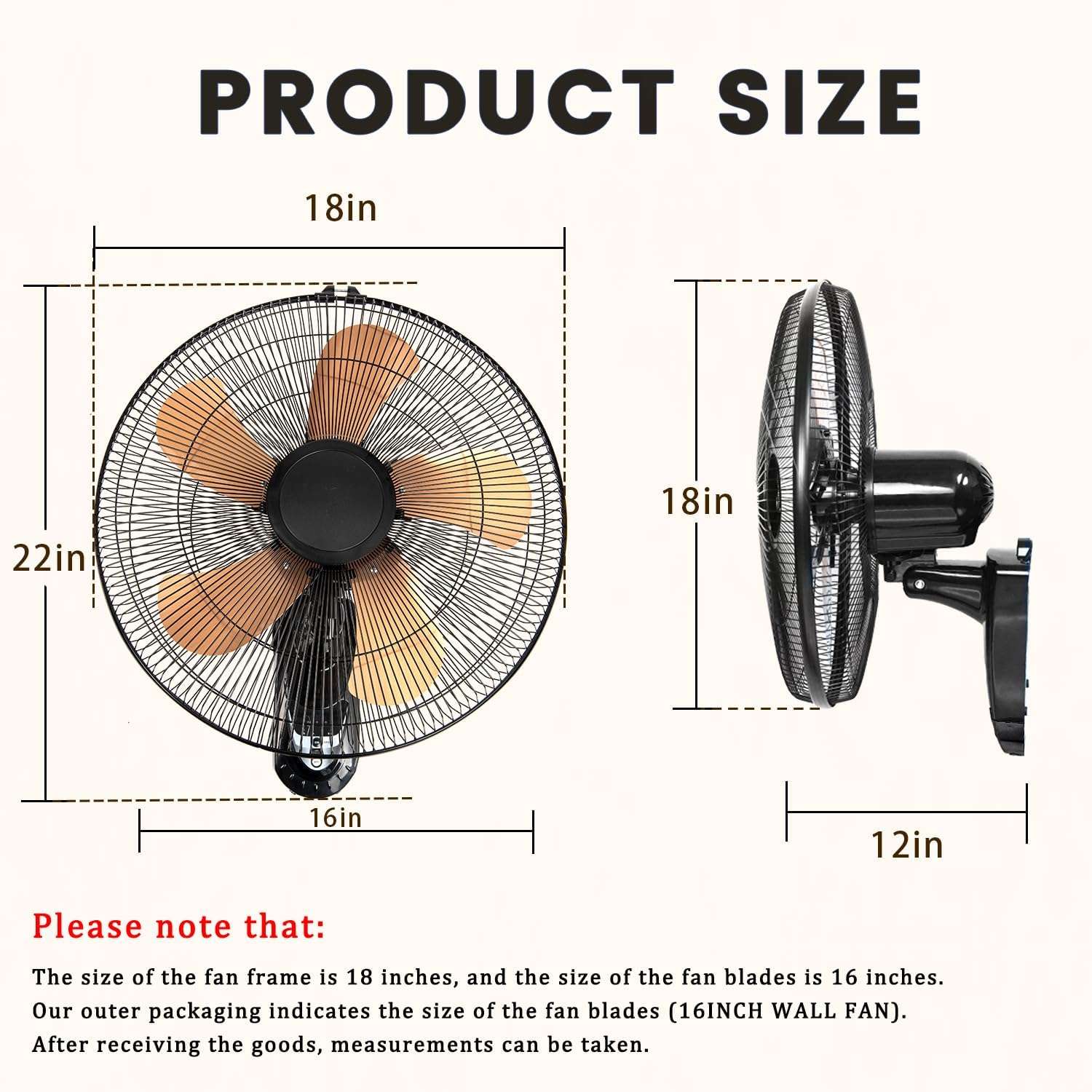
Image 3.2: Diagram illustrating the dimensions of the TMWINGS wall mount fan. The fan frame is approximately 18 inches, and the blades are 16 inches. The depth from the wall is about 12 inches.
4. Setup and Installation
Follow these steps to properly install your wall mount fan.
4.1 Assembly
- Attach Rear Grille: Align the rear grille with the motor housing and secure it.
- Install Fan Blades: Carefully slide the five aluminum blades onto the motor shaft. Ensure they are seated correctly.
- Secure Front Grille: Place the front grille over the blades and secure it to the rear grille using the provided clips or screws.

Image 4.1: Close-up view of the fan's five aluminum blades and the motor assembly, highlighting the durable design for strong airflow and low noise.
4.2 Wall Mounting
- Choose Location: Select a suitable wall location, preferably a wall stud, that allows for optimal air circulation and is within reach of a power outlet. Ensure sufficient clearance around the fan for oscillation.
- Mark Drilling Points: Hold the wall mounting bracket against the wall at the desired height and mark the drilling points.
- Drill Holes: Drill pilot holes at the marked points. If not drilling into a stud, insert wall anchors.
- Attach Bracket: Secure the mounting bracket to the wall using the provided screws.
- Mount Fan: Carefully lift the assembled fan unit and attach it to the wall mounting bracket. Ensure it is securely fastened.
- Connect Power: Plug the fan into a standard 120V AC power outlet.
5. Operation
Your TMWINGS wall mount fan can be controlled using either the integrated control panel or the remote control.

Image 5.1: Illustration of the fan's 2-in-1 control panel located on the fan unit and the handheld remote control, showing buttons for power, speed, oscillation, and timer.
5.1 Control Panel Functions
- ON/OFF Button: Press to turn the fan on or off.
- SPEED Button: Press repeatedly to cycle through fan speeds (Low, Medium, High).
- TIMER Buttons (0.5h, 1h, 2h, 4h): Press to set the fan to automatically turn off after the selected duration.
5.2 Remote Control Functions
The remote control provides convenient access to all fan functions from a distance.
- ON/OFF: Turns the fan on or off.
- SPEED: Cycles through Low, Medium, and High fan speeds.
- OSC (Oscillation): Activates or deactivates the 120° side-to-side oscillation feature.
- TIMER: Cycles through available timer settings (0.5h, 1h, 2h, 4h).

Image 5.2: Visual representation of the three fan speed settings: Low (3000 CFM), Medium (3500 CFM), and High (4000 CFM), with corresponding fan blade rotation illustrations.

Image 5.3: Diagram showing the fan's 120° side-to-side oscillation and 60° manual vertical tilt adjustment, illustrating how air is distributed throughout a room.

Image 5.4: Graphic illustrating the four timer settings (0.5, 1, 2, 4 hours) for automatic fan shutdown, alongside a sound level comparison indicating quiet operation.
6. Maintenance
Regular cleaning and maintenance will ensure optimal performance and longevity of your fan.
6.1 Cleaning
- Unplug Fan: Always ensure the fan is unplugged from the power source before cleaning.
- Clean Grilles: Use a soft, damp cloth to wipe the exterior surfaces of the grilles. For stubborn dust, a vacuum cleaner with a brush attachment can be used.
- Clean Blades: The fan is designed for quick disassembly for easy cleaning. Carefully remove the front grille and wipe the fan blades with a soft, damp cloth. Ensure blades are completely dry before reassembling.
- Do Not Use Abrasives: Avoid using abrasive cleaners, solvents, or harsh chemicals, as these can damage the fan's finish.
6.2 Storage
If storing the fan for an extended period, clean it thoroughly and store it in a cool, dry place, preferably in its original packaging.
7. Troubleshooting
Refer to the table below for common issues and their solutions.
| Problem | Possible Cause | Solution |
|---|---|---|
| Fan does not turn on. | No power, fan unplugged, remote battery dead. | Check power connection, ensure outlet is functional. Replace remote battery. |
| Weak airflow. | Fan speed set too low, grilles/blades dirty. | Increase fan speed. Clean grilles and blades as per maintenance section. |
| Fan is noisy. | Loose parts, dirty blades, fan not mounted securely. | Check for loose components. Clean blades. Ensure fan is securely mounted. |
| Remote control not working. | Dead battery, obstruction, out of range. | Replace remote battery. Ensure no obstructions between remote and fan. Operate within effective range. |
| Oscillation not working. | Oscillation function not activated. | Press the OSC button on the remote or control panel. |
8. Specifications
| Feature | Detail |
|---|---|
| Model Name | FB-40B5 |
| Brand | TMWINGS |
| Size | 16 Inch (Blade Diameter) |
| Product Dimensions | 18.31"D x 7.68"W x 18.31"H (Overall) |
| Power Source | AC/DC |
| Voltage | 120 Volts |
| Wattage | 60 watts |
| Number of Blades | 5 |
| Air Flow Capacity | Up to 4000 Cubic Feet Per Minute (CFM) |
| Speed | 1400 RPM (Max) |
| Noise Level | 40 dB |
| Oscillation | 120° Side-to-Side |
| Tilt Adjustment | 60° Manual Vertical |
| Control Method | Remote, Touch (Push Button) |
| Special Features | Adjustable Tilt, Oscillating, Quiet Operation, Remote Controlled, Energy Efficient |
| Indoor/Outdoor Usage | Indoor, Outdoor |
| Item Weight | 8.38 pounds |
9. Warranty and Customer Support
TMWINGS provides reliable customer service. For technical guidance, installation assistance, or any issues with your wall-mounted fan, please contact our professional team.
Refer to your purchase documentation or the TMWINGS official website for specific warranty details and contact information.
Customer Service Contact: Please refer to the contact information provided with your product packaging or visit the official TMWINGS website.


