
1. Introduction
The MIEKLALE 4-Bay Universal Battery Charger PD4 is designed to charge a wide range of rechargeable batteries, including Li-ion, LiFePO4, Ni-MH, and Ni-Cd types. It features a smart LCD display for monitoring charging progress and multiple safety protection functions to ensure safe and efficient charging.
2. Safety Information
Please read and understand all safety instructions before using this product. Failure to follow these instructions may result in electric shock, fire, or serious injury.
- Use this charger only for specified rechargeable battery types. Attempting to charge non-rechargeable batteries may cause explosion or leakage.
- Do not expose the charger to rain, moisture, or extreme temperatures.
- Do not disassemble or modify the charger. Refer all servicing to qualified personnel.
- Ensure proper ventilation during charging. Do not cover the charger.
- Keep out of reach of children.
- Unplug the charger from the power source when not in use.
- This charger includes multiple safety protection functions: overcharge, over-discharge, short circuit, and reverse polarity protection. It can also intelligently identify damaged batteries.
3. Package Contents
Verify that all items are present in your package:
- MIEKLALE 4-Bay Universal Battery Charger PD4 Unit
- 120V AC Power Cord
- 12V DC Car Power Cord
- Instruction Sheet
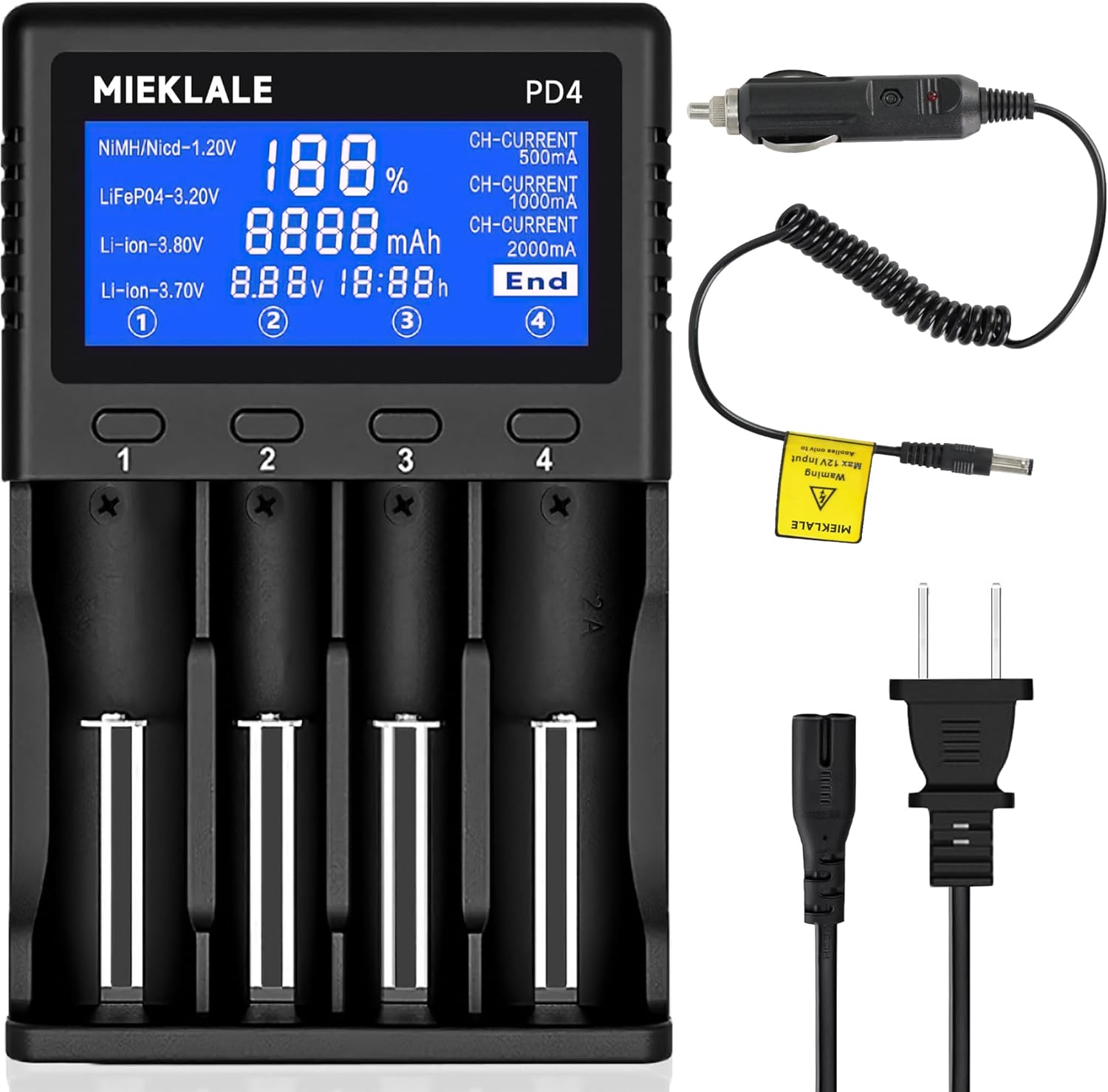
Image 3.1: MIEKLALE PD4 Charger with AC and Car Power Cords. The image displays the black 4-bay charger unit, a coiled car charger adapter, and a standard AC power cord.
4. Product Overview
The MIEKLALE PD4 charger features four independent charging bays and a high-definition LCD display to provide detailed information during the charging process.
4.1. Key Features
- 4 Independent Charging Channels: Each bay operates independently, allowing simultaneous charging of different battery types and sizes without interference.
- Smart LCD Display: Provides real-time information including charging progress (percentage), battery type, charging capacity (mAh), voltage (V), and current (mA).
- Automatic Battery Recognition: Automatically identifies battery type (Li-ion, LiFePO4, Ni-MH, Ni-Cd) and sets appropriate charging parameters. Manual adjustment is also possible.
- Multiple Charging Currents: Supports 500mA, 1000mA, and 2000mA charging currents. The 2000mA current is exclusively available for the fourth slot.
- Universal Compatibility: Supports a wide range of cylindrical rechargeable batteries up to 72mm in length.
- Safety Protections: Built-in safeguards against overcharge, over-discharge, short circuit, reverse polarity, and intelligent detection of faulty batteries.

Image 4.1: High-Definition LCD Display. The image highlights various indicators on the LCD screen, including battery type, percentage, capacity, voltage, time, and charging current settings for each slot.

Image 4.2: Four Independent Channels. This image illustrates the charger with different batteries in each slot, emphasizing that all four channels operate independently.
5. Setup
To begin using your MIEKLALE PD4 charger, follow these steps:
- Connect to Power: Choose either the 120V AC power cord for wall outlets or the 12V DC car power cord for vehicle use. Plug the appropriate cord into the charger's input port and then into the power source.
- Power On: The LCD display will illuminate, indicating the charger is ready for use.

Image 5.1: Power Connection Options. The image shows the charger being powered by a standard wall outlet and also by a car's cigarette lighter socket, demonstrating its versatility.
6. Operating Instructions
6.1. Inserting Batteries
Carefully insert rechargeable batteries into the charging slots. Ensure the positive (+) and negative (-) terminals of the battery align correctly with the markings in the charger slot. The charger will automatically detect the battery type and begin charging.

Image 6.1: Batteries in Charger Slots. This image shows different types of batteries (18650, 26650, AA) correctly inserted into the charger's bays.
6.2. Understanding the LCD Display
The LCD display provides comprehensive information for each charging slot. Use the buttons below each slot to cycle through the display information for that specific battery.
- Battery Type: Indicates whether the battery is NiMH/NiCd, LiFePO4, or Li-ion.
- Charging Progress: Shown as a percentage (e.g., 188% indicates full charge).
- Charging Capacity: Displays the accumulated mAh charged into the battery.
- Battery Voltage: Shows the current voltage of the battery.
- Charging Time: Displays the elapsed charging duration.
- Charging Current: Indicates the current charging rate (500mA, 1000mA, or 2000mA).
- "End" Indicator: Appears when charging is complete for a specific slot.
6.3. Charging Current Selection
The charger automatically selects an appropriate charging current. However, you can manually adjust it if desired. Press the button corresponding to the slot to cycle through available current options (500mA, 1000mA, 2000mA).
- 500mA: Standard charging rate, suitable for most batteries and for extending battery lifespan.
- 1000mA: Faster charging rate for compatible batteries.
- 2000mA: Fastest charging rate, exclusively available for Slot 4 only. Use this for rapid charging of compatible batteries.

Image 6.2: Charge Current Display. The image shows the LCD indicating the selected charging current (e.g., 500mA) and notes that 2000mA is only for slot 4.
6.4. Automatic Stop Charging
The charger features a smart charging system that automatically stops charging when a battery is fully charged, preventing overcharging and prolonging battery life.

Image 6.3: Smart Charging System. This image shows a battery in the charger with the LCD displaying 'End', indicating that the battery is fully charged and charging has stopped automatically.
7. Compatible Battery Types
The MIEKLALE PD4 charger is compatible with a wide range of cylindrical rechargeable batteries. Ensure the battery length is less than 72mm (2.8 inches).
| Battery Type | Compatible Sizes |
|---|---|
| Li-ion / IMR / LiFePO4 (3.7V / 3.8V / 3.2V) | 26650, 21700, 18650, 18490, 18350, 17700, 17670, 17500, 16340 (RCR123), 14500, 10440 |
| Ni-MH / Ni-Cd (1.2V) | AA, AAA, SC, C |
Note: This charger cannot charge 1.5V Li-ion AA/AAA batteries.

Image 7.1: Battery Length Caution. This image visually demonstrates that batteries exceeding 72mm (e.g., some 21700 batteries with USB interfaces or button tops) are not compatible, while flat-top 21700 and standard 18650 batteries are compatible.
8. Maintenance
- Clean the charger and charging slots regularly with a dry, soft cloth. Do not use abrasive cleaners or solvents.
- Store the charger in a cool, dry place away from direct sunlight and moisture.
- Inspect the power cords for any damage before each use. Do not use if cords are frayed or damaged.
9. Troubleshooting
| Problem | Possible Cause | Solution |
|---|---|---|
| Charger not powering on. | No power connection or faulty power cord. | Ensure power cord is securely plugged into both the charger and a working power outlet. Try a different outlet or power cord. |
| Battery not charging. | Incorrect battery insertion, non-rechargeable battery, or faulty battery. | Verify battery polarity. Ensure the battery is rechargeable and compatible. Remove and reinsert the battery. If the issue persists, the battery may be faulty. |
| LCD display shows error. | Battery issue (e.g., short circuit, reverse polarity, damaged battery). | Remove the battery and check for damage. Reinsert correctly. If the error persists, the battery may be faulty and should not be used. |
| Slow charging. | Low charging current selected or multiple batteries charging simultaneously. | Adjust the charging current to a higher setting (e.g., 1000mA or 2000mA for slot 4). Note that charging multiple batteries may distribute available current. |
10. Specifications
| Feature | Detail |
|---|---|
| Model | PD4 |
| Input Voltage | AC 100-240V 50/60Hz, DC 12V |
| Output Voltage | 4.2V (Li-ion/LiFePO4), 1.48V (Ni-MH/Ni-Cd) |
| Output Current | 500mA x 4, 1000mA x 2, 2000mA x 1 (Slot 4 only) |
| Compatible Battery Types | Li-ion, IMR, LiFePO4, Ni-MH, Ni-Cd |
| Compatible Battery Sizes | 26650, 21700, 18650, 18490, 18350, 17700, 17670, 17500, 16340 (RCR123), 14500, 10440, AA, AAA, SC, C (Max length 72mm) |
| Product Dimensions | 5.5 x 3.9 x 1.3 inches (14 x 9.9 x 3.3 cm) |
| Item Weight | 12 ounces (0.34 kg) |
11. Warranty and Support
For warranty information or technical support, please refer to the contact details provided with your purchase or visit the official MIEKLALE website. Keep your proof of purchase for warranty claims.


