1. Introduction
This manual provides comprehensive instructions for the safe and efficient operation of your AVXANKTG SV-3000-60 Switching Power Supply. Please read this manual thoroughly before installation and use, and retain it for future reference. This industrial-grade power supply is designed to convert AC input to a stable, adjustable DC output, suitable for various applications requiring precise power delivery.
2. Safety Instructions
To ensure safe operation and prevent damage to the unit or injury to personnel, observe the following safety precautions:
- Electrical Hazard: This unit operates with high voltage. Do not open the casing or attempt repairs unless you are a qualified professional.
- Input Voltage: Ensure the input voltage is within the specified range of 340-440VAC. Connecting to an incorrect voltage can cause severe damage.
- Grounding: Always ensure the power supply is properly grounded to prevent electrical shock.
- Ventilation: Install the unit in a well-ventilated area. Do not block ventilation openings. Adequate airflow is crucial for heat dissipation.
- Environment: Avoid installing the unit in areas with high humidity, dust, corrosive gases, or extreme temperatures outside the specified operating range (-10~60℃).
- Overload Protection: The unit features overload protection. Do not exceed the maximum output current of 50A or power of 3000W.
- Professional Installation: Installation and wiring should be performed by qualified personnel familiar with electrical systems and safety standards.
3. Product Overview
The AVXANKTG SV-3000-60 is a high-power switching power supply designed for industrial applications. It features a robust design with overload protection and a full-bridge connection method for efficient AC to DC conversion. The output voltage is adjustable, allowing for flexible use across various requirements.
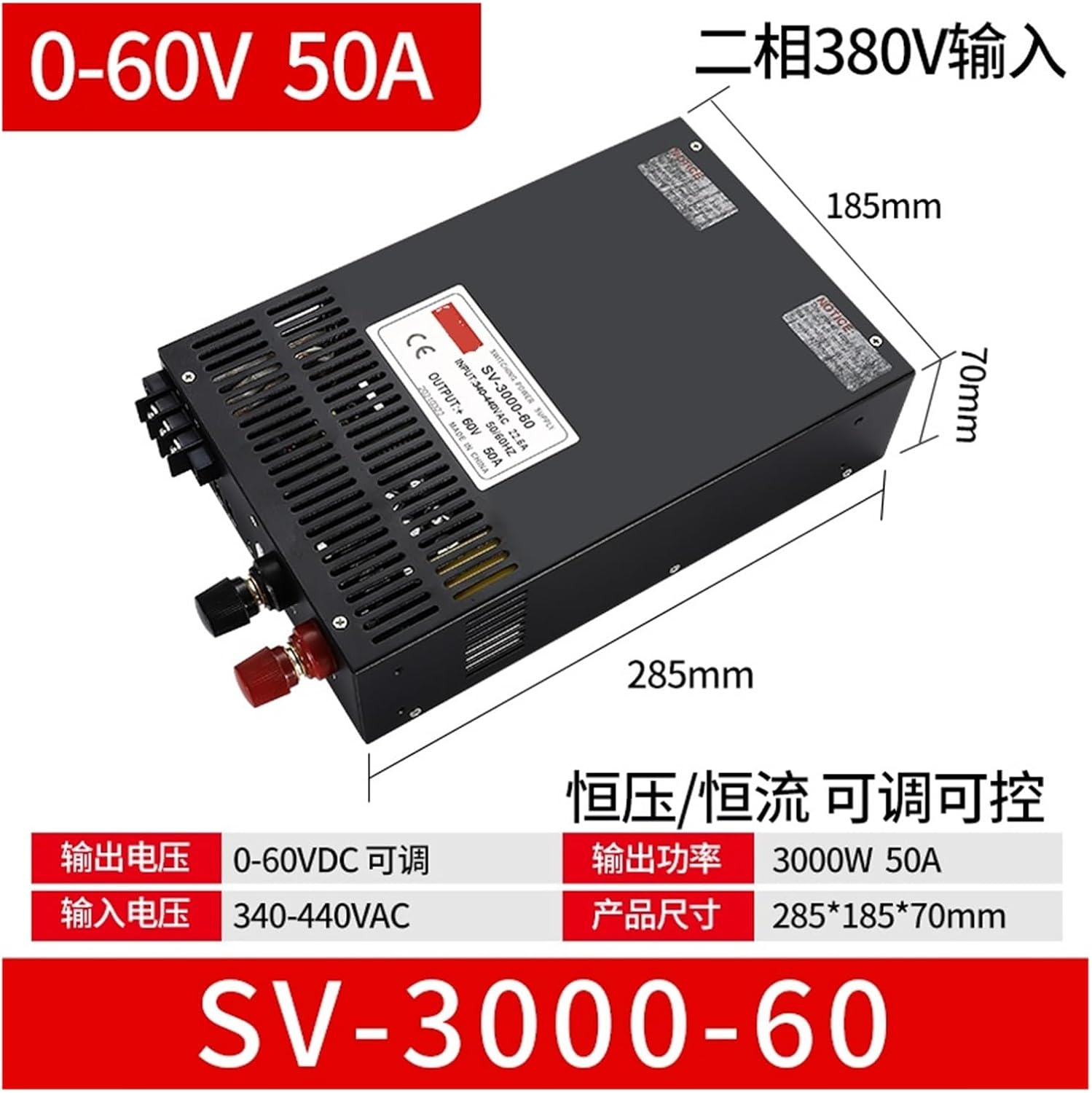
An overhead view of the AVXANKTG SV-3000-60 switching power supply, showing its physical dimensions (285mm length, 185mm width, 70mm height) and key electrical specifications printed on its label. The label indicates model SV-3000-60, input 340-440VAC, output +60V 50A, 50/60Hz, and CE certification. The image also highlights the adjustable output voltage range of 0-60VDC and output power of 3000W 50A.
4. Specifications
| Parameter | Value |
|---|---|
| Model | SV-3000-60 |
| Input Voltage | 340-440VAC |
| Input Frequency | 50/60Hz |
| Output Voltage | 0-60VDC (Adjustable) |
| Output Current | 50A |
| Output Power | 3000W |
| Protection Type | Overload Protection |
| Overall Dimensions (L*W*H) | 285mm * 185mm * 70mm |
| Working Temperature Range | -10~60℃ |
| Certification | CE |
5. Setup and Installation
Proper installation is critical for the performance and safety of the power supply. Follow these steps carefully:
- Mounting: Securely mount the power supply in a stable, well-ventilated location. Ensure there is sufficient clearance around the unit for airflow.
- Input Wiring: Connect the 340-440VAC input power to the designated input terminals. Ensure correct phase connection for the 380V two-phase input. Use appropriate gauge wiring for the current requirements.
- Grounding: Connect the ground terminal of the power supply to a reliable earth ground. This is essential for safety.
- Output Wiring: Connect your load to the DC output terminals. Observe correct polarity (+ and -). Use heavy-gauge wires for the output to minimize voltage drop, especially for high current applications.
- Initial Check: Before applying power, double-check all connections for tightness and correct polarity. Ensure no loose wires or short circuits are present.
6. Operating Instructions
The SV-3000-60 power supply offers adjustable output voltage and operates in constant voltage (CV) or constant current (CC) mode.
- Power On: After verifying all connections, switch on the AC input power. The power supply will initiate.
- Voltage Adjustment: Use the designated potentiometer or control interface (if available) to adjust the output voltage from 0VDC to 60VDC. Monitor the output voltage with a multimeter if precise adjustment is required.
- Current Adjustment: The unit can also operate in constant current mode. Adjust the current limit as needed for your application. When the load current reaches the set limit, the unit will switch to constant current operation.
- Monitoring: Observe the output voltage and current to ensure they are within the desired parameters for your application.
- Power Off: To shut down, first disconnect the load if possible, then switch off the AC input power.
7. Maintenance
The AVXANKTG SV-3000-60 is designed for reliable operation with minimal maintenance. However, periodic checks can extend its lifespan and ensure optimal performance:
- Cleaning: Keep the unit clean and free from dust accumulation, especially around ventilation openings. Use a soft, dry cloth or compressed air for cleaning. Ensure power is off before cleaning.
- Ventilation: Regularly check that the ventilation paths are unobstructed. Overheating can significantly reduce the lifespan of the power supply.
- Connections: Periodically inspect all input and output connections for tightness. Loose connections can lead to arcing, overheating, and power loss.
- Environmental Conditions: Ensure the operating environment remains within the specified temperature and humidity ranges.
8. Troubleshooting
If you encounter issues with your power supply, refer to the following troubleshooting guide:
| Problem | Possible Cause | Solution |
|---|---|---|
| No output voltage/power | No AC input power; Incorrect wiring; Internal fault | Check AC input source and connections; Verify wiring according to instructions; Contact support if problem persists. |
| Overload protection activated | Output current exceeds 50A; Short circuit in load | Reduce load; Check load for short circuits; Restart power supply after resolving overload. |
| Unit is overheating | Poor ventilation; Ambient temperature too high; Excessive load | Ensure adequate airflow; Relocate to a cooler environment; Reduce load to within specifications. |
| Unstable output voltage | Loose connections; Faulty load; Internal component issue | Check all wiring connections; Test with a different load; Contact support. |
If troubleshooting steps do not resolve the issue, do not attempt further repairs. Contact qualified service personnel or the manufacturer for assistance.
9. Warranty and Support
This AVXANKTG product is covered by a standard manufacturer's warranty against defects in materials and workmanship. For specific warranty terms and conditions, please refer to the documentation provided with your purchase or contact your retailer. For technical support, service, or inquiries, please reach out to AVXANKTG customer service through the contact information provided at the point of purchase or on the official AVXANKTG website.


