
RDINSCOS MT75
RDINSCOS MT75 Pinless Moisture Meter
User Manual
Introduction
The RDINSCOS MT75 Pinless Moisture Meter is a versatile, non-invasive digital damp detector designed for accurate moisture measurement in a variety of building materials and wood. Its advanced dielectric sensor allows for detection up to 40mm (1.57 inches) beneath surfaces without causing damage, making it an ideal tool for homeowners, woodworkers, and professional inspectors.
This manual provides comprehensive instructions for the proper setup, operation, maintenance, and troubleshooting of your MT75 moisture meter to ensure reliable and consistent performance.
Product Overview
The MT75 features a large, backlit LCD for clear readings, multiple measurement modes, a REF (Reference) mode for comparative analysis, and an auto shut-off function to conserve battery life. Its robust ABS construction ensures durability for daily use.

The RDINSCOS MT75 Pinless Moisture Meter, a non-invasive digital damp detector, shown with its included USB cable for charging or data transfer.
Key Features
- Versatile Multi-Surface Detection: Works on wood, drywall, concrete, plaster, and more.
- Non-Invasive Pinless Design: Detects moisture up to 40mm (1.57 inches) deep without surface damage.
- High Accuracy: Provides readings with 2.5% accuracy.
- Reference (REF) Mode: Allows comparison of current moisture levels to a baseline.
- Easy-to-Read Backlit LCD: Clear display of 0 to 100 relative moisture values.
- Hold Function: Freezes readings on-screen for convenient recording.
- Auto Shut-Off: Conserves battery by turning off when not in use.
- Durable Construction: Built for professional and DIY use.
Setup
Battery Installation
The MT75 requires one 9V battery (included). To install, open the battery compartment cover on the back of the device, insert the 9V battery, ensuring correct polarity, and then close the cover securely.
Initial Calibration
Before each use, it is recommended to calibrate the meter. Press the MEAS button to perform a quick calibration. This ensures optimal accuracy for your measurements.

This image illustrates the proper way to hold the RDINSCOS MT75 moisture meter for accurate readings, contrasting it with an incorrect grip. It also outlines the basic steps for operation: power on, calibrate, and select measurement mode.
Operating Instructions
Power On/Off
Press the Power button (⑂) to turn the device on. The meter will automatically shut off after a period of inactivity to save battery.
Mode Selection
The MT75 offers five distinct measurement modes for different material types. Press the MODE button to cycle through these options. Select the mode appropriate for the material you are testing to ensure accurate readings.

A user's hand demonstrates pressing the 'MODE' button on the RDINSCOS MT75, which allows selection from five different measurement modes tailored for various materials.
Reference (REF) Mode
The REF mode allows you to establish a baseline moisture level from a known dry area and then compare subsequent readings to this reference. This is particularly useful for identifying abnormal dampness in specific areas.
- Locate a dry spot on the material you wish to test.
- Place the meter on this dry spot and press the REF button to set this as your reference point.
- Move the meter to other areas of the material. The display will show the current moisture level relative to your set reference.
This video provides a visual guide on how to use the Reference (REF) mode to compare moisture levels and the Hold function to freeze readings on the RDINSCOS MT75 Pinless Moisture Meter.
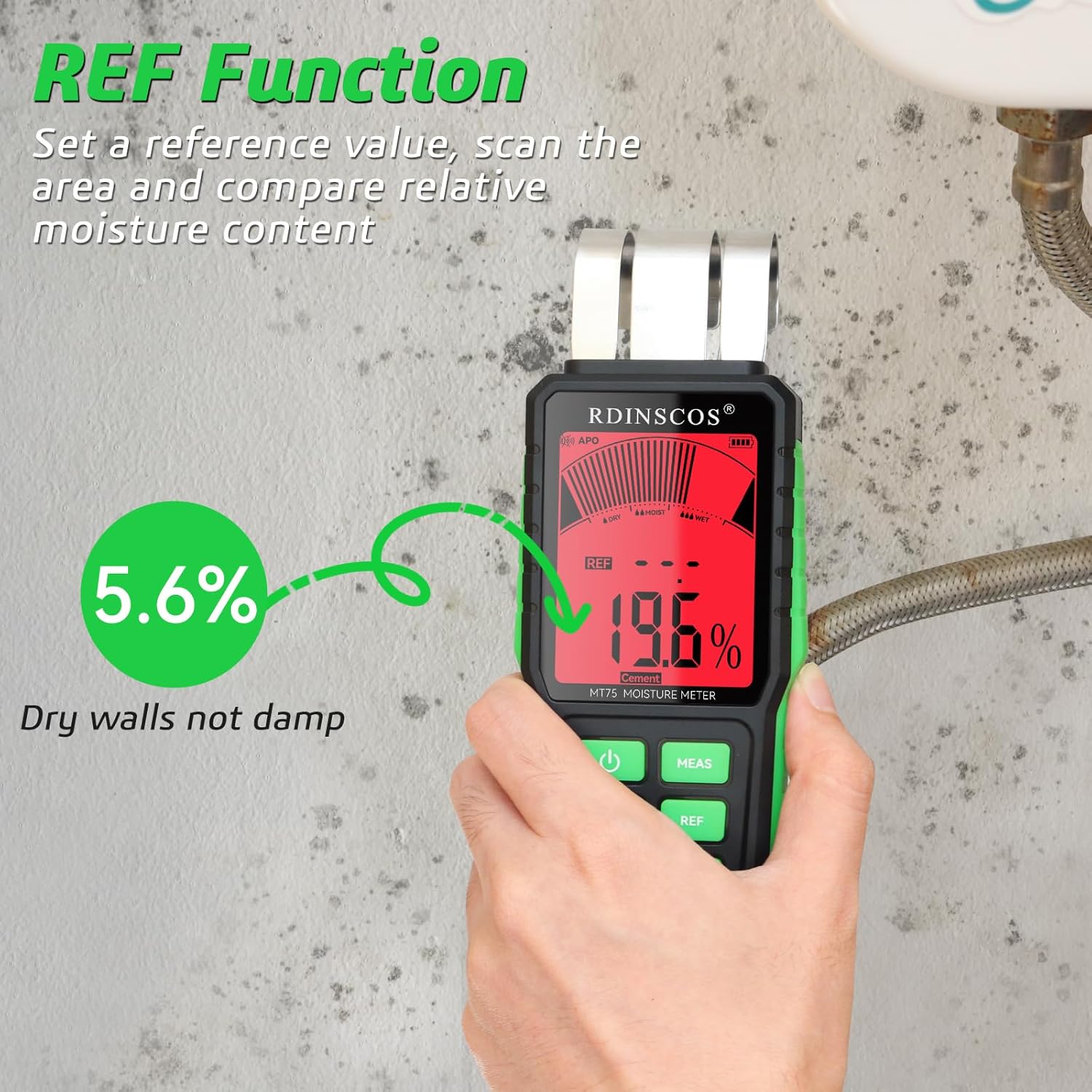
This image illustrates the REF (Reference) function of the MT75 meter. It shows how to establish a baseline reading on a dry area (5.6%) and then compare it to a potentially damp area (19.6%) to identify moisture issues.
Hold Function
Press the HOLD button to freeze the current reading on the display. This is useful for taking measurements in hard-to-reach areas where direct viewing of the screen is difficult. Press HOLD again to release the reading.
Measurement Depth
The MT75 can detect moisture up to a depth of 40mm (1.57 inches) from the surface. This allows for comprehensive assessment of moisture content within materials without needing to penetrate them.

The RDINSCOS MT75 moisture meter in action, demonstrating its non-destructive, pinless measurement technology. The image highlights its ability to detect moisture up to 40mm deep within surfaces without causing damage.
Proper Usage Guidelines
For accurate readings, ensure the sensor pad on the back of the meter is in full contact with the surface being tested. Avoid using the meter near metal objects, electrical wires, or water pipes, as these can interfere with the electromagnetic field used for detection and lead to inaccurate results.

Important usage guidance: This image warns against using the RDINSCOS MT75 moisture meter near metal objects, electrical wires, or water pipes, as these can interfere with accurate moisture detection.
Applications
The RDINSCOS MT75 is suitable for a wide range of applications, including:
- Woodworking: Checking moisture content in lumber, flooring, and furniture.
- Home Inspection: Detecting dampness in walls, ceilings, and floors in basements, bathrooms, and kitchens.
- Construction: Assessing moisture in concrete, plaster, and drywall before painting or finishing.
- Restoration: Monitoring drying progress after water damage.

A visual representation of the RDINSCOS MT75's versatility, showing its effective use across various materials including drywall, ceramic tile, wooden flooring, and concrete.
Maintenance
- Cleaning: Wipe the meter with a soft, dry cloth. Do not use abrasive cleaners or solvents.
- Storage: Store the meter in a cool, dry place away from direct sunlight and extreme temperatures. If storing for extended periods, remove the battery to prevent leakage.
- Battery Replacement: Replace the 9V battery when the low battery indicator appears on the display.
Troubleshooting
If you encounter issues with your RDINSCOS MT75 moisture meter, consider the following:
- Device does not power on: Check if the 9V battery is correctly installed and has sufficient charge. Replace the battery if necessary.
- Inaccurate readings: Ensure the sensor pad is in full contact with the surface. Recalibrate the meter by pressing the MEAS button. Avoid measuring near metal or electrical components.
- Display is dim or flickering: This may indicate a low battery. Replace the 9V battery.
For further assistance, please refer to the Warranty and Support section.
Specifications
| Feature | Detail |
|---|---|
| Model Number | MT75 |
| Measurement Depth | Up to 40mm (1.57 inches) |
| Accuracy | 2.5% |
| Power Source | 1 x 9V Battery (included) |
| Item Weight | 9.9 ounces |
| Package Dimensions | 7.64 x 3.9 x 2.05 inches |
| Included Components | 1*Pinless Moisture Meter, 1*Bag |
| Manufacturer | SHENZHEN REDDRAGON INSTRUMENTS CO.,LTD |
Warranty and Support
The RDINSCOS MT75 Pinless Moisture Meter is backed by a three-year warranty, ensuring long-term reliability and peace of mind. This warranty covers manufacturing defects and ensures the product performs as expected under normal use.
For any questions, technical support, or warranty claims, please contact our customer service team. We are committed to providing friendly support and a replacement guarantee to ensure your satisfaction.

This image signifies the availability of customer support for the RDINSCOS MT75 moisture meter, emphasizing that assistance is available for any inquiries or issues.
Related Documents - MT75
 |
RDINSCOS MT93 Needle Moisture Meter User Manual User manual for the RDINSCOS MT93 needle moisture meter, detailing safety instructions, product specifications, operation, measurement modes, reference tables, battery charging, maintenance, and disposal procedures. |
 |
RDINSCOS MT93 Moisture Meter User Manual User manual for the RDINSCOS MT93 Pin-Type Moisture Meter, detailing its features, operation, technical specifications, safety guidelines, and maintenance. |
 |
Inductive Moisture Meter User Manual User manual for the inductive moisture meter, detailing its features, technical specifications, operation, calibration, and maintenance. |
 |
R&D Instruments MT75 Inductive Moisture Meter User Manual User's manual for the R&D Instruments MT75 Inductive Moisture Meter. Learn how to safely and effectively measure moisture content in building materials like concrete, cement, plaster, and wood using this advanced non-destructive device. |
Ask a question about this manual
Ask about setup, troubleshooting, compatibility, parts, safety, or missing instructions. Manuals+ will review the question and use this page’s manual context to help answer it.