
1. Introduction
This manual provides detailed instructions for the assembly, operation, and maintenance of your SUPERJARE Nightstand with Charging Station and 47-Inch Computer Desk. Please read this manual thoroughly before assembly and use to ensure proper function and safety.

Image 1.1: Overview of the SUPERJARE Nightstand and Computer Desk combination. The nightstand features a charging station and a fabric drawer, while the computer desk includes multiple drawers and shelves.
2. Safety Information
WARNING:
- Potential tip-over risks if not assembled properly. Always follow assembly instructions carefully.
- Keep small parts out of reach of children during assembly to prevent choking hazards.
- Do not overload shelves or drawers. Distribute weight evenly.
- Ensure all electrical connections for the charging station are secure and meet local electrical codes. Do not use damaged cords or outlets.
- Avoid placing hot items directly on the surface without protection.
3. Setup and Assembly
This section details the assembly process for both the nightstand and the computer desk components. Ensure all parts are present before beginning assembly.
3.1 Nightstand Assembly
The nightstand features a fabric drawer with two possible installation positions and a built-in charging station.
- Unpack all components and verify against the parts list (not provided in this manual, refer to packaging).
- Assemble the metal frame structure according to the diagrams.
- Attach the wooden shelves to the frame.
- Install the fabric drawer. The drawer can be positioned at two different heights. Choose the desired height before securing the drawer slides.
- Integrate the charging station into the designated cutout on the top shelf. Ensure the power cord is routed safely.
- Adjust the feet for stability on uneven surfaces.

Image 3.1: The assembled nightstand positioned next to a bed, showcasing its compact design and integrated charging station.

Image 3.2: Detailed dimensions of the nightstand and its fabric drawer. The nightstand measures 15.7" W x 11.8" D x 23.4" H, with the drawer measuring 13.8" W x 11.3" D x 5.6" H.

Image 3.3: The nightstand with its fabric drawer open, demonstrating storage capacity for bedside items. The drawer can be installed at different heights.
3.2 Computer Desk Assembly
The computer desk features a reversible design for drawer placement and an adjustable middle shelf.
- Unpack all components and verify against the parts list.
- Assemble the main desk frame.
- Decide on the placement of the six fabric drawers: either on the left or right side of the desk. This decision affects the frame assembly.
- Install the drawer frames and slides according to your chosen orientation.
- Insert the fabric drawers into their respective compartments.
- Install the middle shelf in the open shelving unit. There are two pre-drilled holes allowing for two height levels, or it can be removed entirely to accommodate a computer tower.
- Attach the desktop surface.
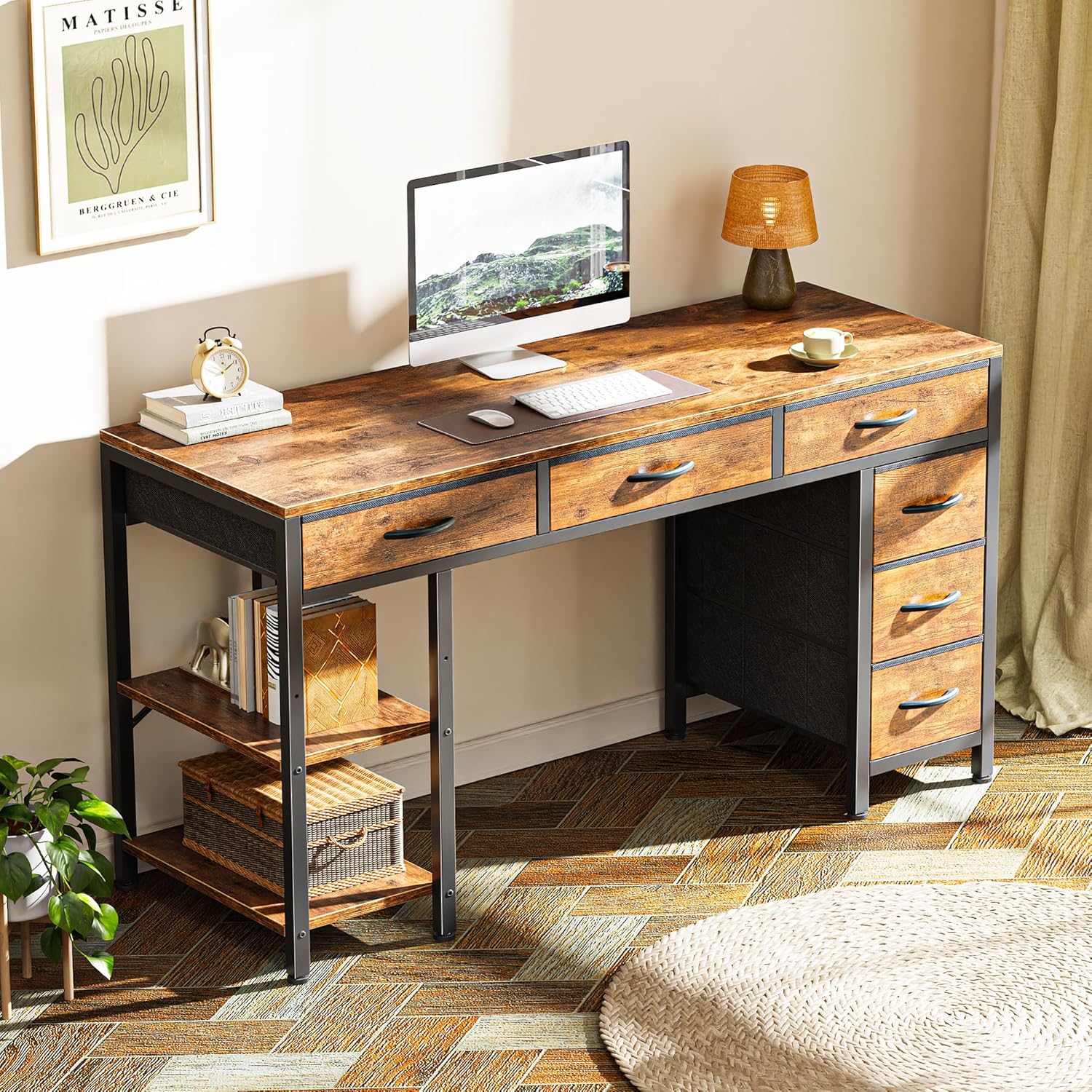
Image 3.4: The assembled computer desk in an office environment, featuring multiple drawers and open shelves for organization.

Image 3.5: Dimensions of the computer desk and its fabric drawers. The desk measures 47.2" W x 18.1" D x 30.3" H. Drawers come in two sizes: 14.3" W x 17.7" D x 3.7" H and 8.5" W x 17.7" D x 6.8" H.
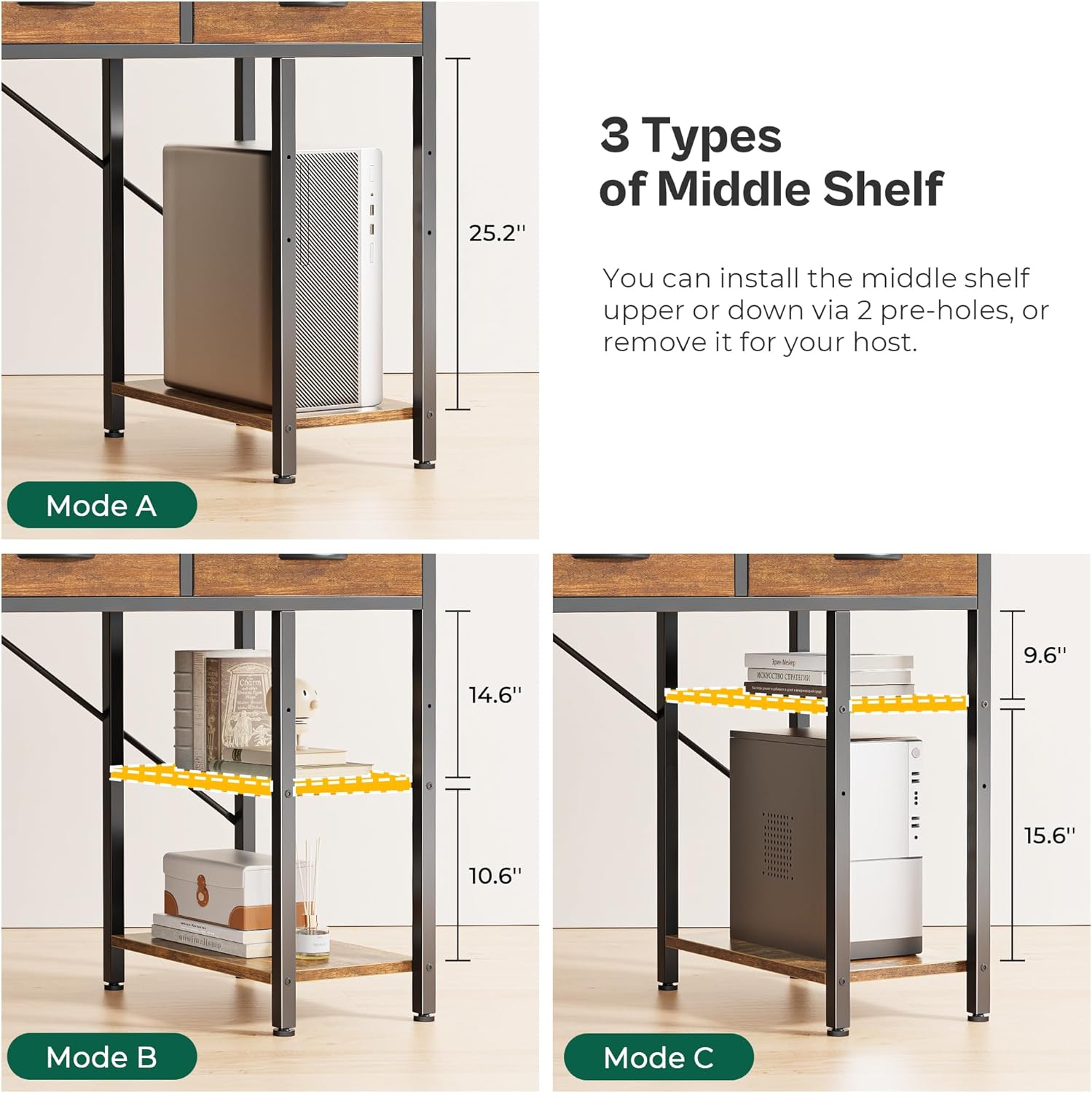
Image 3.6: Three configuration options for the computer desk's middle shelf. Mode A shows the shelf removed for a CPU, Mode B shows it at a lower height, and Mode C shows it at a higher height, demonstrating flexibility for various storage needs.
4. Operation
4.1 Nightstand Charging Station
The nightstand is equipped with a convenient charging station for your electronic devices.
- Plug the nightstand's power cord into a standard wall outlet.
- The charging station includes:
- 2 AC Outlets: 125V / 12A for standard electrical devices.
- 1 USB Port: 5V / 3A for charging smartphones, tablets, and other USB-powered devices.
- 1 Type-C Port: 5V / 3A for charging compatible Type-C devices.
- Ensure devices are compatible with the provided power specifications before plugging them in.

Image 4.1: A detailed view of the nightstand's integrated charging station, showing two AC outlets, one USB port, and one Type-C port for convenient device charging.
4.2 Drawer Usage
Both the nightstand and computer desk feature fabric drawers for organized storage.
- Gently pull the handle to open the fabric drawers.
- Push the drawer back in until it is fully closed.
- Avoid forcing drawers open or closed if they encounter resistance.
- Do not overload drawers beyond their capacity to ensure smooth operation and prevent damage.
4.3 Adjustable Shelving (Computer Desk)
The computer desk includes an adjustable middle shelf in its open storage section.
- The shelf can be set at two different heights using pre-drilled holes.
- To adjust, carefully remove the shelf, reposition the support pins into the desired holes, and reinsert the shelf.
- For larger items, such as a computer tower, the middle shelf can be removed entirely.
5. Maintenance
5.1 Cleaning
- For wooden surfaces, wipe with a soft, damp cloth. Avoid abrasive cleaners or harsh chemicals.
- For fabric drawers, spot clean with a mild detergent and a damp cloth. Allow to air dry completely. Do not machine wash.
- Regularly dust all surfaces to prevent buildup.
5.2 General Care
- Periodically check all screws and fasteners to ensure they are tight. Retighten if necessary.
- Avoid exposing the furniture to direct sunlight or extreme temperature changes to prevent warping or fading.
- Do not drag the furniture; lift it when moving to prevent damage to legs and flooring.
6. Troubleshooting
This section addresses common issues you might encounter.
- Issue: Charging station not working.
Solution: Ensure the nightstand's power cord is securely plugged into a functional wall outlet. Check if the outlet itself is receiving power by testing with another device. Verify that the device you are trying to charge is compatible with the charging station's specifications (voltage/amperage).
- Issue: Furniture feels unstable or wobbly.
Solution: Check that all assembly screws are tightened. Ensure the adjustable feet are properly leveled on the floor. If the floor is uneven, adjust the feet to compensate.
- Issue: Drawers are difficult to open or close.
Solution: Ensure the drawers are not overloaded. Check for any obstructions within the drawer slides. Verify that the drawer slides were installed correctly during assembly.
7. Specifications
| Feature | Detail |
|---|---|
| Brand | SUPERJARE |
| Model Number | B0DPF5R382 |
| Color | Wooden |
| Nightstand Dimensions | 15.7" W x 11.8" D x 23.4" H |
| Computer Desk Dimensions | 47.2" W x 18.1" D x 30.3" H |
| Nightstand Charging Station | 2 AC Outlets (125V/12A), 1 USB Port (5V/3A), 1 Type-C Port (5V/3A) |
| Drawer Material | Fabric |
| Assembly Required | Yes |
8. Warranty and Support
For warranty information and customer support, please refer to the official SUPERJARE website or contact the seller directly through your purchase platform. Keep your proof of purchase for any warranty claims.
Manufacturer: SUPERJARE
Seller: Huuger Direct
First Available Date: December 2, 2024